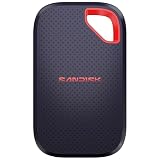
An external SSD is the better choice if you want to play games straight from the drive, while an external hard drive is the better choice if you mostly want cheap space to park a large library. Solid-state drives load faster and shrug off knocks, and hard drives give you far more capacity for the money but respond more slowly and are easier to damage.
That simple split hides several details that change the answer, such as whether you run games from the drive or only archive them, which ports your PC has and how large your library has grown. This guide walks through the real trade-offs in 2026 so you can match the drive type to how you actually play, instead of paying for speed you will never feel or buying space you cannot use.
How Each Drive Behaves With Games
A solid-state drive has no moving parts and reads data from flash memory, so it responds almost instantly to requests. Games benefit most during loading screens, level streaming and open-world traveling, where thousands of small reads happen at once. An external hard drive uses spinning platters and a moving head, which makes those small reads much slower, and it shows up as longer waits and occasional stutter in titles that stream assets.
For plain storage, the roles reverse. A hard drive holds many terabytes at a much lower cost per terabyte, so it works well as a vault for older installs, recordings and backups. The drive you choose should follow the job it will do, not the fastest number printed on the box.
Side-by-Side Comparison
| Factor | External SSD | External hard drive |
|---|---|---|
| Load times | Short and consistent | Longer, varies by title |
| Cost per terabyte | Higher | Lower |
| Capacity options | Large, but at a premium | Very large and affordable |
| Durability | No moving parts, handles bumps | Sensitive to drops while running |
| Noise and heat | Silent, runs cool or warm | Audible spin and seek noise |
| Portability | Small and light | Bulkier, some need extra power |
| Best use | Playing games from the drive | Archiving and backups |
Which Drive Fits Your Habits
You play large open-world games
Big open-world titles stream scenery constantly, so a slow drive can mean pop-in and hitching. An external SSD keeps those streams smooth, and it can be plugged into more than one machine. If you play the same few big games every week, speed is worth the extra cost.
You hoard a huge library
If your Steam or launcher library is hundreds of gigabytes of games you rarely open, a hard drive is the economical shelf. Install the games you want to play now on a fast internal or external SSD, and keep the rest on the hard drive until a new playthrough begins.
You want to carry games between PCs
An SSD is the portable choice. It is small, quiet, powered through the cable and tolerant of being carried in a bag. A hard drive can do the job, but it has moving parts that dislike movement while spinning, so handle it gently and eject it first.
You also record gameplay
Video capture writes large files steadily. A hard drive handles sequential writes reasonably well and gives you hours of footage space at a low cost, which makes it a fine place to dump recordings. If you edit footage from the drive, an SSD makes scrubbing and exporting more responsive.
Interface and Port Details That Matter
A fast drive on a slow port wastes the investment. Check which USB version your PC offers, and match the drive to it. Older ports limit even a quick SSD, while newer ones let it stretch. A hard drive rarely saturates even basic ports, so port speed matters mostly for solid-state models.
Cable quality also counts. Use the cable that came with the drive or one that states its supported speed. Plug the drive into a port directly on the motherboard rather than a crowded hub, because a shared hub can reduce throughput and sometimes drop power. Also look at drive format: games on external drives run best with a file system the operating system supports natively, and the launcher must be able to see the library folder.
How Much Capacity You Need
Modern AAA installs routinely run to well over a hundred gigabytes, and patches keep growing them. A small drive fills quickly, so plan around the games you play now plus a buffer for updates and the next two or three titles. For a rotating collection of a handful of big games, a mid-size SSD is usually enough. For a library of dozens of titles, a large hard drive makes more sense as the long-term home, with a smaller SSD acting as the active play zone.
Remember that the drive never has the full advertised capacity available. Formatting and file system overhead trim the usable space, and a drive that is almost full tends to slow down. Leave a margin rather than filling it to the last gigabyte.
Care and Backup Habits
- Eject the drive from the operating system before unplugging it, especially a spinning hard drive.
- Keep a hard drive on a stable surface while it is running, and avoid carrying it when it is active.
- Give an SSD airflow during long installs, since sustained writes can heat the case.
- Back up save files and capture footage to a second location or cloud storage.
- Keep the drive’s cable short and snug to prevent accidental disconnects during a game.
Treat an external drive as a convenience, not a vault. Games can be downloaded again, but personal files cannot, so give anything irreplaceable a second copy.
Before You Buy Checklist
- Decide whether you will run games from the drive or only store them.
- Check the available ports and their speeds on your PC.
- Estimate your library size and leave room for growth.
- Choose a capacity that covers your biggest games plus updates.
- Consider a rugged case or a protective sleeve for portable use.
- Plan a backup, since no single drive is a safe archive on its own.
- Read the warranty and the cable details in the listing.
Common Mistakes
The most frequent error is buying a hard drive and expecting it to feel like an SSD. It will not, and some games list an SSD as the preferred storage for a reason. The opposite error is paying for the largest solid-state capacity when a mid-size drive plus a hard drive archive would cover everything for less.
Other pitfalls include unplugging a drive without ejecting it, leaving an external hard drive in a spot where it can fall, and ignoring heat on a sealed SSD case during long installs. Keep backups of save files and important recordings in a second location, because any drive can fail.
Related guides
- How To Set Up Computer Speakers For Better Sound At Your Desk
- How To Check Whether Your Ram Is Running At Its Rated Speed
- How To Choose The Right Monitor Riser Height For Your Desk
Frequently Asked Questions
Can I play games directly from an external SSD?
Yes, on most PCs. Install the game to a library folder on the drive, and the launcher will treat it like any other location as long as the drive is connected.
Are external hard drives too slow for gaming?
They work for many games but load more slowly, and some titles stream assets in a way that benefits from faster storage. They shine as an archive. A practical compromise is to keep the current favorites on an SSD and move finished games to the hard drive, so each type of storage does the job it is best at.
Which lasts longer?
Both can last for years with care. Solid-state drives resist shock better, while hard drives risk damage if moved or dropped while spinning. Back up what matters either way.
Do I need a special cable?
You need a cable that supports the drive’s speed. The one included with the drive is the safest starting point, and a cheap unlabeled cable can limit performance. If transfers feel slower than expected, try a different port and a shorter cable before blaming the drive itself, because those two parts cause many speed complaints.
Related guides
More from Amazon
Programs that pair well with the guide above. Offers and eligibility are set by Amazon and may change.
Free shipping on eligible items, Prime Video and more. Eligible new members can start with a free trial.
Start a Prime free trialAd-free music streaming. Eligible new subscribers can start with a free trial.
Try Music Unlimited freeA Prime membership for ages 18-24 with a trial period. Eligibility is set by Amazon.
See Prime for Young AdultsAudiobooks and podcasts to listen to on the go. Eligible new members can start with a free trial.
Try Audible freeAs an Amazon Associate we earn from qualifying purchases.