The best gaming monitor deals appear around Black Friday, which in 2026 is Friday, November 27, with Cyber Monday on November 30. Amazon often starts monitor discounts earlier in November, so you can track a shortlist for a couple of weeks. For a PC builder, the right monitor is the one your graphics card can actually drive: a 1440p panel at a high refresh rate suits many mid-range builds.
The six picks below are not tested by us; the notes reflect published specs and reviewer consensus. Check the current price on Amazon and match the resolution to your GPU.
Our Top Picks
 LG 27GP850-B Ultragear Gaming Monitor 27-Inch QHD14.4"x24.2"x2"11.5 x 24.2 x 22.7 inches13.9 poundsCheck on Amazon
 GIGABYTE M27Q2 27" SuperSpeed IPS QHD AMD Freesync27" QHD7.56 x 24.09 x 20.26 inches18.1 poundsCheck on Amazon
 ASUS TUF Gaming VG27AQ 27 Inch QHD 165Hz27” 2K WQHD IPS19.96 x 24.41 x 8.31 inches12.8 poundsCheck on Amazon


Monitor comparison
| Pick | Best for | Key feature |
|---|---|---|
| Samsung Odyssey G5 27-inch | Curved 1440p value | Curved VA panel, high refresh rate |
| LG UltraGear 27GP850-B | Fast IPS color | Nano IPS with quick response |
| Gigabyte M27Q | Budget 1440p with KVM | Built-in KVM switch |
| ASUS TUF Gaming VG27AQ | Reliable all-rounder | IPS with motion blur reduction |
| MSI MAG 274QRF-QD | Wide color range | Quantum dot IPS panel |
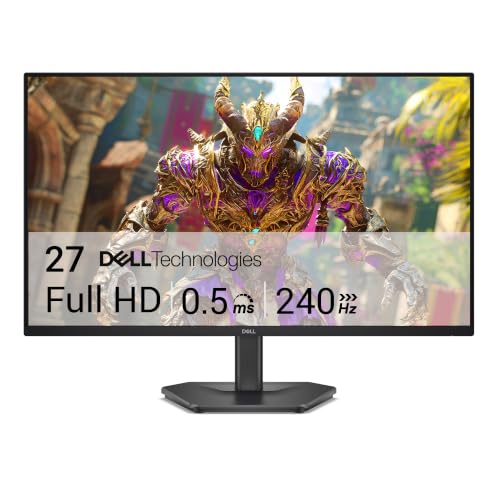
| Dell S2725DGM | Simple, clean design | Fast VA 1440p panel |
1. Samsung Odyssey G5 27-inch Monitor (G5 curved 1440p)
The Samsung Odyssey G5 is a popular curved 1440p option that pairs deep contrast from its VA panel with a high refresh rate. It works well for immersive single-player games in a dim room. The weak spots are VA smearing in fast dark scenes and a curve that some find distracting for desktop work. Compare it against flat IPS options like the LG if you play fast shooters, and verify the stand and port setup.
2. LG UltraGear 27GP850-B (UltraGear 27-inch Nano IPS)
The LG UltraGear 27GP850-B is a Nano IPS monitor with strong color and quick response, which has made it a long-time recommendation for competitive and general gaming. Drawbacks are modest contrast typical of IPS and some backlight glow in a dark room. Compare it with the ASUS TUF and MSI QD options, and check which revision is on sale since LG sometimes updates models.
3. Gigabyte M27Q (M27Q gaming monitor)
The Gigabyte M27Q stands out with a built-in KVM switch, letting you share a keyboard and mouse between a gaming PC and a laptop. It is a sensible value pick for someone who works and games on one desk. The trade-offs are a basic stand and color accuracy that is fine rather than exceptional. Compare it against the ASUS TUF if you want a sturdier stand.
4. ASUS TUF Gaming VG27AQ (TUF 27-inch IPS)
The ASUS TUF Gaming VG27AQ is a reliable all-rounder with IPS color, adjustable stand and motion blur reduction features. It suits people who want a straightforward, dependable monitor. It is an older design, so newer competitors may offer better HDR or higher refresh rates for similar money. Compare it with the Gigabyte and LG and check whether newer replacements are available.
5. MSI MAG 274QRF-QD (MAG 274QRF-QD quantum dot)
The MSI MAG 274QRF-QD uses quantum dots for a wider color range, which makes games look richer and suits mixed use with creative work. The downsides are limited HDR impact and a stand that is functional rather than premium. Compare it with the LG UltraGear if you prefer a different panel tuning, and confirm the exact variant, since MSI sells similarly named monitors.
6. Dell S2725DGM (Dell 27-inch gaming monitor)
The Dell S2725DGM is a clean-looking 1440p panel with a fast VA display. It suits people who want something less flashy for an office-meets-gaming desk. The VA panel has typical dark-scene smearing and narrower viewing angles than IPS. Compare it with the Samsung Odyssey G5 if you want a curve, and check warranty terms for panel defects.
Match the monitor to your GPU
Resolution and refresh rate set the load on your graphics card. A mid-range card usually handles 1440p at high settings in many games, while 4K demands far more. If your card is older, a 1080p high-refresh monitor may deliver better smoothness. Also check ports: DisplayPort is generally the best choice for high refresh rates on PC, and HDMI versions vary. Adaptive sync (FreeSync or G-Sync Compatible) smooths frame delivery, so confirm support with your GPU brand.
How to spot a real Black Friday monitor deal
- Check price history with Keepa; monitors often return to the same sale price repeatedly.
- Verify the exact model number, since revisions change panels.
- Check the seller and warranty, especially for dead-pixel policies.
- Know the return window to test for backlight bleed and defects.
What to buy now vs wait
Buy now if you are building a PC for the holidays and see a trusted model at a price you have seen before. Wait if you are eyeing OLED or higher-end panels, where Cyber Monday often adds new offers. Do not buy a monitor ahead of your GPU choice if you are still deciding on resolution.
Panel types, briefly
IPS panels give accurate color and wide viewing angles, which helps if you share the screen or do creative work. VA panels offer deeper blacks and strong contrast, but can smear in fast scenes. TN panels are rare now. Curved screens add immersion on larger monitors, though they are less useful for desk work and can reflect room lights. Whatever you choose, check the response time claims with independent reviews, because marketing numbers are measured in ideal conditions.
Stand adjustability is another practical detail. A stand that adjusts for height and tilt saves your neck, and VESA mounting lets you swap to an arm later. Finally, look at the on-screen menu and how easily you can switch inputs if you use a console as well.
Features that are nice but not essential
HDR labels on mid-range monitors often mean little, so do not pay extra for them alone. Built-in speakers are usually weak, and USB hubs or KVM switches are a bonus only if you will use them. Focus on panel quality, refresh rate, response, ports and warranty. If a monitor includes a DisplayPort cable in the box, that is a small but real convenience for high refresh rate setups.
Frequently asked questions
Is 1440p better than 1080p for gaming?
It looks sharper, but it needs a stronger GPU. For mid-range cards, 1440p is often a sweet spot.
IPS or VA?
IPS offers better viewing angles and response; VA gives deeper contrast. Choose based on your room and games.
Do I need G-Sync?
Not necessarily. Most monitors support adaptive sync that works with both major GPU brands.
When is Black Friday 2026?
Friday, November 27, 2026, with Cyber Monday on November 30.
Conclusion
Choose the panel type and resolution that fit your GPU, then wait for a fair price. As an Amazon Associate we earn from qualifying purchases.
Related guides
More from Amazon
Programs that pair well with the guide above. Offers and eligibility are set by Amazon and may change.
Send a Prime gift membership to someone who would use free shipping and Prime Video.
Gift Amazon PrimeGive audiobooks to someone who loves to listen. Plans and prices are set by Amazon.
Gift AudibleFree shipping on eligible items, Prime Video and more. Eligible new members can start with a free trial.
Start a Prime free trialAd-free music streaming. Eligible new subscribers can start with a free trial.
Try Music Unlimited freeAs an Amazon Associate we earn from qualifying purchases.