If you look at a monitor for several hours a day, its height is not a small detail. A screen that sits too low pulls your head forward, and one that sits too high tilts it back. An adjustable stand lets you line the top of the display up near eye level, free up desk space, and sometimes add storage underneath. The first decision is the type: a simple riser that lifts the screen, a freestanding stand with tilt and swivel, or an arm that clamps to the desk.
This guide is for desktop gamers and office users who want to raise or position a monitor without replacing the desk. It covers eight options across risers, freestanding stands, a single arm, and a dual-monitor mount. The comparisons use the sizes, weight limits, and features stated in each listing, and no ergonomic outcomes are promised. If you have pain or a medical concern, a professional can advise on your setup.
Our Top Picks
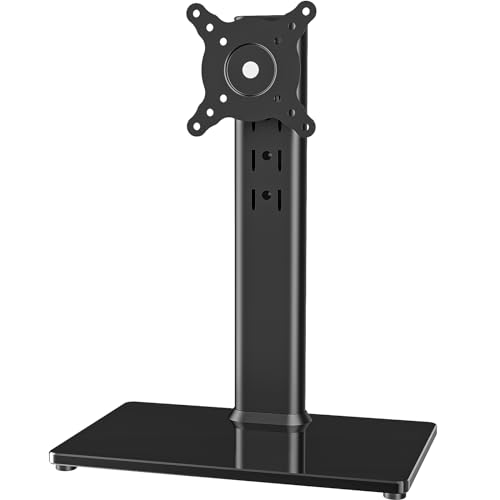 Single LCD Computer Monitor Free-Standing Desk Stand MountComputer monitor stand11.8 x 7.9 x 16 inches4.8 poundsCheck on Amazon




Top 3 picks at a glance
Quick Picks
As an Amazon Associate we earn from qualifying purchases at no extra cost to you.




| Product | Best for | Key feature from the listing |
|---|---|---|
| Free-Standing Single Monitor Stand | Heavy screens without clamping | 13 to 32 inch screens, up to 77 lbs |
| BoYata Metal Riser | Simple lift with storage beneath | Height-adjustable metal riser, open storage |
| WALI Monitor Riser | Desk organization | Up to 44 lbs, under-desk storage |
| VIVO Single Monitor Stand | Ultrawide monitors | Up to 38 inch ultrawide, tilt, swivel, rotation |
| Canyora Monitor Riser 2 Pack | Two screens or two spots | 3 heights, 14.6 by 9.3 inch metal shelf, 2 pack |
| ErGear Single Monitor Arm | Clamp-on flexibility | 13 to 34 inch screens, tool-free VESA mount |
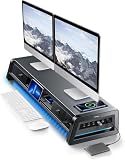
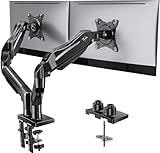
| HUANUO FlowLift Dual Stand | Dual monitor gaming setups | Full motion arms, C-clamp and grommet base |
| Basics Height Adjustable Riser | Light screens and laptops | 3-level stackable ABS design, up to 22 lbs |
How to Choose
Riser, Freestanding Stand, or Arm
A riser is the simplest: your monitor sits on top and you adjust the height in steps. Freestanding stands add tilt, swivel, and rotation without drilling or clamping. Monitor arms attach to the desk edge and free up the most surface, but they need a desk with enough thickness and strength. Choose based on whether you want to keep your desk untouched.
Screen Size and Weight Limits
Check the listed screen size range and the maximum weight. Some stands hold up to 77 lbs, while arms often list a range such as 4.84 to 19.8 lbs per screen. A large ultrawide may exceed an arm’s limit, so look up your monitor’s weight with its stand removed. Ignore claims of fitting every monitor and rely on the numbers.
VESA Compatibility
Arms and some stands attach to the VESA holes on the back of a monitor. Listings mention 75×75 and 100×100 patterns. If your monitor has no VESA holes, a riser or a stand with a base is the better path. Confirm your pattern before you order.
Adjustability, Storage, and What to Ignore
Look for the adjustments you will use: height, tilt, swivel, rotation, or full motion. Storage under a riser is useful for a keyboard or notebooks. Ignore decorative claims. Budget stands cut corners with thin metal, shallow height ranges, and plastic that can flex under a heavier screen.
The 8 Best Options
Free-Standing Single Monitor Stand
A freestanding stand for 13 to 32 inch screens with swivel, height adjustment, rotation, and a VESA base, holding one screen up to 77 lbs.
- Strength: high weight capacity without clamping.
- Strength: swivel, height, and rotation adjustments.
- Trade-off: a floor-standing base uses desk space.
It suits heavy monitors on a desk you cannot clamp to, such as a glass top, a thin board, or a rented desk where drilling is off the table. Skip it if desk space is tight, since the base takes up room behind the screen.
BoYata Metal Riser
A height-adjustable metal desktop riser in black with open storage beneath. It works for monitors, laptops, iMacs, PCs, and TVs.
- Strength: open space for a keyboard or notebooks.
- Strength: metal build and adjustable height.
- Trade-off: no tilt or swivel, so you adjust the screen itself.
It suits a simple lift for a desk with a keyboard that slides underneath, and it also handles a laptop or a small TV if you move things around. Skip it if you want full articulation, or a stand that lets you swing the screen toward a second viewer.
WALI Monitor Riser
A riser with adjustable height, a listed 44 lbs capacity, and storage under the shelf. It fits monitors, laptops, and printers.
- Strength: 44 lbs capacity listed.
- Strength: under-desk storage for organization.
- Trade-off: it only raises the screen, with no tilt or swivel.
It suits tidy desks where a printer, a hub, or a stack of notebooks needs a home below the screen, and the higher weight limit leaves some headroom for a larger display. Skip it if you want an arm that lifts the screen off the desk entirely.
VIVO Single Monitor Stand
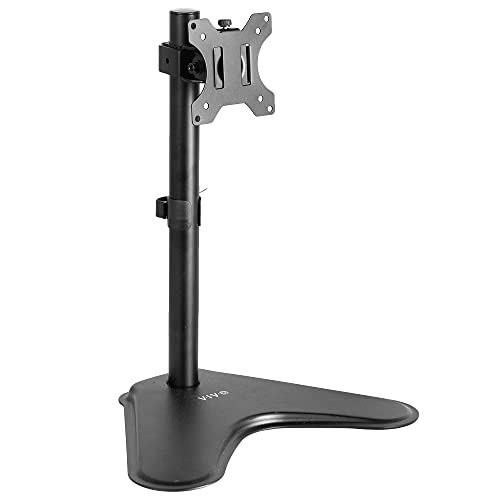
A freestanding steel base supporting regular monitors up to 32 inches or ultrawide up to 38 inches, with height, tilt, swivel, and rotation, holding 22 lbs.
- Strength: ultrawide support up to 38 inches.
- Strength: full set of adjustments.
- Trade-off: the 22 lbs limit is lower than some alternatives.
It suits a single ultrawide that needs a stable base and the freedom to tilt or rotate for different tasks, such as turning the screen to portrait for coding. Skip it if your monitor is heavy, since the listed limit is modest.
Canyora Monitor Riser 2 Pack
A pack of two risers with three height settings, a 14.6 by 9.3 inch metal shelf, and a 44 lbs limit. It fits monitors, PCs, laptops, and TVs.
- Strength: two units in one pack.
- Strength: three heights and a metal shelf.
- Trade-off: the shelf is relatively small for large monitors.
It suits two screens or a monitor and a laptop, or a work desk and a separate gaming desk that each need a lift. Skip it if you want one larger platform, because each shelf is on the compact side.
ErGear Single Monitor Arm
A fully adjustable arm for 13 to 34 inch screens, with tool-free VESA mounting, cable management, and a 4.84 to 19.8 lbs range.
- Strength: full adjustment and cable management.
- Strength: tool-free VESA mount.
- Trade-off: it needs a VESA monitor and a desk that supports clamping.
It suits a clean desk where you want the screen to float, move forward and back, and return to a set position, with the cables tucked along the arm. Skip it if your monitor lacks VESA holes or if the screen is heavier than the listed range.
HUANUO FlowLift Dual Stand
A dual monitor stand for 13 to 32 inch screens, with full motion arms, VESA 75×75 and 100×100, a C-clamp and grommet base, and 4.4 to 19.8 lbs per arm.
- Strength: two arms with full motion.
- Strength: clamp or grommet mounting options.
- Trade-off: it needs two VESA monitors and a sturdy desk edge.
It suits dual setups for gaming on one screen and chat, guides, or streaming tools on the other, with the arms positioning both at the same height. Skip it if you use one screen, or if your desk edge is too thick or too thin for the clamp.
Basics Height Adjustable Riser
A three-level stackable riser with a storage organizer, made of durable ABS plastic and supporting up to 22 lbs.
- Strength: three-level height steps.
- Strength: built-in organizer for small items.
- Trade-off: plastic and a 22 lbs limit suit lighter screens.
It suits light screens and laptops on a budget desk, and the stackable levels let you fine-tune the height as your chair or posture changes. Skip it if your monitor is heavy or if you want a metal frame.
Which One Fits Your Situation
You Have a Heavy or Ultrawide Monitor
The Free-Standing Single Monitor Stand holds up to 77 lbs, and the VIVO covers ultrawide screens up to 38 inches.
You Want the Cleanest Desk in 2026
The ErGear arm frees up surface space and offers cable management, while the HUANUO FlowLift does the same for two monitors.
You Only Need a Lift and Storage
The WALI or BoYata riser raises the screen and leaves room underneath.
Common Mistakes
- Ignoring the weight limit for the stand or arm.
- Buying an arm for a monitor without VESA holes.
- Clamping to a thin or hollow desk.
- Choosing a riser that is too short to reach eye level.
- Forgetting that arms add cable slack that needs to be managed.
Related guides
- How To Set Up Computer Speakers For Better Sound At Your Desk
- How To Check Whether Your Ram Is Running At Its Rated Speed
- How To Choose The Right Monitor Riser Height For Your Desk
Frequently Asked Questions
How high should my monitor be?
Many people set the top edge near eye level, but comfort varies. Adjust to what feels natural for your body.
Can I use a monitor arm on any desk?
Not always. Clamps need a stable edge of a certain thickness, and the listing’s mounting notes apply.
What does VESA mean?
VESA is a standard hole pattern on the back of monitors. Common sizes are 75×75 and 100×100 millimeters.
Is a riser enough?
For many setups, yes. If you want tilt, swivel, or more desk space, an arm or freestanding stand adds options.
Related guides
More from Amazon
Programs that pair well with the guide above. Offers and eligibility are set by Amazon and may change.
Free shipping on eligible items, Prime Video and more. Eligible new members can start with a free trial.
Start a Prime free trialAd-free music streaming. Eligible new subscribers can start with a free trial.
Try Music Unlimited freeA Prime membership for ages 18-24 with a trial period. Eligibility is set by Amazon.
See Prime for Young AdultsAudiobooks and podcasts to listen to on the go. Eligible new members can start with a free trial.
Try Audible freeAs an Amazon Associate we earn from qualifying purchases.