
The Vaydeer all-in-one dual monitor riser is the best overall pick here for most PC builders, because it lifts two screens, tucks a keyboard underneath, and adds a built-in USB hub, drawers, and a wireless charging pad in one desk-length unit. A desk riser is simply a raised shelf that lifts a monitor (or a pair) to eye level and frees the desk surface below it. If you run a single screen and want something compact, the WALI adjustable riser is the simpler choice, and the wood TEAMIX shelf suits larger decks that need a full-width shelf. One listed item is a floor-level tower cart rather than a monitor riser, and we say so plainly below.
Our Top Picks
 Across-Star Dual-Monitor-Stand-Riser-For-Desk Adjustable Length 32-40 Inch,Large Desktop Computer32-40‘’ L*9.25‘’D*4.72‘’H40 x 9.25 x 4.72 inches7 PoundsCheck on Amazon


Top 3 picks at a glance
Quick List
- Vaydeer Dual Monitor Riser with Hub – best for a two-monitor battlestation that needs built-in USB ports and charging
- WALI Adjustable Riser – best for a single monitor or laptop when you want height settings and shelf storage
- Vaydeer Dual Monitor Riser (second listing) – best for matching a specific finish or length of the same family
- Across-Star Adjustable Dual Riser – best for a flexible-length shelf under two screens
- Adjustable Tower Stand Cart – best for lifting a PC tower off the floor (not a monitor riser)
- TEAMIX 20 Inch Wood Riser – best for a warm, rustic look and a roomy shelf for keyboard storage
Which One Is Right for You?
| If you… | Choose |
|---|---|
| run two monitors and want USB ports, drawers, and a charging pad on the desk | Vaydeer Dual Monitor Riser with Hub |
| need a different finish or length than the first Vaydeer listing offers | Vaydeer Dual Monitor Riser (second listing) |
| have one monitor or a laptop and want a few height settings | WALI Adjustable Riser |
| want a plain shelf that stretches to fit two displays | Across-Star Adjustable Dual Riser |
| prefer a wood look and want to slide a full keyboard underneath | TEAMIX 20 Inch Wood Riser |
| keep the tower on the floor and are tired of dust and bumped cables | Adjustable Tower Stand Cart |
Start with how many screens you run, because that decides the shelf width. Then decide whether you want the riser to do extra work (USB, charging, drawers) or just hold weight. Finally, check the load limit against your heaviest monitor, since a large ultrawide can weigh more than a small shelf allows.
All 6 Picks in Detail
1. Vaydeer Dual Monitor Riser with Hub – Best for a Two-Monitor Battlestation
As an Amazon Associate we earn from qualifying purchases at no extra cost to you.
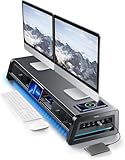
This is the most feature-packed riser in the group, and it is built for builders who treat the desk as a command center. The listing describes an all-in-one dual monitor stand riser for two monitors with two drawers, eight USB ports, a wireless charging pad, and an LED light strip. Public product information for the Vaydeer family describes a long metal shelf in the range of 39 inches, which is wide enough for two 24 to 27 inch displays side by side.
- Designed for two monitors on one long shelf
- Two built-in drawers for cables, SSD enclosures, and small tools
- Eight USB ports (the listing does not state the USB version; confirm on listing)
- Wireless charging pad for a phone, with charging speed to confirm on listing
- LED light strip that lights the desk area under the shelf
For a PC builder, the appeal is consolidation. Card readers, flash drives, a headset dongle, and a phone charger all end up within reach without crawling behind the tower. The drawers are a good home for a precision screwdriver set, spare thermal paste, M.2 screws, and loose cable ties. The trade-off is weight and depth: a unit this long needs a desk that is at least 45 inches wide and deep enough that the shelf does not push your monitors too close to your face.
Pros:
- Replaces a separate USB hub, charger, and drawer organizer
- Long shelf keeps both displays on one stable base
Cons:
- The USB ports need a cable back to the PC, and all ports share one upstream connection
- Heavier and larger than a basic riser, so it needs a deep desk
Compared with the WALI riser, this one costs you desk footprint but saves you several accessories.
2. WALI Adjustable Riser – Best for a Single Monitor or Laptop

The WALI listing is the simple, no-frills pick. It is described as a computer monitor stand with an adjustable laptop riser, a load limit of up to 44 lbs, and under-desk storage space for supplies. The listing says it fits monitors, laptops, and printers. Related WALI risers publish three height settings and a vented metal shelf, but the exact dimensions and finish for this listing are worth confirming on the product page.
- Load limit stated as up to 44 lbs
- Adjustable height so the screen can meet your eye line
- Open space under the shelf for a keyboard, notebook, or small drives
- Fits a monitor, laptop, or printer according to the listing
- Shelf size and finish: confirm on listing
It works well as a first riser for a student build or a small apartment desk, because it asks for very little space. Slide a mechanical keyboard underneath when you are done for the day and you regain a clear desk surface for a laptop or a controller. Because it also lists printer support, it can double as a lift for a small device that you want out of the way. Just remember that the load limit applies to everything sitting on the shelf, not only the monitor.
Pros:
- Compact enough for small desks and shared workspaces
- Easy to move between a desk and a workbench
Cons:
- One shelf only, so two large monitors will not fit comfortably
- No built-in USB, charging, or lighting
If you outgrow it, the Across-Star shelf is the nearest step up for a second screen.
3. Vaydeer Dual Monitor Riser (Second Listing) – Best for Matching a Specific Finish or Length
This second listing carries the same product name as the first Vaydeer entry in the portion of the title we can read, which points to a different color, size, or revision of the same family. It is not a different concept, so everything above about the drawers, USB ports, charging pad, and LED strip applies here as stated in the name. The practical advice is to compare the two product pages line by line before choosing.
- Same family name: dual monitor riser with two drawers and eight USB ports
- Wireless charging pad and LED light strip named in the listing
- Color, length, and weight: confirm on listing, since variants differ
- Meant for two monitors on one raised shelf
- Check that your monitor stand feet fit the shelf depth
Who should pick this version? Someone who liked the first listing in principle but wants a different color to match the desk, or who sees a size difference on the product page that better suits two screens. Open both listings in separate tabs and compare the dimensions, weight, and USB port description. If the two pages match on everything you care about, simply buy whichever is available in your preferred finish. If they differ, trust the numbers on the page over the shared name.
Pros:
- Gives you a second chance to find the right finish or size
- Same all-in-one convenience as the lead pick
Cons:
- Easy to confuse with the first listing, so double-check the variant
- Shares the same upstream USB limitation as any built-in hub
Treat it as an alternative version of pick number one rather than a separate product line.
4. Across-Star Adjustable Dual Riser – Best for a Flexible-Length Shelf

The Across-Star listing is a plain dual monitor riser whose length adjusts between 32 and 40 inches, according to the title. That range lets you match the shelf to your actual monitor footprint instead of buying a fixed length. It is described as a large desktop computer monitor riser for two screens, with a desk shelf organizer function, so it also gives you a place to park small items.
- Adjustable length from 32 to 40 inches
- Built for two screens on a single shelf
- Desk shelf organizer function mentioned in the name
- Load limit: confirm on listing
- Material and leg height: confirm on listing
The adjustable length is the key idea. Two monitors with wide V-shaped feet may need 38 or 39 inches, while compact ones fit in 33, and a shelf that slides between those lengths avoids both a wobbly overhang and a wasted stretch of empty desk. It also suits builders who swap monitors often, since you can lengthen the shelf when a bigger display arrives instead of replacing the whole riser. As with any extendable shelf, tighten the locking screws fully and keep the heaviest items near the middle.
Pros:
- Adjustable width suits different desk and monitor sizes
- Less cluttered than an all-in-one unit
Cons:
- No extra ports or charging included according to the name
- Extension joints can limit the weight you should place at the ends
Choose it over the Vaydeer if you want a clean shelf and plan to add your own hub.
5. Adjustable Tower Stand Cart – Best for Lifting a PC Tower Off the Floor

This listing is not a monitor riser, and it does not match the facet. It is an adjustable computer tower stand with a ventilated mobile CPU holder, described as fitting most PC towers and used as an under-desk floor cart. We include it as a runner-up because some builders searching for a riser actually want to raise the tower itself away from carpet and dust.
- Adjustable width for different tower sizes
- Ventilated platform for airflow under the case
- Mobile base, so you can roll the PC out for cleaning
- Black finish per the listing
- Weight limit and caster lock details: confirm on listing
For a full-size tower with a heavy graphics card and a large AIO, floor dust is a real concern, particularly on carpet where bottom-mounted PSU fans pull in lint. A raised, ventilated platform keeps the intake clear and makes it easier to spin the case around to plug in a cable. Before you buy, measure the width of your case feet and confirm the stand adjusts to match. Keep the power and display cables long enough to roll the tower a few inches without strain.
Pros:
- Keeps the intake fans and PSU filter off the floor
- Makes it easy to reach rear ports
Cons:
- Does nothing for monitor height
- Rolling bases need a stable, level floor and slack in your cables
Pair it with any of the other picks if you want both the screens and the tower off their usual spots.
6. TEAMIX 20 Inch Wood Riser – Best for a Warm Look and Keyboard Storage

The TEAMIX riser is a 20 inch wood shelf in a rustic brown finish. The listing says it fits a laptop, printer, TV, or PC tower, with room underneath for a full keyboard. At 20 inches wide it suits a single monitor or a laptop best, and it brings a different look to a desk that is otherwise black plastic and RGB.
- 20 inch wide wood desktop shelf
- Rustic brown finish
- Space beneath for a full keyboard, per the listing
- Listed as suitable for laptops, printers, TVs, and towers
- Load limit and height: confirm on listing
This is the pick for a desk that leans toward a home-office look rather than a dark gaming aesthetic. The wide opening below suits a full-size keyboard and a notepad, and the flat top is large enough for a monitor and a pair of small speakers. If you place a PC tower on it, as the listing allows, confirm the load limit and the case weight first, because a filled mid-tower can weigh 20 pounds or more.
Pros:
- Attractive finish and a solid-feeling surface
- Simple design with nothing to configure
Cons:
- Fixed width, so two monitors will not fit
- Wood needs a stable surface and may differ in tone from the photos
It is the nearest alternative to the WALI riser when appearance matters more than adjustability.
Specs Compared
| Model | Screens supported | Material / finish | Width | Extras | Load limit |
|---|---|---|---|---|---|
| Vaydeer Dual Monitor Riser with Hub | 2 | Metal (confirm on listing) | Confirm on listing | 2 drawers, 8 USB ports, wireless charging pad, LED strip | Confirm on listing |
| WALI Adjustable Riser | 1 (monitor, laptop, or printer) | Confirm on listing | Confirm on listing | Under-desk storage space, adjustable height | Up to 44 lbs |
| Vaydeer Dual Monitor Riser (second listing) | 2 | Confirm on listing | Confirm on listing | 2 drawers, 8 USB ports, wireless charging pad, LED strip | Confirm on listing |
| Across-Star Adjustable Dual Riser | 2 | Confirm on listing | 32 to 40 inches adjustable | Shelf organizer | Confirm on listing |
| Adjustable Tower Stand Cart | None (tower stand) | Black | Adjustable (confirm on listing) | Ventilated, mobile base | Confirm on listing |
| TEAMIX 20 Inch Wood Riser | 1 | Wood, rustic brown | 20 inches | Keyboard storage space beneath | Confirm on listing |
How We Chose These
We built this list from the current catalog listings supplied for this page, then read each listing name and cross-checked what we could against manufacturer product pages and retailer specification fields. The criteria were shelf width for one or two monitors, stated load limit, extra features that matter to PC builders such as USB hubs and charging, adjustability, and how clearly the listing describes what you get. We did not own or physically use these products, so every statement here comes from published specifications. Where a listing does not state a value, we say to confirm it on the product page instead of guessing, and we flag the one item that is not a monitor riser.
What to Look For
Shelf width and depth
Measure the footprint of your monitor stands, not the screen diagonal. A 27 inch 16:9 monitor is roughly 24 inches wide, and two of them side by side need about 48 inches of desk if the bezels touch. A riser around 39 inches long holds two smaller 24 inch monitors, while two 27 inch screens usually need either a longer shelf or a monitor arm. Depth matters too: a shelf around 9 to 11 inches deep fits most stand feet, but wide V-shaped feet can overhang the edge. Leave at least 2 inches of space behind the shelf for cable bends.
Load limit and stability
Add up everything you will put on the shelf. A 27 inch monitor often weighs 11 to 15 pounds with its stand, a 34 inch ultrawide can reach 20 pounds or more, and a laptop adds another 4 to 6 pounds. A simple rule of thumb is to stay below about two thirds of the stated limit so the shelf is not near its edge case. Metal frames with rubber feet resist wobble better than thin plastic, and an adjustable-length shelf is best loaded near the center rather than at the ends.
Height and ergonomics
The top edge of the screen should sit at or just below eye level when you sit upright. For most adults that means raising a monitor 3 to 6 inches above desk height, which is the range most riser shelves target. Taller is not always better: if you game with a controller or mouse, a very high riser can force you to tilt your head back. Check that your keyboard still slides under the shelf if you plan to store it there, which typically needs about 1.5 to 2 inches of clearance.
Built-in USB, charging, and lighting
All-in-one risers add convenience, but they add dependencies as well. A built-in USB hub is only as fast as its single upstream cable, so a keyboard, mouse, and headset dongle are fine, while moving large files to several external SSDs at once will share bandwidth. A wireless charging pad usually follows the Qi standard, but advertised wattage varies, so confirm it if you charge a newer phone. LED strips are decorative and can usually be turned off. If you already own a powered USB hub, a plain riser is the cleaner choice.
Cable routing and airflow
A riser changes how cables hang. Monitors that sit 4 inches higher need roughly 4 more inches of slack on each display and power cable, so check that HDMI or DisplayPort leads are long enough before you lift the screens. Leave a clear gap behind the shelf for the cable bundle, and use a few hook-and-loop ties to keep it tidy. Do not stack a PC tower or console on a solid shelf with no ventilation, since a case that breathes from the bottom needs open space under it.
Worked example
Say you have two 24 inch monitors that are each about 21.5 inches wide and 8 inches deep at the stand, weighing 9 pounds each. Together they span about 43 inches, so a 39 inch shelf would leave the outer edges hanging unless the stands are narrower than their screens. In that case a shelf that adjusts out to 40 inches, or a longer fixed unit, is the safer fit. Total load is 18 pounds, which is well within a 44 pound single-shelf limit but should be confirmed for any dual unit before you commit.
Questions
How high should a desk riser be for a gaming monitor?
Aim for the top of the screen to sit level with or slightly below your eyes when you sit upright. For most desks that is a 3 to 6 inch lift. Adjust until you do not tilt your neck up or down for long sessions.
Can a desk riser hold two 27 inch monitors?
Only if the shelf is long enough and the load limit covers both screens plus their stands. Two 27 inch monitors are usually around 48 inches wide combined, which is longer than many dual risers. Measure your stand feet and compare them with the shelf length on the product page.
Do the USB ports on a riser work without a computer connection?
Data ports need a USB cable running from the riser to the PC. Some charging-only ports may work from a separate adapter, but the listing should state which ports are which, so confirm that before relying on them.
Is a tower stand the same thing as a desk riser?
No. A tower stand lifts the PC case off the floor, while a desk riser lifts monitors or laptops above the desk. They solve different problems, and you can use both together.
Will a riser make my desk wobble?
A well-built riser with rubber feet and a flat base should not wobble on a sturdy desk. Wobble usually comes from overloading an adjustable-length shelf near the ends or placing it on an uneven surface. Spread the weight evenly and keep heavy items near the center.
Update History
- October 20, 2026 – Initial publication; product set drawn from current catalog listings.
- Check the product page for current specifications and availability before buying.
Sources
- Manufacturer and brand product pages for Vaydeer and WALI
- Retailer listing titles and specification fields for all six listed products






