The WD_BLACK SN850P is the best overall pick here for anyone building a 2TB game library on a PlayStation 5 or a desktop with room for a heatsink: it is a PCIe 4.0 x4 M.2 2280 drive with a quoted 7,300MB/s read rate, a built-in heatsink and a 1,200TBW endurance rating. A 2TB NVMe SSD is simply a flash drive that talks to the system over PCIe lanes, which is why game load times and patch installs feel quicker than on any hard drive. Handheld owners should look at the Crucial P310, and Xbox Series X|S owners need the SanDisk expansion card instead of a standard M.2 drive.
The six listings below cover very different slots, so read the fit notes before you compare speed numbers.
Our Top Picks
 Sandisk 2TB Optimus GX C50 Storage Expansion Card2TB2.18 x 0.3 x 1.24 inches0.06 poundsCheck on Amazon




Top 3 picks at a glance
Quick List
- WD_BLACK SN850P 2TB – best for PS5 consoles and desktops that can fit a heatsinked drive
- SanDisk Optimus 5100 2TB – best for a plain, heatsink-free PCIe 4.0 drive in a desktop or laptop
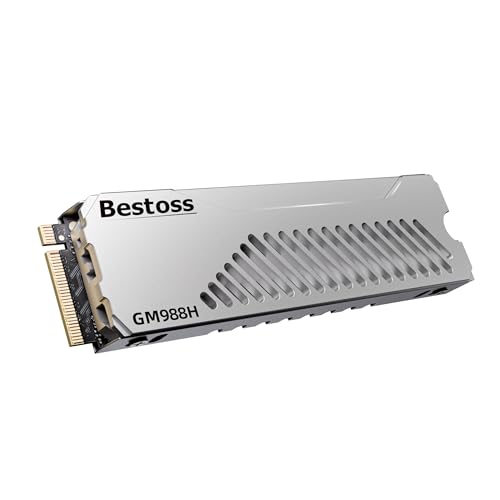
- Bestoss 2TB PCIe 4.0 with Heatsink – best for PS5 owners who want a lesser-known brand with cooling included
- Crucial P310 2TB (M.2 2230) – best for Steam Deck, ROG Ally, MSI Claw and other small-form-factor devices
- Silicon Power P34A60 2TB – best for older PCIe 3.0 motherboards and light-duty library storage
- SanDisk Optimus GX C50 2TB – best for Xbox Series X|S only (not a standard M.2 drive)
Which One Is Right for You?
| If you… | Choose |
|---|---|
| Own a PS5 and want a licensed drive with a heatsink already fitted | WD_BLACK SN850P 2TB |
| Own a PS5 and are comfortable with a newer, less established brand | Bestoss 2TB with Heatsink |
| Have a desktop or laptop with a free PCIe 4.0 M.2 2280 slot and your own heatsink or motherboard cooler | SanDisk Optimus 5100 2TB |
| Play on a Steam Deck, ROG Ally, MSI Claw or a compact mini PC | Crucial P310 2TB (2230) |
| Run an older board that only offers PCIe 3.0 M.2 slots | Silicon Power P34A60 2TB |
| Play on an Xbox Series X|S and need more room for installed games | SanDisk Optimus GX C50 2TB |
The fastest way to choose is to start with the slot, not the speed. A drive that does not physically or electrically fit your device is worthless no matter how large its headline number is. Once the slot is settled, endurance and cooling decide between the remaining candidates.
All 6 Picks in Detail
1. Silicon Power P34A60 2TB – Best for older PCIe 3.0 systems
As an Amazon Associate we earn from qualifying purchases at no extra cost to you.

Silicon Power’s P34A60 is a PCIe Gen3 x4 NVMe 1.3 drive in the M.2 2280 format. The manufacturer’s product page lists up to 2,200MB/s reads and 1,600MB/s writes, and the retailer listing states 1,200TBW for the 2TB capacity. It uses TLC flash with a DRAM-less design and a host memory buffer. Those speeds are a fraction of Gen4 drives, but game loading is often limited by the game, not the drive, so it remains usable for a secondary library on older machines.
- Interface and size: PCIe Gen3 x4, NVMe 1.3, M.2 2280
- Quoted sequential speed: up to 2,200MB/s read, 1,600MB/s write
- Endurance: 1,200TBW per the retailer listing; warranty term varies by source, so confirm
- Memory design: TLC NAND, DRAM-less with HMB
- Cooling: none supplied
Pros
- Works in almost any NVMe-capable board, including older PCIe 3.0 systems
- Generous endurance rating for the speed class
Cons
- Well below the PCIe 4.0 drives for installs, copies and level loads
- Not suitable as a PS5 expansion drive because it falls under the recommended read speed
Choose it over the Optimus 5100 only if your board cannot use PCIe 4.0 anyway. If you are unsure which generation your board supports, check the motherboard manual: a PCIe 4.0 drive will still run in a 3.0 slot, just at the lower slot speed, so a Gen4 drive is the safer long-term buy when the two options are close in cost.
2. SanDisk Optimus GX C50 2TB – Best for Xbox Series X|S (runner-up for this list)

This product does not match the standard M.2 facet of this guide. It is an officially licensed storage expansion card that plugs into the dedicated expansion port on Xbox Series X|S consoles, and the listing bundles one month of Xbox Game Pass and Discord Nitro. It is the right choice for Xbox owners because those consoles do not accept ordinary M.2 drives. It is not a PC or PS5 drive. Retailers disagree on its interface wording, so check SanDisk’s page for the exact specification.
- Form factor: proprietary Xbox expansion card, plug and play
- Console support: Xbox Series X|S
- Quoted speeds: one retailer lists about 2,100MB/s read and 1,900MB/s write, confirm on listing
- Warranty: five years per retailer pages
- Extras: bundled Game Pass and Discord Nitro trial
Pros
- Plays Series X|S optimized games directly, matching internal storage behavior
- No installation beyond inserting the card
Cons
- Useless outside Xbox Series X|S consoles
- Slower in raw terms than PCIe 4.0 M.2 drives
It is the only option here for an Xbox, so it does not compete with the other five; it fills a different slot entirely. Players on other platforms should skip it, and anyone buying for an Xbox should confirm the 2TB capacity and console model on the product page first.
3. SanDisk Optimus 5100 2TB – Best for a bare PCIe 4.0 drive

The Optimus 5100 is a straightforward M.2 2280 drive that makes no console claims, which is a plus if you are building a PC and already own a heatsink. SanDisk’s data sheet lists up to 7,100MB/s reads and 6,700MB/s writes for the 2TB capacity, 900TBW of endurance and a five-year warranty. The same sources describe QLC flash and a host-memory-buffer design without onboard DRAM, which explains the lower endurance than the TLC-based drives in this list while still being a sensible rating for game files that are written once and read many times.
- Interface and size: PCIe 4.0 x4, M.2 2280
- Quoted sequential speed: up to 7,100MB/s read, 6,700MB/s write
- Endurance: 900TBW at 2TB
- Memory design: QLC NAND, no dedicated DRAM, per SanDisk documentation
- Cooling: none supplied; use a motherboard shield or heatsink
Pros
- Thin, flat profile fits almost any M.2 slot or laptop bay
- Fast quoted speeds for the capacity class
Cons
- Not a PS5 pick without buying a compatible heatsink separately
- Sustained writes will slow once the fast cache fills
It is the cleaner PC choice over the SN850P if your board already provides cooling and you do not need the PlayStation license.
4. WD_BLACK SN850P 2TB – Best for PS5 and heatsink-friendly desktops

This is the officially licensed PS5 version of the SN850 family, and the listing highlights a quoted 7,300MB/s read speed, a PS5-shaped heatsink and the PlayStation license. Western Digital’s specification page rates the 2TB model at 1,200TBW with a five-year limited warranty, which is the strongest endurance figure in this group. Hardware sites that compared it with the SN850X describe the two as essentially the same drive with a different cooler, so a desktop owner with enough height clearance can use it as a fast general-purpose game drive too.
- Interface and size: PCIe 4.0 x4, M.2 2280
- Quoted sequential speed: up to 7,300MB/s read, 6,600MB/s write per the manufacturer page
- Endurance: 1,200TBW (2TB model), five-year limited warranty
- Cooling: factory heatsink, roughly 9.9mm tall overall
- NAND type and DRAM presence: confirm on listing
Pros
- Highest endurance rating and a comfortable warranty term
- Heatsink already fitted, so a PS5 install needs no extra parts
Cons
- Heatsink height can clash with motherboard M.2 shields or tight laptop bays
- Not suited to thin laptops or handhelds
Compared with the Bestoss drive, it offers an established brand and a published endurance rating in exchange for a tighter budget fit. Because the heatsink is part of the product, measure the gap under your graphics card or inside a laptop bay before ordering, since a cooler that does not fit cannot be removed and replaced with a thinner one.
5. Bestoss 2TB PCIe 4.0 with Heatsink – Best for PS5 owners who want a heatsink included

This listing pairs a PCIe 4.0 x4 M.2 2280 drive with a dual-surface heatsink and is aimed at PS5 owners. The title quotes 7,350MB/s and names 3D NAND TLC; other retailer pages for the same product family quote 6,600MB/s or 6,200MB/s writes, so the write figure is not consistent. The seller also describes an SLC cache and HMB, which means no onboard DRAM. Some guides recommend a DRAM-equipped drive for PlayStation use, so confirm compatibility notes and warranty terms on the product page before buying.
- Interface and size: PCIe 4.0 x4, M.2 2280
- Quoted read speed: 7,350MB/s (seller claim)
- Write speed: varies between listings, confirm on listing
- Memory design: TLC NAND with SLC cache and HMB per the seller
- Cooling: included dual-surface heatsink
Pros
- Heatsink included, which saves a separate purchase
- Headline speeds meet the PS5 recommended minimum with room to spare
Cons
- No published endurance rating in the listing text
- Little track record for the brand, so support is harder to judge
Pick it over the SN850P only if you accept the brand trade-off; otherwise the WD drive is the safer PlayStation option. Whichever heatsinked drive you choose for a console, check that the total thickness stays within the console slot limit and keep the drive screw and spacer that come with the console cover, since you will need them to secure the new drive.
6. Crucial P310 2TB (M.2 2230) – Best for handhelds and mini PCs

The short 2230 format is the point of this drive. The listing names the Steam Deck, ASUS ROG Ally, MSI Claw, mini PCs and ultrabooks, all of which use the compact 30mm card length. Crucial lists 7,100MB/s reads, 6,000MB/s writes, PCIe Gen4 x4, 440TBW for the 2TB model and a five-year warranty. It is DRAM-less and uses host memory buffer. Hardware sites disagree on whether its NAND is TLC or QLC, so confirm that on the product page if it matters to you. For a game library the practical difference is modest, but it affects how well the drive holds speed during long copies.
- Interface and size: PCIe Gen4 x4 NVMe, M.2 2230
- Quoted sequential speed: up to 7,100MB/s read, 6,000MB/s write
- Endurance: 440TBW at 2TB, five-year warranty
- Memory design: DRAM-less with HMB
- Typical hosts: handhelds, mini PCs, thin laptops
Pros
- One of the few 2TB drives in the small 2230 size
- Low power draw suits battery-powered devices
Cons
- Lowest endurance rating among the PCIe 4.0 drives here
- Will not fit a standard 2280 desktop slot without an adapter or the right standoff
It sits at the opposite end of the list from the SN850P: tiny and efficient rather than large and heavily cooled. Handheld owners should also check which 2230 length and keying their device supports, and remember that swapping the internal drive usually means reinstalling the operating system or restoring a backup.
Specs Compared
| Drive | Interface and size | Quoted read / write | Endurance (2TB) | DRAM / cache design | Fits |
|---|---|---|---|---|---|
| WD_BLACK SN850P | PCIe 4.0 x4, M.2 2280 with heatsink | 7,300 / 6,600MB/s | 1,200TBW | confirm on listing | PS5, desktops with clearance |
| SanDisk Optimus 5100 | PCIe 4.0 x4, M.2 2280 | 7,100 / 6,700MB/s | 900TBW | HMB, no DRAM | Desktops, laptops |
| Bestoss 2TB with heatsink | PCIe 4.0 x4, M.2 2280 with heatsink | 7,350MB/s read, write confirm on listing | confirm on listing | SLC cache, HMB | PS5, desktops |
| Crucial P310 | PCIe Gen4 x4, M.2 2230 | 7,100 / 6,000MB/s | 440TBW | HMB, no DRAM | Handhelds, mini PCs |
| Silicon Power P34A60 | PCIe Gen3 x4, M.2 2280 | 2,200 / 1,600MB/s | 1,200TBW (listing) | HMB, no DRAM | Older PC boards |
| SanDisk Optimus GX C50 | Xbox expansion card | confirm on listing | confirm on listing | confirm on listing | Xbox Series X|S only |
How We Chose These
This guide is built from desk research rather than lab work. We started with the six listings supplied for this page and checked each against the manufacturer’s specification page or data sheet where one exists, then against retailer listing fields. We prioritized the slot a drive fits, the interface generation, the stated endurance, whether cooling is included and how consistent the listing information is. Where sources disagreed, such as write speeds and NAND type, we say so and tell you to confirm on the product page. Items that do not match the standard M.2 facet are labeled as runners-up. We did not run speed or temperature measurements, so every figure here is a manufacturer or retailer claim.
What to Look For
Slot and form factor first
Most desktops and PS5 consoles use the M.2 2280 size, which is 22mm wide and 80mm long. Handhelds and thin laptops often take the 2230 size, which is only 30mm long. A 2230 drive can be mounted in a 2280 slot only with an adapter or a movable standoff, so never assume it will fit. Xbox Series X|S ignores M.2 entirely and uses a proprietary card.
PCIe generation and real needs
PCIe 3.0 x4 tops out around 3,500MB/s in theory and PCIe 4.0 x4 around 7,000MB/s, so a drive quoted at 7,000MB/s or more is a PCIe 4.0 part, and a drive quoted near 3,500MB/s or below is a PCIe 3.0 part. The PlayStation 5 requires PCIe Gen4 x4 and Sony recommends at least 5,500MB/s reads, which rules out Gen3 drives. For a PC, the difference between a Gen3 and Gen4 drive is far more noticeable when copying large files than when loading a level.
Endurance and what TBW means
TBW is the total data a manufacturer says a drive can write during its warranty. Games are mostly read, not written, so even 440TBW is a lot. A worked example: if you install and update 500GB of games a month, that is 6TB a year, so a 440TBW rating would last far longer than any typical warranty. Endurance matters more if you also record video or run a scratch disk on the same drive.
Cooling and height
Fast drives throttle when hot. The PS5 needs a heatsink and limits total thickness, with guides citing a maximum of roughly 11.25mm including cooling. A bare drive under a motherboard shield is usually fine on a desktop. Check clearance before buying a drive with a tall factory heatsink, because the cooler may collide with a graphics card or shield.
Matching capacity to how you play
Capacity planning is easier with a rule of thumb. Add up the installed size of the games you play in a typical month, multiply by 1.5 to leave room for patches, shader caches and the occasional new download, and compare the result with the usable capacity of the drive. A 2TB drive formats to roughly 1.8TB of usable space, so a library of ten 90GB titles, ten 50GB titles and a dozen smaller games already uses about 1.5TB. If that sounds like you, treat 2TB as the minimum rather than the comfortable choice, and keep seldom-played titles on a cheaper secondary drive.
Console and handheld compatibility traps
Three mistakes cause most returns. First, buying a PCIe 3.0 drive for a PS5 and discovering that it misses the recommended read speed. Second, buying a bare 2280 drive for a console that needs a heatsink. Third, buying a 2230 drive for a desktop slot without the mounting hardware. Read the form factor, interface and cooling line of every listing before you add it to a cart, and keep the original packaging until the drive has been formatted and checked in the target device.
DRAM, HMB and sustained writes
Several of these drives are DRAM-less and use host memory buffer. That works well for gaming, but sustained large writes can slow down once the fast cache fills. If you will move hundreds of gigabytes at a time, favor a drive known to hold speed or accept slower copies.
Questions
Is 2TB enough for a game library?
It holds roughly 15 to 20 modern large titles when each takes 100GB or more, and far more smaller games. Many players keep favorites on a 2TB drive and archive the rest to an external disk. Plan on at least 10 percent free space for patches.
Can I use a PS5 drive in my PC?
Often yes, since the SN850P and Bestoss drives are standard PCIe 4.0 M.2 2280 devices with heatsinks. Check the height against your motherboard’s shield and graphics card. The heatsink may not fit in a laptop, and some boards cannot accept a drive with a tall cooler in the slot nearest the processor.
Does a faster SSD improve FPS?
Not directly. A faster drive shortens loading times and texture streaming stalls in some titles, but frame rates come mainly from the processor and graphics card. Moving from a Gen3 to a Gen4 drive is a small gain for most players.
Why is the Xbox card included in a list of NVMe drives?
It uses an NVMe-style design but in a proprietary shape, so it only works in Xbox Series X|S consoles. It is listed because shoppers searching for a 2TB game drive often land on it. If you own an Xbox, it is your only internal-style option.
Do I need a heatsink for a PCIe 4.0 drive in a desktop?
Most motherboards ship with an M.2 shield, which is enough for gaming loads. A drive under constant heavy writes benefits from extra airflow. Skip a second heatsink if your shield already makes contact with the drive, and never stack two thermal pads on top of each other.
What happens when an SSD reaches its TBW?
The warranty ends at the lower of the TBW figure or the warranty period, but the drive does not stop working at that point. Back up important data regardless, and watch the drive’s health indicator in its utility software. Most owners replace a drive for capacity reasons long before wear becomes a concern.
Update History
- October 14, 2026 – Initial publication; product set drawn from current catalog listings.
- Check the product page for current specifications and availability before buying.
Sources
- Manufacturer product and specification pages for Western Digital (WD_BLACK), SanDisk, Crucial and Silicon Power
- PlayStation 5 M.2 expansion requirements as summarized by hardware guides
- Retailer listing titles and specification fields
- Independent hardware publications’ coverage of the Crucial P310 and WD_BLACK SN850P