
Our Top Picks
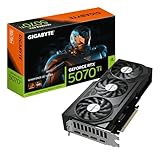
 ZOTAC Gaming GeForce RTX 5070 Ti Solid SFFGraphics Card12 x 1.6 x 0.1 inches3.75 PoundsCheck on Amazon


Top 3 picks at a glance
The Short Answer
For an RTX 5070 Ti, NVIDIA recommends a 750W power supply as the baseline, and that is the correct starting point for most builds in 2026. The card itself has a Total Graphics Power (TGP) of 300W, but your PSU needs to handle the whole system — CPU, fans, storage, RAM, and transient power spikes.
Here is how to choose quickly:
As an Amazon Associate we earn from qualifying purchases at no extra cost to you.


- 750W PSU: Ideal for most mid-range to high-end builds pairing the RTX 5070 Ti with a CPU like an Intel Core i5-14600K / i7-14700 or AMD Ryzen 7 7700X / 7800X3D, with no heavy overclocking. This is the most common and cost-effective choice.
- 850W PSU: Recommended if you are using a power-hungry CPU such as an Intel Core i9-14900K or AMD Ryzen 9 7950X/9950X, plan to overclock the GPU or CPU, or have many peripherals, custom cooling, or multiple drives. It gives you comfortable headroom for transient spikes and quieter operation.
- 1000W PSU: Only necessary for extreme builds with a flagship CPU heavily overclocked, custom water cooling loops, or if you want maximum future-proofing for next-generation upgrades.
Do not go below 750W, even if a wattage calculator shows a lower number. The RTX 5070 Ti can produce brief power excursions well above its rated 300W, and a quality 750W unit with ATX 3.0/3.1 and a native 12VHPWR or 12V-2×6 connector will handle those spikes far better than an older 650W design. Look for 80 PLUS Gold or better efficiency and a reputable brand with a 7 to 10-year warranty.
Standard Sizes
Sizing for an RTX 5070 Ti build is about two things: the physical dimensions of the graphics card and the form factor of the power supply that will fit your case and power it properly. All four reference RTX 5070 Ti models are large triple-fan or large dual-fan cards that require a full-size mid-tower or larger case, or a specifically designed small form factor (SFF) case with verified GPU clearance.
| Component / Model | Length | Height / Width | Thickness (Slots) | Weight (Approx.) |
|---|---|---|---|---|
| ZOTAC Gaming RTX 5070 Ti Solid SFF OC (ZT-B50710J3-10A) | 11.97 in / 30.4 cm | 4.53 in / 11.5 cm | 1.97 in / 5.0 cm (2.5-slot) | 2.65 lbs / 1.20 kg |
| MSI GeForce RTX 5070 Ti Ventus 3X OC | 11.93 in / 30.3 cm | 4.72 in / 12.0 cm | 1.97 in / 5.0 cm (2.5-slot) | 2.87 lbs / 1.30 kg |
| ZOTAC Gaming RTX 5070 Ti Solid CORE OC White Edition (ZT-B50710Q2-10A) | 12.20 in / 31.0 cm | 4.76 in / 12.1 cm | 2.36 in / 6.0 cm (3-slot) | 3.09 lbs / 1.40 kg |
| GIGABYTE RTX 5070 Ti WINDFORCE OC V2 16G | 11.97 in / 30.4 cm | 4.96 in / 12.6 cm | 1.97 in / 5.0 cm (2.5-slot) | 2.82 lbs / 1.28 kg |
| Standard ATX PSU (Fits most mid-tower/full-tower) | 5.91 in / 15.0 cm | 3.39 in / 8.6 cm | 5.51 in / 14.0 cm deep | 3.5 – 4.5 lbs / 1.6 – 2.0 kg |
| SFX PSU (For compact SFF cases) | 4.92 in / 12.5 cm | 2.50 in / 6.35 cm | 3.94 in / 10.0 cm deep | 2.0 – 2.8 lbs / 0.9 – 1.3 kg |
| SFX-L PSU (Slightly larger SFF option) | 4.92 in / 12.5 cm | 2.50 in / 6.35 cm | 5.12 in / 13.0 cm deep | 2.4 – 3.0 lbs / 1.1 – 1.36 kg |
All RTX 5070 Ti cards require either a native 16-pin 12VHPWR / 12V-2×6 cable from an ATX 3.0 or 3.1 PSU, or the included 2-to-1 or 3-to-1 8-pin PCIe adapter. For clearance, allow at least an additional 1.5 inches / 3.8 cm of cable headroom in front of the card for the 16-pin connector bend.
How to Measure Your Space
Before you buy a PSU or a card, take five minutes to measure your case. A tape measure in inches and centimeters is all you need.
- Check GPU length clearance: Measure from the inside of the rear expansion slot bracket to the nearest obstruction in front, usually the front fans, radiator, or case frame. Compare this to the card length above. Add 1.5 inches / 3.8 cm for the power cable if the connector is on the side or end.
- Check GPU thickness and height: Measure the vertical space from the PCIe slot to the side panel. A 2.5-slot card needs about 2.0 inches / 5.1 cm, a 3-slot card needs 2.4 inches / 6.1 cm. Also measure from the top of the motherboard to the side panel to ensure the card height (4.5 to 5.0 inches) will not interfere.
- Check PSU bay dimensions: For ATX cases, measure the PSU shroud or mounting area. Standard ATX PSUs are 5.91 x 3.39 x 5.51 inches. Confirm depth, as some 850W and 1000W units are 6.3 inches / 16.0 cm deep and may conflict with bottom-mounted hard drive cages.
- Confirm PSU form factor: Look at your case spec sheet. Mid-tower and full-tower cases use ATX. Compact ITX cases require SFX or SFX-L. An SFX PSU can fit in an ATX case with an adapter bracket, but an ATX PSU will not fit in an SFF case.
- Measure airflow path: Ensure at least 1.2 inches / 3.0 cm between the GPU fans and the PSU shroud or bottom of the case, and at least 2 inches / 5.0 cm between the GPU backplate and the CPU cooler for heat dissipation.
- Verify cable routing: If you use the adapter, you need room to make a gentle bend without pressing the cable against the side panel. ATX 3.1 PSUs with a native 12V-2×6 cable with a 90-degree connector can save 0.75 to 1.0 inch of clearance.
By Room or Use Case
Compact SFF Build (ITX Case, Living Room or Small Office)
For cases like the Cooler Master NR200P, Fractal Terra, or Lian Li A4-H2O, choose the ZOTAC Solid SFF OC at 11.97 inches long because it is specifically tuned for smaller chassis. Pair it with a 750W or 850W SFX or SFX-L Gold PSU that is ATX 3.1 rated. You must verify GPU length under 12.2 inches and PSU depth under 5.12 inches. This setup typically draws 480 to 580W under gaming load, so 750W provides safe headroom without excess heat in a confined space.
Mid-Tower Gaming Build (Bedroom, Dorm, or Dedicated Gaming Space)
This is the most common use case for cards like the MSI Ventus 3X OC and GIGABYTE WINDFORCE OC V2. Any standard mid-tower ATX case with at least 13 inches / 33 cm of GPU clearance will fit these cards comfortably. A 750W ATX 3.1 Gold PSU is sufficient for a Ryzen 7 or Core i7 system. If your CPU is a Ryzen 9 or Core i9, or you use a 240mm or 360mm AIO cooler with multiple RGB fans, step up to 850W to keep fan noise low and handle transient spikes during demanding titles.
Overclocked and Creator Workstation (Home Office or Studio)
If you plan to overclock the RTX 5070 Ti, which can push board power to 330W to 350W, or you use the system for long rendering, video editing, or AI workloads with sustained CPU plus GPU load, choose the ZOTAC Solid CORE OC White Edition or any factory-overclocked model and pair it with an 850W minimum, ideally 1000W if you have a 200W+ CPU. Workstation loads can keep total system draw at 650 to 750W for hours, so the extra capacity keeps efficiency in the optimal 50 to 70 percent range and extends PSU lifespan. An ATX Gold or Platinum unit with a native 12V-2×6 cable is strongly recommended.
Future-Proofed Family or Multi-Use System
For a system that will stay in place for three to five years and may receive future GPU or CPU upgrades, an 850W ATX 3.1 Gold PSU is the smart size. It covers the RTX 5070 Ti today with 250 to 370W of headroom and will support most next-generation single-GPU upgrades without requiring a full rewiring. Physical sizing is rarely an issue in a standard ATX mid-tower or full-tower, so prioritize a unit that is 5.91 x 3.39 x 6.3 inches or smaller to leave room for bottom storage drives.
Common Sizing Mistakes
1. Buying by wattage calculators alone. Online calculators often show 520 to 600W for an RTX 5070 Ti build and tempt buyers to choose a 650W PSU. They do not account for transient spikes of 2x to 3x the average power for milliseconds, which can shut down an undersized or older group-regulated PSU. Always follow the 750W minimum.
2. Ignoring the power connector standard. The RTX 5070 Ti uses a 16-pin 12VHPWR / 12V-2×6 connector. Using an older ATX 2.4 PSU with three daisy-chained 8-pin adapters works but creates messy cabling, extra heat at the adapter, and tight bends. An ATX 3.0 or 3.1 PSU with a native cable is safer, cleaner, and saves space.
3. Measuring only length. Many buyers check length but forget thickness and height. A 3-slot card like the ZOTAC White Edition at 2.36 inches thick can block the second PCIe slot and press against a bottom-mounted front panel connector. A card that is 4.96 inches tall may touch tempered glass if the case has a narrow chamber.
4. Choosing SFX when you need ATX, or vice versa. SFX PSUs are excellent for small cases but have smaller, louder fans and shorter cables that may not reach in a full-tower. ATX PSUs are quieter and often less expensive per watt but simply will not fit in an ITX case. Match the form factor to the case spec sheet, not just the wattage.
5. Forgetting PSU depth and drive cages. High-wattage ATX PSUs are often 0.5 to 0.8 inches deeper than standard 750W units. In cases with a hard drive cage directly in front of the PSU, that extra depth can prevent installation or pinch cables. Measure depth and remove or relocate the cage if the case allows.
6. Cheap 750W over quality 750W. A low-quality 750W unit without independent over-current protection or with thin 18-gauge PCIe cables is riskier than a high-quality 750W Gold unit from a reputable manufacturer. Look for 80 PLUS Gold, Cybenetics efficiency ratings, and a single-rail 12V design capable of delivering at least 62A on the 12V rail for a 750W model.
FAQ
Is 750W really enough for an RTX 5070 Ti with a high-end CPU?
Yes, a high-quality 750W ATX 3.1 Gold PSU is enough for an RTX 5070 Ti paired with a modern high-end CPU like a Ryzen 7 7800X3D or Core i7-14700, even during gaming at 4K. Total gaming draw for that combination is usually 450 to 600W. If you have an Intel Core i9-14900K, Ryzen 9 7950X, or plan to overclock both CPU and GPU to their limits, move to 850W for extra headroom and lower noise. The key is quality and the ATX 3.1 rating for handling transients, not just the number on the box.
Do I need an ATX 3.0 or 3.1 power supply for the RTX 5070 Ti?
You do not strictly need it, as every card ships with an adapter for traditional 8-pin PCIe connectors, but it is highly recommended. ATX 3.0 and 3.1 PSUs include a native 12VHPWR or improved 12V-2×6 cable that delivers up to 600W over a single connector, monitors for proper insertion, and handles transient spikes up to 200 percent of rated load for 100 microseconds. This reduces cable clutter, improves airflow, and lowers the risk of melting at the adapter junction when space is tight.
What size power supply do I need for two RTX 5070 Ti cards?
Consumer RTX 5070 Ti cards do not support NVLink or SLI for gaming, so dual-GPU gaming setups are not applicable. For professional workloads that can use two cards independently, such as rendering or compute, you will need a 1200W to 1500W PSU, a full-tower case with at least 13.5 inches / 34.3 cm of GPU clearance per card, and a motherboard with adequate PCIe slot spacing for 2.5 to 3-slot coolers. Most users should plan for a single GPU and a 750W to 850W PSU.
Will my old 750W PSU from three years ago work with the RTX 5070 Ti?
It can work if it is a quality Gold-rated unit with at least two or three dedicated 8-pin PCIe cables and can deliver 62A on the 12V rail, using the included adapter. However, older ATX 2.4 designs lack the transient response and the sense pins of ATX 3.1 and may shut down under spike loads or run hotter.









