
Most people shopping for an RTX 5080 build get PSU wattage wrong in one of two directions. They either grab the biggest number on the shelf and overspend on headroom they will never use, or they buy a 750W unit because a calculator told them the bare minimum would “probably work,” then spend the next year troubleshooting shutdowns during load. The RTX 5080 has a 360W TGP with transient spikes well above that, and NVIDIA’s ATX 3.1 standard exists precisely so power supplies can absorb those spikes without tripping overcurrent protection. Here is what actually matters when you’re deciding how to choose PSU wattage for RTX 5080 build quality, safety, and long-term value — and what to skip.
Our Top Picks


Top 3 picks at a glance
Decide These 3 Things First
Before you compare a single product, answer these three questions. Everything else follows from them.
As an Amazon Associate we earn from qualifying purchases at no extra cost to you.


1. What GPU are you pairing with it? The RTX 5080 draws around 360W, and with a modern CPU (a Ryzen 7 9800X3D or Core Ultra 7 265K pulling 125–250W under load), a full system realistically lands between 550–650W sustained. That alone rules out anything under 750W. If there is any chance you upgrade to a 5090 later, buy for that now.
2. Do you need ATX 3.1 and native 12V-2×6? The RTX 5080 uses the 16-pin 12V-2×6 connector (450W rated). A PSU with a native cable means no adapter, no extra heat at the plug, and cleaner cable management. Every pick in this guide meets ATX 3.1.
3. What is your real budget? Set it before browsing.
Size and Form Factor: Get the Dimensions Right
Standard ATX power supplies measure 150mm wide by 86mm tall, but depth varies from 140mm to 180mm, and depth is what kills builds in compact cases. The MSI MAG A850GL PCIE5 runs a compact footprint designed for smaller ATX cases, while longer units can collide with front radiator mounts or bottom fan rows. Check your case’s PSU clearance spec — anything under 170mm of clearance needs a PSU under 160mm deep.
Also check cable reach if you have a large case. A full-tower or vertically mounted GPU may need the 12V-2×6 cable to stretch 650mm or more; most stock cables reach 600–650mm comfortably, but confirm before buying.
Weight is a rough proxy for internal quality. A quality 850W unit with a full bridge or LLC resonant topology and proper heatsinks weighs 2.5–4 lbs. Featherweight units at the same wattage are cutting exactly the components you don’t want cut.
Construction Quality: What’s Inside Counts More Than the Label
Two PSUs can both say “850W 80+ Gold” and be built to completely different standards. The components that matter:
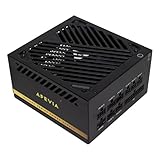
Capacitors. Japanese electrolytic caps on the primary side are the benchmark for longevity — they handle heat better and last years longer than mainland Chinese caps. The Apevia Galaxy 1000W explicitly lists Japanese caps; at its price, that’s a meaningful spec. Many mid-tier units use Taiwanese caps, which are acceptable but not ideal for a build you plan to keep through multiple GPU generations.
Topology. Look for DC-DC conversion on the minor rails and an LLC or active-clamp resonant design. Cheap group-regulated designs struggle when 12V load (your GPU and CPU) spikes while 5V stays low — which is exactly what happens in a gaming rig.
Modularity. Fully modular units let you skip the SATA and peripheral cables you don’t need, which improves airflow and simplifies the build.
Fan. A 135mm fluid dynamic bearing (FDB) fan, like the one in the Apevia Galaxy, will outlast the sleeve-bearing fans in budget units and stay quieter past 40°C.
Performance: Wattage, Efficiency, and Transients
What wattage should you actually buy? For an RTX 5080 plus a mainstream CPU:
- 850W is the sweet spot. NVIDIA recommends 850W for the 5080, and it covers transients with room to spare.
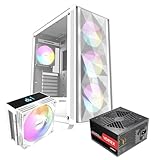
- 750W only works with an efficient CPU (65W class) and a PSU rated well for transient response — like the 750W Gold unit in the RAIDMAX bundle. It leaves zero upgrade path.
Efficiency. 80+ Gold means roughly 87–90% efficiency at typical loads. Versus Bronze, that’s about 20–30W less heat at gaming loads — heat your case doesn’t have to exhaust and your electric bill doesn’t pay.
Transient response. ATX 3.1-certified units must handle GPU power spikes up to 200% of rated TGP without shutting down. This is the single biggest reason “it worked on paper but crashes in-game” happens with older PSUs. All four reference picks here are ATX 3.1 with PCIe 5.1 output.
Price Tiers: What Each Dollar Buys
Budget:The tradeoff: a less established warranty track record and fewer premium extras like a fully braided cable set.
Mid-range: This is where most 5080 builders should land. The Corsair carries stronger brand support; the MSI is more compact.
Bundle route:Just verify the 750W fits your CPU choice.
Premium: Platinum efficiency, near-silent operation under 40% load, and 10–12 year warranties. Worth it for high-end or always-on systems; unnecessary for a standard 5080 gaming build.
Warranty and Support
Warranty length is the best public signal of manufacturer confidence, because a warranty claim on a failed PSU can take out other components. Expect 10 years from MSI and Corsair on these models, with Apevia typically shorter (check the listing — often 5–10 years). Beyond length, weigh how the company handles claims: Corsair and MSI have established RMA processes with cross-shipping options in many cases.
Delivery and Assembly Considerations
PSUs ship heavy — 4 to 7 lbs boxed — so check that the retailer packs them in foam or molded inserts, not loose in a box; a dropped PSU can have cracked solder joints you won’t discover for months. If you buy a bundle like the RAIDMAX package, everything arrives in one shipment and cables are pre-sorted (“SI OEM Direct Cable Version” means fixed, non-modular-optional cabling), which simplifies a first build.
During assembly: route the 12V-2×6 cable with a gentle bend radius — at least 35mm from the connector — and seat it fully until it clicks. Most melted-connector incidents trace to partially seated plugs, not the PSU itself. Keep the native cable that came with your unit; never mix modular cables between brands or models.
Spec Checklist
| Spec | Budget | Mid | Premium |
|---|---|---|---|
| Wattage | Varies | Varies | 1000–1200W |
| Efficiency rating | 80+ Gold | 80+ Gold | 80+ Platinum/Gold |
| ATX standard | ATX 3.1, PCIe 5.1 | ATX 3.1, PCIe 5.1 | ATX 3.1, PCIe 5.1 |
| 12V-2×6 connector | Native, 600W rated | Native, dual-color keyed | Native, 600W rated |
| Capacitors | Japanese primary | Japanese/Taiwanese mix | Full Japanese |
| Modularity | Fully modular | Fully modular | Fully modular |
| Fan | 135mm FDB | 120–140mm FDB, zero-RPM mode | 140mm FDB, quiet tuned |
| Warranty | 5–10 years | 10 years | 10–12 years |
| Depth | 150–160mm | 140–150mm (compact) | 160–180mm |
| Price | Check on Amazon | Check on Amazon | Check on Amazon |
Red Flags
- No ATX 3.1 certification. A pre-ATX 3.0 PSU relies on adapters and may not survive 5080 transient spikes gracefully.
- Adapters-only 16-pin output. If the unit only offers 2–3 PCIe 8-pin to 12V-2×6 adapters, you’re adding connectors and resistance in the highest-current cable in your system.
- “750W” minimum-wattage marketing with no transient spec. If a listing claims it powers a 5080 but doesn’t mention ATX 3.1 or PCIe 5.x, treat it as unverified.
- No named capacitor sourcing. Vague specs at budget prices usually mean the cheapest possible internal parts.
- Warranty under 5 years from an unfamiliar brand, especially with no US-based RMA process.
- Fixed non-modular cabling above 850W. At that wattage, the unused cable bundle genuinely hurts airflow.
FAQ
Is 850W enough for an RTX 5080?
Yes — comfortably. NVIDIA recommends 850W for the 5080, and an ATX 3.1 850W Gold unit handles the card’s transient spikes with headroom for a 125–200W CPU. Go to 1000W only for a 250W+ CPU, a future 5090 upgrade, or a heavily overclocked system.
Do I need a 12V-2×6 native cable or can I use the adapter?
The included adapter works, but a native 12V-2×6 cable is one continuous run from the PSU with no junctions, which means less resistance, less heat at the connector, and cleaner cable management.
Is a 1000W PSU overkill, or does it waste electricity?
It doesn’t waste meaningful power — efficiency curves on modern Gold units stay flat between 20% and 100% load. You only “overbuy” when you pay a large premium for wattage you’ll never draw.
How long should a PSU last?
A quality Gold unit with Japanese caps typically runs 10+ years, which is why 10-year warranties are common at the mid tier. Budget units with lower-grade caps realistically serve 5–8 years of daily gaming. Buy once at the right wattage and it should outlast two or three GPU upgrades.









