Choosing an 8TB external hard drive looks simple until you notice how much of the catalog is padded with other capacities, internal drives in enclosures, and refurbished units wearing new-looking listings. The real decision is narrower: every drive here is a genuine 8TB desktop model, so the choice comes down to encryption, backup software, hub features and how the drive behaves as your single big archive.
This roundup is for home users consolidating scattered photo and video libraries, PC gamers offloading installed titles, and anyone who wants one large drive beside the computer instead of a drawer of small ones. Each pick was verified against the model number printed on its Amazon listing, and only drives whose listings state the full 8TB capacity made the cut.
Our Top Picks

Top 3 picks at a glance

Quick Picks
As an Amazon Associate we earn from qualifying purchases.
| Product | Best for | Key spec from title |
|---|---|---|
| WD Elements Desktop 8TB | Simple plug-and-play storage | USB 3.0 external hard drive, 8TB |
| Seagate Expansion 8TB | Straightforward bulk backup | USB 3.0 with Rescue Data Recovery Services |
| WD My Book 8TB | Buyers who want encryption | Password protection and backup software |
| Seagate Backup Plus Hub 8TB | Desks short on USB ports | 8TB desktop drive with two front USB ports |
How to Choose
Confirm the capacity on the model number, not the headline
Capacity variants share listings across this whole category, and a search result that says 8TB can land you on a page where a smaller size is selected by default. The reliable check is the model number: each manufacturer assigns a distinct code to the 8TB version, and that code should appear in the listing details and on the box when it arrives. If the delivered drive’s label shows a different model code than the one you ordered, return it before copying data onto it.
Decide whether you need encryption and backup software
Plain drives like the Elements and Expansion lines do nothing but store files, which is exactly what some buyers want. Others are better served by a model with password protection and hardware encryption, because an 8TB archive concentrates years of photos, documents and footage into one stealable box. Bundled backup software also matters if you will not remember to copy files manually. Pick based on your habits: if backups only happen when they are automatic, pay attention to the software column of the listing.
Remember these are desktop drives with power bricks
Every 8TB model in this roundup is a 3.5-inch desktop unit that needs its own wall adapter, so it lives on a desk rather than in a laptop bag. That is a fair trade for the capacity, but it means the drive is not coming with you to a coffee shop. Check that you have a free outlet near the computer and enough desk depth for a vertical enclosure, and plan where the cable run goes before the drive arrives and migrates to the floor.
Think about what 8TB on one disk really risks
A single large drive is a single point of failure, and desktop hard drives are mechanical devices with spinning platters. Eight terabytes of family video on one disk with no other copy is a loss waiting for a dropped enclosure or a failed motor. Treat the 8TB drive as one leg of a backup plan: keep the most irreplaceable material duplicated on a second drive or a cloud tier, and consider a model with bundled data recovery services if the archive truly cannot be replaced.
The 4 Best Options
WD Elements Desktop 8TB

Buyers who want the plainest possible 8TB drive should start here. The Elements line skips encryption and bundled software in favor of a simple enclosure that you plug in, format if needed, and fill. That simplicity is the appeal for a media archive or a game library overflow disk, where the drive spends its life doing one job. It works with PC out of the box and can be reformatted for Mac, and the slim vertical case takes little desk space beside a tower.
Specs
- Capacity: 8TB
- Model: WDBWLG0080HBK-NESN
- Interface: USB 3.0
- Form factor: desktop external hard drive
- Compatibility: PC ready, reformattable for Mac
Best for: A no-frills archive drive for media collections and game storage.
Watch out for: There is no password protection or hardware encryption, so secure sensitive files another way.
ASIN: B07D5V2ZXD
Seagate Expansion 8TB
The Expansion desktop drive takes the same simple approach from Seagate’s side, with one meaningful extra: the listing includes Rescue Data Recovery Services, which gives you a recovery path if the drive fails with important data on it. Setup is drag-and-drop storage for Windows with a reformat for Mac use, and the enclosure is a basic matte box that sits quietly under a monitor stand. For buyers whose main fear is losing the archive rather than securing it, that services bundle is the deciding feature.
Specs
- Capacity: 8TB
- Model: STKP8000400
- Interface: USB 3.0
- Included: Rescue Data Recovery Services
- Compatibility: Windows and Mac (reformat required for Mac use)
Best for: Bulk backup buyers who value the included data recovery services.
Watch out for: Like the Elements, it offers no encryption, and Mac users must reformat before use.
ASIN: B092R5KTT7
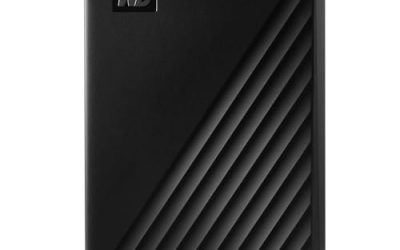
WD My Book 8TB
The My Book is the pick when the archive holds tax records, client files or anything you would not leave on a sticky note. Its listing includes password protection with 256-bit AES hardware encryption, plus WD’s backup software for scheduled, automatic copies from your computer. That combination makes it the natural home for a primary backup routine rather than a passive storage shelf. The enclosure is larger than the Elements case, so measure your desk corner before assuming it fits the same spot.
Specs
- Capacity: 8TB
- Model: WDBBGB0080HBK-NESN
- Interface: USB 3.0
- Security: password protection with 256-bit AES hardware encryption
- Software: WD backup software included
Best for: Your main scheduled backup drive, especially for sensitive documents.
Watch out for: Forgetting the password locks you out permanently, since the encryption cannot be bypassed to recover data.
ASIN: B01LQQHLGC
Seagate Backup Plus Hub 8TB

Desks crowded with dongles and short front-panel ports get the most from this model, because the enclosure carries two USB 3.0 ports on its front face for charging phones or plugging in flash drives while the main disk stays connected. Underneath that convenience it is still a full 8TB desktop drive for backups and archives, and it can be used with both Windows and Mac workflows after formatting. It suits a workstation hub role better than a silent corner archive.
Specs
- Capacity: 8TB
- Model: STEL8000100
- Interface: USB 3.0
- Extra feature: two front-facing USB 3.0 hub ports
- Compatibility: Windows and Mac systems
Best for: A desk hub drive that stores backups and hosts your everyday USB gadgets.
Watch out for: The front ports share the drive’s single upstream connection, so they are for convenience devices, not maximum-speed transfers.
ASIN: B01HD6ZLQ6
Which One Fits Your Situation
You are consolidating years of photos and videos
Start with the Seagate Expansion or WD Elements, and put the money you save toward a second copy of the irreplaceable folders. Between the two, the Expansion’s included recovery services suit archives you cannot recreate, while the Elements is the simpler box for media you mostly stream from.
You want set-and-forget PC backups
The WD My Book is built for this job. Its bundled software handles scheduling, and the hardware encryption protects the backup if the drive is ever taken. Set the schedule the day it arrives, because a backup routine postponed is usually a backup routine that never exists when the internal drive fails.
Your desk is out of USB ports
Choose the Backup Plus Hub. The two front ports absorb your phone cable, headset dongle and flash drives, and the 8TB disk behind them still handles the nightly archive. It turns one rear-panel connection into the center of a small desk setup.
You are offloading a game library
Any of these drives holds a large installed library, with load times that trail an internal SSD but beat re-downloading by hours. The Elements is the usual pick here: cheap seats, no software arguing with your launcher, and enough room that deleting games to make space stops being a weekly chore for the whole household.
Common Mistakes
- Ordering from a shared listing and receiving a smaller capacity variant without checking the model number.
- Treating one 8TB drive as a complete backup plan with no second copy of irreplaceable files.
- Buying a desktop drive for travel, then discovering it needs a wall adapter everywhere it goes.
- Setting an encryption password on the My Book and storing it nowhere safe.
- Placing the enclosure on the floor or a subwoofer, where vibration and kicks shorten its life.
Frequently Asked Questions
Are all of these drives really 8TB?
Yes. Each pick was matched to the manufacturer model code for the 8TB version, not just a headline. Listings in this category often host many capacities, so confirm the model number on the box matches the code in the specs here before you start copying data across.
Can I use an 8TB desktop drive with a Mac?
Yes, after reformatting to a Mac file system, since most ship formatted for Windows. The WD My Book and Seagate models list Mac compatibility in their details. Reformatting erases the drive, so do it before loading your archive, not after.
Should I choose an external hard drive or an SSD at this size?
For bulk storage and backups, hard drives remain the practical way to get 8TB in one box, and the speed is fine for archives, media and game storage. SSDs win for active editing and fast transfers, but at this capacity the hard drive is the sensible archive tool.
What happens if an 8TB drive fails?
Everything on it is at risk at once, which is why a second copy matters more than any single feature. The Seagate Expansion includes Rescue Data Recovery Services in its listing, and the My Book’s encryption protects privacy but not against failure, so plan duplication for anything you cannot replace.
Related guides
More from Amazon
Programs that pair well with the guide above. Offers and eligibility are set by Amazon and may change.
Free shipping on eligible items, Prime Video and more. Eligible new members can start with a free trial.
Start a Prime free trialAd-free music streaming. Eligible new subscribers can start with a free trial.
Try Music Unlimited freeA Prime membership for ages 18-24 with a trial period. Eligibility is set by Amazon.
See Prime for Young AdultsAudiobooks and podcasts to listen to on the go. Eligible new members can start with a free trial.
Try Audible freeAs an Amazon Associate we earn from qualifying purchases.