Some buyers still want a laptop with a traditional hard drive and no solid-state drive at all. The reason is usually simple: a large hard drive holds a big collection of documents, photos, music, and video in one place, and the buyer already knows how that kind of storage behaves. If you are replacing an older machine, matching its storage type can also make the move feel familiar, since your files, folders, and habits stay in the same shape.
The three laptops below all use a 1TB hard drive as their only internal storage, with no SSD listed in the Amazon title or specifications. They suit different buyers: the Lenovo IdeaPad 3 fits light everyday use on a Full HD screen, the HP Pavilion 15t adds a touchscreen and a stronger processor for heavier daily work, and the HP 15-dw2025cl pairs a touchscreen with a 10th Gen Core i5 for general home and office use.
Top 3 picks at a glance

Quick Picks
As an Amazon Associate we earn from qualifying purchases.
| Product | Best for | Key spec from title |
|---|---|---|
| Lenovo IdeaPad 3 15IML05 | Light everyday use on a Full HD screen | 1TB HDD, 4GB RAM, Intel Pentium Gold 6405U |
| HP Pavilion 15t 15-CC665CL | Touchscreen use with stronger everyday power | 1TB HDD, 12GB RAM, Intel Core i7-8550U |
| HP 15-dw2025cl 2Z155UA | Touchscreen use with a 10th Gen Core i5 | 1TB HDD, 12GB RAM, Intel Core i5-1035G1 |
How to Choose
Confirm the drive is HDD only
A laptop can list a large capacity without making the drive type clear, so read the storage line itself before anything else. Look for the words hard drive or HDD and a capacity such as 1TB, and check that no SSD, NVMe, or eMMC entry appears beside it. Some listings mix a small SSD with a large hard drive, and those machines do not belong in this group. If the title names one storage type and the detail table names another, treat that mismatch as a warning and ask the seller which drive the shipped machine contains.
Match memory and processor to your daily work
Memory and processor decide how smoothly a hard-drive laptop handles ordinary days, because the drive itself will never be quick. A Pentium Gold machine with 4GB of RAM suits web browsing, email, word processing, and video playback when only a few programs run at once. A Core i5 or Core i7 machine with 12GB of RAM copes better with many browser tabs, large documents, spreadsheets, and video calls running together. Choose the stronger combination when your work involves several heavy programs at the same time.
Weigh screen size, resolution, and touch
All three laptops here use a 15.6-inch screen, which gives room for documents, spreadsheets, and video without making the machine hard to carry around the house. Resolution matters more than size once you sit down to work: a Full HD screen shows sharper text and more detail than an HD screen, which helps when you read for long periods. A touchscreen adds another way to scroll, tap, and select, and it can feel natural for browsing and media. Decide whether touch is a real habit for you before paying attention to it.
Check the system, keyboard, and ports
Each laptop in this guide runs Windows 10 Home, so confirm that the system version matches the software you already use. A full-size keyboard with a numeric keypad helps when you type numbers often, and a backlit keyboard helps in dim rooms. Look at the port list as well, since USB ports, HDMI, Wi-Fi, and Bluetooth decide what you can connect without extra adapters. Weight matters too: these are desktop-replacement style machines, so they suit a desk or a table far better than constant travel.
The 3 Best Options
Lenovo IdeaPad 3 15IML05

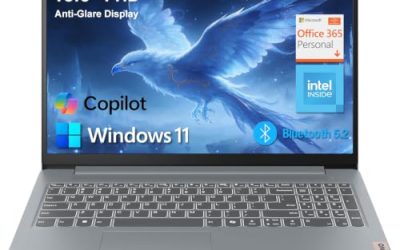
The Lenovo IdeaPad 3 15IML05 is the simplest machine in this group, and that simplicity is its main appeal. Its Pentium Gold 6405U processor and 4GB of RAM handle browsing, email, documents, and streaming video when you keep the workload light. The 15.6-inch Full HD screen shows clear text for reading and writing, and the 1TB hard drive leaves plenty of room for a growing collection of files. Windows 10 Home keeps the setup familiar for anyone moving from an older Windows laptop.
Specs
- 15.6-inch Full HD display, 1920 x 1080
- Intel Pentium Gold 6405U processor, dual-core, 2.40 GHz
- 4GB DDR4 RAM
- 1TB HDD
- Windows 10 Home
- Colour: Almond
- Weight: 3.75 lbs
Best for: light everyday use on a Full HD screen.
Watch out for: 4GB of RAM limits heavy multitasking, and a hard drive starts up more slowly than a solid-state drive.
ASIN: B08RBRM82M
HP Pavilion 15t 15-CC665CL
The HP Pavilion 15t 15-CC665CL is the strongest everyday machine among the three, thanks to its Core i7-8550U processor and 12GB of RAM. That combination handles many browser tabs, large documents, and video calls with more headroom than the lighter Lenovo, while the 1TB hard drive still gives you a single large space for files. The Full HD IPS touchscreen adds sharp images and touch control, and the backlit keyboard helps when you work in the evening. It is a good fit for a home desk where one machine does most of the daily work.
Specs
- 15.6-inch Full HD IPS touchscreen display, 1920 x 1080
- Intel Core i7-8550U processor, up to 4.0 GHz with Turbo Boost
- 12GB DDR4 RAM
- 1TB 5400RPM SATA hard drive
- Backlit keyboard, Bluetooth, Wi-Fi, HDMI
- Windows 10
- Weight: 3.97 lbs
Best for: touchscreen use with stronger everyday power.
Watch out for: this is a 2018 model sold through a third-party listing, so double-check the listed configuration and who is selling it before you order.
ASIN: B077RK32QD
HP 15-dw2025cl 2Z155UA
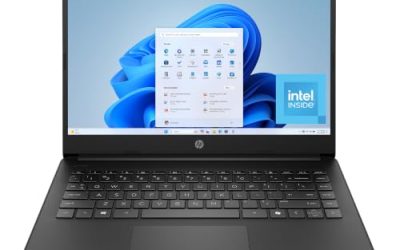
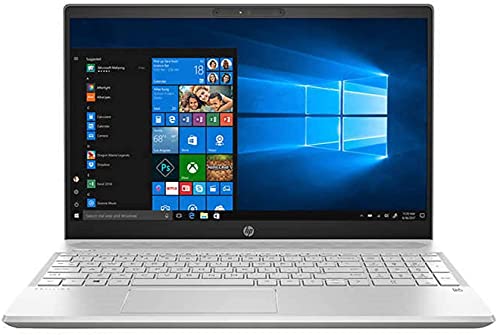
The HP 15-dw2025cl 2Z155UA sits between the other two picks on everyday power. Its 10th Gen Core i5-1035G1 processor and 12GB of RAM handle home and office work, study, browsing, and video calls without the limits of a 4GB machine. The 15.6-inch HD touchscreen responds to taps and swipes, though its resolution is lower than the Full HD screens on the other two laptops. The 1TB hard drive again provides one large place for documents, photos, and media, and Windows 10 Home keeps the software side familiar.
Specs
- 15.6-inch HD touchscreen display, 1366 x 768
- Intel Core i5-1035G1 processor
- 12GB DDR4 RAM
- 1TB 5400RPM SATA hard drive
- Intel UHD Graphics
- Windows 10 Home
- Colour: Silver
- Weight: 3.92 lbs
Best for: touchscreen use with a 10th Gen Core i5.
Watch out for: the HD screen is less sharp than Full HD, and the listing mixes 12GB and 16GB memory figures, so confirm the memory amount before buying.
ASIN: B0892ZYL16
Which One Fits Your Situation
You want the simplest laptop for basic tasks
Choose the Lenovo IdeaPad 3 15IML05 when your day is mostly browsing, email, documents, and video. Its Full HD screen is clear, its 1TB hard drive holds a large file collection, and its light specification matches light work. Keep the number of open programs low, and it will feel calm and predictable for everyday use around the house.
You want the strongest machine for a home desk
Choose the HP Pavilion 15t 15-CC665CL when one laptop handles most of your daily work. The Core i7 processor and 12GB of RAM give you room for many tabs and programs, while the Full HD touchscreen and backlit keyboard make long sessions more comfortable. It is the pick for buyers who want the most headroom in this hard-drive-only group.
You want a touchscreen with a newer Core i5
Choose the HP 15-dw2025cl 2Z155UA when you like touch control and want a 10th Gen Core i5 with 12GB of RAM. It handles study, office work, and video calls well, and its 1TB hard drive keeps your files in one place. Accept the HD screen as the trade-off, since text will look softer than on the two Full HD laptops here.
You are replacing an older hard-drive laptop
Choose any of the three based on the machine you are leaving behind, and match its strengths rather than chasing new features. If your old laptop had 4GB of RAM and felt slow with several programs open, move to one of the 12GB HP models. If your old laptop mainly handled writing and browsing, the Lenovo keeps that pattern with a sharper screen.
Common Mistakes
- Buying a laptop with a small SSD plus a large hard drive and assuming it has no SSD at all.
- Choosing 4GB of RAM for heavy multitasking, then blaming the hard drive for the slowdown.
- Expecting a hard drive to start the system and load programs as quickly as a solid-state drive.
- Ignoring screen resolution and discovering too late that an HD screen looks softer than Full HD.
- Skipping the listing details and missing a memory or processor figure that conflicts with the title.
Frequently Asked Questions
Are these laptops really without an SSD?
Yes, each of the three laptops in this guide lists a 1TB hard drive as its only internal storage, with no SSD in the Amazon title or specifications. That is the point of the selection: a buyer who wants a traditional hard drive should not have to sort through hybrid machines. Still, check the listing again before buying, since sellers sometimes change a configuration.
Why would anyone choose a hard drive over an SSD?
A hard drive gives you a large amount of storage, which suits buyers with big collections of photos, video, music, and documents. Some buyers also prefer the familiar behaviour of a spinning drive, or they are replacing an older hard-drive laptop and want the same kind of storage. The trade-off is speed: a hard drive loads the system and programs more slowly than a solid-state drive.
Is 4GB of RAM enough on a hard-drive laptop?
It is enough for light use such as browsing with a few tabs, email, word processing, and video playback. It is not a good match for heavy multitasking, large spreadsheets, or many programs running at once, because the machine will feel sluggish when memory runs short. If your day involves several demanding programs together, choose one of the 12GB models in this guide instead.
Can I add an SSD to one of these laptops later?
That depends on the exact model and its internal layout, so do not assume an upgrade is possible. Check the model service guide and the listing details before opening anything, and confirm whether a spare drive bay or slot exists. If you plan to change the storage later, keep a copy of your files elsewhere first, since any drive change carries a risk of data loss.
Related guides
More from Amazon
Programs that pair well with the guide above. Offers and eligibility are set by Amazon and may change.
Free shipping on eligible items, Prime Video and more. Eligible new members can start with a free trial.
Start a Prime free trialAd-free music streaming. Eligible new subscribers can start with a free trial.
Try Music Unlimited freeA Prime membership for ages 18-24 with a trial period. Eligibility is set by Amazon.
See Prime for Young AdultsAudiobooks and podcasts to listen to on the go. Eligible new members can start with a free trial.
Try Audible freeAs an Amazon Associate we earn from qualifying purchases.