
A gaming mouse is not the only mouse that can keep up in a game. Many office and productivity mice carry the same ingredients that matter in a match: a precise sensor, a comfortable shape for long sessions, and buttons that can be set up for the commands a player uses most. The difference is that these mice were designed for desks and workdays first, so they tend to be quieter, longer lasting on a charge, and easier on the wrist.
This guide looks at five regular mice that work well for gaming, from a flagship productivity mouse with a high resolution sensor to a compact travel mouse and two vertical shapes built for comfort. Each one is a non-gaming mouse by design, yet each brings something useful to a gaming setup, whether that is precise tracking, extra buttons, or a shape that stays comfortable through a long evening of play.
As an Amazon Associate, we earn from qualifying purchases.
Top 3 picks at a glance

How to Choose
Check the sensor first
The sensor decides how accurately the cursor follows the hand, and that matters in every genre. A higher maximum sensitivity gives more room to tune the feel, and a sensor that tracks on more surfaces keeps the cursor steady on different desks and pads. For fast games, a sensor with a high ceiling and a stable low end is the safer pick, since it can be set low for careful aiming and high for quick turns.
Think about the shape and the grip
Office mice come in more shapes than gaming mice, and the shape decides comfort over long sessions. A sculpted right-handed body suits palm grip players, a compact body suits small hands and travel, and a vertical body holds the wrist in a handshake position that some players find easier during long games. The hand should rest on the mouse without stretching or cramping, and the main buttons should fall under the fingers without reaching.
Count the buttons and the software
Extra buttons are useful in games, and many office mice have them. Side buttons can carry reload, melee, or push-to-talk, and a scroll wheel that switches modes can help with weapon selection or fast scrolling through inventory. Software that lets each button be reassigned makes an office mouse far more useful in a game, so check that the mouse has a companion app or on-board memory for custom bindings.
Weigh wired against wireless
Most office mice are wireless, and modern wireless connections are steady enough for casual and competitive play alike. Bluetooth is convenient for laptops and shared desks, while a dedicated receiver often gives a more direct link for a desktop setup. Battery life matters too: a mouse that runs for weeks or months on a charge is one less thing to think about before a session.
Consider clicks, weight, and noise
Quiet clicks are a real advantage for late-night sessions and shared rooms, and several office mice are built around them. Weight matters as well: a heavier mouse can feel steady and planted for careful aiming, while a lighter mouse is easier to flick across the pad. There is no single right answer, so the best choice is the one that matches the hand, the grip, and the games being played.
Logitech MX Master 3S

The MX Master 3S is a productivity mouse first, but its sensor and shape make it a strong choice for gaming too. The 8K DPI optical sensor tracks on almost any surface, including glass, so the cursor stays steady whether the desk is bare or covered with a pad. The sculpted right-handed body fills the palm, and the thumb rest keeps the hand relaxed during long sessions, which helps in games that run for hours.
The MagSpeed electromagnetic scroll wheel is one of the standout features. It spins freely for fast movement through long pages and inventories, then switches to a precise ratchet mode for step-by-step control. The wheel is useful for weapon selection and quick scrolling in strategy and role-playing games. Quiet clicks keep late-night sessions discreet, and the buttons can be reassigned through Logitech software, so side buttons and the gesture button can carry game commands.
Battery life is rated up to 70 days on a full charge, and a quick charge adds hours of use from a short top-up. The mouse connects by Bluetooth or a Logi Bolt USB receiver and pairs with up to three devices, which suits a setup shared between a gaming PC and a work laptop. At 141 grams it is on the heavier side, and that weight gives a planted, steady feel that suits careful aiming more than fast flicks.
| Spec | Detail |
|---|---|
| Brand | Logitech |
| Sensor | 8K DPI optical, tracks on glass |
| Scroll wheel | MagSpeed electromagnetic, free spin and ratchet modes |
| Buttons | Programmable, quiet clicks |
| Connectivity | Bluetooth, Logi Bolt USB receiver |
| Battery | Up to 70 days, USB-C rechargeable |
| Weight | 141 g |
| Model number | 910-007500 |
| ASIN | B0G2SG3NFT |
Who It Suits
This mouse suits players who want one mouse for work and play, especially those who play strategy, role-playing, and slower-paced shooters where comfort and precision matter more than flick speed. It is a good fit for palm grip players with medium to large hands, and for anyone who plays late at night and values quiet clicks. It suits a desk setup where the mouse also handles daily work.
Logitech MX Anywhere 3S
The MX Anywhere 3S packs much of the MX Master 3S experience into a compact body that fits small hands and travel bags. It carries the same 8K DPI sensor with tracking on glass, the same MagSpeed scroll wheel, and the same quiet clicks, so it stays accurate on almost any surface, from a desk to a couch arm. The smaller size makes it easy to carry between a desktop and a laptop.
For gaming, the compact shape suits claw and fingertip grips, and the lighter body is easier to move quickly than a full-size mouse. The side buttons and scroll wheel can be reassigned through Logitech software, which lets the mouse carry game commands despite its small size. Battery life is rated up to 70 days on a full charge, and USB-C quick charging adds hours of use from a short charge.
The trade-off is the shape: the compact body does not fill a large palm the way a full-size mouse does, so palm grip players with large hands may find it cramped during long sessions. For small hands, travel setups, and laptop gaming, though, it is one of the most capable compact mice available.
| Spec | Detail |
|---|---|
| Brand | Logitech |
| Sensor | 8K DPI, tracks on glass |
| Scroll wheel | MagSpeed, free spin and ratchet modes |
| Buttons | Programmable, quiet clicks |
| Connectivity | Bluetooth, Logi Bolt USB receiver |
| Battery | Up to 70 days, USB-C rechargeable |
| Model number | 910-006925 |
| ASIN | B0BPY4ZQXG |
Who It Suits
This mouse suits players with small hands, laptop gamers, and anyone who games in more than one place. It is a good fit for claw and fingertip grips, and for players who want a capable mouse that also works well for travel and daily work. It suits fast-paced games where a light, compact mouse is easier to move quickly.
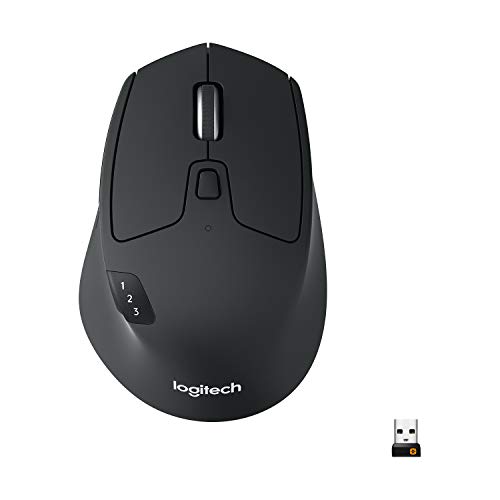
Logitech M720 Triathlon
The M720 Triathlon is a full-size office mouse built for people who switch between devices, and that same flexibility works well for gaming. It pairs with up to three devices over Bluetooth or the included Unifying receiver, so one mouse can serve a gaming PC, a laptop, and a tablet. The sculpted shape fits a palm grip, and the rubberized sides give a steady hold during long sessions.
The sensor is rated at 1000 DPI, which is lower than the flagship models in this guide, and that is the main limit for fast-paced play. For strategy games, role-playing games, and casual shooters, the fixed sensitivity is workable, and the six programmable buttons are a real advantage: side buttons and the scroll wheel can be set up for game commands through Logitech software. The hyper-fast scroll wheel switches between free spin and ratchet modes, which helps with inventory and weapon selection.
Battery life is the strongest point here, rated up to 24 months on a single AA battery. That is far longer than most gaming mice, and it means the mouse is ready whenever a session starts. The M720 is a practical pick for players who want a dependable, comfortable mouse with plenty of buttons and almost no battery worries.
| Spec | Detail |
|---|---|
| Brand | Logitech |
| Sensor | 1000 DPI optical |
| Buttons | 6 programmable |
| Scroll wheel | Hyper-fast, free spin and ratchet modes |
| Connectivity | Bluetooth, Unifying USB receiver |
| Battery | Up to 24 months, 1 AA battery |
| Devices | Up to 3 |
| Model number | 910-006036 |
| ASIN | B087Z6LSHW |
Who It Suits
This mouse suits players who value battery life and multi-device use, and who play strategy, role-playing, and casual games where a 1000 DPI sensor is enough. It is a good fit for palm grip players who want a full-size, comfortable mouse with six buttons and a long battery life. It suits a shared desk where one mouse serves several computers.
Logitech Lift Vertical Ergonomic Mouse

The Lift takes a different approach: a vertical body that holds the hand at a 57-degree angle, close to a handshake position. That shape takes pressure off the wrist and forearm, which matters in long gaming sessions where the same hand position is held for hours. The mouse is sized for small to medium hands, so it fits players who find full-size vertical mice too tall.
The sensor is adjustable from 400 to 4000 DPI, which gives plenty of room to tune sensitivity for different games. The SmartWheel scrolls smoothly and can switch modes, and the quiet clicks keep sessions discreet. Four buttons, including back and forward controls, can be reassigned through Logitech software, so the mouse can carry game commands alongside its office duties.
Battery life is rated up to 24 months on a single AA battery, and the mouse connects by Bluetooth or a Logi Bolt USB receiver. At 125 grams it is light for a vertical mouse, and the shape stays stable on the desk. The main limit is the grip itself: a vertical shape feels different from a standard mouse, and players used to a flat palm grip may need time to adjust before it feels natural in fast games.
| Spec | Detail |
|---|---|
| Brand | Logitech |
| Sensor | 400 to 4000 DPI, adjustable |
| Shape | Vertical, 57-degree angle |
| Buttons | 4, quiet clicks |
| Scroll wheel | SmartWheel |
| Connectivity | Bluetooth, Logi Bolt USB receiver |
| Battery | Up to 24 months, 1 AA battery |
| Weight | 125 g |
| Model number | 910-006466 |
| ASIN | B09J1TB35S |
Who It Suits
This mouse suits players who feel wrist strain during long sessions and want a vertical shape for comfort. It is a good fit for small to medium hands, and for players who spend long evenings in strategy, role-playing, and simulation games. It suits anyone who wants a comfortable mouse for both work and play, with adjustable sensitivity for different games.
Anker 2.4G Wireless Vertical Ergonomic Optical Mouse

The Anker vertical mouse is the budget option in this guide, and it brings the same handshake-style grip as the Lift at a much lower cost. The vertical shape holds the wrist in a neutral position, which helps during long sessions, and the five buttons include forward and back controls that can be useful in games. A DPI button on the body switches between 800, 1200, and 1600 DPI, so sensitivity can be changed without software.
The sensor ceiling is lower than the other mice here, and 1600 DPI is the top setting. That is enough for casual and slower-paced games, but fast competitive shooters will feel the limit. The 2.4 GHz wireless connection uses a small USB receiver, and the mouse runs on two AAA batteries with a power-saving mode that puts it to sleep when idle.
For players who want to try a vertical mouse without committing to a higher cost, the Anker is a sensible first step. The shape is the main reason to choose it: if the vertical grip feels right, it can make long sessions noticeably more comfortable, and the low cost makes it easy to experiment.
| Spec | Detail |
|---|---|
| Brand | Anker |
| Sensor | 800, 1200, or 1600 DPI, switchable |
| Shape | Vertical, right-hand |
| Buttons | 5 |
| Connectivity | 2.4 GHz wireless USB receiver |
| Battery | 2 AAA batteries, power-saving mode |
| Model number | AK-98ANWVM-UBA |
| ASIN | B00BIFNTMC |
Who It Suits
This mouse suits players on a budget who want to try a vertical grip, and those who play casual, strategy, and role-playing games where a 1600 DPI ceiling is enough. It is a good fit for anyone with wrist discomfort who wants a low-cost way to test whether a vertical mouse helps. It suits a desk where comfort matters more than top-end sensor performance.
FAQ
Can a non-gaming mouse work well for gaming?
Yes, a non-gaming mouse can work well for gaming when it has a precise sensor, a comfortable shape, and buttons that can be reassigned. Office mice often have high resolution sensors, quiet clicks, and long battery life, which are all useful in games. The main limits are usually a lower polling rate and fewer buttons than a dedicated gaming mouse, so fast competitive play may feel different, while casual and slower-paced games work well.
What DPI should a non-gaming mouse have for gaming?
A higher maximum DPI gives more room to tune sensitivity, and a mouse with an adjustable range is the most flexible choice. For careful aiming, a lower setting such as 800 or 1200 DPI is common, while a higher setting suits fast turns and large monitors. The mice in this guide range from 1000 DPI to 8000 DPI, and the best setting depends on the game, the grip, and the size of the pad.
Are vertical mice good for gaming?
Vertical mice can be good for gaming when comfort is the priority, since the handshake position takes pressure off the wrist during long sessions. The shape feels different from a standard mouse, so players used to a flat grip may need time to adjust. For strategy, role-playing, and simulation games, a vertical mouse works well, while fast shooters may suit a standard shape better.
Do office mice have enough buttons for gaming?
Many office mice have five or six buttons, which is enough for the most common game commands such as reload, melee, and push-to-talk. The side buttons and scroll wheel can be reassigned through the maker’s software, so a few well-placed buttons can cover a lot of actions. Players who need many commands at once may want a mouse with more buttons, but for most games, five or six is a workable count.
Final Verdict
The best non gaming mouse for gaming depends on the hand and the games being played. The Logitech MX Master 3S is the strongest all-round pick, with an 8K DPI sensor, a comfortable sculpted shape, and quiet clicks that suit both work and play. The MX Anywhere 3S brings the same sensor into a compact body for small hands and travel, while the M720 Triathlon offers six buttons and a battery life measured in months.
For comfort, the Logitech Lift is the better vertical option, with an adjustable sensor up to 4000 DPI and a shape built for small to medium hands. The Anker vertical mouse is the budget way to try the same grip. Any of these five mice can handle a game night well, and the right choice is the one that fits the hand, the grip, and the games on the screen.
Product and ASIN Reference
| Product | ASIN |
|---|---|
| Logitech MX Master 3S | B0G2SG3NFT |
| Logitech MX Anywhere 3S | B0BPY4ZQXG |
| Logitech M720 Triathlon | B087Z6LSHW |
| Logitech Lift Vertical Ergonomic Mouse | B09J1TB35S |
| Anker 2.4G Wireless Vertical Ergonomic Optical Mouse | B00BIFNTMC |
Related guides
More from Amazon
Programs that pair well with the guide above. Offers and eligibility are set by Amazon and may change.
Free shipping on eligible items, Prime Video and more. Eligible new members can start with a free trial.
Start a Prime free trialAd-free music streaming. Eligible new subscribers can start with a free trial.
Try Music Unlimited freeA Prime membership for ages 18-24 with a trial period. Eligibility is set by Amazon.
See Prime for Young AdultsAudiobooks and podcasts to listen to on the go. Eligible new members can start with a free trial.
Try Audible freeAs an Amazon Associate we earn from qualifying purchases.








