
The best-looking gaming PCs in 2026 combine a glass-fronted or panoramic case, a consistent color theme and tidy cable routing, and the most commonly praised examples come from NZXT, Corsair, Alienware, Lenovo Legion and boutique builders, with DIY builders favoring cases from Lian Li, Fractal Design, Hyte and NZXT. Looks are subjective, but the ranking below relies on three traits that reviewers repeatedly cite: clean internals, a cohesive color scheme and visible quality of finish. It is based on published product pages and reviews, not on in-house use.
A good-looking PC is not only a case choice. Cable routing, fan color, graphics card design and even where the PC sits on the desk decide whether it looks designed or merely assembled. Use the style recipes after the list if you are building your own.
As an Amazon Associate we earn from qualifying purchases at no extra cost to you.
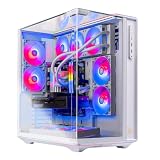


Top 3 picks at a glance
Quick comparison of the picks
| Pick | Look | Best for | Trade-off | Price tier |
|---|---|---|---|---|
| NZXT Player (H-series case, white) | Minimal, clean white or black | On-camera setups, minimalists | Brand-matched parts, limited low-end choices | Mid to premium |
| Corsair Vengeance (white or black glass) | Clean tower with coordinated RGB | Tidy builds with standard parts | Slightly conservative styling | Mid to premium |
| Alienware Area-51 | Bold, futuristic chassis | Showpiece builders | Premium and brand-specific parts in some configurations | Premium |
| Lenovo Legion Tower 7 | Restrained, modern gaming | Discreet desk setups | Less RGB spectacle | Mid to premium |
| HP Omen (where offered) | Distinct gaming aesthetics | Retail shoppers | Availability and naming change | Mid to premium |
| Boutique custom builds (Falcon Northwest, Maingear) | Custom paint, premium cabling | Bespoke finishes | Premium cost and lead times | Premium |
| DIY with a panoramic or dual-chamber case | Fully custom | Builders who want total control | Time and skill required | Entry to premium |
Best minimalist: NZXT Player with a white H-series case
Spec line: NZXT airflow-focused case with a perforated front, clean internal layout and a curated component list, available with recent AMD and Intel processors and RTX 50-series graphics. Best for: people who want a PC that looks calm and organized. Skip if: you want heavy RGB lighting or a wild design.
NZXT’s design language is simple: flat surfaces, hidden cables and limited lighting. The white versions are especially popular for desk setups with light-colored furniture. The curated configuration process reduces the chance of mismatched parts.
- Pro: Clean look with well-routed cables.
- Pro: Airflow design is balanced with style.
- Pro: Easy configuration with matching components.
- Con: Premium for the brand and styling.
- Con: Fewer choices at lower price tiers.
Best coordinated RGB: Corsair Vengeance
Spec line: Tower with Corsair fans, memory, cooler and case, offered in white or black with tempered glass and a range of current graphics options. Best for: buyers who want matching lighting without tuning it themselves. Skip if: you prefer no lighting at all.
Because Corsair makes the fans, memory and controllers, its prebuilt systems can offer unified lighting through a single software suite. That avoids the mismatched colors that appear when parts from many brands are combined.
- Pro: Matching components and lighting control from one ecosystem.
- Pro: Standard parts and tidy assembly.
- Pro: White and black variants.
- Con: Lighting software adds another app to manage.
- Con: Premium compared with integrators with similar graphics.
Best showpiece: Alienware Area-51
Spec line: Large, distinctive tower with a futuristic design, strong airflow and recent high-end graphics options. Best for: buyers who want a PC that becomes a centerpiece. Skip if: your budget is tight or you want a standard-looking case.
Alienware has built its identity on bold design, and the current Area-51 maintains that approach with a modern chassis. Reviewers typically describe it as unmistakable. As always with showpiece designs, confirm which components are standard, since non-standard parts can limit later swaps.
- Pro: Distinctive design that stands out.
- Pro: Large interior suited to high-end hardware.
- Pro: Large support network.
- Con: Premium pricing.
- Con: Some parts may be less standard.
Best understated: Lenovo Legion Tower 7
Spec line: Mid-to-large tower with restrained styling, modern processors and RTX graphics. Best for: shared rooms and office desks where a loud design would not fit. Skip if: you want a dramatic look.
Not every attractive PC needs to shout. The Legion Tower line leans toward a tidy, modern look with modest lighting, which suits people who want gaming performance without a gamer aesthetic.
- Pro: Subtle design that fits many rooms.
- Pro: Established warranty structure.
- Pro: Sales cycles lower the effective price.
- Con: Limited lighting options.
- Con: Less customization.
Best bespoke: boutique builders
Spec line: Custom-configured systems with premium cases, custom paint, braided cables and hand-tuned assembly. Best for: enthusiasts willing to pay for a unique look. Skip if: cost per frame is your main metric.
Boutique builders such as Falcon Northwest and Maingear offer finishes and cable work that mass-market systems rarely match. The premium is for labor and design; if the look matters most to you, that can be a fair trade.
- Pro: Highest level of finish and customization.
- Pro: Careful cable management.
- Pro: Personal service.
- Con: Premium price tier.
- Con: Longer lead times.
Best DIY route: panoramic and dual-chamber cases
Spec line: Cases such as the Lian Li O11 Dynamic family, Hyte Y-series, Fractal Design North and NZXT H-series, paired with matching fans and a vertical GPU mount if desired. Best for: builders who want total control. Skip if: you do not want to manage cables and lighting.
Building your own is the most flexible route to a good-looking PC. Panoramic glass cases display the interior from two sides and reward tidy cabling, while wood-accented designs such as the Fractal North give a warmer look. Check clearances for coolers and radiators before choosing.
- Pro: Complete freedom over color and layout.
- Pro: Often lower total cost than a comparable prebuilt.
- Pro: Easy to change the look later.
- Con: Requires building skill and time.
- Con: Panoramic cases can compromise airflow if fans are insufficient.
Style recipes for a good-looking build
White RGB gaming PC
- Pick a white case with a tempered glass side panel.
- Choose white fans, a white or silver cooler, and a white power supply shroud or hidden power supply.
- Use a white graphics card or one with a neutral shroud.
- Use white RAM with diffused RGB, or no RGB if your fans already provide the lighting.
- Pick one RGB color or a slow gradient rather than a rainbow cycle, since a limited palette looks more deliberate.
Black stealth build
- Choose a black case with a mesh front and a solid or smoked glass panel.
- Use all-black fans, cables and heatsinks.
- Add a single accent color through a light bar or a few fans.
Showcase build with a vertical GPU
- Use a case that supports a vertical graphics card mount, and check that the card thickness leaves enough gap to the glass.
- Use a riser cable of the right PCIe generation for the card.
- Leave at least 20mm to 30mm between the card fans and the glass so the card can breathe, or the card will run hotter.
Looks versus airflow: a numbers check
A sealed glass front looks sleek but can choke airflow. As a rough rule, aim for at least three intake fans and one to two exhaust fans for a high-power gaming build, which often means a total of around four to six 120mm fans. If a case has a solid glass front, check that it has side or bottom intake and that reviewers report reasonable temperatures. A processor and graphics card consuming about 450W total need roughly 450W of heat to be removed from the case; if airflow is poor, fans run faster and louder, or components throttle. Looks should not cost you performance.
Cable management basics
- Route cables behind the motherboard tray, using the case’s cutouts.
- Use the shortest cables that reach, and avoid loose slack in view.
- Choose sleeved or color-matched extension cables for the visible 24-pin and GPU cables.
- Bundle hidden cables with ties, leaving enough slack for later changes.
- Check the fan and RGB headers before closing the case, so you do not need to reopen it.
Popular DIY cases compared for looks and practicality
| Case | Look | Airflow character | Watch out for |
|---|---|---|---|
| Lian Li O11 Dynamic family | Dual-chamber glass, showcase interior | Good with side and bottom fans installed; needs fans on the radiator | Cable routing needs patience; glass is heavy |
| Hyte Y-series | Panoramic glass with a vertical GPU mount | Moderate; depends on fan placement | Vertical GPU needs a riser and clearance planning |
| Fractal Design North | Wood-accented, warm look | Mesh front option performs well | Wood front panel can limit radiator choices on some versions |
| NZXT H-series (H6 Flow, H9 Flow) | Clean, minimal, white or black | Good with the Flow versions | Check the version, since non-Flow fronts restrict air |
| Corsair 4000D Airflow and similar | Plain, tidy, affordable | Good with mesh front | Less dramatic than showcase cases |
Case models are revised often, so confirm current names and radiator support on the manufacturer’s page. The categories matter more than the exact model: a mesh-front airflow case looks plainer but runs cooler, while a glass-front or panoramic case looks more dramatic and needs more fans to compensate.
A worked color-plan example
Many builds look messy because every part brings its own color. A simple plan limits you to three: a base color, a secondary neutral and one accent. For a white build, the base is white (case, fans, cooler), the neutral is silver or light gray (graphics card shroud, motherboard heatsink) and the accent is a single RGB hue such as cool blue or soft magenta. Count the visible parts: if more than about four visible surfaces break the plan, replace the offenders. A black motherboard heatsink in a white build can be hidden by a cover, a black power supply by the case shroud, and black cables by white sleeving. This three-color rule is a design heuristic, not a standard, but it is a quick way to judge whether a listing’s photos show a cohesive build.
Lighting basics: what to control and what to leave alone
- Use one lighting controller. Mixing several brands’ software suites leads to conflicts. Choose parts that work with your motherboard’s lighting header standard (usually 5V addressable RGB) or one ecosystem such as Corsair’s.
- Know the header types. Addressable RGB (ARGB) uses a three-pin 5V connector that lets each LED show a different color. Older 12V RGB headers use four pins and show a single color at a time. Plugging one into the other can damage the lighting, so check the labels.
- Prefer diffused lighting. Fans with soft ring lighting look more refined than bright, single-point LEDs.
- Dim the brightness. A moderate brightness, often 30% to 60%, looks more premium and is more comfortable in a dark room.
- Turn off lighting at night if the PC shares a bedroom. Most suites support schedules or a single toggle.
Where the PC sits matters
A beautiful PC on the floor under the desk is rarely seen. If looks matter, place the tower on the desk, to one side of the monitor, with the glass panel angled toward your seat. Leave at least 10cm to 15cm of clearance around intake fans, and avoid placing it against a wall that blocks airflow. For on-camera streamers, position the PC behind your shoulder rather than in the center of the frame so the lighting acts as background rather than a distraction. A simple desk mat and a tidy monitor arm help the whole setup look more intentional than the PC alone.
Budget approach: where to spend for looks
If your budget is limited, prioritize in this order: a case you like, matching fans, cable management, then graphics card design. The case and fans account for most of the look and cost relatively little compared with the processor and graphics card, which drive performance. A modest, well-organized build in a good case often looks better than a high-end machine with tangled cables. If you buy a prebuilt, look at photos of the interior and read reviews for comments on cable work, since the product render and the real machine can differ.
Frequently Asked Questions
What is the best-looking prebuilt gaming PC?
That depends on taste, but NZXT Player systems are widely praised for clean minimalism, Corsair Vengeance for coordinated RGB and Alienware’s Area-51 for bold design. Boutique builders offer custom finishes for those who want something unique.
How do I make a white gaming PC?
Choose a white case, white fans, a white or silver cooler, a white power supply or a hidden one, and a graphics card with a white shroud. Keep the RGB palette limited to one color or a slow gradient for a clean look.
Do good-looking PCs perform worse?
They can if the case restricts airflow. Choose a case with enough intake fans and a mesh or vented front, and confirm that reviewers report reasonable temperatures.
Is RGB worth it?
It is a matter of taste. Lighting adds no performance and uses a small amount of power, so enable it only if you like it. Controlling it through a single software suite reduces the complexity of mixed brands.
Should I build or buy for looks?
Building offers the most control and often lower cost, but a prebuilt from NZXT, Corsair or a boutique builder can provide tidy results without the work. If you choose a prebuilt, check that its parts are standard so you can restyle later.
What is the best case for a showcase build?
Panoramic glass cases such as the Lian Li O11 family and Hyte Y-series are popular for showcase builds, and the Fractal North is a favorite for a warmer, wood-accented look. Check radiator and graphics card clearances against your parts.
Bottom line
If you want a good-looking PC without building it, start with NZXT for minimalism, Corsair for coordinated lighting or Alienware for a bold centerpiece. If you want full control, choose a panoramic or dual-chamber case and follow a single color theme with tidy cables. Whichever route you take, check airflow and component clearances so the PC performs as well as it looks.
Related guides
- Best High-End Prebuilt Gaming PCs in 2026: Flagship RTX 5090, 5080 and 9800X3D Builds: 4 Compared
- Best RTX 3080 Prebuilt Gaming PCs: Used and Refurbished Buying Guide for 2026: 4 Compared
- Best Prebuilt Gaming PCs for 2026: 7 Lines Worth Buying and How to Spot a Weak Config: 4 Compared
- 4 Best Prebuilt Gaming PCs for 1080p: Entry-Level and Esports Picks for 2026
More from Amazon
Programs that pair well with the guide above. Offers and eligibility are set by Amazon and may change.
Free shipping on eligible items, Prime Video and more. Eligible new members can start with a free trial.
Start a Prime free trialAd-free music streaming. Eligible new subscribers can start with a free trial.
Try Music Unlimited freeA Prime membership for ages 18-24 with a trial period. Eligibility is set by Amazon.
See Prime for Young AdultsAudiobooks and podcasts to listen to on the go. Eligible new members can start with a free trial.
Try Audible freeAs an Amazon Associate we earn from qualifying purchases.


