A power meter plug only earns its place if it answers the question you are asking. A gamer sizing a power supply needs a spot check: watts at idle against watts under full load. A home-office user costing a desk setup needs a kilowatt-hour total that survives a week. A standby hunter needs fine low-watt resolution, and a NAS owner needs logging that runs itself. Pick the wrong memory or display type and the measurement fails quietly: the tally resets, the screen is unreadable, or the one reading you needed was never captured.
This guide serves four groups: gamers measuring a rig before choosing a PSU or UPS, home-office users costing a desk setup, standby hunters tracking down always-on drains, and owners of always-on gear such as a NAS or router who want history instead of spot checks. The five meters below were chosen from the names and specifications on their Amazon product pages, and split between bench meters with their own displays and one app-logging smart plug.
Our Top Picks
 P3 P4400 Kill A Watt Electricity Usage MonitorOriginal version8.4 x 2.1 x 6.1 inches0.4 poundsCheck on Amazon

Top 3 picks at a glance
Quick Picks
As an Amazon Associate we earn from qualifying purchases
| Product | Best for | Key spec from title |
|---|---|---|
| P3 Kill A Watt EZ P4460 Electricity Usage Monitor | Week-long cost tracking that survives unplugging | Kill A Watt EZ with built-in battery backup and cost forecast |
| P3 Kill A Watt P4400 Electricity Usage Monitor | Quick idle-versus-load spot checks | Volts, amps, watts, kWh, Hz, VA and power factor on one LCD |
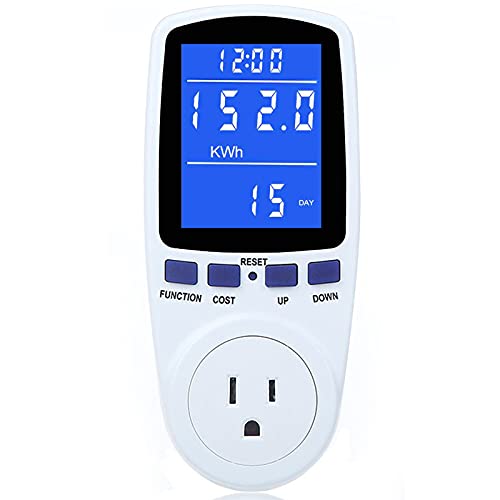
| MECHEER Watt Meter Plug | Checking several devices around one setup | 7 display modes with backlight and overload protection |
| HBN Watt Meter Plug with Backlight | Reading consumption under a desk | Backlit display, 9 display modes |
| Emporia Energy Monitoring Smart Plug (EMSO1) | Always-on gear that needs logged history | Wi-Fi smart plug that logs energy use in the Emporia app |
How to Choose
Check the rated current and voltage against your load
Every meter here is a pass-through device: your PC draws its power through the meter, so the meter’s rating is a hard ceiling, not a guideline. The P3 bench meters are rated at 15 A and 115 VAC, which covers a gaming rig, monitor and speakers on one strip. The Emporia smart plug tops out at 10 A by the maker’s figures, fine for a NAS or a single monitor but tight for a high-draw PC under load. Check the rating printed for the exact model, and never meter a load beyond it or a 240 V appliance on a 115 V meter.
Decide whether the tally must survive an unplug
A kilowatt-hour tally is only useful if it survives the way you actually test. The Kill A Watt EZ P4460 has a built-in battery backup, so you can unplug it, carry it to another room and keep the running total; a power cut does not erase a week of data either. The original P4400 has no backup: unplug it and the accumulated energy reading is gone, which ruins any long test the moment someone tidies the power strip. If your measurement runs longer than an afternoon, battery-backed memory is the feature that decides whether the result exists at all.
Pick the readings you actually need
For running cost, watts and total kilowatt-hours are enough, and every pick here shows both. For PSU and UPS sizing, look for volt-amps and power factor as well: a PC power supply draws apparent power above its real watts, and a UPS is rated in volt-amps, so the P3 meters’ VA and PF readouts prevent undersizing. For standby hunting, resolution at the low end matters more than capacity; you are chasing single-digit watt draws from monitors, docks and chargers, and a meter that rounds coarsely will hide exactly the loads you are trying to find.
Think about display and placement before you buy
Where the meter sits decides whether you will read it at all. A bench meter’s screen ends up under the desk or behind the tower, so a backlight, as on the MECHEER and HBN, is the difference between reading the display and guessing at it. Body size matters too: the P3 meters are bulky blocks that can cover the neighbouring outlet, and a short extension cord is a common workaround. The Emporia takes the opposite route with no display at all, trading instant at-a-glance readings for app history, schedules and remote switching from anywhere.
The 5 Best Options
P3 Kill A Watt EZ P4460 Electricity Usage Monitor
The P4460 is the meter to pick when the number you care about most is the running total. Its built-in battery backup keeps the cumulative kilowatt-hour tally alive when you unplug the meter or move it to another outlet, so a week-long measurement of a gaming PC does not reset halfway through. Enter your utility rate and it converts the readings into a running cost with forecasts by hour, day, week, month and year. It suits gamers sizing a power supply or UPS, and anyone who wants one bench meter that answers both draw and cost questions without a phone or an account.
Specs
- Operating voltage: 115 VAC (max 125 VAC)
- Max current: 15 A
- Max power: 1,875 VA
- Built-in battery backup keeps cumulative readings when unplugged
- Calculates running cost and forecasts by hour, day, week, month and year once the utility rate is entered
- Eight display readouts, including volts, amps, watts, VA, Hz, power factor and kWh
- Stated accuracy about 0.2 Percent (maker figure)
- Large LCD
- Weight: about 5 oz
Best for: Long measurements of a gaming PC or desk setup where the cost total must survive the meter being unplugged.
Watch out for: 115 V only, so it cannot meter a 240 V appliance; the body is a bulky block that can cover the neighbouring outlet, so a short extension cord may be needed behind a desk.
ASIN: B000RGF29Q
P3 Kill A Watt P4400 Electricity Usage Monitor
The original Kill A Watt is the straightforward choice for spot checks. Plug it in, cycle through volts, amps, watts, volt-amps, hertz, power factor and kilowatt-hours on the single LCD, and you know what a rig pulls at the desktop and under a gaming load within minutes. True RMS measurement keeps the readings honest on the switched-mode power supplies PCs actually use. It fits buyers who want quick, credible numbers for PSU and UPS sizing without paying for extras, as long as every test can start and finish while the meter stays plugged in.
Specs
- Operating voltage: 115 VAC (max 125 VAC)
- Max current: 15 A
- Max power: 1,875 VA
- True RMS measurement
- Energy range up to 9,999 kWh
- Elapsed-time counter
- Manufacturer-stated accuracy 0.2 Percent
- Weight: about 5 oz
- Dimensions: 5 1/8 x 2 3/8 x 1 5/8 in
Best for: Fast, credible spot checks of idle versus load draw before a PSU or UPS purchase.
Watch out for: No battery backup, so unplugging the meter or a power cut wipes the accumulated kWh tally and long tests must stay plugged in; a single screen means cycling buttons to change readings, and it sits flush and can block the adjacent outlet.
ASIN: B00009MDBU
MECHEER Watt Meter Plug
The MECHEER is the pick for buyers who read meters in awkward places. Its backlight makes the display legible under a desk or behind a tower, and seven display modes cover the everyday readings: energy, voltage, amps and watts. Overload protection adds a safety net when a load spikes. It is sold as single units and multi-packs, with a corded version for outlets the meter body would otherwise block. Choose it when you want several inexpensive checkpoints around a setup rather than one precision instrument, and when a lit screen matters more than published accuracy figures.
Specs
- Plug-in socket meter
- 7 display modes covering energy, voltage, amps and watts
- Backlight
- Overload protection
- Sold as single units and multi-packs, plus a version with a cord
Best for: Leaving meters on several devices at once during a standby-power hunt.
Watch out for: The listing copy does not state a rated current or an accuracy figure, so verify the maximum printed for the exact variant before metering any high-draw device and start with a small load; several similar variants make it easy to order the wrong one.
ASIN: B09BQNYMMM
HBN Watt Meter Plug with Backlight

The HBN suits buyers who want the widest spread of on-screen readings from a simple plug-in meter. Nine display modes rotate through voltage, amps, wattage and cumulative consumption, and the backlight keeps the figures readable under a desk or behind furniture, where PC power strips usually live. There is no app and no account: plug it in and read the screen. Pick it for a home-office desk you want to cost over a working week, or for checking one appliance at a time around the house, and treat it as a practical screen-first meter rather than a documented lab tool.
Specs
- Plug-in socket power meter
- Backlight for reading under a desk or behind furniture
- 9 display modes across voltage, amps, wattage and cumulative consumption
Best for: A screen-first meter for costing one desk or appliance at a time.
Watch out for: Rated current and accuracy are not stated in the short listing text, so confirm the stated maximum on the product page before use on large appliances; brand documentation is thinner than the P3 meters.
ASIN: B09MHGK6MT
Emporia Energy Monitoring Smart Plug (EMSO1)

The Emporia smart plug is the only pick here with no screen, because the screen is your phone. It reports the plugged-in device’s energy use in the Emporia app, keeps a history you can review later, and adds on/off schedules and remote control, with Alexa and Google Home support. That makes it the natural fit for always-on gear such as a NAS or router, where a spot check says little and a week of logged data says a lot. Choose it when hands-off logging matters more than instant readings at the outlet itself.
Specs
- Reports the plugged-in device’s energy use in the Emporia app
- On/off schedules and remote control
- Alexa and Google Home support
- For 120 V outlets
Best for: NAS, router and other always-on gear where logged history beats spot checks.
Watch out for: Maker material puts its current ceiling at 10 A, below the 15 A bench meters, so check the load before metering a high-draw gaming rig; it needs Wi-Fi, the app and an account, and shows nothing on the plug itself.
ASIN: B0CLVRZ2QL
Which One Fits Your Situation
Measuring a gaming rig before a PSU or UPS upgrade
Plug the whole rig into a P3 meter and record idle watts at the desktop, then load watts in a demanding game. The Kill A Watt EZ P4460 adds volt-amps and power factor, which is what a UPS is rated in, and its battery backup protects a longer session. The P4400 covers the same spot check for less fuss, provided the meter stays plugged in from start to finish.
Costing a full desk setup over a work week
Put the meter between the wall and the power strip feeding the PC, monitors, dock and speakers, then let it accumulate from Monday to Friday. The P4460 is the safe choice because its battery backup keeps the kilowatt-hour total intact if the strip gets unplugged. The backlit HBN works for a shorter run where you read the screen daily under the desk and note the running consumption yourself.
Hunting standby power across the desk
Work through one device at a time: monitor asleep, dock idle, charger plugged in with nothing attached. A bench meter with clear low-end readings, such as either P3 model, shows the small constant draws that add up across a desk. The MECHEER’s backlight helps behind furniture, and its multi-packs make it practical to leave a meter on the worst offender for a week while you keep hunting elsewhere.
Always-on gear that needs logged history
A NAS or router draws power around the clock, so a single spot check says almost nothing about its real cost. The Emporia smart plug logs energy use in its app over days and weeks, adds schedules and remote control, and its 10 A ceiling is comfortable for network gear. Review the history when you like instead of crawling behind the rack with a flashlight to read a bench meter’s screen.
Common Mistakes
- Metering a load above the plug’s rated current, such as a high-draw gaming rig on a 10 A smart plug.
- Unplugging a meter without battery backup midway through a long test and losing the accumulated kilowatt-hour total.
- Sizing a UPS from watts alone and ignoring volt-amps and power factor, which is how the UPS ends up undersized.
- Trusting a headline accuracy figure without checking whether the listing states one for the exact variant you are buying.
- Leaving the meter behind the desk where its screen cannot be read, then guessing at readings instead of choosing a backlit or app-based model.
Frequently Asked Questions
Can a power meter plug measure a whole gaming PC setup?
Yes, if the total draw stays within the meter’s rating. Plug the power strip feeding the PC, monitor and speakers into a 15 A bench meter such as either P3 model and it will total the whole setup. Check the combined load first, and never run a meter beyond its stated current limit.
Why does my kilowatt-hour total keep resetting?
The meter almost certainly has no battery backup. Meters like the original Kill A Watt P4400 hold their accumulated energy reading only while plugged in, so unplugging the meter or a brief power cut wipes the tally. For tests that run for days, choose a meter with battery-backed memory, such as the Kill A Watt EZ P4460, or keep the meter powered for the whole run.
Do I need volt-amps and power factor, or are watts enough?
Watts and kilowatt-hours are enough for running cost. For choosing a power supply or a UPS, volt-amps and power factor matter because a PC supply draws more apparent power than its real watts suggest, and UPS units are rated in volt-amps. The P3 meters show both, which keeps a UPS purchase from being undersized.
Can I use one of these meters on a 240 V appliance?
No. The P3 bench meters are built for 115 VAC circuits, and the Emporia plug is made for 120 V outlets. Plugging a 115 V meter into a 240 V supply can destroy the meter and create a safety hazard. Check the voltage rating printed for the exact model before use, and only meter appliances that plug into a standard outlet, never hardwired equipment.
Related guides
More from Amazon
Programs that pair well with the guide above. Offers and eligibility are set by Amazon and may change.
Free shipping on eligible items, Prime Video and more. Eligible new members can start with a free trial.
Start a Prime free trialAd-free music streaming. Eligible new subscribers can start with a free trial.
Try Music Unlimited freeA Prime membership for ages 18-24 with a trial period. Eligibility is set by Amazon.
See Prime for Young AdultsAudiobooks and podcasts to listen to on the go. Eligible new members can start with a free trial.
Try Audible freeAs an Amazon Associate we earn from qualifying purchases.