A gaming PC that runs without a monitor attached often behaves as if part of it is missing. The graphics card may fall back to a low default resolution, remote sessions can open on a tiny desktop, and streaming hosts can refuse to start because no display is present. A small plug that reports a display to the GPU solves that problem.
This guide covers five picks in two shapes, and the split is worth stating plainly up front. The first two picks are closed-end dummy plugs: they terminate the video path, create a virtual display, and suit a PC that runs with no monitor at all. The last three picks are inline EDID passthrough emulators: they sit between the PC and a real monitor or KVM switch and keep the display identity alive when the screen is off, switched away, or unplugged. Every resolution figure below is a listing claim, not a measured result.
As an Amazon Associate, we earn from qualifying purchases.
Top 3 picks at a glance


Quick answer
A headless PC needs the GPU to believe a monitor is attached, and these five picks split into two shapes: closed-end dummy plugs that create a virtual display, and inline EDID emulators that keep a screen’s identity alive through power cycles, KVM switches and cable changes on remote rigs. Choose by the resolution your remote session needs, whether a physical monitor stays connected, and HDCP support.
How to choose
Start with the shape, because it decides everything else. If the PC will never have a monitor attached, a closed-end dummy plug is the simpler tool: it plugs into an HDMI output, presents a fixed EDID profile, and the OS treats the virtual display as a real desktop. If a monitor stays connected but the PC loses its display settings whenever the screen sleeps or is shared through a KVM, an inline passthrough emulator is the right shape instead, because it holds the display identity steady while passing the real picture through.
Next, match the listed resolution ceiling to the desktop you actually want. A remote session at 1080p suits administration and most streaming setups, while a listed 4K mode gives more room but demands more from the GPU and the network link. Read the fine print: one plug below specifies its 4K mode at 4:2:0 chroma, and one inline unit lists two different 4K widths, so treat every figure as the seller’s claim for that model.
EDID flexibility is the third decision. A fixed-profile plug is set-and-forget, which suits a single-purpose machine. A copy-button emulator can learn the EDID of a specific monitor and reproduce it later, which matters when software or an audio setup depends on the exact display identity and its advertised audio formats. If your audio runs over HDMI, check the channel format the emulator presents; a stereo-only preset will not satisfy a surround setup.
HDCP support deserves a direct check. One pick below passes HDCP through, one expressly does not support it, and the closed-end plugs create a virtual display where protected playback is not the point. If any part of your chain involves protected video, pick accordingly.
Finally, keep expectations realistic: a GPU, an operating system, or a KVM can still behave unexpectedly with a given EDID profile, so confirm the display still appears as intended after a few reboots and sleep cycles.
The picks
UGREEN HDMI Dummy Plug, 4-Pack
The UGREEN pack is the straightforward choice for more than one headless machine, or one rig with several HDMI outputs to satisfy. It is a closed-end dummy plug set: each plug terminates the video path and presents a fixed EDID profile, so the PC believes a display is attached even though there is no output for a physical monitor. That is the correct shape for a streaming host, a render node, or a spare gaming PC run entirely over remote desktop.
The listing’s stated modes are 4K60 at 4:2:0 chroma and 1080p120, and the qualifier matters: the 4K mode is never a bare full-chroma 4K60, so it suits a remote desktop rather than critical color work. An indicator LED confirms the plug is active, and with four plugs in the pack, one purchase can cover a small fleet or leave spares in the drawer.
Specs
- Pack contents: four closed-end HDMI dummy plugs
- Listed modes: 4K60 at 4:2:0 chroma; 1080p120
- EDID profile: fixed
- Indicator: LED
- Compatibility: Windows, Mac and Linux, per the listing
- Power: no display cable or external power required
DTECH 4K HDMI Dummy Plug Display Emulator Headless Ghost Adapter, 1-Pack

The DTECH adapter is the single-plug version of the same closed-end idea, aimed at one machine that needs one virtual display. The listing describes emulation up to 4K 60 Hz at 4096×2160, and that figure is the listing’s own ceiling, so read it as the seller’s claim rather than a guaranteed mode on every GPU and OS. In practice, the machine wakes up, the GPU sees a display, and remote access opens on a full-size desktop instead of a fallback resolution.
The listing names a wide set of use cases, including GPU-accelerated remote desktop, GPGPU, mining and rendering workloads, game streaming, VR, and Mac Mini screen sharing. It is plug-and-play with no driver or external power, and the connector is gold-plated per the listing. Buyers with one headless PC should start here; anyone outfitting several machines should look at the UGREEN pack above.
Specs
- Pack contents: one closed-end HDMI dummy plug
- Listed emulation ceiling: up to 4K 60 Hz (4096×2160), per the listing
- Setup: plug-and-play, no driver or external power
- Connector: gold-plated, per the listing
- Compatibility: Windows, Mac OS and Linux, per the listing
- Named uses: remote desktop, GPGPU and rendering workloads, game streaming, VR, Mac Mini screen sharing
THWT HD-EWB HDMI 2.0 EDID Emulator with EDID Copy Button
The THWT HD-EWB changes shape: an inline HDMI 2.0 passthrough emulator that sits between the PC and a real monitor or KVM, so the display stays in the chain and the picture still reaches it. A button selects between an internal 1080p60 preset and an external 4K60 preset, and holding the button for three seconds copies a connected monitor’s EDID so the unit can reproduce that display identity later. That copy function is the reason to choose it over a fixed-profile plug, especially where software or an audio chain depends on one specific monitor.
Two recorded cautions belong in any shortlist. The preset audio is 2.1-channel, and the seller directs buyers who need 5.1 or 7.1 audio to copy the EDID of a display that advertises that format instead. The seller also explicitly cautions that HDMI 2.1 devices and some 4K60 4:4:4 hot-plug situations may lose signal, so this HDMI 2.0 unit is a poor match for an HDMI 2.1 chain. HDCP is passed through rather than stripped, per the listing, the unit is powered from the HDMI source, and the seller states headless operation is supported.
Specs
- Form: inline HDMI 2.0 passthrough emulator
- Presets: internal 1080p60 or external 4K60, selected by button
- EDID copy: hold the button for three seconds to copy a connected monitor’s EDID
- Preset audio: 2.1-channel
- HDCP: passed through, not stripped, per the listing
- Power: powered from the HDMI source, no separate supply
- Caution: seller warns HDMI 2.1 devices and some 4K60 4:4:4 hot-plug situations may lose signal
EVanlak HDMI EDID-Lock Passthrough Emulator (1080p)
The EVanlak is the focused 1080p option among the inline units. It locks the display’s EDID so the source keeps treating the screen as connected when the monitor is turned off or disconnected, the classic fix for windows rearranging and resolutions resetting overnight. Its stated default is 1920×1080 at 60 Hz, with listed modes running from 800×600 at 60 Hz up to 1080p60.
That ceiling defines its audience: a hard limit of 1080p60, never a fit for a 4K desktop. For a 1080p gaming monitor, a capture workstation, or an office display that must simply stay put, the narrower range is no drawback. The listing also mentions virtual-monitor use when the display is absent, and details such as audio handling are not stated in the reviewed copy.
Specs
- Form: inline HDMI passthrough with EDID lock
- Default mode: 1920×1080 at 60 Hz
- Listed modes: 800×600 at 60 Hz up to 1080p60
- Resolution ceiling: 1080p60
- Virtual-monitor use: mentioned in the listing when the display is absent
- Audio handling: not stated
Woieyeks HDMI EDID-Lock Passthrough Emulator (4K)
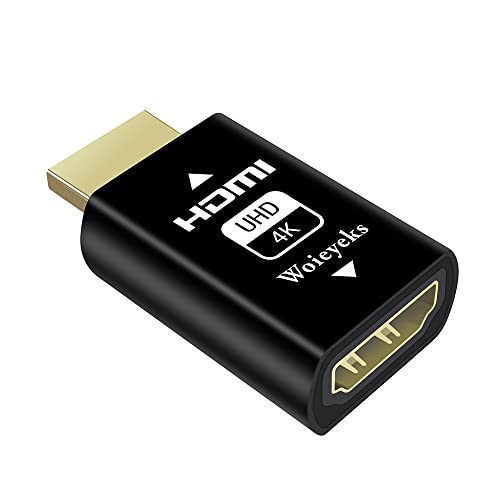
The Woieyeks is the 4K counterpart in the inline group: an EDID lock that passes HDMI video and audio while retaining the display identity across monitor and KVM power cycles, so a 4K screen can sleep or be switched away without the PC rebuilding its desktop. The listing gives modes up to 3840×2160 at 60 Hz, while another listing line mentions 4096×2160 at 60 Hz; both figures come from the listing and are presented as listed, never merged into one settled number. The listing also says it can serve as a virtual monitor for remote access, and it needs no driver or separate power.
One restriction must be weighed before anything else: the listing expressly says HDCP is NOT supported. That rules it out for protected-video paths; any setup routing streaming services, disc playback, or other protected content through the same chain should choose a different pick. For a gaming desktop or KVM desk where HDCP is not in play, the restriction may never matter, but it is a genuine dividing line rather than a footnote.
Specs
- Form: inline HDMI passthrough with EDID lock
- Listed modes: up to 3840×2160 at 60 Hz; another listing line mentions 4096×2160 at 60 Hz
- Display identity: retained across monitor and KVM power cycles, per the listing
- HDCP: NOT supported, per the listing
- Virtual-monitor use: named in the listing for remote access
- Power: no driver or separate power required
Who should skip
Skip this category if your PC always has a monitor attached and never loses its display settings. Skip the closed-end plugs if a physical screen must stay connected and visible, since a closed-end plug has no output for a real monitor by design. Skip the EVanlak for a 4K desktop, because its ceiling is 1080p60. Skip the Woieyeks for any chain carrying protected video, because its listing states HDCP is not supported, and skip the THWT for an HDMI 2.1 setup, because the seller cautions that HDMI 2.1 devices may lose signal with it. Skip every pick if what you actually need is a capture card or a KVM switch; these devices only manage display identity.
FAQ
Do I need a dummy plug or an inline EDID emulator?
Choose a closed-end dummy plug when the PC runs with no monitor at all and simply needs a virtual display for remote access or streaming. Choose an inline emulator when a real monitor stays connected but its identity must survive power cycles, input changes, or a KVM switch.
Will a dummy plug give my headless PC a 4K desktop?
It can, within the listing’s stated modes for that model. The UGREEN plug lists 4K60 at 4:2:0 chroma, and the DTECH listing claims up to 4K 60 Hz at 4096×2160. Treat those figures as seller claims for the specific plug.
Does HDCP work through these emulators?
It depends on the pick. The THWT emulator passes HDCP through, per its listing. The Woieyeks emulator expressly does not support HDCP, per its listing, which rules it out for protected-video paths.
Can an emulator copy the EDID from my exact monitor?
One pick here can: the THWT HD-EWB has a copy button, and holding it for three seconds copies a connected monitor’s EDID for later emulation. The other picks use fixed or preset profiles instead, which is simpler but cannot reproduce a specific display’s identity, including its advertised audio formats.
Final verdict
For a PC that runs with no screen at all, the closed-end plugs are the clean answer: the UGREEN four-pack covers several machines at once, and the DTECH single plug suits one headless rig. For a desk where a real monitor must stop disappearing, the inline units divide by resolution and features: the EVanlak locks a 1080p display, the Woieyeks locks a 4K display for chains where HDCP is irrelevant, and the THWT adds a genuine EDID copy function for setups tied to one specific monitor. Match the shape to the problem first, then the resolution ceiling.
Product and ASIN Reference
| Product | ASIN |
|---|---|
| UGREEN HDMI Dummy Plug, 4-Pack (4K@60Hz 4:2:0 virtual display EDID emulator) | B0G43C71HS |
| DTECH 4K HDMI Dummy Plug Display Emulator Headless Ghost Adapter, 1-Pack | B09P6DKF28 |
| THWT HD-EWB HDMI 2.0 EDID Emulator with EDID Copy Button (inline passthrough) | B0CRRWQ7XS |
| EVanlak HDMI EDID-Lock Passthrough Emulator (1080p) | B07YMS18T7 |
| Woieyeks HDMI EDID-Lock Passthrough Emulator (4K) | B0B7R5NYPV |
Related guides
- 4 Best PCs for Streaming and YouTube Gaming: Encoder Choice, Bitrate Math and 7 Builds (2026)
- Best Desk Refresh Safflower Picks: 5 Golden Corner Fixes: 5 Compared (2026)
- Best Desk Refresh Verbena Picks: 5 Small Setup Upgrades: 5 Compared (2026)
- Best Desk Refresh Sorrel Picks for Work and Gaming Desks: 5 Compared (2026)
More from Amazon
Programs that pair well with the guide above. Offers and eligibility are set by Amazon and may change.
Free shipping on eligible items, Prime Video and more. Eligible new members can start with a free trial.
Start a Prime free trialAd-free music streaming. Eligible new subscribers can start with a free trial.
Try Music Unlimited freeA Prime membership for ages 18-24 with a trial period. Eligibility is set by Amazon.
See Prime for Young AdultsAudiobooks and podcasts to listen to on the go. Eligible new members can start with a free trial.
Try Audible freeAs an Amazon Associate we earn from qualifying purchases.