The RTX 5070 Ti is a graphics card aimed at high-refresh 1440p and 4K gaming, and the processor feeding it frames has to keep up with that pace. A CPU that is too weak for the resolution and settings you play at leaves the graphics card waiting; a CPU that is far stronger than your workload needs spends money that could have gone to memory, storage, or a better monitor. The good news is that you do not need the most expensive chip on the shelf to keep this card busy.
This guide compares five processors that pair sensibly with the RTX 5070 Ti, spread across three platforms. Three are AMD Ryzen chips on the AM5 socket, one is an Intel Core i5 on LGA1700, and one is an older AM4 chip that exists in this list for a very specific reason: it lets owners of an existing AM4 system upgrade the processor without replacing the motherboard and memory. Socket matters as much as core count here, because the socket decides which motherboard and which memory generation your build is built around.
As an Amazon Associate, we earn from qualifying purchases.
Our Top Picks

Top 3 picks at a glance
Quick answer
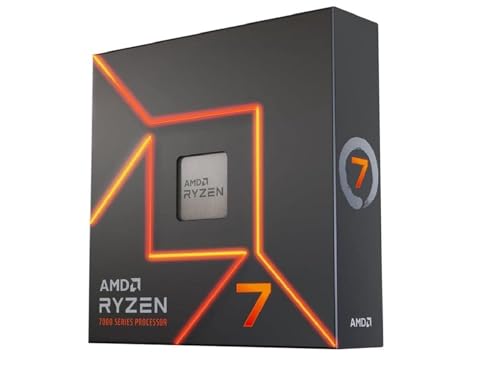
For a new RTX 5070 Ti build, the three AM5 Ryzen picks cover the main routes: the Ryzen 7 7700X for a gaming-first eight-core setup, the Ryzen 7 7700 as its lower-power sibling, and the Ryzen 9 7900X when extra cores matter. Intel buyers get the Core i5-14600K on LGA1700, while existing AM4 owners can drop in the Ryzen 7 5800X3D instead.
AMD Ryzen 7 7700X
The Ryzen 7 7700X is the straightforward gaming-first pick for a new AM5 build. It is an 8-core, 16-thread unlocked desktop processor, which means it spreads game threads and background tasks across a modern core layout while leaving the multiplier open for boards and cooling setups that support tuning. Paired with an RTX 5070 Ti, it suits players who run high-refresh monitors and want the processor to stay out of the way at 1440p, where the CPU still has real work to do feeding frames to the card.
Because it sits on AM5, choosing the 7700X also commits you to an AM5 motherboard and DDR5 memory. That is the current AMD platform, so the board you buy today leaves room for later processor upgrades on the same socket. If you are building from scratch and want a gaming-led machine with a streaming or editing side that stays occasional rather than constant, this is the balanced starting point of the five.
Specs
- Cores / threads: 8 cores, 16 threads
- Unlocked: Yes
- Socket: AM5
- Boost clock: Not stated
- Cache: Not stated
AMD Ryzen 7 7700
The Ryzen 7 7700 is a different chip from the 7700X above, and the two should not be treated as the same product with a shorter name. It is also an 8-core, 16-thread unlocked processor on the AM5 socket, from the model family 100-100000592, but it is the lower-power non-X part in the lineup. That positioning suits builders who want the same core layout in a system where power draw and heat output matter, such as a compact case with limited airflow or a machine that runs for long hours every day.
For an RTX 5070 Ti pairing, the 7700 makes sense when your gaming happens alongside lighter everyday multitasking rather than heavy production work. You still get the AM5 platform benefits — a current motherboard chipset range and DDR5 memory — so the rest of the build stays modern even though the processor itself is the calmer option of the two eight-core Ryzen picks. Choose it when efficiency and quiet operation rank alongside frame rates in your priorities.
Specs
- Cores / threads: 8 cores, 16 threads
- Unlocked: Yes
- Socket: AM5
- Model family: 100-100000592
- Boost clock: Not stated
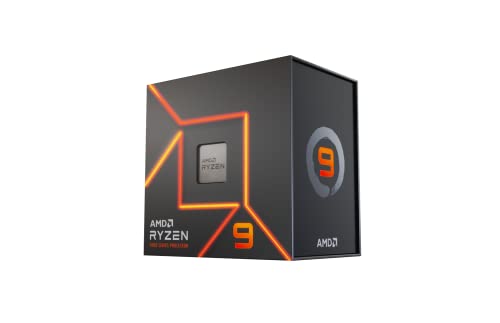
AMD Ryzen 9 7900X
The Ryzen 9 7900X steps up to 12 cores and 24 threads, still unlocked and still on the AM5 socket. That extra core count is not about raising game frame rates on its own; it is about everything running next to the game. If your RTX 5070 Ti build doubles as a workstation — video editing timelines, code compilation, virtual machines, or streaming with CPU-heavy encoding settings — the 7900X gives those workloads room that an eight-core chip cannot.
For a purely gaming-focused machine, those additional cores will mostly sit underused, and the money is usually better spent elsewhere in the build. But for a hybrid rig that games in the evening and renders, encodes, or compiles during the day, this is the pick that keeps one machine doing both jobs. Like the other AM5 options here, it pairs with an AM5 motherboard and DDR5 memory, keeping the platform current for future upgrades.
Specs
- Cores / threads: 12 cores, 24 threads
- Unlocked: Yes
- Socket: AM5
- Boost clock: Not stated
- Cache: Not stated
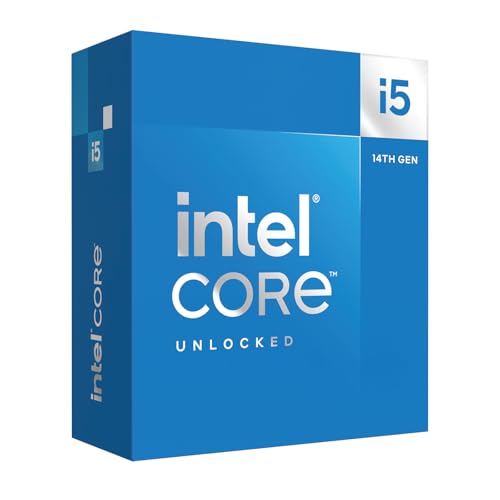
Intel Core i5-14600K
The Intel Core i5-14600K is the LGA1700 option in this guide, and it uses Intel’s hybrid core design: 14 cores in total, split into 6 performance cores and 8 efficiency cores, with speeds up to 5.3 GHz. The performance cores handle the game itself while the efficiency cores absorb background work, which suits players who keep voice chat, a browser, recording software, and launchers open while they play. The boxed model is BX8071514600K, and that model number is the one to check when ordering so you receive the exact processor described here.
Choosing the 14600K means choosing the Intel platform: an LGA1700 motherboard rather than an AMD board. That makes it the natural pick if you are upgrading an existing LGA1700 system, prefer Intel’s board ecosystem, or are carrying parts over from a recent Intel build. In a fresh RTX 5070 Ti build it stands as the direct alternative to the AM5 route — a different platform decision, not a lesser one.
Specs
- Cores: 14 (6 performance cores + 8 efficiency cores)
- Max speed: Up to 5.3 GHz
- Socket: LGA1700
- Model: BX8071514600K
- Cache: Not stated
AMD Ryzen 7 5800X3D
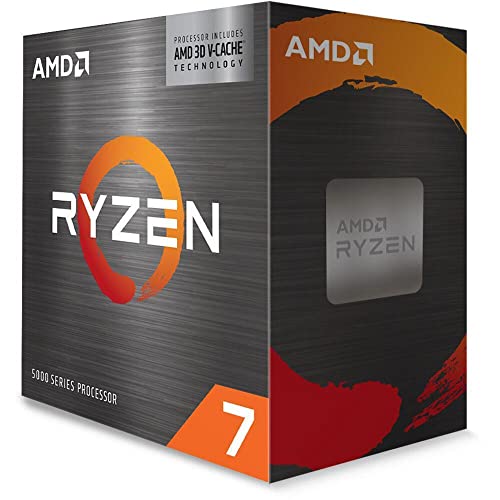
The Ryzen 7 5800X3D needs an honest framing: it is not a recommendation for a brand-new build. It is an 8-core, 16-thread processor with a listed CPU speed of 4.5 GHz and AMD 3D V-Cache technology, and it sits on the older AM4 socket with DDR4 memory. That platform difference is the whole point of the pick. If you already own a working AM4 system, this chip can drop into your existing motherboard and memory setup and refresh the machine around an RTX 5070 Ti without a platform swap.
If you are starting from an empty case, the AM5 picks above are the better foundation, because AM4 is a finished platform with no newer processors coming to it. The 5800X3D is for upgraders: people whose board, cooler mounting, and DDR4 kit are already bought and working, and who want one more strong gaming generation out of them. Judge it on that basis — as an upgrade path, it is compelling; as a new-build foundation, it is the wrong starting point.
Specs
- Cores / threads: 8 cores, 16 threads
- CPU speed: 4.5 GHz
- Socket: AM4
- Cache technology: AMD 3D V-Cache
- Memory platform: DDR4
How to choose
Start with the platform, not the processor. If you are building new, the real decision is AM5 versus LGA1700, because that choice fixes your motherboard and memory for the life of the system. The three AM5 picks and the Intel pick all assume a fresh board purchase, so pick the platform you are comfortable staying on, then choose the chip inside it. Only the 5800X3D breaks that pattern, and only for people who already own its platform.
Next, match core count to your whole workload, not just your games. Eight cores and sixteen threads cover gaming plus ordinary multitasking comfortably, which is why three of these five picks sit there. The 12-core 7900X earns its place when the machine also does sustained multi-threaded work. The 14600K takes a third route, splitting its 14 cores between performance and efficiency types for mixed loads.
Then think about resolution and settings in qualitative terms. At higher resolutions and settings, the graphics card does more of the work per frame; at lower resolutions chasing very high refresh rates, the processor’s frame delivery matters more. Any of these five can feed an RTX 5070 Ti, so let your platform, your side workloads, and the parts you already own make the decision rather than chasing a single headline number.
Finally, confirm the exact model before ordering. Several of these processors have close siblings with similar names — the 7700 and 7700X are different chips, and the 14600K’s boxed model number is BX8071514600K. Checking the model and socket on the product page against your motherboard’s support list takes a minute and prevents the most common pairing mistake.
Who should skip
Skip the Ryzen 7 5800X3D if you are building a new PC from scratch. Its AM4 socket and DDR4 memory belong to a finished platform, and the AM5 picks in this guide give a new build a longer upgrade runway for a similar overall system cost once a board and memory are included.
Skip the Ryzen 9 7900X if your machine is purely for gaming. Its extra cores are aimed at production workloads, and a gaming-only budget usually does more work spent on the monitor, storage, or cooling than on cores a game will not use.
Skip the Intel Core i5-14600K if you already own an AM5 motherboard, and skip the three AM5 picks if you already own an LGA1700 board. None of these processors can cross sockets, so an existing board settles the platform question for you.
Skip all five if you are hoping a processor swap alone will transform an older, much weaker graphics card. These picks are chosen to partner the RTX 5070 Ti specifically; a different card tier calls for a different pairing conversation.
FAQ
Does the RTX 5070 Ti need a specific socket or motherboard chipset?
No. The card works with any of the platforms in this guide, because the pairing question is about the processor platform you build around, not a requirement from the graphics card itself. What matters is that the CPU, motherboard socket, and memory generation all match each other: AM5 chips need AM5 boards and DDR5, the 14600K needs an LGA1700 board, and the 5800X3D needs an AM4 board with DDR4.
Is the Ryzen 7 7700 the same processor as the Ryzen 7 7700X?
No. They are separate products that share an 8-core, 16-thread layout and the AM5 socket. The 7700 is the lower-power non-X part, identified with model family 100-100000592, while the 7700X is the higher-performance variant. Treat them as distinct listings when comparing and ordering, and do not assume a fact stated for one automatically applies to the other.
Can I use the Ryzen 7 5800X3D in a new build with DDR5 memory?
No. The 5800X3D is an AM4 processor and AM4 systems use DDR4 memory. It cannot go into an AM5 motherboard and cannot use DDR5. Its role in this guide is as an upgrade for people who already own an AM4 board and DDR4 memory; new builds should start from one of the AM5 picks, or the LGA1700 Intel pick, instead.
Which of these CPUs is best if I stream and record while gaming?
All five can handle gaming alongside chat and recording software, but the strongest fits are the ones with headroom beyond the game itself. The Ryzen 9 7900X offers 12 cores and 24 threads for heavier production habits, and the Core i5-14600K splits work across performance and efficiency cores. If your streaming is light, the eight-core Ryzen picks remain sensible, balanced choices.
Final verdict
For most new RTX 5070 Ti builds, the Ryzen 7 7700X is the clean default: a modern AM5 platform, eight cores, and nothing in the spec sheet aimed at workloads you do not have. The Ryzen 7 7700 covers the same platform with a lower-power character, the Ryzen 9 7900X is the pick when the machine works as hard as it plays, and the Core i5-14600K is the equal-standing choice for Intel builders on LGA1700. The Ryzen 7 5800X3D stands apart as the upgrade-path pick — excellent for AM4 owners extending a system they already own, and the wrong foundation for a new one. Decide your platform first, and the processor choice mostly makes itself.
Product and ASIN Reference
| Product | ASIN |
|---|---|
| AMD Ryzen 7 7700X 8-Core, 16-Thread Unlocked Desktop Processor | B0BBHHT8LY |
| AMD Ryzen 7 7700 8-Core, 16-Thread Unlocked Desktop Processor | B0BMQHSCVF |
| AMD Ryzen 9 7900X 12-Core, 24-Thread Unlocked Desktop Processor | B0BBJ59WJ4 |
| Intel Core i5-14600K Desktop Processor | B0CHBGVFHP |
| AMD Ryzen 7 5800X3D 8-Core, 16-Thread Desktop Processor with AMD 3D V-Cache Technology | B09VCJ2SHD |
Related guides
- 4 Best PCs for Streaming and YouTube Gaming: Encoder Choice, Bitrate Math and 7 Builds (2026)
- Best Desk Refresh Safflower Picks: 5 Golden Corner Fixes: 5 Compared (2026)
- Best Desk Refresh Verbena Picks: 5 Small Setup Upgrades: 5 Compared (2026)
- Best Desk Refresh Sorrel Picks for Work and Gaming Desks: 5 Compared (2026)
More from Amazon
Programs that pair well with the guide above. Offers and eligibility are set by Amazon and may change.
Free shipping on eligible items, Prime Video and more. Eligible new members can start with a free trial.
Start a Prime free trialAd-free music streaming. Eligible new subscribers can start with a free trial.
Try Music Unlimited freeA Prime membership for ages 18-24 with a trial period. Eligibility is set by Amazon.
See Prime for Young AdultsAudiobooks and podcasts to listen to on the go. Eligible new members can start with a free trial.
Try Audible freeAs an Amazon Associate we earn from qualifying purchases.