
Overclocking a Ryzen 7 chip is a balancing act. Push an AMD Ryzen 7 7800X3D or 9700X past stock speeds and you are asking a dual tower air cooler to dump 150 to 200 watts of heat into a case that may only have 155 millimeters of clearance above the motherboard. Get the sizing wrong and you either throttle under sustained all-core loads or you discover the heatsink blocks your first RAM slot.
We focused this roundup specifically on tower coolers that can hold an overclocked Ryzen 7 under control during long rendering, gaming, and compile sessions — not just survive a 10-minute Cinebench run. Every pick below is a dual tower or large single tower design rated for at least 220 watts of heat dissipation, with proven AM5 and AM4 mounting. We checked pricing, compatibility notes, fan specifications, and real-world fitment concerns like RAM height and VRM clearance. Here are the eight tower air coolers we would actually recommend to an overclocker in 2026, ranked from our top overall pick down to the best budget escape hatch.
As an Amazon Associate we earn from qualifying purchases at no extra cost to you.






Our Top Picks
 Cooler Master Hyper 212 Black CPU Air Cooler4 Heat Pipes4.7 x 3.1 x 6.3 inches1.54 PoundsCheck on Amazon




Top 3 picks at a glance
be quiet! Dark Rock 5 Air CPU Cooler, High RAM and VRM...Check pricePCCOOLER RT720TC ARGB CPU Air Cooler, 270W TDP Dual Tower 7 Heat...Check priceQuick Picks
| Product | Best for | Price |
|---|---|---|
| Noctua NH-D15 chromax.Black | Best overall for serious overclocking | Check on Amazon |
| be quiet! Dark Rock 5 Air | Best for tight RAM and VRM clearance | Check on Amazon |
| PCCOOLER RT720TC ARGB | Best value dual tower with lighting | Check on Amazon |
| PCCOOLER RT720TC | Best raw value for max overclocking headroom | Check on Amazon |
| Cooler Master Hyper 620S | Best mid-range all-rounder | Check on Amazon |
| Cooler Master Hyper 212 Black | Best budget pick for modest OC | Check on Amazon |
| Thermalright Peerless Assassin 120 Digital White | Best cheap cooler with a live readout | Check on Amazon |
| Thermalright Phantom Spirit 120 Vision EVO | Best for builders who want a display showcase | Check on Amazon |
How We Compared
An overclocked Ryzen 7 changes the requirements compared to a stock cooler swap. First, heat load: a tuned Ryzen 7 can draw well beyond its rated TDP, so we only considered coolers with a rated dissipation capacity of roughly 220 watts or more, with the PCCOOLER RT720TC models standing out at a stated 270W TDP rating. Second, dual tower architecture: for sustained all-core loads, dual tower designs simply outperform single towers of the same footprint because they double the fin surface area without doubling the height.
Third, compatibility. Overclockers often run tall RGB RAM and beefy VRM heatsinks, so front-fan placement and fin cutouts matter. We favored designs with adjustable fan clips or explicit high-RAM compatibility. Fourth, socket support: every pick here covers AMD AM4 and AM5, and most also ship Intel LGA 1851, 1700, 1200, or 115X brackets so the cooler survives a platform swap. Finally, we weighed price. We did not fabricate thermal test numbers; where wattage and fan speed figures appear, they come from manufacturer specifications.
The 8 Best Picks
1. Noctua NH-D15 chromax.Black — Best Overall
The NH-D15 chromax.Black is the reference point every other dual tower cooler is measured against, and it remains our top pick for a heavily overclocked Ryzen 7. Two 140mm fans push air through a massive dual tower stack, giving it the kind of sustained thermal headroom that lets you hold an all-core overclock through summer ambient temperatures without the fans ever becoming the loudest thing in the room. The all-black finish matters to builders who found the original beige-and-brown scheme hard to live with, and the included fan clips let you raise the front fan to clear tall memory. If your case has 165 millimeters of cooler clearance, this is the one.
- Exceptional sustained cooling capacity for heavy all-core overclocks
- Two large 140mm fans run quietly under full load
- Premium price and a very large footprint that can crowd the first PCIe slot on smaller boards
Who should skip it: builders on a budget, or anyone with a compact mid-tower that cannot fit its height and width.
2. be quiet! Dark Rock 5 Air — Best for RAM and VRM Compatibility
The Dark Rock 5 Air earns its spot by solving the problem that plagues dual tower builds: clearance. Its design prioritizes high RAM and VRM cooler compatibility, meaning you can run tall RGB memory sticks and densely finned motherboards without dismantling your build plan. For an overclocked Ryzen 7, that matters more than it sounds — a cooler that forces you to mount its front fan higher loses real performance, and this one avoids the compromise. Noise levels are a signature be quiet! strength, so the cooler stays unobtrusive during long gaming sessions. The trade-off is that its outright maximum dissipation is a step behind the biggest dual towers, so extreme voltage-pushed overclocks are better served by the NH-D15 or the RT720TC.
- Excellent RAM and VRM clearance for crowded modern motherboards
- Very quiet operation relative to its cooling class
- Slightly less maximum headroom than the largest dual tower competitors
Who should skip it: extreme overclockers chasing every last megahertz who need maximum raw dissipation.
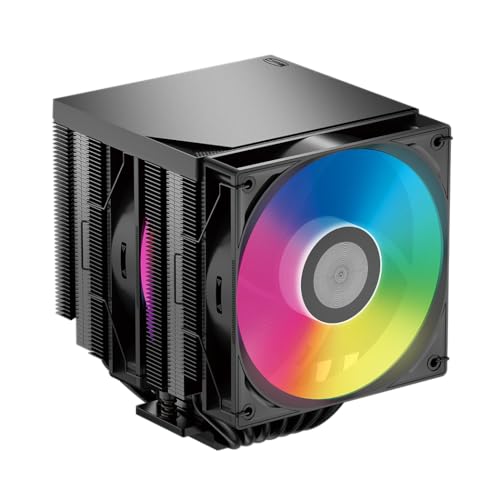
3. PCCOOLER RT720TC ARGB — Best Value Dual Tower with Lighting
It pairs a 270W TDP rating with seven heat pipes and a full dual tower layout, which is specification territory that cost twice as much a few generations ago. For an overclocked Ryzen 7, that 270-watt ceiling gives you more headroom than most chips will ever demand, even under a manual curve optimizer tune. The ARGB lighting across the fan and top plate lets it match a showcase build without looking like an afterthought. Build quality and finish are a clear step below the Noctua, and fan noise under full load is more present, but as pure performance-per-dollar with aesthetics included, this is a standout.
- Rated for 270W TDP, more headroom than most Ryzen 7 overclocks will ever need
- ARGB lighting at a price point where it is usually absent
- Fit, finish, and fan acoustics trail the premium brands
Who should skip it: buyers who prioritize whisper-quiet stock fan behavior and premium materials.
4. PCCOOLER RT720TC — Best Raw Value
That is remarkable for a cooler with this much rated capacity, and it is our recommendation for anyone overclocking a Ryzen 7 who cares about thermals first and looks second. The dual tower format and seven heat pipes translate to strong sustained-load behavior, and the mounting covers AM4 and AM5. But for half the price of the Noctua, you are buying most of the thermal capability, and that math is hard to argue with.
- Seven heat pipes provide excellent heat transfer for sustained overclocks
- Plain styling and ordinary fan quality
Who should skip it: anyone building a visible showcase PC where the cooler’s looks matter.
5. Cooler Master Hyper 620S — Best Mid-Range All-Rounder
The Hyper 620S occupies the sensible middle of this list. It is a dual tower with six heat pipes, a single 120mm PWM fan configuration, and silver nickel-plated copper construction that resists oxidation over years of use. At 154.9mm tall, it fits the vast majority of mainstream mid-tower cases, which list a 155mm cooler limit — check your case spec, but it squeaks under the most common ceiling. Cooler Master ships brackets for AMD Ryzen AM5 and AM4 as well as Intel LGA 1851, 1700, and 1200, making it a strong choice if you swap platforms often. For a moderate Ryzen 7 overclock in the 10 to 15 percent range, it has ample capacity, and the ARGB accents keep it presentable.
- 154.9mm height fits most standard mid-tower cases
- Broad socket support including LGA 1851 and AM5 for future platform swaps
- Six heat pipes versus seven on similarly priced rivals means slightly less ceiling
Who should skip it: extreme overclockers who want a 270W-class rating at the same price.
6. Cooler Master Hyper 212 Black — Best Budget Pick
The Hyper 212 line has been the default budget cooler recommendation for over a decade, and the Black edition continues that run. With four heat pipes and a 120mm PWM fan in a compact tower format, it is the smallest and lightest cooler here — which also makes it one of the easiest to install and the least stressful on your motherboard. It will handle a stock or lightly overclocked Ryzen 7 without drama, and it is an enormous upgrade over the included Wraith cooler in both temperature and noise. Be honest with yourself about your goals, though: if you are planning a sustained all-core overclock with raised voltage, a dual tower from this list is the better tool. This is the pick for moderate tunes, small cases, and tight budgets.
- Compact and lightweight, easy to install and case-friendly
- Four heat pipes limit headroom for aggressive sustained overclocks
Who should skip it: anyone pushing serious all-core overclocks that generate sustained 200-watt heat loads.
7. Thermalright Peerless Assassin 120 Digital White — Best Cheap Cooler with a Live Readout
The Peerless Assassin has quietly become the value king of the dual tower world, and this Digital White variant adds something genuinely useful for overclockers: a digital display on the top cover showing live CPU temperature. When you are tuning a Ryzen 7 and testing stability, having the temp readout staring at you from inside the case is a small luxury at an absurd price. The white finish shows dust faster than black, and Thermalright’s included thermal paste application is spartan — but neither is a dealbreaker at this price.
- Digital temperature display on the top cover for real-time monitoring
- Dual fans up to 1850RPM deliver strong cooling at the lowest price here
- White finish requires more frequent dusting to look its best
Who should skip it: builders with dark-themed builds who dislike white components, or those wanting premium fan acoustics.
8. Thermalright Phantom Spirit 120 Vision EVO — Best Display Showcase
The Phantom Spirit 120 Vision EVO is the enthusiast’s flex. It combines a twin tower radiator with fans spinning up to 2150RPM for strong thermal performance, and then goes completely off-script with a 3.95-inch IPS screen on the top cover running at 480×480 resolving power — capable of displaying live CPU temperature, fan speeds, or custom content. For an overclocked Ryzen 7 build, that screen doubles as a permanent hardware monitor, and 2150RPM fans mean the thermal side is no gimmick. It covers Intel LGA1851/1700/115x and AMD AM4/AM5. You are paying for the display, so buy it because you want the display.
- 3.95-inch 480×480 IPS screen for live system monitoring or custom visuals
- 2150RPM twin fans provide genuine dual tower cooling performance
- You pay a premium for the screen over equally capable display-free rivals
Who should skip it: builders who want maximum thermal performance per dollar and do not care about a screen.
Buying Guide
Cooling Capacity and Heat Pipes
Match the cooler’s rated capacity to your actual heat load. A Ryzen 7 at stock rarely exceeds 120 watts, but an overclocked chip with a manual voltage bump can draw 180 to 250 watts under all-core load. Look for dual tower designs rated at 220W TDP or higher — the PCCOOLER RT720TC models, rated at 270W, sit at the top of this list by specification. Heat pipe count is a decent proxy for capacity: four pipes (Hyper 212 Black) suits light tunes, six (Hyper 620S) handles moderate overclocks, and seven (RT720TC) supports aggressive voltage. More heat pipes spread heat across more fin area, which keeps the cooler efficient when the load is sustained for an hour rather than a minute.
Clearance: RAM, VRM, and Case Height
Dual tower coolers fail compatibility checks in three places. First, case height: most mid-towers allow 155 to 165mm, and the Hyper 620S at 154.9mm fits the common 155mm limit with almost no margin — measure yours. Second, RAM: if the front fan hangs over the first DIMM slot, sticks taller than about 32mm (most RGB kits) will not fit unless the cooler has a raised fan clip or fin cutouts, which is why the Dark Rock 5 Air’s high RAM compatibility deserves its premium. Third, VRM heatsinks on modern AM5 boards are tall and close to the socket, so check that the cooler’s base does not overhang them. When in doubt, a single front fan mounted high costs you a few degrees; an unusable RAM slot costs you a build day.
Noise, Fans, and Socket Support
Fan speed matters for an overclocker: a 1850RPM dual fan setup (Peerless Assassin Digital) or 2150RPM twin fans (Phantom Spirit Vision EVO) moves substantially more air than a single 120mm unit, which is what sustains low temperatures under 200-watt loads. But speed without control is just noise, so prefer 4-pin PWM fans that let your motherboard ramp them with CPU temperature. Check that the cooler includes AM5 mounting hardware with the correct offset — all eight picks here do — plus Intel LGA 1851/1700 brackets if you might switch platforms later. Finally, consider long-term support: a cooler you can re-use across two or three builds justifies a higher price than one locked to a single socket generation.
Our Verdict
FAQ
Is a tower air cooler enough for an overclocked Ryzen 7?
Yes, in most cases. Modern Ryzen 7 chips respond well to air cooling, and the dual tower coolers in this roundup — particularly the 270W-rated PCCOOLER RT720TC and the Noctua NH-D15 — have rated capacities well above what even an aggressive Ryzen 7 overclock produces. A quality dual tower air cooler matches or beats many 240mm liquid AIOs under sustained loads while eliminating pump-failure risk, and it typically costs less.
Will a dual tower cooler block my RAM slots?
It depends on the cooler and your memory. Front fans on dual tower coolers often overhang the first DIMM slot, and RGB sticks taller than roughly 32mm may not fit underneath. Coolers like the be quiet! Dark Rock 5 Air are explicitly designed for high RAM compatibility, and models with adjustable fan clips (like the NH-D15) let you raise the front fan to clear tall memory at a small thermal cost. Check your RAM height against the cooler’s clearance spec before buying.
How much should I spend on a cooler for overclocking?
Do these coolers support AM5 mounting?
Yes. Every cooler in this roundup includes AMD AM4 and AM5 mounting hardware, and most also ship brackets for Intel LGA 1851, 1700, 1200, and 115X sockets. That means your cooler investment survives a platform upgrade in either direction. Always confirm the included AM5 offset mounting in the box, as correct contact frame alignment noticeably affects temperatures on Ryzen 7000 and 9000 series chips.









