
You bought a micro-ATX motherboard because you wanted a smaller PC, and then you discovered the hard part: most compact cases suffocate airflow behind solid steel front panels. In a warm room — a home office with an afternoon sun exposure, a small apartment bedroom where the PC sits inside a desk cubby — a choked front intake can push GPU temperatures up noticeably compared to a mesh-fronted enclosure. The fix is simple in principle: a fine-p perforated front panel that actually lets air through, paired with fans that move enough volume to matter.
The catch is that “mesh front” covers a huge range of quality. Some budget cases punch oversized holes in thin steel and call it high airflow; others add magnetic dust filters, proper fan mounts, and room for a 240mm or even 360mm radiator. Every case below has a mesh front panel and a layout that respects real-world clearances — GPU length, CPU cooler height, and PSU placement.
As an Amazon Associate we earn from qualifying purchases at no extra cost to you.




Our Top Picks
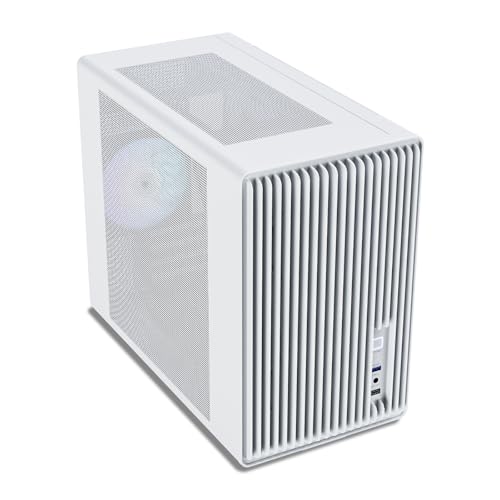
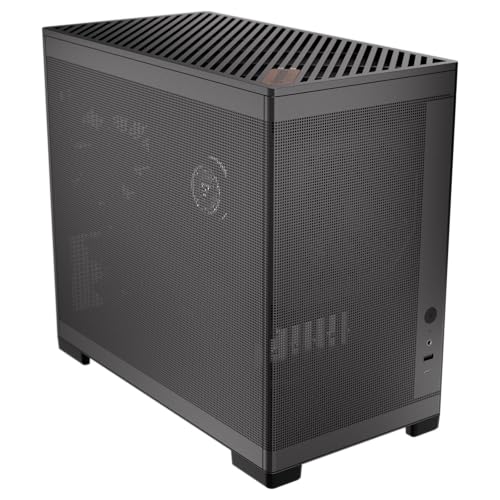
 ASUS A21 White Edition Micro-ATX PC CaseWhite|w/o Fans|BTF18.31 x 8.66 x 16.93 inches18.5 PoundsCheck on Amazon


Top 3 picks at a glance
Quick Picks
| Product | Best for | Price |
|---|---|---|
| Cooler Master Q300L V1 | Tightest budgets | Check on Amazon |
| Lian Li B4-mATX | Big GPUs in a small box | Check on Amazon |
| ASUS A21 White Edition | White-build aesthetics | Check on Amazon |
| Vetroo M06 White | First-time builders | Check on Amazon |
| Okinos MiniArt 4 | Fans included, front PSU layout | Check on Amazon |
| Lian Li A3-mATX Wood Black | Design-conscious living spaces | Check on Amazon |
| JONSBO C6 Black | Small desk setups | Check on Amazon |
| JONSBO D32 STD | Back-connect motherboards | Check on Amazon |
How We Compared
We focused on four criteria. First, airflow: the front panel must be genuine perforated mesh, not a mostly-solid facade with token vents, and the case should support at least two front intake fans. Second, compatibility: we checked maximum GPU length, CPU cooler height, and radiator support against current hardware — a case that only fits a 200mm GPU is already obsolete for most builders. Third, build experience: tool-free panels, sensible cable routing, and removable dust filters matter more in a small chassis where your hands have less room to work. Fourth, value: we weighed what each case includes (fans, especially) against its street price rather than judging on price alone.
We did not laboratory-test thermal performance for this roundup; instead, we evaluated published specifications, layout quality, and how each case’s airflow design holds up in warm-room scenarios like the ones described above. Prices are listed as printed and may fluctuate with sales.
The 8 Best Picks
1. Cooler Master Q300L V1 — Best Budget Pick
It’s a compact micro-ATX chassis with a perforated front panel, high-airflow oriented layout, and a transparent side panel that shows off your build without costing extra. It’s aimed squarely at first-time builders and office PCs where the GPU is midrange and the cooling demands are modest. You get a functional mesh intake, Cooler Master’s familiar build quality, and a price that leaves room in the budget for an extra 120mm fan.
- Transparent side panel and genuine high-airflow front design
- Compact footprint means tight clearances for long GPUs and tall coolers
Skip it if you’re planning a 360mm radiator or a flagship triple-slot GPU — step up the list instead.
2. Lian Li B4-mATX — Best for Big GPUs
The B4-mATX is the case to buy when you want small-footprint aesthetics without small-hardware compromises. It fits GPUs up to 358mm and supports 360mm AIO radiators — numbers usually reserved for mid towers — all in a 21.3-liter volume with a black mesh front. Two slim fans come pre-installed to get airflow moving out of the box.
- 358mm GPU clearance and 360 AIO support in 21.3L
- Includes two slim fans pre-installed
- Slim fans move less air than standard 25mm-thick fans
Skip it if you want included standard-thickness fans or the lowest possible price.
3. ASUS A21 White Edition — Best White Build
Matching a white build is notoriously frustrating, and the A21 White Edition solves it with ASUS’s characteristic fit and finish. This micro-ATX case pairs a mesh front panel with a clean white interior and exterior, making it the natural home for white GPUs, white AIOs, and RGB-heavy builds destined for a visible desk spot. ASUS’s build quality shows in panel alignment and finish consistency, areas where budget brands often cut corners.
- Coordinated white mesh design for themed builds
- Strong panel fit and finish for the price
- Fewer included extras than similarly priced competitors
Skip it if you’re set on a black build or need maximum radiator compatibility over aesthetics.
4. Vetroo M06 White — Best for First-Time Builders
The slightly larger mid-tower body gives newcomers room to maneuver during assembly — routing cables and mounting a cooler is noticeably less fiddly than in ultra-compact chassis. It’s the case we’d hand to someone building their first PC for a dorm, bedroom, or starter gaming setup.
- Mesh front panel supports healthy intake airflow
- Larger footprint than true compact mATX cases
Skip it if desk space is scarce and you need the smallest possible chassis.
5. Okinos MiniArt 4 — Best Included Fan Value
Reverse-blade fans on the front intake are a smart touch: they’re oriented for clean ARGB presentation while still pulling air through the mesh. The front-mounted PSU design frees up interior space in this compact mATX chassis, and it supports a 240mm radiator for liquid cooling. This is the pick for builders who want a working, decent-looking airflow setup the moment the side panel goes on, without buying extra fans.
- Three pre-installed fans including two reverse-blade units
- 240mm radiator support and space-saving front PSU mount
- 3-pin fans mean no PWM control granularity
Skip it if you want PWM fans or plan to upgrade cooling immediately anyway.
6. Lian Li A3-mATX Wood Black Mesh — Best Premium Design
The A3-mATX (A3X-WD) is the case you buy when the PC lives in a living room and needs to look like furniture. Wood accents on a black mesh body give it warmth that no all-steel chassis matches, and underneath the styling it’s genuinely capable: GPUs up to 415mm and 360mm AIO support make it the most hardware-friendly case in this roundup. This is our choice for high-end mATX builds in visible, design-conscious spaces heading into 2026.
- 415mm GPU clearance — the longest here
- 360 AIO support and distinctive wood-and-mesh design
Skip it if budget matters more than aesthetics; the B4-mATX offers similar capability for less.
7. JONSBO C6 Black — Best Compact Desktop
The JONSBO C6 is a deliberately minimal, compact micro-ATX chassis with a black mesh front and tool-free removal for both the upper cover and side panels — a small thing that makes upgrades and cleaning genuinely pleasant. Its constraints are clear: ATX power supplies up to 185mm in length, CPU coolers up to 75mm tall, and GPUs between 200mm and 255mm. Those numbers define a low-profile, small-form build — think ITX-style GPUs or slim cards, low-profile coolers, and modest power draw.
- Tool-free top cover and side panel access
- Compact footprint ideal for small desks
- Only 75mm CPU cooler height and 255mm max GPU
Skip it entirely if you’re running a discrete high-end GPU — the D32 below is the JONSBO you want.
8. JONSBO D32 STD — Best for Back-Connect Builds
The D32 STD is the forward-looking pick: it supports micro-ATX back-connect (and BTF) motherboards, the connector-hidden layouts that are increasingly the standard for clean builds. Compatibility is excellent — 365mm GPUs, 240mm AIOs, 163mm-tall air coolers, and your choice of ATX, SFX-L, or SFX power supplies — plus USB 3.2 front I/O. The mesh front keeps it all cool.
- Back-connect/BTF motherboard support with 365mm GPU clearance
- Flexible ATX/SFX-L/SFX PSU options and 163mm air cooler height
- Cable management behind a standard board requires effort
Skip it if you’re reusing an older standard motherboard and don’t plan to switch to back-connect.
Buying Guide
Airflow and Fan Configuration
A mesh panel is only half the equation — the fans behind it determine results. Look for at least two front intake positions supporting 120mm or 140mm fans, with a rear or top exhaust. Note fan thickness: slim fans (typically 15mm instead of the standard 25mm) fit tight layouts but move less air. Reverse-blade fans are worth having on a visible front intake for aesthetics without sacrificing function.
Compatibility Clearances
Measure before you buy, not after. Three numbers matter most: maximum GPU length (here ranging from 255mm on the JONSBO C6 to 415mm on the Lian Li A3), maximum CPU cooler height (a critical 75mm on the C6 versus a generous 163mm on the D32), and radiator support (240mm is the practical baseline for gaming builds; 360mm gives AIO headroom). Also confirm PSU length limits — compact cases often cap ATX units at 185mm — and whether the case takes SFX/SFX-L units if you need the interior space.
Size, Layout, and Build Quality
Micro-ATX cases range from roughly 20-liter sandwich-style volumes to mid-tower footprints. Smaller is better for desks, but only if your hardware fits with breathing room — a GPU jammed against a glass panel runs hotter. Front-mounted PSU designs (like the Okinos MiniArt 4) reclaim interior space; back-connect support (JONSBO D32) produces the cleanest possible interior. Check for tool-free panels, removable dust filters on intakes, and panel thickness — thin steel resonates, thick steel lasts.
Our Verdict
FAQ
Are mesh front panels actually better for cooling?
Yes, in warm or enclosed environments especially. A perforated mesh front allows unobstructed intake, while solid front panels force air through narrow side gaps, starving fans. The tradeoff is dust — mesh pulls in more particulates — so prioritize cases with removable front dust filters and clean them every few months.
Can a micro-ATX case fit a high-end GPU?
Often, yes. Verify the GPU clearance figure, not the case’s overall size. Cases here range from 255mm (JONSBO C6, sufficient only for compact cards) to 415mm (Lian Li A3-mATX, which fits virtually any current flagship). Measure your specific card, including power connector overhang, which can add 20–40mm.
Do pre-installed fans need replacing?
Usually not for a first build. The included fans on cases like the Okinos MiniArt 4 (three fans) and Lian Li B4-mATX (two slim fans) provide adequate baseline airflow. Plan to add fans later if you run hot components — and note that 3-pin fans offer less speed control than PWM models, which matters for noise-sensitive setups.
What’s the difference between micro-ATX and mini-ITX cases?
Micro-ATX cases accept the slightly larger 244×244mm mATX board, which typically means more expansion slots, better cooling support, and lower motherboard prices. Mini-ITX cases are smaller still but demand more careful component selection. Several cases here (Vetroo M06) accept both standards; all accept mATX boards natively.









