The usual home-office power problem is not a lack of outlets, it is a lack of surface. A strip lying on the floor collects dust, gets kicked, and sits in the line of fire if a cord is pulled. Mounting it to the wall, the side of a desk or the back of a cabinet keeps the plugs at hand and the floor clear, and it puts the surge protection somewhere you can see its indicator light.
This guide is for people setting up a PC, monitors, a printer and a router in a spare room or corner, who want a protector with mounting slots or one that plugs straight into the wall. Some listings below have a cord and keyhole slots; others are wall taps that add outlets directly at the receptacle. The sections that follow explain how to choose between them, and how to avoid the usual compromises, in 2026.
Our Top Picks
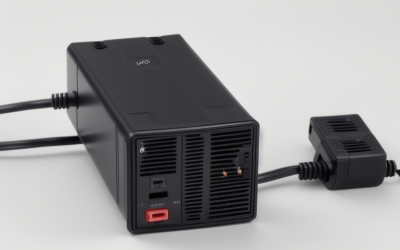
 Surge Protector Outlet Extender with Rotating Plug2C2A, 1 Pack6.3 x 2.76 x 2.17 inchesCheck on Amazon


Top 3 picks at a glance
Quick Picks
As an Amazon Associate we earn from qualifying purchases at no extra cost to you.





| Product | Best for | Key feature from the title |
|---|---|---|
| Belkin 6-Outlet Strip | Brand-conscious buyers with USB-C needs | 1680J, USB-C Power Delivery, ETL listed |
| Rotating Plug Outlet Extender | Compact wall tap with USB-C | 6 AC outlets, 4 USB ports, 1800J |
| TROND 5ft Power Strip | Wide-spaced bricks | 5 outlets, 2 USB-A and 2 USB-C, ETL listed |
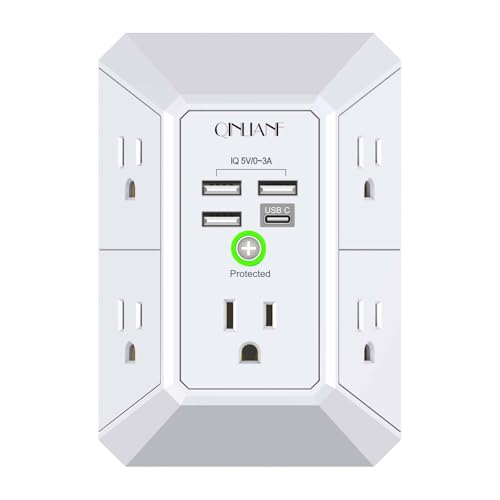
| QINLIANF 5-Outlet Extender | Tight spaces behind furniture | 3-sided, 1680 Joules, 4 USB ports |
| LeZone 12-Outlet Strip | Heavy desks with many devices | 4800J, 12 outlets, wall mountable |
| HHSOET Heavy Duty Strip | Workshop or home studio | 8 outlets, 14AWG cord, metal, switch |
| 12 Wide Spaced Outlets Strip | Many large adapters | 12 outlets, 3 sides, overload protection |
| Philips 6-Outlet Wall Tap | Simple plug-in outlet adding | 900 Joules, ETL listed, LED indicator |
How to Choose
Decide between a corded strip and a wall tap
A corded strip with mounting slots, such as the TROND, LeZone or HHSOET, lets you place the outlets where you need them, within the cord length. A wall tap plugs into the receptacle and adds outlets right there, which is compact but puts weight on the wall plate and places the plugs low or high depending on the outlet. Taps suit a spare outlet near the desk; strips suit a desk against a different wall. In a rented home, a tap also avoids drilling, while a strip with keyhole slots needs at least one screw or adhesive hook to hold it up.
Check the protection figures and listings
Joules in these listings run from 900 up to 4800. A higher number suggests more surge capacity but does not promise safety in every event. Look for mentions of ETL or UL listing, an LED indicator that shows protection is active, and an overload breaker. Replace any protector whose protection light goes out, since the surge circuitry wears down over time. Ask an electrician if you are unsure about wall wiring.
Outlet spacing, cord length and USB ports
Adapters and bricks block neighbors on tight rows, so wide spacing saves outlets. The five-foot or six-foot cords listed here suit a desk beside the mounting wall, while the 10-foot LeZone reaches farther. USB-C ports in the listing add charging convenience, though a wall tap with built-in ports may be limited in output compared with a dedicated charger.
Where budget models cut corners
Budget strips often skip clear safety listings, use thin cords for the wattage and offer weak mounting slots. Look for a stated amp and watt limit, such as the 15A and 1875W in the TROND listing, and for a heavier cord gauge such as 14AWG. Ignore decorative claims and keep the total load of your PC, monitors and accessories well under the stated maximum. High-draw appliances such as space heaters do not belong on any of these strips, even if outlets are free.
The 8 Best Options
Belkin 6-Outlet Surge Protector, 1680J
The Belkin pairs six outlets with a 1680J figure, USB-A and USB-C ports, USB-C Power Delivery and an ETL listing. It is wall mountable and has an LED indicator, which is useful in a room where you want to see protection status at a glance.
- USB-C Power Delivery plus USB-A
- ETL listed with an LED indicator
- Trade-off: only six outlets for a busy desk
Skip it if you need more than six outlets.
Rotating Plug Outlet Extender with USB-C
This unit plugs directly into the wall with a rotating plug and gives six AC outlets and four USB ports, two of them USB-C. The 1800J figure is the highest among the wall taps in this group.
- Rotating plug for awkward outlet orientation
- Six outlets and four USB ports
- Trade-off: a heavy tap can pull on an older loose receptacle
Skip it if the wall outlet is loose or worn.
TROND Power Strip, 5ft, Wall Mount
The TROND strip has five widely spaced outlets, two USB-A and two USB-C ports, a flat plug, a 5-foot cord and a 1300J figure. It is ETL listed and shows 1875W at 15A, which gives a clear limit to plan around.
- Widely spaced outlets for large adapters
- Stated 15A and 1875W limit
- Trade-off: only five outlets
Skip it if you need more than five devices powered at once.
QINLIANF 5-Outlet Wall Charger Extender
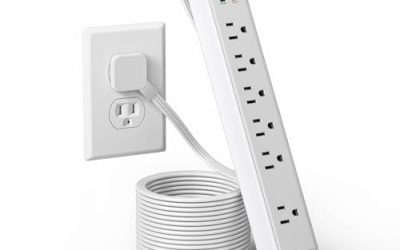
A three-sided white extender with five outlets, four USB ports and 1680 Joules. The multiple faces make it practical behind furniture or at a corner where a normal strip will not fit.
- Three-sided layout saves space
- Four USB ports on one unit
- Trade-off: as a wall tap it hangs from the outlet rather than mounting separately
Skip it if your wall outlet sits behind a heavy piece of furniture.
LeZone 12-Outlet 4800J Strip
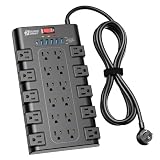
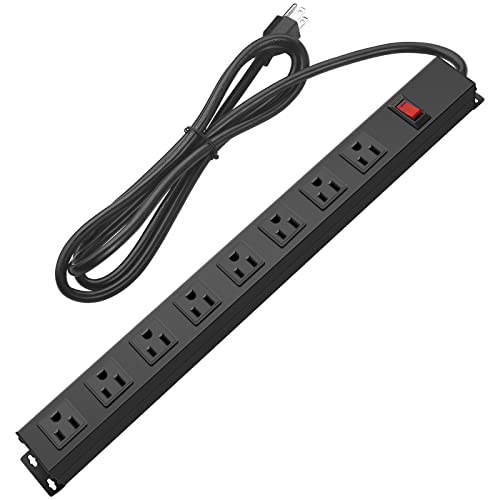
The LeZone offers 12 outlets, two USB-C and two USB ports, a 10-foot flat-plug cord and wall-mount capability, with a 4800J figure. It is the choice for a large home-office desk with lots of gear.
- Highest joule figure in the group
- Wall mountable with a long cord
- Trade-off: bulky for a small corner
Skip it if you only need a handful of outlets.
HHSOET Heavy Duty 8-Outlet Strip
This strip lists eight wide-spaced outlets, a 14AWG extension cord, a metal body, a switch and wall-mountable slots, with a 6-foot cord. The metal casing suits a workshop-style home office.
- Thicker 14AWG cord
- Metal body with a master switch
- Trade-off: no joule figure in the title
Skip it if you want a stated surge number or USB charging ports.
12 Wide Spaced Outlets, 3-Sided Strip
A strip with 12 wide-spaced outlets on three sides, a 5-foot flat-plug cord, overload protection and a wall mount. Outlets on multiple faces help avoid collisions between bulky adapters.
- 12 outlets across three sides
- Overload protection stated
- Trade-off: no joule figure or USB ports in the title
Skip it if you want a stated surge figure.
Philips 6-Outlet Wall Tap, 900 Joules
The Philips tap adds six outlets at the wall, with 900 joules, a protection indicator LED and an ETL listing. Its space-saving design suits a basic setup near the desk.
- ETL listed with an LED indicator
- Simple plug-in design
- Trade-off: the lowest joule figure in the group and no USB ports
Skip it if you want the strongest protection or USB charging.
Which One Fits Your Situation
Large desk with a tower, monitors and a printer
The LeZone 12-outlet strip is the natural match, with the 12 Wide Spaced strip as an alternative if you want outlets on multiple faces. Mount either one on the wall or the side of the desk at a height where the cord can reach the PC without stretching, and leave the indicator light facing the room.
Small corner with limited wall space
The QINLIANF three-sided extender or the Philips wall tap adds outlets without a cord, with the QINLIANF offering USB ports as well. If your only free outlet is in a corner behind the desk, a compact tap is usually easier to install than any corded strip, which needs a place to hang.
Safety-minded setup near kids or pets
The Belkin and TROND units both list ETL listings, while the HHSOET adds a heavier cord and a metal body for sturdier mounting. Whichever you pick, mount it out of a child’s reach and keep the cord away from walkways so nobody trips over it.
Common Mistakes
- Mounting the strip where cables must stretch tightly to reach it.
- Assuming a wall tap’s weight is harmless on a loose outlet.
- Overloading a strip beyond its stated amp or watt limit.
- Ignoring the protection LED when it goes out.
- Choosing by joules alone and skipping the safety listing.
Related guides
- How To Set Up Computer Speakers For Better Sound At Your Desk
- How To Check Whether Your Ram Is Running At Its Rated Speed
- How To Choose The Right Monitor Riser Height For Your Desk
Frequently Asked Questions
Is a wall-mounted strip safer than a floor strip?
Mounting keeps the unit away from dust, feet and spills, which is helpful. It does not change the electrical safety, so the listing and load still matter.
How do I mount a surge protector?
Most mountable strips have keyhole slots on the back that hang over screws. Fit them into a stud or a proper anchor.
When should I replace a surge protector?
Replace it when the protection indicator goes out, after a major surge, or when it is several years old. Surge components wear down.
Can I plug a wall tap into a loose outlet?
It is better to repair a loose outlet first, because the added weight can strain it. Consult an electrician if needed.
Related guides
More from Amazon
Programs that pair well with the guide above. Offers and eligibility are set by Amazon and may change.
Free shipping on eligible items, Prime Video and more. Eligible new members can start with a free trial.
Start a Prime free trialAd-free music streaming. Eligible new subscribers can start with a free trial.
Try Music Unlimited freeA Prime membership for ages 18-24 with a trial period. Eligibility is set by Amazon.
See Prime for Young AdultsAudiobooks and podcasts to listen to on the go. Eligible new members can start with a free trial.
Try Audible freeAs an Amazon Associate we earn from qualifying purchases.