A Surface Pro is thin, light, and short on storage, which is why so many owners end up hunting for an external drive within a year. The catch is that the tablet has very few ports, and which ones depend on the generation: older models lean on a USB-A jack, while newer ones rely on USB-C. A drive that needs a clumsy adapter, a separate power brick, or a bulky enclosure undermines the reason you bought a slim two-in-one in the first place.
This guide is for people who want a drive that travels in a laptop sleeve, draws power from the tablet, and works without drivers. The choice usually comes down to a fast flash-based portable SSD versus a roomy portable hard drive, and then to the connector. Every note below comes straight from the listing titles and their stated specs, so use it to shortlist, then confirm the port on your exact Surface in 2026 before ordering.
Our Top Picks


Top 3 picks at a glance
Quick Picks
As an Amazon Associate we earn from qualifying purchases at no extra cost to you.




| Product | Best for | Key spec from the title |
|---|---|---|
| SSK Portable SSD 1TB | Fast transfers with A and C cables | Up to 1050MB/s, USB 3.2 Gen 2, A and C cables |
| SanDisk 1TB Portable Drive | Everyday carry with drop protection | Up to 600MB/s read, up to 2M drop protection |
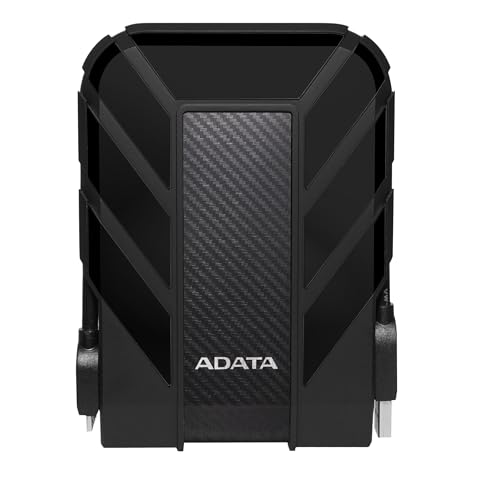
| ADATA HD710 Pro 2TB | Bulk storage that survives rough use | 2TB, shockproof, waterproof, dustproof |
| OSCOO 1TB External SSD | Quick large-file moves | Up to 2100MB/s, USB 3.2 Gen 2 |
| Avolusion HD250U3 1TB | Older Surface models with USB-A | UltraSlim USB 3.0, 2-year warranty |
| Gigastone 1TB Portable SSD | Dual-connector flexibility | USB-C+A, USB 3.2 Gen 2, 3-year warranty |
How to Choose
Start with the port on your Surface
Check whether your tablet has USB-A, USB-C, or both before you shop. A drive that ships with both an A and a C cable, or one that lists USB-C plus A connectors, avoids the dongle problem completely. If your model only has USB-C, a drive with only a USB-A cable will force you to carry an adapter, which defeats the purpose of buying something portable.
Pick SSD or hard drive by how you use it
A portable SSD has no moving parts and moves files noticeably faster, which matters when you copy video, project folders, or a large photo library. A portable hard drive gives you more terabytes for the same budget, which suits backups you rarely touch. If a drive lists a speed ceiling, treat it as a maximum on a matching port, not a promise for every transfer. Anything near 500MB/s or above is plenty for general document and photo use.
Look for bus power and a sensible cable
The tablet will not tolerate a drive that demands a separate power adapter. Every drive in this group is a portable, bus-powered style, but check that the cable length suits how you sit at a desk or on a train. Note whether the cable is included, because a missing one means another purchase.
Weigh durability and warranty against price tier
Budget SSDs trim warranty length, enclosure materials, and the thermal design that keeps sustained transfers steady. Drop-protection and water or dust resistance ratings in a title are useful if the drive rides in a bag daily. Warranty terms in the title, such as two or three years, are a practical tiebreaker between two similar models. Ignore marketing about phone compatibility or 4K recording unless you actually plan to use the drive that way.
A final check is formatting. Windows reads NTFS and exFAT without trouble, and a drive prepared for another system may need a quick reformat before it behaves well on the tablet. If you plan to store anything sensitive, a drive with password protection or a Windows encryption feature is worth the extra setup, since a tablet-sized drive is easy to leave behind.
The 6 Best Options
SSK Portable SSD 1TB
This is the pick for Surface owners who want fast speed and no adapter hunting. The title lists up to 1050MB/s, USB 3.2 Gen 2, and a package with both A and C cables, along with SMART and TRIM support and an LED indicator.
- Strength: Both A and C cables cover older and newer Surface models.
- Strength: Gen 2 speeds suit large file transfers and project backups.
- Trade-off: The 1TB capacity is limited if you want to archive a big video library.
Think of it as the all-rounder for a student or remote worker who juggles an older Surface at home and a newer laptop at the office. Skip it if you need multi-terabyte capacity at a lower tier, or if you would rather have a drive with a stated drop-protection rating.
SanDisk 1TB Portable Drive
SanDisk’s portable drive is the familiar everyday option. The title describes up to 600MB/s read speeds, a claim of being four times faster than a portable HDD, and a durable design with up to two meters of drop protection.
- Strength: The stated drop protection suits a drive that lives in a backpack.
- Strength: Read speed is comfortably above what a Surface needs for documents and media.
- Trade-off: Peak speed is lower than the USB 3.2 Gen 2 models in the list.
It is a sensible fit for a commuter who needs a sturdy place for work files and offline media and values a name that is easy to find replacements for. Skip it if you regularly copy very large files and want the quickest possible transfers, or if you need more than a terabyte.
ADATA HD710 Pro 2TB
The ADATA HD710 Pro is a conventional hard drive built around protection. The title describes a 2TB capacity, shockproof, waterproof, and dustproof construction, and positions it for gamers, students, and professionals across Mac, PC, and Linux.
- Strength: 2TB gives room for a full photo archive or a Windows backup.
- Strength: The stated shock, water, and dust protection suits outdoor or travel use.
- Trade-off: As a hard drive, it is slower and thicker than the flash drives in this group.
It fits someone who treats the drive as a vault for family photos, scanned documents, and a full system backup rather than a working disk. Skip it if you want the thinnest possible carry or you work with video files that benefit from SSD speeds.
OSCOO 1TB External SSD
This one targets buyers who want a high speed headline at a modest tier. The title lists up to 2100MB/s, USB 3.2 Gen 2, and use with Mac, Windows PC, laptops, and gaming devices.
- Strength: The highest stated speed in this group, for large project copies.
- Strength: Works across several device types if you share the drive.
- Trade-off: The stated peak depends on a matching port, and the Gen 2 interface on a Surface may not reach it.
It makes sense for a creative who edits on a newer Surface and wants the quickest card in the deck for scratch files and exports. Skip it if your Surface only has an older USB-A port, since you would not see the advertised speed.
Avolusion HD250U3 1TB
This UltraSlim USB 3.0 drive names Surface Pro in its description, which makes the compatibility question easy for owners of older models. The title lists a pocket-style design, 1TB capacity, and a two-year warranty, with a renewed-condition note.
- Strength: Explicit Surface Pro mention reduces compatibility doubt.
- Strength: Slim form factor fits a small bag pocket.
- Trade-off: USB 3.0 speeds and renewed condition will not suit buyers who want a new, fast drive.
This is a budget-minded choice for someone who just needs somewhere to park documents, scans, and class files from an older tablet without spending much. Skip it if you want a fast flash drive or a new unit, since this model is a more basic, economy choice.
Gigastone 1TB Portable SSD
Gigastone lists a USB-C plus A design on a USB 3.2 Gen 2 drive, with speeds up to 500MB/s and a three-year warranty. The title also mentions use with iPhone, PS5, MacBook, iPad, and Android.
- Strength: Dual connectors suit mixed devices, including an older Surface and a newer phone.
- Strength: The three-year warranty is the longest in the group.
- Trade-off: Its 500MB/s ceiling is the lowest SSD figure listed.
It suits a household that wants one shared drive for the family tablet, a laptop, and a game console, with long coverage as a safety net. Skip it if raw speed is your first priority or if you only ever plug into a single device.
Which One Fits Your Situation
You own an older Surface Pro with USB-A
The Avolusion HD250U3 is the most obvious match, since the title names Surface Pro and uses USB 3.0. The SSK Portable SSD is the upgrade choice if you want faster transfers and an A cable in the box.
You carry the drive every day
The SanDisk 1TB Portable Drive or ADATA HD710 Pro suits a bag that gets tossed around. SanDisk’s drop protection and ADATA’s shockproof, waterproof, and dustproof claims are the relevant features.
You move large video or photo projects
The OSCOO 1TB External SSD offers the highest stated speed, and the SSK Portable SSD is a close second with dual cables.
You are on a tight budget but need space
Consider the ADATA HD710 Pro for the most capacity for the money, or the Avolusion HD250U3 if all you need is a slim place to offload files from a first-generation tablet. Both lean on spinning or older interface designs, so accept slower copies in exchange for lower spending.
Common Mistakes
- Buying a USB-C-only drive for a Surface with only a USB-A port, or the reverse.
- Expecting the headline speed on a port or cable that cannot deliver it.
- Choosing a hard drive for tasks that benefit from SSD speed, such as video editing.
- Skipping the format step, since a drive formatted for another system may need reformatting for Windows use.
- Ignoring warranty length when comparing two similar models.
Related guides
- Noctua Nh-D15 Vs Thermalright Peerless Assassin 120
- Sustainable Gaming Pc Power Supply Efficiency Guide
- Thermal Paste Application Method For Lga1851
Frequently Asked Questions
Should a Surface Pro owner buy an SSD or a hard drive?
An SSD is quicker and lighter, which suits frequent transfers and anyone who works from the drive directly. A hard drive suits large, infrequent backups where capacity matters more than speed, and the ADATA model in this list is the example with 2TB.
Do these drives need a separate power adapter?
No. Portable drives of this style draw power from the tablet through the cable, but confirm the cable is included.
Does the port type matter?
Yes. A and C cables are different, and a mismatch means an adapter. Dual-connector drives avoid that.
Will the advertised speed show up on my Surface?
Only if your port, cable, and drive all support the same standard. Treat the maximum as a ceiling, because a slower port or cable caps the whole chain, and real transfers also vary with file size and how full the drive is.