A budget of under 200 dollars sounds generous for a case until you realize how the market is split. At that ceiling you can buy a plain mid-tower and spend the savings elsewhere, or reach for a larger high-airflow chassis that eats most of the money by itself. The decision is not “which case is nicest” but “how much of the cap should the box consume, and what do I still need to buy around it.”
This guide is for builders working to a cap who want an ATX-class gaming case with tempered glass or mesh airflow, plus one compact option for small builds. Five cases are covered. Rolling carrying cases and travel bags that turned up in the search results were left out because they carry a computer rather than house one. As always, the listings are compared only on the specifications they state, and buyers should confirm the current cost of each against the cap before ordering in 2026.
Our Top Picks


Top 3 picks at a glance
Quick Picks
As an Amazon Associate we earn from qualifying purchases at no extra cost to you.



| Product | Best for | Key spec from the title |
|---|---|---|
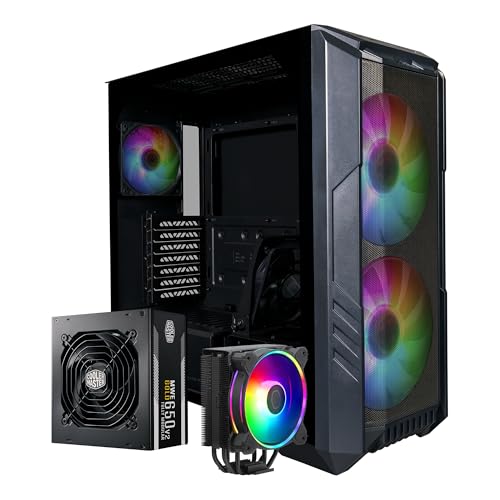
| Cooler Master HAF 500 Pro bundle | One-purchase first build | ATX mid-tower with 650W Gold PSU, CPU cooler, dual 200mm ARGB fans |
| ASUS Prime AP304 | Simple ARGB glass case | ATX, tempered glass, four ARGB fans |
| Cooler Master HAF 700 | Large E-ATX airflow | Mesh front, dual 200mm ARGB fans, USB 3.2 Gen 2 Type-C |
| GAMDIAS ATX Mid Tower | Radiator-ready budget tower | Two 200mm ARGB fans, front 360mm and top 240mm support |
| TGDGAMER MATX | Compact micro-ATX build | Micro ATX, 80mm fan, supports mini-ITX and ATX power |
How to Choose
Match the case size to the motherboard
Case classes follow motherboard sizes. ATX boards need a mid-tower, E-ATX boards need a larger chassis, and micro-ATX or mini-ITX boards can live in a compact one. Buying a larger case than your board requires is fine, but it costs desk space and often more of the cap. The reverse is a hard failure: an ATX board will not fit in a micro-ATX case. If you are not sure what board you own or plan to buy, default to a standard ATX mid-tower, which accepts the widest range of boards.
Look at fans and airflow design
Fans are the hidden budget item. A case that ships with four fans saves the cost of buying them, while a case with a single small fan will need upgrades. The HAF cases state dual 200mm ARGB fans, the GAMDIAS also lists two 200mm ARGB fans, and the Prime AP304 states four ARGB fans. Large 200mm fans move a lot of air at low speed, which keeps noise down. Mesh fronts, as on the HAF 700, usually flow better than solid glass fronts.
Check radiator support and front I/O
If you may add liquid cooling later, look for stated radiator mounts. The GAMDIAS listing names front 360mm and top 240mm support, which leaves room to grow. For ports, a USB Type-C connector on the front panel is worth having for modern drives and headsets; the HAF 700 lists a USB 3.2 Gen 2 Type-C port plus additional USB 3.2 ports. A compact case such as the TGDGAMER lists a single USB 3.0 port, so expect fewer connections.
What to ignore and where corners get cut
Ignore marketing language about gaming looks, because a dramatic shape tells you nothing about airflow or build quality. At this level, corners get cut on panel thickness, dust filters, and cable routing room. Bundles deserve a special look: a bundle that adds a power supply and cooler can be good value, but only if you actually need those parts. Compare the bundle’s total cost with buying a case separately, and ask whether the included power supply wattage fits your graphics card.
One more practical point: set aside part of the cap for fans and thumb screws you may need, and avoid the temptation to pour the whole cap into the chassis. A modestly priced case with a sensible airflow path will treat a mid-range gaming build better than an expensive case with too little ventilation.
It also helps to think in budget tiers rather than exact numbers. A budget-tier case such as the compact micro-ATX model leaves most of the cap for the graphics card and processor, which is where gaming performance actually comes from. A mid-range ATX tower with included fans takes a bigger slice but saves on accessories. The large premium-leaning chassis and the bundle take the biggest slice, so they only make sense when their extras replace parts you would have bought anyway.
Finally, remember that a case outlives several rounds of upgrades. A graphics card that fits today may be replaced by a longer one in two years, and a motherboard swap can change the board format entirely. Choosing a case with a little extra room, a roomy radiator mount, and a ventilated front is cheap insurance, because replacing the chassis means rebuilding the entire system from scratch.
The 5 Best Options
Cooler Master HAF 500 Pro Bundle
This listing bundles the HAF 500 Pro high-airflow ATX mid-tower with a 650W Gold power supply and a Hyper 212 Halo CPU cooler, and the case itself includes dual 200mm ARGB fans. It is the only entry that tackles the case, power supply, and cooler in a single purchase, which suits a first-time builder who wants fewer separate parts to track.
- Strength: bundles a 650W Gold PSU and a CPU cooler with the case.
- Strength: dual 200mm ARGB fans support a high-airflow design.
- Trade-off: as a bundle, it may take a bigger share of the cap than a case alone.
Skip it if you already own a power supply and cooler, since you would pay for duplicates.
ASUS Prime AP304
The Prime AP304 is an ARGB ATX gaming case with a tempered glass panel and four ARGB fans. The short listing gives few details, but four included fans and an ATX frame cover the basics for a straightforward gaming build. It is a fit for buyers who want a clean, modest look and don’t need extras.
- Strength: four ARGB fans come with the case, saving a separate purchase.
- Strength: tempered glass and ATX support cover the standard gaming build.
- Trade-off: the title lists no radiator support or port details, so verify those yourself.
Skip it if you need to see stated radiator sizes or front Type-C before buying.
Cooler Master HAF 700
The HAF 700 is an E-ATX high-airflow case with a mesh front panel, dual 200mm Sickleflow customizable ARGB fans, a USB 3.2 Gen 2 Type-C port, and four more USB 3.2 connections. It is the largest chassis in this list and is aimed at builders who put airflow first and have the space for a big tower.
- Strength: mesh front panel and dual 200mm fans favor strong airflow.
- Strength: front Type-C plus extra USB 3.2 ports offer generous connectivity.
- Trade-off: its size can push against a tight cap and a small desk.
Skip it if you only need ATX or smaller support and want to protect the budget, or if your desk cannot take a case of this height and depth.
GAMDIAS ATX Mid Tower
This ATX mid-tower includes two 200mm ARGB LED fans that sync with motherboards, and the listing states support for front 360mm and top 240mm cooling mounts. For a budget case, that radiator headroom is a notable feature, since it lets you upgrade to liquid cooling later without swapping the chassis.
- Strength: states front 360mm and top 240mm radiator-style support.
- Strength: two 200mm ARGB fans sync with compatible motherboards.
- Trade-off: the title says little about build details such as dust filtering or front ports.
Skip it if you want a name-brand airflow design or a Type-C front port stated up front.
TGDGAMER MATX
The TGDGAMER is a micro-ATX case in white, described as a high-airflow slim design with an 80mm fan. The title says it is compatible with mini-ITX and ATX power and lists one USB 3.0 port. It is the small, budget-friendly option for compact builds and secondary desktops.
- Strength: micro-ATX format keeps the footprint small for tight desks.
- Strength: supports mini-ITX boards and ATX power supplies.
- Trade-off: a single 80mm fan and one USB 3.0 port are modest for a gaming build.
Skip it if you plan a hot graphics card or want multiple front ports, since a single small fan and one USB 3.0 connector leave little room to grow.
Which One Fits Your Situation
You are building your first PC
The Cooler Master HAF 500 Pro Bundle reduces the number of separate decisions, since the power supply and CPU cooler arrive with the case. Compare the total against the cap before ordering.
You want the most airflow and ports
The Cooler Master HAF 700 is the choice, with its mesh front, dual 200mm fans, and a front Type-C connector. Make sure your desk can handle the size.
You plan to add liquid cooling later
The GAMDIAS ATX Mid Tower states front 360mm and top 240mm support, making it the budget pick for a future radiator upgrade.
You need a small system
The TGDGAMER MATX is the compact choice for a micro-ATX board. If you prefer a standard ATX build with included fans, the ASUS Prime AP304 comes with four ARGB fans.
Common Mistakes
- Spending the whole cap on the case and leaving nothing for the power supply and cooler.
- Buying a micro-ATX case and then discovering an ATX board will not fit.
- Choosing a bundle without checking whether the included power supply wattage matches your graphics card.
- Counting RGB fans as a reason to skip airflow planning.
- Overlooking carry bags and travel cases that share the same search results as actual PC cases.
Related guides
- Sustainable Gaming Pc Power Supply Efficiency Guide
- Noctua Nh-D15 Vs Thermalright Peerless Assassin 120
- Thermal Paste Application Method For Lga1851
Frequently Asked Questions
Is a bundle better than buying a case alone?
A bundle is better when you need every included part and the parts match your build. If you already own a power supply or cooler, buying the case alone avoids paying for duplicates.
Do I need a case with 200mm fans?
No, but large fans tend to move more air at lower speeds, which helps keep noise down. A case with several smaller fans can work well if it has a good airflow path, so judge the whole intake and exhaust layout rather than a single fan size.
Can a micro-ATX case run a gaming build?
It can, provided the graphics card fits and the cooling is adequate. Compact cases with a single small fan leave less margin, so choose parts that run cool.
Why are carrying cases not in the list?
Those items are bags and wheeled cases for transporting a tower, not enclosures for building a PC. They share search results with real cases because the word “case” appears in both, but they do not suit this keyword. If you ever need to move a finished tower between rooms or cities, a padded carrier becomes a useful second purchase, just not a substitute for the chassis itself.