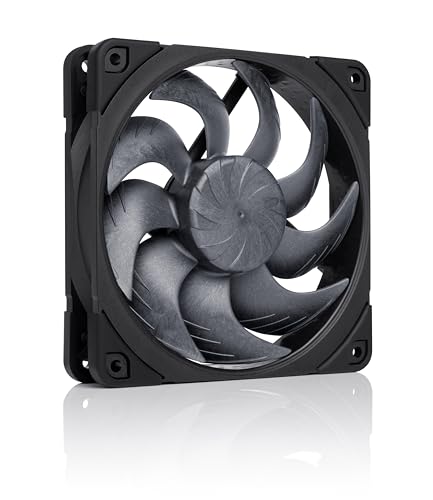
The Noctua NF-A12x25 G2 PWM chromax.Black is the best Noctua fan for airflow in this group for most PC builders: it pairs a rated 107 cubic meters per hour of airflow with solid static pressure and a rated noise figure of about 22.5 dB(A). If you want a lower-cost way to move air through a mesh front panel, the NF-P12 redux-1700 PWM is the sensible alternative. Airflow, in a PC context, is the volume of air a fan moves per hour at its top speed, and it matters most when the fan has an open path with little resistance. The six options below include case fans, one industrial fan and one desk fan set.
Our Top Picks




Top 3 picks at a glance
Quick List
- NF-A12x25 G2 PWM chromax.Black – best for all-round airflow and pressure in a modern case
- NF-A12x25 PWM – best for the proven original design at lower speed
- NF-A12x25 PWM chromax.Black.swap – best for a black build with swappable anti-vibration pads
- NF-P12 redux-1700 PWM – best for strong airflow through open mesh at a modest noise level
- NF-F12 iPPC-3000 PWM – best for brute static pressure on dense radiators and filters
- NV-FS1 desk fan set – best for a quiet desk fan rather than a case fan
Which One Is Right for You?
| If you… | Choose |
|---|---|
| Want the strongest pressure-plus-airflow balance for a radiator or a mesh case | NF-A12x25 G2 PWM chromax.Black |
| Need to push air through a thick radiator or dust filter and can accept noise | NF-F12 iPPC-3000 PWM |
| Want strong paper airflow for a mesh front panel with a simpler fan design | NF-P12 redux-1700 PWM |
| Are building an all-black PC and like swappable vibration pads | NF-A12x25 PWM chromax.Black.swap |
| Prefer the original A12x25 design | NF-A12x25 PWM |
| Want to cool a desk or a small room, not a case | NV-FS1 desk fan set |
Think about what the fan has to push through. A mesh front panel with no filter barely resists airflow, so a fan with a high airflow rating and low noise is the right trade. A thick radiator or a tight dust filter resists air, and there static pressure matters more than headline airflow. Keep the noise ceiling in mind too: a fan that is rated very high on airflow usually reaches that figure at a speed that is audible.
All 6 Picks in Detail
1. NF-P12 redux-1700 PWM – Best for strong airflow through open mesh
As an Amazon Associate we earn from qualifying purchases at no extra cost to you.

The NF-P12 redux-1700 PWM is Noctua’s value-oriented 120 mm line, and on paper it is the airflow leader of the six case fans: Noctua lists about 120.2 m³/h at 25.1 dB(A), with 2.83 mm H₂O of static pressure at a maximum of 1,700 rpm. It uses a simpler construction and a grey finish, and the listing notes a streamlined package. For a front panel that is mostly mesh, that rated airflow is a real advantage.
Keep in mind that the airflow ratings of different Noctua families are not always directly comparable, because the fans use different frame and blade designs. Treat it as a strong airflow fan for open-flow positions rather than a pressure specialist.
- 120 x 120 x 25 mm, 4-pin PWM
- Up to 1,700 rpm, per Noctua; 550 rpm at 20 percent PWM
- About 120.2 m³/h and 2.83 mm H₂O
- About 25.1 dB(A) maximum
- SSO bearing and a 6-year warranty, per Noctua
Buyers who want to fill several front and top positions with matching fans will find that this model keeps a multi-fan layout manageable, since each fan is rated at a moderate noise level when run below its top speed.
Pros:
- High rated airflow with a moderate noise figure
- Simpler, value-oriented design in the Noctua range
Cons:
- Less refined than the A12x25 models
- Grey finish does not blend with black builds
Compared with the G2, it moves more air on paper but is not as strong at pushing through resistance.
2. NV-FS1 desk fan set – Best as a desk fan, not a case fan

The NV-FS1 does not belong in a case. It is a multi-purpose fan set with an adjustable-angle mount, built around a 120 mm NF-A12x25 and an airflow amplifier that shapes the air into a stronger stream. The set includes a controller and a wall adapter, so it runs from an outlet rather than a motherboard header. Noctua rates the underlying fan at about 22.6 dB(A) and 2,000 rpm.
It earns a place as a runner-up for readers who typed “Noctua fans for airflow” and may want to cool a desk or room. If you are building a PC, choose one of the other five.
- NF-A12x25 PWM chromax.Black-class 120 mm fan with an airflow amplifier
- Includes a pivoting mount and a fan controller; confirm the full contents on the listing
- Plugs into an outlet via an included power supply, not a PC header
- Fan rated at about 22.6 dB(A), per Noctua
- Designed for desks, rooms and general use
Because it is powered from an outlet, the set also frees up PC fan headers. Confirm the cable length and plug style on the listing, and place it where the airflow amplifier has a clear path to you.
Pros:
- Quiet, focused airflow for a desk
- Ready to use without extra hardware
Cons:
- Not intended for PC case or radiator mounting
- Larger footprint than a bare fan
Unlike the other five, it is a finished product rather than a component, so the comparison is about use case, not specs.
3. NF-F12 iPPC-3000 PWM – Best for brute static pressure

This is an industrial version of the NF-F12, built for harsh environments with an IP52 rating for dust and water protection. Noctua rates it at up to 3,000 rpm, about 186.7 m³/h, 7.63 mm H₂O and 43.5 dB(A). That is a huge amount of airflow and pressure, and it is also loud, so it is a specialist choice. Think of it for a dense radiator, a server-style case, or a cooling setup where noise is a lower priority than moving air.
For a normal gaming PC, it is overkill. If you do use one, plan to cap its speed with a fan curve or a controller, otherwise its noise will dominate the room.
- 120 x 120 x 25 mm, 4-pin PWM
- Up to 3,000 rpm, per Noctua
- About 186.7 m³/h and 7.63 mm H₂O
- About 43.5 dB(A) at full speed
- IP52 construction and a 6-year warranty, per Noctua
If your goal is a quiet PC, look at the A12x25 models instead. This fan is for the minority of builders who value pressure above everything else, such as someone fitting a thick radiator in a crowded case.
Pros:
- Highest airflow and pressure in the group
- Dust and water protection for harsh spots
Cons:
- Very loud at full speed
- Needs a fan controller or tuned curve for quiet use
Compared with the P12 redux, it offers far more pressure but is the opposite of quiet.
4. NF-A12x25 PWM chromax.Black.swap – Best for black builds

The chromax.Black.swap uses the same NF-A12x25 design as the standard model, which means the same 2,000 rpm, 102.1 m³/h and 22.6 dB(A) figures from Noctua, but in a black frame and rotor. The “swap” in the name refers to anti-vibration pads that can be exchanged, so you can tune the color accents to your case. It is the one to choose if the beige-and-brown look would clash with an all-black or themed build.
Performance does not change with the color treatment, so the decision comes down to matching your aesthetic and checking what is in the box.
- 120 x 120 x 25 mm, 4-pin PWM
- 2,000 rpm maximum, 102.1 m³/h, 2.34 mm H₂O
- 22.6 dB(A) maximum, per Noctua
- Black finish with swappable anti-vibration pads; confirm which pads ship in the box
- 6-year warranty, per Noctua
A black build with several of these gives a clean, uniform look, and the pads help damp vibration where the fan touches the case frame. Check the product page for the exact pad colors included.
Pros:
- Same strong design in a more flexible color scheme
- Good for builds with multiple fans that need matching
Cons:
- The black finish and swappable pads are a cosmetic extra, not a performance gain
- Specs are the same as the standard A12x25, not the G2
Next to the G2 chromax.Black, it has slightly lower rated pressure but a higher top speed.
5. NF-A12x25 G2 PWM chromax.Black – Best for all-round airflow
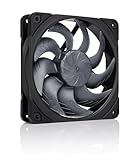
The G2 is Noctua’s second-generation 120 mm flagship, and the listing positions it as a high-performance, quiet fan with strong airflow and static pressure for coolers, radiators and cases. Noctua’s published figures put it at a maximum of about 1,800 rpm, roughly 107 m³/h of airflow, 3.14 mm H₂O of static pressure and 22.5 dB(A) at full speed. That combination suits most PC builders: it is quiet enough at moderate speeds for a living-room PC, and it keeps enough pressure for a tower cooler or a standard radiator.
It is also the easiest fan on this list to recommend without a caveat, because the two things you usually trade off, pressure and airflow, are both well covered. The black chromax finish matches most cases and avoids the tan-and-brown look of the classic Noctua palette.
- 120 x 120 x 25 mm frame, 4-pin PWM connector
- Rated up to about 1,800 rpm; Noctua figures with the Low-Noise Adaptor are lower
- About 107.3 m³/h and 3.14 mm H₂O at full speed, per Noctua
- About 22.5 dB(A) at full speed, per Noctua
- SSO2 bearing and a 6-year warranty, per Noctua; confirm included accessories on the listing
Its 25 mm thickness fits standard 120 mm mounts, and the 4-pin PWM connector works with the fan headers on most current motherboards. Use it as a template: if the G2 fits your layout and noise budget, you rarely need anything else.
Pros:
- Best blend of airflow, pressure and noise here
- Fits radiators, coolers and case mounts
Cons:
- Premium fan, so building a full set adds up
- Max rated speed is slightly lower than the older A12x25
Compared with the original NF-A12x25 PWM, it adds rated airflow and pressure with a slightly lower top speed.
6. NF-A12x25 PWM – Best for the proven original design

This is the standard NF-A12x25 PWM, a design that has been a common choice for builders who wanted a quiet, high-pressure 120 mm fan. Noctua rates it at 2,000 rpm, 102.1 m³/h, 2.34 mm H₂O of static pressure and 22.6 dB(A). It is the model that many tower coolers and radiators are paired with, and the listing says it is meant for coolers, radiators and cases.
If you already own one and want to match fans, this is the straightforward option. If you are buying a new set, the G2 version is the better pick on paper, while this one makes more sense when you prefer the classic look or already own matching fans.
- 120 x 120 x 25 mm, 4-pin PWM
- 2,000 rpm maximum, per Noctua
- 102.1 m³/h airflow and 2.34 mm H₂O pressure, per Noctua
- 22.6 dB(A) maximum, per Noctua
- Classic beige-and-brown colorway; confirm accessories on the listing
For radiator use, it keeps pressure healthy without the noise penalty of an industrial fan, which is why many builders have used this design across both cases and coolers for years.
Pros:
- Well-established design with broad compatibility
- Strong airflow for the noise level
Cons:
- Beige-and-brown styling does not suit every build
- Rated pressure and airflow trail the G2
The chromax.Black.swap version is the same fan in a darker finish, so the choice between them is mostly cosmetic.
Specs Compared
| Fan | Max speed | Airflow | Static pressure | Noise | Frame |
|---|---|---|---|---|---|
| NF-A12x25 G2 PWM chromax.Black | About 1,800 rpm | About 107.3 m³/h | 3.14 mm H₂O | About 22.5 dB(A) | 120 x 25 mm |
| NF-A12x25 PWM | 2,000 rpm | 102.1 m³/h | 2.34 mm H₂O | 22.6 dB(A) | 120 x 25 mm |
| NF-A12x25 PWM chromax.Black.swap | 2,000 rpm | 102.1 m³/h | 2.34 mm H₂O | 22.6 dB(A) | 120 x 25 mm |
| NF-P12 redux-1700 PWM | 1,700 rpm | About 120.2 m³/h | About 2.83 mm H₂O | About 25.1 dB(A) | 120 x 25 mm |
| NF-F12 iPPC-3000 PWM | 3,000 rpm | About 186.7 m³/h | About 7.63 mm H₂O | About 43.5 dB(A) | 120 x 25 mm, IP52 |
| NV-FS1 desk fan set | Fan up to 2,000 rpm | Confirm on listing | Not applicable | Fan about 22.6 dB(A) | Desk set with mount |
How We Chose These
We worked from the six Noctua products named in current catalog listings and compared the manufacturer’s published specification pages, retailer listing titles and fields, and the standard conventions for how fan specifications are stated. We weighted rated airflow, static pressure, noise level and speed range, then considered use case: case intake, radiator, industrial or desk. Published figures are the manufacturer’s laboratory ratings, so real-world results depend on your case, filters and fan curve. We did not run our own measurements. Where the listing does not state a value, the table says to confirm on the product page.
What to Look For
Airflow Versus Static Pressure
Airflow, quoted in cubic meters per hour (m³/h) or cubic feet per minute (CFM), is how much air a fan moves in free air. One m³/h is about 0.59 CFM, so 107 m³/h is roughly 63 CFM. Static pressure, in mm H₂O, is how well the fan keeps moving air when something blocks it. Fans with a wide, open blade layout favor airflow, and fans with tighter blades favor pressure. Choose airflow for open mesh fronts and rear exhaust. Choose pressure for radiators, dense filters and tower coolers.
Noise, rpm and dB(A)
Noise ratings are given in dB(A), and the scale is logarithmic. A rise of 3 dB roughly doubles the acoustic power, and a rise of about 10 dB sounds about twice as loud to most people. A fan rated at 22 dB(A) at full speed is quiet in almost any case, while one at 43 dB(A) is a noticeable roar. Use the PWM header to slow a fan down: running a fan at 60 to 70 percent of top speed usually cuts noise a lot while losing far less airflow.
Case Layout and Fan Count
A common rule of thumb is to have equal or slightly more intake than exhaust, which creates mild positive pressure and keeps dust from sneaking in through gaps. A mid-tower with two or three 120 mm fans at the front and one at the rear is a solid starting point. As a worked example, three intake fans rated at about 63 CFM each give roughly 190 CFM of rated free-air flow, but real flow through dust filters and mesh will be lower, so do not expect the full number. Add more fans only if temperatures justify it, since extra fans add cost and noise.
Connectors, Controls and Compatibility
All five case fans here use 4-pin PWM connectors, which let your motherboard vary speed smoothly. Use a header that supports PWM, and check how many headers your board has before buying a pack of fans, since a splitter or hub may be required. All fans measure 120 mm square and 25 mm thick, so they fit standard 120 mm mounts. For tight clearance, confirm the thickness before you order, and make sure radiator mounting holes line up with the 105 mm hole spacing typical of 120 mm fans.
Also remember that rated figures come from the manufacturer’s own measurement setup, and third-party measurements of the same fan can differ somewhat. Use the numbers to compare fans within a product family and to rule out poor fits, then fine-tune with your own temperatures and a fan curve you find comfortable.
Where Each Fan Fits in Your Build
Match the fan to the position. Front intake behind a mesh panel is the easiest job, so a high-airflow fan like the NF-P12 redux-1700 or the G2 will do well there. A rear or top exhaust sees little resistance, so almost any fan works. Radiators, tower coolers and filtered intakes are the demanding positions, and that is where the A12x25 family earns its keep. Reserve the iPPC-3000 for the single toughest position, rather than filling the whole case with it. Whatever you choose, keep the same model across a group of fans so their sounds blend into one tone rather than several competing ones, and set a gentle curve that ramps up with temperature rather than jumping to full speed at idle.
Questions
Which Noctua 120 mm fan has the most airflow?
By Noctua’s published figures, the NF-F12 iPPC-3000 PWM leads in airflow and pressure, but it is loud at full speed. Among the quieter case fans in this list, the NF-P12 redux-1700 PWM has the highest rated airflow.
Is the G2 version worth it over the original NF-A12x25?
The G2 is rated for slightly higher airflow and pressure with a slightly lower top speed. If you are buying a new set, it is the better choice on paper, and the original remains a solid, well-established option.
Can I use the NF-F12 iPPC-3000 in a gaming PC?
You can, but it is loud at full speed, so you would need to limit its speed with a fan curve. It is better suited to dense radiators and industrial cases than to quiet desktops.
Do Noctua fans come with fan controllers?
Most case fans plug into the motherboard and are controlled by PWM. The listing for each fan shows its included accessories, such as adapters, so confirm that on the product page.
Is the NV-FS1 a PC fan?
No. It is a desk and room fan set powered from an outlet, so use it for cooling a workspace rather than a PC case.
How many case fans do I need for good airflow?
Most mid-tower cases do well with two or three intake fans and one exhaust fan. Add more only if your component temperatures show a need.
Update History
- October 20, 2026 – Initial publication; product set drawn from current catalog listings.
- Check the product page for current specifications and availability before buying.
Sources
- Manufacturer product and specification pages for Noctua
- Retailer listing titles and specification fields