The Cable Matters 3-way 4-pin PWM splitter pack is the best overall fan splitter here for most PC builders: it turns one motherboard fan header into three fan connections, keeps PWM speed control on the lead fan, and comes as a two-cable pack with a 12 inch reach. A fan splitter is a short passive cable that shares one header’s power and speed signal among several fans, so they spin together. If you only need two fans, a 2-way cable is simpler, and if you want five, a hub-style cable is available but needs careful current math. We explain that math below.
Our Top Picks


Top 3 picks at a glance
Quick List
- Cable Matters 3-Way PWM Splitter (2-Pack) – best overall for adding two followers to one fan header
- Cable Matters 2-Way PWM Splitter (2-Pack, 4 inch) – best for short runs between neighboring fans
- Mbiydeg 3-Way PWM Splitter (2 Pcs) – best for an alternative 3-way pair that accepts 3-pin and 4-pin fans
- Gavemi 2-Way PC Fan Splitter – best for a single 12 inch 2-way cable
- ThreeBulls 4-Pin PWM Splitter (5 Pack) – best for builders who want a sleeved multi-pack for several cases
- UMLIFE 1-to-5 PWM Fan Hub (2-Pack) – best for many fans in one spot, if the current budget allows
Which One Is Right for You?
| If you… | Choose |
|---|---|
| want to run three fans from one header with PWM control | Cable Matters 3-Way PWM Splitter |
| need a pair of fans that sit close together | Cable Matters 2-Way PWM Splitter |
| prefer a second source for 3-way cables | Mbiydeg 3-Way PWM Splitter |
| need a single longer 2-way cable | Gavemi 2-Way PC Fan Splitter |
| build or repair several PCs and want spares | ThreeBulls 4-Pin PWM Splitter (5 Pack) |
| have five small fans in a row and a header that can handle them | UMLIFE 1-to-5 PWM Fan Hub |
First count your fans and write down each fan’s current draw from its label, usually in the 0.1 to 0.3 amp range. Then decide whether the fans are 4-pin PWM or 3-pin, which affects speed control. Finally, check which header you plan to use, because a splitter shares everything that header can supply, and that limit is lower than most people expect.
All 6 Picks in Detail
1. Cable Matters 3-Way PWM Splitter (2-Pack) – Best Overall for Three Fans
As an Amazon Associate we earn from qualifying purchases at no extra cost to you.

The Cable Matters 3-way splitter is the most straightforward choice. The listing describes a two-pack of 12 inch (30 cm) cables where one connector is PWM-controlled and two act as followers. It plugs into a standard 4-pin header and gives you three fan connectors, which suits the front intake of a case or a pair of radiator fans with a third on the rear.
- Two cables in the pack, each 12 inches (30 cm) long
- One PWM-controlled connector and two followers, according to the listing
- Three-way, 1-to-3 conversion from a 4-pin header
- Works with 4-pin PWM fans; 3-pin compatibility: confirm on listing
- Current limit: confirm on listing and against your motherboard header
Because the first connector carries the speed-sensing signal, the motherboard sees one fan’s speed, not three. That is normal for this kind of cable, and it keeps all fans following the same curve. It is a good match for case fans of the same model.
A common layout is to plug the cable into a chassis fan header, connect the three front intake fans, and let the board’s fan curve respond to a case or motherboard temperature sensor. Because the follower connectors have no speed feedback, label which fan is the lead so you can find it if the reading ever drops. Keep the spare cable from the pack for a radiator or a top exhaust group.
Pros:
- Clean 1-to-3 layout with a useful 12 inch reach
- Pack of two lets you cover two fan groups
Cons:
- Only one fan reports its speed to the board
- Three fans on a weak header can overload it
It is the best compromise between reach and fan count, while the 4 inch version below is better for fans that sit side by side.
2. Cable Matters 2-Way PWM Splitter (2-Pack, 4 inch) – Best for Short Runs

This Cable Matters listing is a pack of two 2-way splitters, each only 4 inches long. The listing describes it as a PC fan splitter, converting one 4-pin connector into two. That makes it ideal when the two fans sit close together, such as a pair of stacked radiator fans or two rear exhaust fans, where a long cable would just create clutter.
- Two cables per pack, 4 inches long
- 1-to-2 conversion on 4-pin PWM connectors
- Also described as a PWM extension cable
- Works best with 4-pin PWM fans; 3-pin handling: confirm on listing
- Current limit: confirm on listing
It is the lightest load of the group because two fans draw far less than three or five. The short length is a disadvantage if your fans are more than a few inches from the header, so measure before ordering.
The short length is also an advantage in a tidy build, since there is less cable to hide behind the motherboard tray. A neat trick is to mount the splitter right at the first fan and use that fan’s own cable to reach the header, then run the second fan from the splitter end. That keeps the wiring close to the fans and leaves the main cable path clear for the graphics card power leads and front panel cables.
Pros:
- Very compact and easy to hide behind a fan
- Two fans are a safe load for most headers
Cons:
- Too short for fans far from the header
- Only two outputs per cable
Pair it with the 3-way pack if you have a mixed layout of close and distant fans.
3. Mbiydeg 3-Way PWM Splitter (2 Pcs) – Best for Mixed 3-Pin and 4-Pin Fans

The Mbiydeg listing sells two 3-way, 4-pin PWM splitters at 11 inches each, and it names compatibility with computer ATX cases and with both 4-pin and 3-pin cooling fans. That makes it a handy choice if your case has an older fan or two that use three-pin connectors. Three-pin fans can plug into a four-pin splitter, but they will not respond to PWM, so they run at a speed determined by the header’s voltage or at full speed.
- Two cables per pack, each 11 inches long
- 1-to-3 conversion
- Designed for 4-pin PWM with 3-pin fan compatibility
- Intended for ATX case cooling fans
- Current limit: confirm on listing
It is functionally close to the Cable Matters 3-way. Choose whichever you can get and whichever suits the length you need, but check which connectors on the cable are the lead and follower connectors, since the lead sends speed data.
Older cases and budget builds often include a mix of three-pin and four-pin fans, and this is where a cable that names both types helps. You can plug them in together, but expect the three-pin fans to ignore PWM. If you want smooth, quiet control, replace the older fans with PWM models over time, and keep the splitter for the matched group.
Pros:
- Names support for both fan connector types
- Pack of two covers multiple fan groups
Cons:
- Brand name has less documentation than the Cable Matters pack
- Mixed fan types may not follow the same speed curve
It is the closest alternative to the leading pick, and slightly shorter.
4. Gavemi 2-Way PC Fan Splitter – Best for One Longer 2-Way Cable

The Gavemi listing is short and to the point: a 2-way PC fan splitter, a 12 inch PWM cable for 3-pin and 4-pin cooling fans. The name does not state the pack quantity, so confirm on the product page whether you receive one cable or more. At 12 inches it reaches farther than the 4 inch Cable Matters pair, which helps when two fans are on opposite sides of a radiator.
- 2-way splitter, 1-to-2
- 12 inches long
- PWM cable for 3-pin and 4-pin fans
- Pack quantity: confirm on listing
- Current limit: confirm on listing
Two fans on one header is a conservative load, and it keeps the wiring simple. If you need to add a third fan, a 3-way cable is better than chaining splitters, because chaining can quickly exceed the header limit. Two-way cables are also the safest choice for the CPU fan header, since two modest fans stay well inside the usual amperage limit.
When you install it, push the connectors in fully until the latch clicks, and route the cable so it does not touch spinning blades. A loose connector can cause a fan to stutter or stop, which is hard to notice behind a closed panel. After the build, open your fan control software or BIOS and check that the fans respond smoothly across the full speed range.
Pros:
- Longer reach than the shortest 2-way option
- Names both 3-pin and 4-pin compatibility
Cons:
- Pack count is unclear from the name
- Fewer outputs than the 3-way packs
It is a good alternative to the Cable Matters 2-way when you need extra length.
5. ThreeBulls 4-Pin PWM Splitter (5 Pack) – Best for a Sleeved Multi-Pack
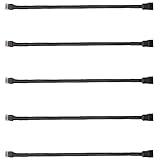
The ThreeBulls listing is a five-pack of 4-pin PWM splitter cables with sleeved braided covering, described as an adapter or power extension cable for ATX cases. The listing name does not show how many outputs each cable has, so confirm whether they are 2-way or 3-way before relying on them. The braided sleeve looks tidy in a windowed case and resists tangling.
- Five cables in the pack
- Sleeved braided covering
- 4-pin PWM splitter cable
- Number of outputs per cable: confirm on listing
- Length and current limit: confirm on listing
It makes sense for builders who set up several PCs, run a repair bench, or like to keep spare cables. Five splitters also let you break a large set of case fans into separate small groups, each on its own header.
Ask the product page three questions before relying on them: how many fans does each cable support, how long is each cable, and does it connect fans in parallel. Parallel wiring is the normal design, and it shares the header’s current among all the fans. If the cables turn out to be 2-way, a pack of five gives you a flexible set of small groups, which is safer for the motherboard than one large group.
Pros:
- Large quantity for multiple builds or spares
- Sleeving looks neater in a visible case
Cons:
- Key specs, such as the way count, are not in the name
- Sleeving can add stiffness in tight spaces
Pick it over the Cable Matters packs if you value a sleeved look and quantity, and verify the details first.
6. UMLIFE 1-to-5 PWM Fan Hub (2-Pack) – Best for Many Fans, With Care

The UMLIFE listing is a two-pack of 4-pin PWM fan hubs that split one connection into five fan outputs. It mentions a power supply cable and compatibility with 4-pin and 3-pin ATX computer fans. Retailer information we found describes it as a plain cable-style hub, and it does not mention a SATA power input, so confirm how it is powered before you load it with five fans.
- Two hubs per pack
- 1-to-5 fan outputs
- 4-pin PWM, with 3-pin fan compatibility
- Power source: confirm on listing, since no SATA input is mentioned
- Length and current limit: confirm on listing
Five fans can draw a full amp or more on one header, and many motherboard headers are specified for around 1 amp. For five low-power fans it can work, but for five standard 120mm fans it risks overloading the header. If the hub draws from the motherboard header only, treat five fans as the upper limit and keep the load well below the rated amperage.
Pros:
- One cable handles a whole group of fans
- Pack of two covers two zones
Cons:
- Easy to overload a motherboard header
- Power source and limits are unclear from the name
Choose it only after doing the current math, and otherwise stay with the 3-way cables.
A good use is a group of small, low-power fans, such as 80mm or 92mm models, or a set of fans in a server-style chassis where each draws well under 0.1 amp. For standard 120mm and 140mm fans, split the group across two headers instead. Label the hub with its fan count so a future upgrade does not quietly push the total past the limit.
Specs Compared
| Model | Outputs per cable | Cables in pack | Length | Fan types | Power source / limit |
|---|---|---|---|---|---|
| Cable Matters 3-Way PWM Splitter | 3 | 2 | 12 inches (30 cm) | 4-pin PWM (confirm 3-pin on listing) | Motherboard header; confirm limit on listing |
| Cable Matters 2-Way PWM Splitter | 2 | 2 | 4 inches | 4-pin PWM | Motherboard header; confirm limit on listing |
| Mbiydeg 3-Way PWM Splitter | 3 | 2 | 11 inches | 4-pin and 3-pin | Motherboard header; confirm limit on listing |
| Gavemi 2-Way PC Fan Splitter | 2 | Confirm on listing | 12 inches | 3-pin and 4-pin | Motherboard header; confirm limit on listing |
| ThreeBulls 4-Pin PWM Splitter | Confirm on listing | 5 | Confirm on listing | 4-pin PWM | Motherboard header; confirm limit on listing |
| UMLIFE 1-to-5 PWM Fan Hub | 5 | 2 | Confirm on listing | 4-pin and 3-pin | Confirm on listing; no SATA input mentioned |
How We Chose These
We began with the six catalog listings supplied for this page and read each listing name closely. We then compared them with the maker’s product pages where available, retailer specification fields, and general guidance on the 4-pin PWM fan standard and typical motherboard header limits. The criteria were the number of outputs, cable length, pack quantity, support for 3-pin and 4-pin fans, how the listing describes power, and how clearly it states those values. We did not use these cables ourselves, so everything here is based on published information. Where a listing does not state a value, we say to confirm it on the product page.
What to Look For
How PWM splitting works
A four-pin fan connector carries ground, 12 volt power, a speed-sensing signal, and a control signal at about 25 kHz. A passive splitter connects the grounds, power, and control lines of all fans together, but usually passes only the lead fan’s speed signal back to the motherboard. As a result, all fans follow the same speed command, and the board reports just one fan’s RPM. That is fine for matched fans, but it means a failed follower fan will not trigger a speed alarm.
Know your header’s current limit
Intel’s four-wire fan specification defines the signals, not the current, so each motherboard maker sets its own limit. Many headers are specified for about 1 amp (12 watts), while some allow 2 amps, and chassis headers are often lower. Always read the manual. Add up the current of every fan on the splitter, and stay comfortably below the header’s limit, ideally by 25 percent or more. Typical 120mm case fans draw 0.1 to 0.3 amps, so three of them fit easily, but five or more can approach the limit.
When to use a hub with its own power
If your fans total more than about 0.8 amps, or you are running thick high-speed 140mm or industrial fans, use a powered fan hub that draws from a SATA or Molex connector and takes only the control signal from the header. A powered hub also protects the motherboard from startup surges, which are larger than running current. Do not use a passive splitter for a liquid cooler pump or any device that must not stop, because a header problem could cut its power. Treat warm connectors, a burning smell, or fans that stutter under load as a sign to unplug the splitter and reduce the number of fans on that header.
Length, sleeving, and fit
Measure the distance from the header to the farthest fan and add a few inches for routing. Short cables of 4 inches suit adjacent fans; 11 to 12 inch cables suit most case layouts. Sleeving looks neat but can be stiffer, and thick bundles are harder to route behind a motherboard tray. Check that connectors are keyed, since four-pin fan connectors have a guide notch, and do not force a plug in the wrong direction.
Startup surge and fan curves
Fans draw more current when they start from a stop than when they run, and the surge is larger with several fans. If a header shuts down on boot or the fans stutter at low speed, the load may be too high. Set a minimum fan speed of around 20 to 30 percent in the BIOS so fans do not stall, since a stalled fan on a shared line can leave the whole group silent. Match fans of the same model on one splitter so they respond the same way to the curve.
Worked example
Say you have three 120mm front fans rated at 0.18 amps each. The total is 0.54 amps, a little over half of a typical 1 amp header limit, which leaves a comfortable margin. One 3-way cable is a fine solution. Now say you add two radiator fans rated at 0.25 amps each. The load would reach 1.04 amps, which exceeds a 1 amp header. Split the fans over two headers, or use a powered hub.
Questions
Can I use a fan splitter on the CPU fan header?
Yes, but keep the load low and only for fans with a similar speed range. The CPU header is the main thermal input on many boards, and a separate case fan header is often a better place for splitting.
Will a splitter slow down my fans?
No, a passive splitter does not slow the fans on its own. All fans follow the same speed command, but if the header cannot supply enough current the fans may not reach full speed or the header may shut down.
Can I mix 3-pin and 4-pin fans on one splitter?
Yes, it works physically, but 3-pin fans cannot use PWM. They may run at full speed or follow the lead fan’s voltage, depending on the board, so mixed groups do not always behave evenly.
Why does my board show only one fan’s RPM?
Most splitters pass the speed signal from only the lead fan. The rest of the fans follow the control signal without reporting their speed, so it is normal to see one reading.
Is it safe to chain two splitters together?
It is better not to. Chaining raises the number of fans on one header without increasing its capacity, and a short or overload becomes more likely. Use a larger splitter or a powered hub instead.
Update History
- October 20, 2026 – Initial publication; product set drawn from current catalog listings.
- Check the product page for current specifications and availability before buying.
Sources
- Manufacturer and brand product pages and retailer specification fields for Cable Matters and the other listed brands
- Retailer listing titles and specification fields for all six listed products
- Intel four-wire PWM fan specification, as summarized in published fan-header guides