
The best graphics card to pair with a Ryzen 9 5900X from this list is the Sapphire Nitro+ RX 7900 XTX Vapor-X: its 24GB of memory and top-tier raster speed give the 12-core chip a card it cannot hold back at 1440p or 4K. For a smaller budget and a lower power bill, the Gigabyte RTX 4060 Gaming OC is the efficient 1080p pick. “Pairing” here means matching a card’s speed, size, power draw and PCIe interface to an AM4 processor that has no integrated graphics, so a discrete card is mandatory and balance matters more than the biggest number.
Our Top Picks


Top 3 picks at a glance
Quick List
- Sapphire Nitro+ RX 7900 XTX Vapor-X – best for 4K and 1440p high refresh
- PowerColor Red Devil RX 6900 XT – best for 1440p with 16GB of memory
- Gigabyte RTX 4060 Gaming OC 8G – best for efficient 1080p gaming
- PNY RTX 5050 Dual Fan – best for compact builds and DLSS 4 features
- Gigabyte RTX 3060 Gaming OC 12G (Rev 2.0) – best for 12GB on a modest budget
- AISURIX RX 5500 8GB – best for entry-level 1080p esports, with caveats
- VisionTek RX 550 4GB – runner-up: best as a low-profile display card
- Maxsun RX 550 4GB ITX – runner-up: best as a multi-output display card
Which One Is Right for You?
| If you… | Choose |
|---|---|
| Play at 4K or 1440p above 100 fps and own a large case | Sapphire Nitro+ RX 7900 XTX Vapor-X |
| Want 16GB at 1440p and already own a 900W-class supply | PowerColor Red Devil RX 6900 XT |
| Play 1080p and want low power draw | Gigabyte RTX 4060 Gaming OC 8G |
| Need a short two-slot card with DLSS 4 | PNY RTX 5050 Dual Fan |
| Edit video or play texture-heavy games and want 12GB | Gigabyte RTX 3060 Gaming OC 12G (Rev 2.0) |
| Want the cheapest route to 1080p with an 8-pin cable available | AISURIX RX 5500 8GB |
| Need a single-slot, cable-free card for a small case | VisionTek RX 550 4GB |
| Need DVI, HDMI and DisplayPort on one cable-free card | Maxsun RX 550 4GB ITX |
The Ryzen 9 5900X has no integrated graphics, so any of these cards also doubles as your only video output. Pick by resolution first, then confirm power cables and case length.
All 8 Picks in Detail
1. Sapphire Nitro+ RX 7900 XTX Vapor-X – Best for 4K and 1440p High Refresh
As an Amazon Associate we earn from qualifying purchases at no extra cost to you.

This is the card for a 5900X owner who wants to stop worrying about GPU limits at 1440p ultra or 4K. At those resolutions the graphics card, not the processor, sets the frame rate, and 24GB of memory removes the VRAM worries that hit 8GB cards. It is a large, power-hungry board, so check the case and supply first.
- 24GB GDDR6, 384-bit bus, PCIe 4.0 x16
- Boost clock up to 2680 MHz, game clock up to 2510 MHz
- Three 8-pin connectors; listed board power 420 W
- About 320 mm long, 133 mm tall and 71.6 mm thick, close to four slots
- Vapor-X cooler with dual BIOS
Pros
- Plenty of memory and speed for 4K
- PC Perspective described it as cool and quiet under load
Cons
- Needs an 800 W to 850 W supply per listings
- Gains over a reference 7900 XTX were modest, and PC Perspective measured peaks near 495 W
Pairing note: at 1080p this card can outrun a 5900X, so buy it for 1440p and above. PC Perspective weighed the card at about 1.9 kg, recorded a hot spot of 73 degrees C and a core of 61 degrees C in a sustained Furmark run, and noted that a support bracket is included. Fit the bracket and leave airflow beside the fans.
Compared with the Red Devil RX 6900 XT, it is the newer architecture with more memory, but it asks for a roomier case and a stronger supply.
2. PowerColor Red Devil RX 6900 XT – Best for 1440p with 16GB
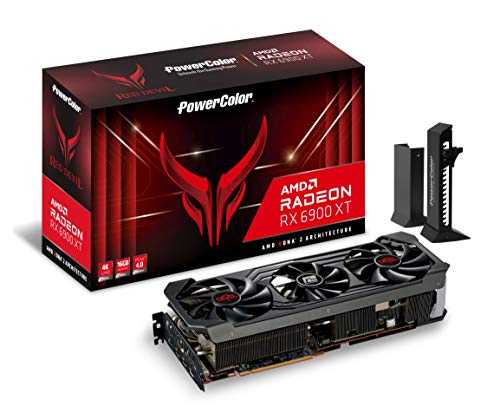
A previous-generation flagship that still has 16GB and 5,120 stream processors, which suits a 5900X at 1440p. The listing title mixes brand names, so confirm whether you are buying the standard Red Devil or the Ultimate version before ordering; PowerColor lists different clocks and supply minimums for each.
- 16GB GDDR6 at 16 Gbps, 256-bit bus, PCIe 4.0
- Standard model: boost up to 2340 MHz in OC mode, 2250 MHz in Silent mode
- Three 8-pin connectors; PowerColor lists a 900 W minimum supply (950 W for the Ultimate)
- 320 x 135 x 62 mm, three slots
- Outputs: one HDMI 2.1, three DisplayPort 1.4; dual BIOS
Pros
- 16GB covers 1440p textures comfortably
- Switchable OC and Silent BIOS modes
Cons
- Heavy, long and demanding on the supply
- Older DisplayPort 1.4 outputs
Pairing note: 16 Gbps memory on a 256-bit bus gives 512 GB/s of bandwidth, which keeps a 5900X-driven 1440p system fed. One listing puts the weight near 2.4 kg, so use a support bracket. PowerColor also sells a smaller two-connector Red Devil variant with a different supply rating, so match the listing to the model you intend to buy.
Choose it over the 7900 XTX only if you find it in stock at a clearly lower cost than the newer card; otherwise the Sapphire is the better long-term match.
3. Gigabyte RTX 4060 Gaming OC 8G – Best for Efficient 1080p

The RTX 4060 is the easiest card in this list to live with. It draws little power, fits most cases and gives a 5900X a well-matched partner at 1080p, where the CPU rarely limits a mid-range card. It carries only 8GB, so it suits 1080p better than 1440p ultra.
- 8GB GDDR6, 128-bit bus, 3,072 CUDA cores
- Boost clock 2550 MHz (reference is 2460 MHz)
- One 8-pin connector; 115 W TDP; Gigabyte lists a 450 W supply
- About 281 x 114 x 40 mm, two slots, three fans
- Two DisplayPort 1.4a and two HDMI 2.1a outputs
Pros
- Low power and heat for the performance
- DLSS 3 Frame Generation support
Cons
- 8GB limits maximum textures at 1440p
- Narrow 128-bit bus
Pairing note: 17 Gbps memory on a 128-bit bus is modest, and the card is built on an eight-lane interface (confirm on listing), so on a PCIe 3.0 board expect the link to run at 3.0 x8. Because the listing asks for only 450 W, an existing 550 W supply usually covers it with room to spare, and the single 8-pin cable is easy to route.
Against the RTX 5050 it is roughly 5% to 7% faster at 1080p in aggregated comparisons, but the 5050 is shorter.
4. PNY RTX 5050 Dual Fan – Best for Compact Builds and DLSS 4

PNY’s two-slot card is the shortest high-feature option here at about 200 mm. It adds DLSS 4 with Multi Frame Generation to a 1080p-class GPU. Note its interface: PNY lists PCIe 5.0 x8, so it runs at 4.0 x8 on an X570 or B550 board and 3.0 x8 on older AM4 boards.
- 8GB GDDR6, 128-bit bus, 2,560 CUDA cores, 320 GB/s bandwidth
- Boost clock 2572 MHz
- One 8-pin connector; 130 W total graphics power; 550 W system supply
- 200 x 120 x 40 mm, two slots
- Three DisplayPort 2.1b and one HDMI 2.1b
Pros
- Short and cool enough for small cases
- Roughly 8% to 14% ahead of an RTX 3060 12GB at 1080p in one 21-game comparison
Cons
- 8GB runs out in some modern games
- x8 link is worth checking on a PCIe 3.0 board
Pairing note: PNY quotes 20 Gbps memory (320 GB/s), support for four displays, and a ceiling of 4K at 480 Hz or 8K at 165 Hz with DSC. Multi Frame Generation raises displayed frame counts, but it does not shorten input latency the way a higher base frame rate does, so judge the card by its native 1080p speed first.
Compared with the Gigabyte RTX 4060, it trades a few percent of speed for a shorter body and newer features.
5. Gigabyte RTX 3060 Gaming OC 12G (Rev 2.0) – Best for 12GB on a Modest Budget

The older RTX 3060 earns its place through its 12GB frame buffer. In memory-hungry games or creative apps such as video editors, it can outlast faster 8GB cards, which matters for a 12-core CPU owner who also edits. It is slower in games that fit in 8GB.
- 12GB GDDR6, 192-bit bus, 3,584 CUDA cores, PCIe 4.0 x16
- Boost clock 1837 MHz (reference 1777 MHz)
- One 8-pin connector; 170 W TDP; Gigabyte lists a 550 W supply
- About 282 x 117 x 41 mm, two slots, three WINDFORCE fans
- Two DisplayPort 1.4a and two HDMI 2.1 outputs
Pros
- More memory than the RTX 4060 or 5050
- Full x16 link
Cons
- Older architecture without DLSS 3 Frame Generation
- Higher board power than the RTX 4060
Pairing note: memory bandwidth is 360 GB/s, and a published review recorded the card running above its rated boost, averaging 1947 MHz. Its 12GB also suits high-resolution texture settings better than the 8GB cards above. Its 550 W supply guidance is higher than the RTX 4060 asks for, so check the supply before upgrading from an older card.
Compared with the RTX 5050, it is slower by about 8% to 14% at 1080p, but one creator comparison found it far ahead where 8GB ran out.
6. AISURIX RX 5500 8GB – Best for Entry-Level 1080p Esports

This is a lesser-known brand selling an RX 5500-class card with 8GB. For a 5900X system that mostly plays esports titles at 1080p, it can work, but the listing is inconsistent and independent reviews are scarce, so it is the riskiest pick here. Confirm the GPU name and PCIe version with the seller.
- 8GB GDDR6, 128-bit bus
- One 8-pin connector; maximum draw listed as 130 W
- Three DisplayPort 1.4a and one HDMI 2.0b
- Dual-slot, two-fan cooler that stops the fans at low load
- Title says PCIe 4.0 x8; the description says PCIe 3.0 x16 (confirm on listing)
Pros
- Eight gigabytes at a budget level
- Four outputs for multi-monitor desks
Cons
- No independent benchmarks found for this exact board
- Unclear warranty and driver support compared with major brands
Pairing note: a standard RX 5500 XT 8GB has 1,408 stream processors, 224 GB/s of bandwidth and a 130 W rating, and reviewers placed it near an RX 580 at 1080p. This board is sold under a different brand and name, so those figures are a guide rather than a guarantee. Ask the seller for the exact GPU, check the card promptly and keep the return window in mind.
The RTX 3060 and RTX 4060 are safer choices if you can raise the budget.
7. VisionTek RX 550 4GB – Runner-Up: Best as a Low-Profile Display Card

This is not a real gaming match for a 5900X, and it is listed here as a labeled runner-up. Its real job is giving the iGPU-less 5900X a display output in a small case or a troubleshooting setup, with 512 stream processors and 4GB of GDDR5.
- 4GB GDDR5, 128-bit bus, 96 GB/s, up to 1071 MHz
- PCIe 3.0 x8; 50 W, drawn from the slot with no cable
- Two DisplayPort 1.4; two monitors maximum
- Single slot, about 6.68 inches (169.7 mm) long
- Low-profile and full-height brackets included
Pros
- No power cable and a one-slot body
- Fits small and low-profile cases
Cons
- Only suited to light 1080p games
- No HDMI port, so adapters may be needed
Pairing note: expect light or older games at low settings and 1080p video playback, not modern titles. It is useful as a spare card for bringing up a new 5900X build, because the processor cannot display anything on its own. VisionTek lists support for two 4K monitors, and the included low-profile bracket lets it fit slim cases. Confirm that your monitors accept DisplayPort or that you own the right adapter.
Compared with the Maxsun RX 550, it has no DVI or HDMI but is thinner and shorter.
8. Maxsun RX 550 4GB ITX – Runner-Up: Best as a Multi-Output Display Card

Like the VisionTek, this card is for display output and light use rather than gaming. It is the better choice when you still have an older DVI monitor next to a modern one, since it carries three different outputs.
- 4GB GDDR5, 128-bit bus, Polaris 12 with 512 stream processors
- Core clock listed as 1100 to 1183 MHz; 112 GB/s
- PCIe 3.0; roughly 50 W; the manual asks for a 400 W or larger supply
- DVI-D dual link, HDMI and DisplayPort (one low-profile variant omits DVI)
- 9 cm fan
Pros
- Three video output types
- Draws all its power from the slot (confirm on listing)
Cons
- Gaming performance is entry level
- Listing size and bracket details vary by variant
Pairing note: the listing also mentions H.264 and HEVC decode and encode up to 4K, which suits a media or office machine. Listings give the card as about 18.5 cm long, but variants differ, so measure against the exact model shown. Do not buy it expecting 1440p gaming. Like the VisionTek, it can serve as a spare card for bringing up a build, and its manual’s 400 W supply minimum is easy to meet.
Pick the VisionTek for a one-slot, low-profile case and this card for broader port variety.
Specs Compared
| Card | Memory | Power connector | Listed board power | Listed supply | Approx. length |
|---|---|---|---|---|---|
| Sapphire RX 7900 XTX Nitro+ | 24GB GDDR6 | 3x 8-pin | 420 W | 800-850 W | 320 mm |
| PowerColor RX 6900 XT Red Devil | 16GB GDDR6 | 3x 8-pin | Confirm on listing | 900 W (standard) | 320 mm |
| Gigabyte RTX 4060 Gaming OC | 8GB GDDR6 | 1x 8-pin | 115 W | 450 W | 281 mm |
| PNY RTX 5050 Dual Fan | 8GB GDDR6 | 1x 8-pin | 130 W | 550 W | 200 mm |
| Gigabyte RTX 3060 Gaming OC (Rev 2.0) | 12GB GDDR6 | 1x 8-pin | 170 W | 550 W | 282 mm |
| AISURIX RX 5500 | 8GB GDDR6 | 1x 8-pin | 130 W (max) | Confirm on listing | Confirm on listing |
| VisionTek RX 550 | 4GB GDDR5 | None | 50 W | 350 W | 170 mm |
| Maxsun RX 550 ITX | 4GB GDDR5 | None (confirm on listing) | About 50 W | 400 W | Confirm on listing |
How We Chose These
This guide is based on published research and specification checks only. We started with the eight cards on the list and checked manufacturer pages, retailer specification sheets, published reviews and aggregated benchmark comparisons for each one. Where sources disagreed, such as supply recommendations, PCIe lane counts or the exact model behind a listing title, we kept the manufacturer’s figure or marked it as something to confirm on the listing. We then ordered the cards, with the two RX 550 boards marked as display-only runner-ups, by how well they suit a 12-core AM4 processor that has no integrated graphics: resolution target, memory, power connectors, interface bandwidth and physical size.
What to Look For
Match the Card to Your Resolution
A Ryzen 9 5900X has 12 cores and 24 threads, with a base clock of 3.7 GHz and a boost of 4.8 GHz. That is more than most games use, yet at 1080p a very fast card can still outrun the CPU, which is why guides repeat that the processor limits top-tier cards mainly at low resolutions. At 1440p and 4K the graphics card becomes the limit. Use that to set a realistic target. For example, an RTX 4060 at 1080p keeps the GPU as the limit, while a 7900 XTX at 1080p may leave performance unused.
| Target | Sensible card class from this list |
|---|---|
| 1080p, 60 to 144 fps | RTX 4060, RTX 5050, RTX 3060 |
| 1440p, high settings | RX 6900 XT, RX 7900 XTX |
| 4K | RX 7900 XTX |
| Display output only | Either RX 550 |
VRAM: 8GB, 12GB, 16GB or 24GB
Eight gigabytes is workable at 1080p, but it is where the compromise shows. One comparison of the RTX 5050 and RTX 3060 found the 5050 ahead by about 8% at 1080p ultra, yet in a heavy 1440p case the 12GB card kept running when the 8GB card collapsed. If you plan to keep the card for several years or play at 1440p, lean toward 12GB or more.
PCIe Lanes and Your AM4 Board
The 5900X supports PCIe 4.0, but the board decides the speed: X570 and B550 boards offer 4.0, while most 400-series boards run the graphics slot at 3.0 (check your manual). Several cards here use only eight lanes (RTX 5050, RX 5500 class and RX 550, plus the RTX 4060 per its design, so confirm on listing), so the link speed matters more for them. Read your board’s manual to see which applies.
| Link | Approx. bandwidth per direction |
|---|---|
| PCIe 3.0 x8 | 7.9 GB/s |
| PCIe 4.0 x8 or 3.0 x16 | 15.8 GB/s |
| PCIe 4.0 x16 | 31.5 GB/s |
NVIDIA lists Zen 3 Ryzen 5000 on 400 and 500 chipsets as supporting Resizable BAR once the motherboard BIOS is updated. Update the BIOS, enable Resizable BAR in firmware, then confirm it in NVIDIA Control Panel under System Information. NVIDIA says some games gain a few percent, up to 12%, while a few can lose performance. AMD’s equivalent, Smart Access Memory, follows the same BIOS route with Radeon cards.
Power Supply and Cables
Add the card’s board power to the processor, which can draw up to about 142 W under load, then leave room for the rest of the system. Worked example for the RX 7900 XTX: 420 W plus 142 W is 562 W, and drives, fans and memory add roughly 75 to 100 W, so sustained draw lands near 650 W. Listings still ask for 800 W to 850 W to absorb spikes. Use separate cables for each 8-pin connector instead of splitting one, and never open a supply to adjust it.
| Card | Listed supply | Cables to plan for |
|---|---|---|
| RTX 4060 | 450 W | One 8-pin |
| RTX 5050, RTX 3060 | 550 W | One 8-pin |
| RX 6900 XT Red Devil | 900 W (standard) | Three 8-pin |
| RX 7900 XTX Nitro+ | 800-850 W | Three 8-pin |
Size, Slots and Weight
Measure the case before ordering. The RX 7900 XTX and RX 6900 XT are about 320 mm long and thick enough to cover three or four slots. The RTX 4060, RTX 3060 and RTX 5050 sit between 200 and 282 mm. Heavy cards often need a support bracket, and you should ground yourself before handling any card.
Questions
Does the Ryzen 9 5900X bottleneck any GPU in this list?
Not in a way most players will notice at the resolutions recommended above. A very fast card such as the RX 7900 XTX can outrun the CPU at 1080p, so use it at 1440p or 4K. The smaller cards here are well matched.
Is 8GB of VRAM enough with a 5900X?
It works for most 1080p games. Some new titles at high texture settings need more, so 12GB or 16GB is safer for 1440p.
Do I need a new motherboard to use these cards?
No, not for compatibility. Any AM4 board that already runs your 5900X has a x16 slot. A PCIe 3.0 board runs the x8 cards at a lower link speed, and a BIOS update helps with Resizable BAR.
Can the 5900X run without a graphics card?
No. It has no integrated graphics, so you need a card for any display output, including the RX 550 models.
Is the RTX 5050 better than the RTX 3060 12GB?
For most 1080p games, yes, by roughly 8% to 14%. For memory-heavy games, the 12GB card can win.
How much power supply do I need?
Follow the listing: 450 W for the RTX 4060, 550 W for the RTX 5050 and RTX 3060, 900 W for the standard RX 6900 XT and 800 W to 850 W for the RX 7900 XTX.
Update History
- October 20, 2026 – Updated with specification checks and a revised product comparison.
- Check the product page for current specifications and availability before buying.
Sources
- PNY GeForce RTX 5050 product page
- NVIDIA GeForce RTX 5050 and Resizable BAR pages
- PowerColor Red Devil RX 6900 XT product page
- PC Perspective review of the Sapphire RX 7900 XTX Nitro+
- VisionTek RX 550 product page
- Manufacturer and retailer specification listings for the Gigabyte, AISURIX and Maxsun cards
- HotHardware and TechSpot coverage of the RX 5500 XT
- NanoReview and FPS Per Dollar GPU comparisons









