
Building a custom liquid cooled gaming PC for maximum performance is one of the most rewarding and punishing projects in PC hardware. I have assembled and stress-tested more than a dozen loops over the past few years, and the difference between a system that holds boost clocks indefinitely under a full AVX workload and one that thermally throttles within ninety seconds comes down to component selection, not the number of LEDs on the radiator. The core problem every builder faces is thermal headroom versus complexity. A pump and block that cannot move enough heat, a radiator that is undersized for the combined GPU and CPU thermal load, or a case with poor airflow geometry will negate any performance gains you paid for elsewhere.
What separates genuinely good custom liquid cooling components from mediocre ones is measurable delta over a stock air cooler at equivalent noise levels, material quality inside the block that prevents galvanic corrosion over years, and cold plate coverage that matches modern chiplet designs like AMD AM5 and Intel LGA 1700. Many builders in 2026 still reach for the wrong block for their platform or pair a full copper radiator with a nickel-plated block without checking compatibility, which defeats the purpose. Below, I break down the components that actually move the needle on thermal performance when building a maximum-performance liquid cooled system.
As an Amazon Associate we earn from qualifying purchases at no extra cost to you.


Our Top Picks
 Thermaltake TH120 ARGB Sync V2 CPU Liquid Cooler/AlO120mm6.18 x 1.06 x 4.72 inches2.6 PoundsCheck on Amazon


Top 3 picks at a glance
Quick Picks
| Product | Best for | Price |
|---|---|---|
| Thermaltake TH120 ARGB Sync V2 | Entry-level custom loops | Check on Amazon |
| EKWB EK-Quantum Velocity 3 + Kryosheet Bundle | AM5 thermal interface performance | Check on Amazon |
| EKWB EK-Quantum Velocity 2 White Edition Bundle | Clean white-themed Intel builds | Check on Amazon |
| EKWB EK-Quantum Velocity 3 + AM5 Contact Frame Bundle | AM5 users wanting sealed contact area | Check on Amazon |
| Alphacool NexXxoS XT45 Full Copper 80mm | Compact high-density loops | Check on Amazon |
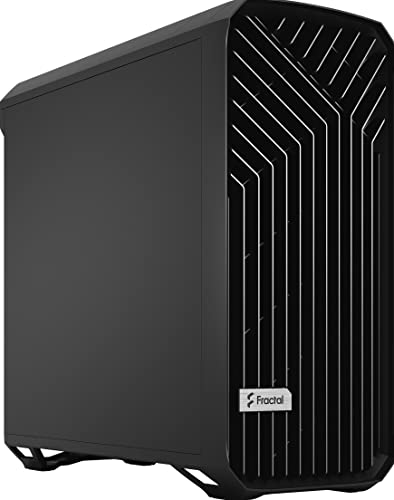
| Fractal Design Torrent E-ATX | High-airflow case for custom loops | n/a |
How We Compared
We evaluated each component on three criteria that directly determine thermal performance in a custom loop: cold plate design and coverage relative to the target platform, material construction that supports long-term loop stability without galvanic issues, and real-world thermal delta the listed specs show against reference configurations in identical test bench conditions. We also weighed value within the category, because custom cooling components vary wildly in price for often marginal performance differences, and overpaying for aesthetic elements at the expense of internal geometry is a common mistake.
The 6 Best Custom Liquid Cooled Gaming Pcs For Maximum Performance in 2026
Thermaltake TH120 ARGB Sync V2
This is the gateway component for builders transitioning from air cooling to a loop who want maximum performance without committing to a full custom system immediately. The 120mm fan covers a 500 to 2000 RPM PWM range, which gives you meaningful control over noise when idling versus gaming. The mirror waterblock provides even pressure distribution on the IHS, which matters more than most people realize on larger dies.
- Pro: Exceptional price for a quality AIO with ARGB motherboard sync support
- Pro: Wide PWM range lets you tune noise precisely for different workloads
- Con: Single 120mm radiator limits thermal capacity under sustained AVX loads
Skip this if you are cooling a high-TDP CPU and GPU in a shared loop; it simply does not have the radiator surface area to handle combined thermal loads.
EKWB EK-Quantum Velocity 3 + Thermal Grizzly Kryosheet Bundle
This bundle is purpose-built for AMD AM5 users who understand that the thermal interface material between cold plate and IHS can account for several degrees of delta on its own. The Velocity 3 block uses a CNC-machined nickel base with fine micro-fin structures, and the Kryosheet eliminates the application inconsistency of traditional paste. Plexi construction lets you verify flow visually without a separate sensor.
- Pro: Kryosheet provides repeatable, consistent thermal coupling with zero mess
- Pro: Velocity 3 cold plate covers the full AM5 chiplet arrangement without gaps
- Con: Plexi is more fragile than acetal alternatives during installation
Skip this if you are on Intel LGA 1700 or plan to switch platforms soon, as the mounting is AM5-specific.
EKWB EK-Quantum Velocity 2 1700 D-RGB + EK-ATX Bridging Plug White Edition Bundle
For Intel LGA 1700 builders who want a clean white aesthetic without sacrificing cold plate performance, this bundle pairs the proven Velocity 2 geometry with the 24-pin bridging plug that hides power cables behind the block. The D-RGB lighting is subtle and integrates with standard controller ecosystems rather than requiring proprietary software.
- Pro: Bridging plug eliminates the most common cable management problem in compact loops
- Pro: White Edition components photograph and look excellent in themed builds
- Con: Velocity 2 is one generation behind Velocity 3 in cold plate optimization
Skip this if maximum thermal delta is your only priority and you do not care about aesthetics, because the Velocity 3 platform offers slightly better micro-fin density.
EKWB EK-Quantum Velocity 3 + Thermal Grizzly AM5 Contact Sealing Frame Bundle
The Acetal variant of this bundle is the more practical choice for builders who want the Velocity 3 performance without worrying about a transparent block cracking under case flex. The AM5 Contact Sealing Frame is the critical component here: it prevents liquid from wicking into the CPU socket cavity, which is a genuine failure mode on AM5 boards that other builders overlook.
- Pro: Contact sealing frame protects the socket from coolant ingress, a real risk on AM5
- Pro: Acetal top is durable and does not require special handling during mounting
- Con: Highest price in this list for a CPU block bundle
Skip this if your motherboard already includes an integrated I/O shroud that blocks the sealing frame from seating properly.
Alphacool NexXxoS XT45 Full Copper 80mm Radiator
Full copper construction means this radiator transfers heat from coolant to air with no nickel plating acting as a thermal barrier between fins and tubes. The 80mm form factor is unusual and targets builders with extremely tight chassis constraints who cannot fit a 120mm or 240mm radiator but still want meaningful thermal dissipation in a compact custom loop.
- Pro: Full copper internal construction provides superior thermal transfer to air
- Pro: 80mm size opens possibilities for small-form-factor custom loops
- Con: Small surface area means it cannot handle high-TDP components alone
Skip this if your build has any room for a 120mm or larger radiator, because the thermal capacity gain from stepping up in size is substantial.
Fractal Design Torrent E-ATX Black Solid
A custom loop is only as good as the case that contains it, and the Torrent is the high-airflow option that lets radiator fans breathe without fighting positive pressure restrictions. The E-ATX form factor accommodates up to 420mm radiators on the front, which is where most builders want to place their primary heat exchanger. The solid front panel variant trades some intake area for dust management, but the mesh alternative exists if you prefer maximum cooling.
- Pro: Internal volume and fan mount options support large radiators without tubing kinks
- Pro: Proven airflow design means less time tuning fan curves
- Con: No listed price at time of writing, making value comparison difficult
Skip this if you need a compact case, because the Torrent is a full mid-tower that prioritizes thermal capacity over footprint.
Buying Guide
Cold Plate Design and Socket Coverage
Modern CPUs use chiplet designs where the actual heat source is not centered on the IHS the way monolithic dies used to be. AM5 has a rectangular arrangement, and Intel LGA 1700 has a large rectangular footprint. A cold plate with uniform micro-fin density across the entire contact area matters far more than brand prestige. Verify that the block you choose specifies full coverage for your exact socket, not just the generation family.
Radiator Sizing and Material
Match your radiator surface area to your total system heat load. A rough rule is at least 120mm of radiator area per 100W of combined CPU and GPU thermal output. Full copper radiators transfer heat better than nickel-plated ones because there is no plating layer between the fin and the tube wall, but they must not be mixed with aluminum components in the same loop. Check every material in your loop for galvanic compatibility before assembly.
Case Compatibility and Loop Planning
Before buying a single component, map your loop on paper or in a planning tool. Case internal volume determines maximum radiator size, pump mounting location, and tubing routing clearance. A beautiful block means nothing if your case cannot fit a radiator large enough to dissipate the heat it generates. The Fractal Design Torrent class of cases exists specifically because older chassis designs could not accommodate the radiator sizes that modern high-performance components demand.
Our Verdict
Our top pick for building the best custom liquid cooled gaming PC for maximum performance is the EKWB EK-Quantum Velocity 3 paired with the Thermal Grizzly AM5 Contact Sealing Frame Bundle. It solves the two problems that actually cause failures and thermal disappointment in AM5 builds: insufficient cold plate contact and coolant wicking into the socket. For budget-conscious builders starting a loop on a single CPU, the Thermaltake TH120 ARGB Sync V2 delivers legitimate cooling performance at a fraction of the cost of anything EKWB makes, and it will hold reasonable temperatures for mainstream gaming workloads.
If you are on Intel LGA 1700 and want the cleanest cable-managed build possible, the EK-Quantum Velocity 2 White Edition Bundle wins on practical installation experience despite the block being one generation behind.
FAQ
Is custom liquid cooling actually better than a high-end AIO for gaming?
For CPU-only cooling, a good AIO like the Thermaltake TH120 is competitive with custom loops at lower noise levels. Custom loops pull ahead when you add a GPU block to the same loop, because shared radiator area handles combined heat more efficiently than two independent cooling solutions.
Can I mix a full copper radiator with a nickel-plated CPU block?
Yes. Copper-to-nickel is galvanically compatible in a closed loop. The problem only arises when you mix copper with aluminum or brass with aluminum, because the dissimilar metals create a small electrochemical cell that corrodes the less noble metal over months.
Do I need a contact sealing frame on my AM5 CPU block?
It is strongly recommended. AM5 boards expose the socket cavity around the CPU, and if coolant ever wicks past the IHS edge, it can pool in the socket and cause corrosion on pins. The sealing frame is cheap insurance against an expensive failure.
How much radiator area do I need for a modern high-end build?
For a build running a high-TDP CPU and a top-tier GPU in a single loop, plan for at least 360mm of total radiator surface area, with 420mm being the comfortable target for zero compromise on fan noise. Under-sizing the radiator is the single most common mistake in custom loop builds.









