
The best tower air CPU cooler for most gaming PCs in 2026 is the Thermalright Phantom Spirit 120 EVO, a dual-tower cooler that comes within a few watts of the Noctua NH-D15 G2 at a fraction of the price; the Arctic Freezer 36 is the budget pick for mid-range chips, and the NH-D15 G2 is the premium choice when low noise and warranty matter more than cost. Gaming loads are lighter than most people assume, so the real decision is which tower fits your case, RAM and CPU socket without compromise.
As an Amazon Associate we earn from qualifying purchases at no extra cost to you.




Our Top Picks



Top 3 picks at a glance
How much heat a gaming CPU really produces
Cooler marketing quotes TDP ratings of 250 W or more, but a CPU running a game rarely gets close to its all-core limit. Most current gaming chips draw roughly 70–160 W while playing, with short spikes during loading screens and shader compilation. Size the cooler for gaming plus occasional heavy work, not for a 30-minute torture test you will never run.
| CPU | Rated power limit | Typical gaming draw | Tower class that is enough |
|---|---|---|---|
| Ryzen 5 9600X / Ryzen 7 9700X | 88 W PPT | 50–80 W | Single tower |
| Ryzen 7 9800X3D / 9850X3D | 162 W PPT | 70–110 W | Dual tower |
| Core Ultra 5 245K | 159 W PL2 | 60–100 W | Single or entry dual tower |
| Core Ultra 7 265K | 250 W PL2 | 80–140 W | Dual tower |
| Core Ultra 9 285K | 250 W PL2 | 90–150 W | Premium dual tower (or AIO for heavy rendering) |
| Ryzen 9 9950X3D | 230 W PPT | 90–140 W | Premium dual tower (or AIO for heavy rendering) |
The gaming draw column is why a good tower cooler handles even flagship chips in games. Where towers struggle is sustained all-core work on 16- and 24-core CPUs; if you render or compile for hours, look at a 360 mm AIO instead.
The towers worth buying
| Cooler | Type | Height | Fans | Typical price range |
|---|---|---|---|---|
| Thermalright Phantom Spirit 120 EVO | Dual tower, 7 heatpipes | 157 mm | 2 × 120 mm | Check on Amazon |
| Thermalright Peerless Assassin 120 SE | Dual tower, 6 heatpipes | 155 mm | 2 × 120 mm | Check on Amazon |
| Arctic Freezer 36 | Single tower, push-pull | 159 mm | 2 × 120 mm | Check on Amazon |
| Noctua NH-D15 G2 | Dual tower, 8 heatpipes | 168 mm | 2 × 140 mm | Check on Amazon |
| be quiet! Dark Rock Pro 5 | Dual tower | 168 mm | 135 mm + 120 mm | Check on Amazon |
| DeepCool AK620 Digital | Dual tower with status display | 162 mm | 2 × 120 mm | Check on Amazon |
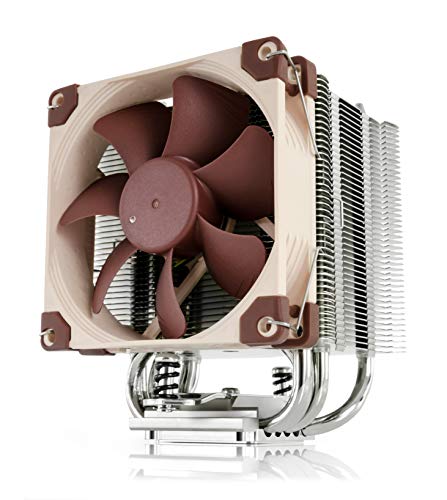
| Noctua NH-U12A | Single tower, push-pull | 158 mm | 2 × 120 mm | Check on Amazon |
Thermalright Phantom Spirit 120 EVO: best overall
In independent noise-normalized results on AM5, it trails the NH-D15 G2 by only about 3 W of heat dissipation, which is within the margin of a different paste application. It handles a 9800X3D or Core Ultra 7 265K quietly in games and stays under 157 mm, so it fits most mid-tower cases.
Thermalright Peerless Assassin 120 SE: best value dual tower
One fewer heatpipe and a slightly lower ceiling than the EVO, but the same practical result for gaming. If it is significantly cheaper where you shop, buy it without hesitation.
Arctic Freezer 36: best budget cooler
A single tower with push-pull fans and a direct-touch base. It runs a few degrees warmer than dual towers under heavy load but is notably quiet, and leaves more room around the RAM slots. Perfect for a Ryzen 5 or Core Ultra 5 gaming build.
Noctua NH-D15 G2: best premium tower
The highest-performing air cooler available, with low noise at every fan speed, a choice of base convexity (standard, LBC for AM5, HBC for bent LGA1700/1851 heatspreaders) and a six-year warranty. It costs roughly three times as much as the Phantom Spirit, and at 168 mm it rules out many compact cases.
be quiet! Dark Rock Pro 5: best for silence-first builds
Black-coated fins, a top cover and tuned fans keep noise low, and its front fan can be raised for tall memory. It cools slightly worse than the Phantom Spirit at equal noise but looks cleaner in a windowed case.
DeepCool AK620 Digital: best for a status display
A strong dual tower with a top-mounted screen that shows CPU temperature or usage. Useful in a showcase build where you want at-a-glance readouts without software overlays.
Noctua NH-U12A: best for tight RAM clearance
A 120 mm single tower that performs close to many dual towers and leaves all memory slots unobstructed, so tall RGB DDR5 is never a problem.
Clearance check: will it fit?
Most “it doesn’t fit” returns come from three measurements. Run through them before ordering.
- Case CPU cooler height limit. Subtract 3–5 mm from the listed limit for side-panel fans or thick glass. A 165 mm case limit fits a 157 mm Phantom Spirit but not a 168 mm NH-D15 G2.
- RAM height. Dual towers overhang the first one or two DIMM slots. Standard-height DDR5 (about 32–35 mm) clears almost everything; RGB sticks at 42–47 mm can force you to raise the front fan, adding 5–10 mm to the total height.
- Top radiator or fan. In cases with top fans, a tall tower can collide with fan frames near the rear; check the gap between the motherboard top edge and the roof.
Decision matrix
| Your build | Best tower |
|---|---|
| Ryzen 5 / Core Ultra 5 budget gaming PC | Arctic Freezer 36 |
| 9800X3D, 9850X3D or Core Ultra 7 265K | Phantom Spirit 120 EVO or Peerless Assassin 120 SE |
| Core Ultra 9 285K or Ryzen 9 9950X3D, mostly gaming | Noctua NH-D15 G2 or Phantom Spirit 120 EVO |
| Case limit under 160 mm | Phantom Spirit 120 EVO, Peerless Assassin, Freezer 36 |
| Tall RGB RAM, no compromises | Noctua NH-U12A |
| Quiet windowed build | be quiet! Dark Rock Pro 5 |
Installation and fan settings that matter
- Orient the cooler front-to-back so it blows toward the rear exhaust fan, matching your case airflow.
- Use the offset or AM5-specific mount if supplied; Ryzen 9000 compute dies sit off-center, and offset mounting can lower temperatures by a couple of degrees.
- On Intel LGA1851, use the cooler’s LGA1700-compatible hardware; the mounting holes are the same, and a contact frame is optional rather than required.
- Set a gentle fan curve: about 30–40% up to 55 °C, 60% at 70 °C and 100% only above 85 °C, with a 3–5 second ramp delay so brief spikes do not cause fan surges.
- Re-check after a week. Tighten mounting screws evenly in an X pattern if temperatures creep up; pressure can settle slightly after the first heat cycles.
Frequently asked questions
Do I need an AIO cooler for a high-end gaming CPU?
No, a good dual-tower cooler is usually sufficient for high-end gaming CPUs. Gaming loads are lighter than sustained all-core work, and the article lists the Phantom Spirit 120 EVO for the Ryzen 9800X3D, Ryzen 9850X3D and Core Ultra 7 265K. An AIO becomes more appropriate when a Core Ultra 9 285K or Ryzen 9 9950X3D performs heavy rendering or other prolonged all-core workloads.
Can tall RGB memory work with a dual-tower cooler?
Yes, but tall RGB memory may require raising the cooler’s front fan. Standard-height DDR5 clears almost everything, while RGB sticks can force the fan upward, adding to the cooler’s total height. If you want tall RGB DDR5 without compromises around the memory slots, the Noctua NH-U12A is the article’s recommended choice because its single tower leaves all memory slots unobstructed.
Which cooler is easiest to choose for a compact case?
Choose a cooler below the case’s CPU-cooler height limit, with the Phantom Spirit 120 EVO, Peerless Assassin 120 SE and Arctic Freezer 36 suited to cases limited under 160 mm. A 165 mm limit fits the 157 mm Phantom Spirit but not the 168 mm NH-D15 G2. Leave additional room for side-panel fans or thick glass.
What should I do if my CPU temperature briefly spikes?
Use a fan curve with a ramp delay instead of making the fans react immediately to every spike. The article suggests about 30–40% fan speed up to 55 °C, 60% at 70 °C and 100% only above 85 °C, with a 3–5 second delay. This helps prevent brief temperature changes from causing distracting fan surges.
Does the cooler’s mounting direction matter?
Yes, orient the cooler front-to-back so it sends air toward the rear exhaust fan and matches the case airflow. Use the offset or AM5-specific mount when supplied, because Ryzen 9000 compute dies sit off-center and offset mounting can lower temperatures by a couple of degrees. On Intel LGA1851, use LGA1700-compatible mounting hardware.









