
The be quiet!
Our Top Picks
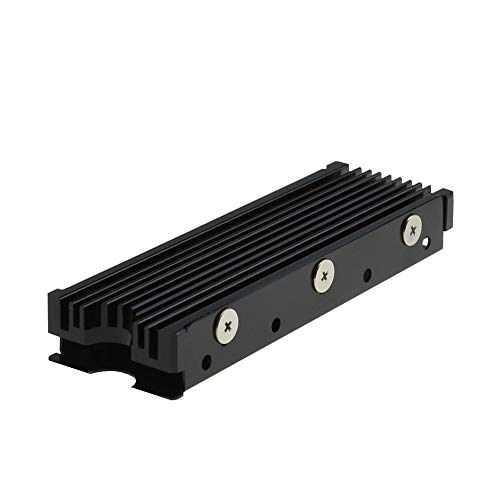 MHQJRH M.2 2280 SSD heatsink for PC /Double Side Heatsink(black)3 x 0.95 x 0.4 Inches0.1 poundsCheck on Amazon
 M.2 Heatsink Cooler 2280 SSD Double-Sided Heat Sink3"L x 0.95"W x 0.4"H3 x 0.95 x 0.4 Inches0.1 poundsCheck on Amazon


Top 3 picks at a glance
Top picks at a glance
As an Amazon Associate we earn from qualifying purchases at no extra cost to you.



| Model | Key spec | Price | Best for |
|---|---|---|---|
| SGTKJSJS M.2 Heatsink Cooler | Double-sided, thermal silicone pad | Check on Amazon | Absolute budget entry |
| Atdcoek 5-Pack SSD Heat Sink | 5-pack, thermal silicone pad | Check on Amazon | Multiple drives or bulk builds |
| Bestoss M.2 SSD Heatsink | Double surface thermal dissipation | Check on Amazon | Basic single-drive budget pick |
| MHQJRH M.2 SSD Heatsink | For PC / PS5, M.2 PCIe or SATA | Check on Amazon | PS5-compatible budget pick |
| Thermalright TR-M.2 Heatsink | Type A/B, dual thermal conductivity pads | Check on Amazon | Best budget value |
| be quiet! MC1 | Single/double-sided compatible | Check on Amazon | Established brand mid-tier |
| be quiet! MC1 Pro | Heatpipe design, dual-sided compatible | Check on Amazon | Best overall cooling performance |
| SABRENT Rocket Heatsink | Designed for Sabrent Rocket SSDs | Check on Amazon | Sabrent ecosystem builds |
SGTKJSJS M.2 Heatsink Cooler, around $5
This is a double-sided aluminum heatsink with an included thermal silicone pad, one of the most basic entries in this roundup by design, providing a straightforward passive cooling upgrade over running an SSD completely bare.
Double-sided coverage here means both sides of the M.2 drive (where the drive design has components on both sides) receive some thermal contact, though the passive aluminum construction relies purely on surface area and ambient airflow rather than any active heat-moving mechanism.
The included thermal silicone pad is a genuinely necessary component, not an optional extra — without proper thermal interface material between the heatsink and the SSD’s controller chip, even a well-designed heatsink provides minimal cooling benefit due to poor thermal contact.
- Pros
- Very low price for a genuine thermal improvement over a bare drive
- Includes necessary thermal silicone pad
- Double-sided coverage
- Cons
- Passive aluminum design provides limited improvement under sustained heavy load
- Not recommended for PCIe 5.0 drives generating higher heat output
- Basic construction with no advanced cooling mechanism
Who it’s for: budget builders with a PCIe 4.0 drive in a well-ventilated case who want a basic thermal improvement over a completely bare SSD.
Atdcoek 5-Pack SSD Heat Sink Cooler, around $5
This listing provides five identical heatsinks with thermal silicone pads at the same price as a single SGTKJSJS unit above, making it a genuinely strong value for buyers with multiple drives to cool, or for system builders and IT professionals handling several builds.
Each individual heatsink in this pack matches the basic passive aluminum design common across the budget tier of this roundup, meaning the value here comes specifically from the bulk quantity rather than any per-unit design advantage over the other budget options.
For buyers who only need to cool a single SSD, this pack provides more units than necessary, making the SGTKJSJS or Thermalright options a more direct single-purchase comparison — but for anyone building multiple systems or maintaining a small fleet of PCs, the per-unit cost here is difficult to beat.
The included thermal silicone pads across all five units maintain the same basic functional requirement discussed on the SGTKJSJS above, ensuring each heatsink in the pack can actually make proper thermal contact once installed.
- Pros
- Five heatsinks at the price of one comparable single unit
- Genuinely strong value for multi-drive or multi-build scenarios
- Includes thermal silicone pads for each unit
- Cons
- Same basic passive design as other budget options in this roundup
- Excess quantity for buyers who only need one heatsink
- Not suited for PCIe 5.0 drives’ higher heat output
Who it’s for: system builders, IT professionals, or anyone cooling multiple SSDs who wants the lowest per-unit cost in this roundup.
Bestoss M.2 2280 SSD NVMe Heatsink, around $6
This is another entry in the budget passive aluminum tier, specifically marketed with “Double Surface Thermal Dissipation” branding, functionally similar in design approach to the SGTKJSJS and Atdcoek options covered above.
The “double surface” branding here emphasizes the same basic principle as the other budget heatsinks — maximizing contact area across the drive’s components to improve passive heat dissipation into surrounding case airflow.
- Pros
- Competitively priced within the budget tier
- Confirmed 2280 form factor compatibility
- Double-surface thermal dissipation design
- Cons
- Functionally similar to several other budget options in this roundup
- Passive design limits cooling under sustained heavy load
- Not suited for PCIe 5.0 drives
MHQJRH M.2 2280 SSD Heatsink, for PC / PS5, around $6
This is the only heatsink in this roundup that explicitly confirms PS5 compatibility in its listing title, a genuinely important detail given the console’s known strict M.2 slot height restrictions that rule out many taller heatsinks not specifically validated for that use case.
Compatibility with both M.2 PCIe NVMe SSDs and M.2 SATA SSDs broadens this heatsink’s practical use beyond just current-generation gaming drives, useful for buyers who might be cooling an older SATA-based M.2 drive rather than a newer NVMe unit.
The explicit PS5 validation here matters specifically because PlayStation 5’s internal M.2 expansion slot has a maximum heatsink height restriction that several taller, more aggressive heatsinks — including some other entries in this roundup — may exceed, risking a fit issue during installation.
- Pros
- Explicitly confirmed PS5 compatibility
- Supports both M.2 PCIe NVMe and SATA SSDs
- Budget-tier pricing with console-specific validation
- Cons
- Same basic passive cooling design as other budget options
- Not suited for PCIe 5.0 drives’ higher heat output
- PC case clearance still needs separate verification despite PS5 confirmation
Who it’s for: PS5 owners specifically expanding console storage who want confirmed slot-height compatibility without guesswork.
Thermalright TR-M.2 2280 Type A B Heatsink, around $6
This is the strongest budget-tier value in this roundup, from Thermalright, a brand with genuine credibility in the CPU cooler and thermal solutions market, explicitly featuring “2 Thermal Conductivity” material layers and Type A/B compatibility for broader M.2 form factor support.
Thermalright’s broader reputation in CPU air cooling, discussed in our other cooling roundups, lends genuine credibility to this SSD heatsink beyond the generic budget brands elsewhere in this price tier — the company’s core competency is thermal engineering, not just accessory manufacturing.
The dual thermal conductivity material layers mentioned in the listing suggest a slightly more considered thermal interface design than the single thermal silicone pad approach used by several other budget options in this roundup, potentially providing modestly better heat transfer despite the similar overall passive aluminum design.
- Pros
- Thermalright’s established thermal engineering reputation
- Dual thermal conductivity material layers
- Type A/B compatibility for broader form factor support
- Cons
- No explicit PS5 compatibility confirmation, unlike the MHQJRH
- Still a passive design, not suited for PCIe 5.0 drives
- Marginal design improvement over other budget options despite the brand reputation
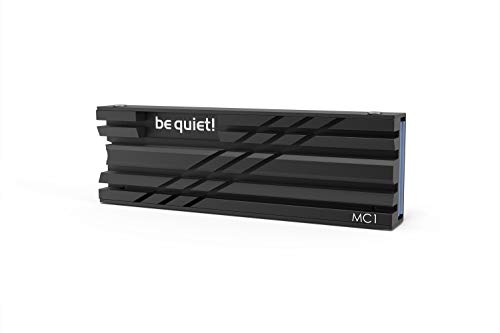
be quiet! MC1, around $14
This is be quiet!’s standard M.2 SSD cooler, explicitly compatible with both single-sided and double-sided 2280 modules, bringing the same brand credibility discussed in our be quiet! power supply roundup to the thermal accessory category — a company with genuine engineering focus rather than a generic accessory manufacturer.
The explicit single/double-sided module compatibility here is a genuinely useful detail, since some SSDs place NAND and controller chips on both sides of the PCB while others keep everything on one side, and a heatsink not designed to accommodate both configurations can create clearance or contact issues.
‘s more considered design and materials rather than the basic aluminum-slab approach common at the lower price points.
- Pros
- be quiet!’s established thermal engineering reputation
- Explicit single/double-sided module compatibility
- More considered design than budget-tier options
- Cons
- Roughly double the price of the budget aluminum-slab options
- Still a passive design rather than heatpipe-based
- No explicit PS5 compatibility confirmation
Who it’s for: buyers who want a more considered mid-tier passive heatsink from an established thermal engineering brand.
be quiet! 9
This is the strongest cooling solution in this entire roundup: a genuine heatpipe design rather than a purely passive aluminum slab, explicitly compatible with dual-sided modules, bringing an active heat-transfer mechanism that meaningfully outperforms every other option covered so far.
The heatpipe design here uses a sealed, liquid-filled tube to actively move heat away from the SSD controller toward a larger dissipation area, a fundamentally different and more effective cooling mechanism than the passive aluminum mass relied upon by the budget-tier options in this roundup.
For buyers running a PCIe 5.0 drive — covered in depth in our PCIe 5.0 SSD roundup, where we note these drives generate meaningfully more heat than PCIe 4.0 predecessors — this heatpipe design provides the kind of active cooling margin that a basic aluminum slab may not adequately deliver under sustained heavy sequential transfer loads.
- Pros
- Genuine heatpipe design, the strongest cooling mechanism in this roundup
- Well-suited to PCIe 5.0 drives’ higher heat output
- Dual-sided module compatibility
- Cons
- Highest price among the be quiet! options in this roundup
- Overkill for a basic PCIe 4.0 drive in a well-ventilated case
- Thicker profile may create clearance concerns in compact cases
Who it’s for: buyers with a PCIe 5.0 drive or anyone who wants the strongest available cooling performance in this roundup, regardless of drive generation.
SABRENT M.2 2280 SSD Rocket Heatsink, around $22
This heatsink is specifically designed around Sabrent’s own Rocket-series SSD lineup, positioning it as the natural pairing for buyers who already own or plan to buy a Sabrent Rocket drive, though the listing’s 2280 form factor compatibility should extend to most standard M.2 drives from other brands too.
Sabrent has built a solid reputation specifically within the NVMe SSD and accessory space, and this heatsink reflects that focused product development, generally designed with attention to the exact PCB layout and component placement common on Sabrent’s own drives.
MC1 Pro, worth weighing directly against that stronger cooling mechanism before assuming higher price automatically means better performance.
Buyers without a specific Sabrent Rocket SSD or brand loyalty should directly compare this listing’s disclosed cooling design against the MC1 Pro’s confirmed heatpipe mechanism, since price alone doesn’t confirm which offers superior thermal performance for a non-Sabrent drive.
- Pros
- Specifically designed around Sabrent’s own Rocket SSD lineup
- Genuine brand focus within the NVMe accessory space
- 2280 form factor compatibility for broader drive support
- Cons
- Highest price in this roundup, above the heatpipe-based MC1 Pro
- Design optimized specifically for Sabrent drives may offer less advantage on other brands
- Cooling mechanism not as clearly disclosed as the MC1 Pro’s confirmed heatpipe design
Who it’s for: buyers specifically building around a Sabrent Rocket SSD who want a heatsink designed with that exact drive in mind.
How we compared and picked
MC1, MC1 Pro, and Sabrent Rocket), since this distinction matters more for buyers than price alone.
We flagged PS5 compatibility explicitly where confirmed in a listing, given the console’s known strict height restrictions for its internal M.2 expansion slot, a detail that rules out several taller options in this roundup for that specific use case.
What to look for in an SSD heatsink
Match heatsink design tier to your drive’s actual heat output
As covered in our PCIe 5.0 SSD roundup, drives at that speed tier generate meaningfully more heat than PCIe 4.0 predecessors. A basic budget-tier passive heatsink, adequate for most PCIe 4.0 drives in a well-ventilated case, may not provide sufficient cooling margin for a PCIe 5.0 drive under sustained heavy sequential transfer load. Match your heatsink’s design sophistication (passive aluminum versus heatpipe) to your specific drive’s generation and expected workload.
PS5 compatibility requires explicit confirmation, not assumption
Only the MHQJRH heatsink in this roundup explicitly confirms PlayStation 5 compatibility. The console’s internal M.2 expansion slot has known strict height restrictions that several taller or bulkier heatsinks in this roundup, including the heatpipe-based options, may not clear. If you’re specifically expanding PS5 storage, prioritize a listing with explicit console compatibility confirmation rather than assuming any generic PC heatsink will fit.
Thermal interface material matters as much as the heatsink metal itself
Every budget-tier heatsink in this roundup includes a thermal silicone pad, and this component is functionally essential rather than optional — without proper thermal contact between the heatsink and the SSD controller chip, even a well-designed heatsink provides minimal cooling benefit. Confirm any heatsink you buy includes this material, or budget for a separate thermal pad purchase if it doesn’t.
Heatpipe designs represent a genuine mechanism upgrade, not just marketing
The be quiet! MC1 Pro’s heatpipe design in this roundup uses fundamentally different physics than the passive aluminum slabs making up most of the budget tier — actively transferring heat via a sealed liquid-filled tube rather than relying purely on surface area and ambient airflow.
Mistakes buyers make when shopping SSD heatsinks
Assuming any heatsink fits a PS5 without checking explicit console compatibility risks a physical fit issue given the console’s known strict M.2 slot height restrictions, as this roundup’s single confirmed-compatible option highlights.
Buying a basic budget-tier passive heatsink for a PCIe 5.0 drive without understanding that drive generation’s higher heat output can lead to thermal throttling under sustained heavy transfer loads that a more capable design would avoid.
Overlooking case clearance measurements before buying a taller, more aggressive heatsink like the heatpipe-based MC1 Pro can create a fit conflict with a GPU or case side panel, a problem thinner passive options in this roundup wouldn’t cause.
Assuming the most expensive option is always the best performer overlooks that the SABRENT Rocket Heatsink’s higher price versus the be quiet! MC1 Pro doesn’t necessarily indicate superior cooling mechanism for a non-Sabrent drive.
Skipping the thermal silicone pad requirement, either by choosing a listing without one included or improperly applying it during installation, undermines the cooling benefit of even a well-designed heatsink.
Verdict
The be quiet!
Frequently asked questions
Do all M.2 SSDs need an aftermarket heatsink?
No — many current motherboards include a built-in M.2 heatsink under the chipset shroud that’s adequate for most PCIe 4.0 drives; aftermarket heatsinks matter most for PCIe 5.0 drives, boards without built-in cooling, or SSDs installed in a poorly-ventilated case position.
What’s the difference between a passive aluminum heatsink and a heatpipe cooler?
A passive aluminum slab relies purely on surface area and thermal mass to dissipate heat into surrounding airflow, while a heatpipe cooler like be quiet!’s MC1 Pro uses a sealed liquid-filled pipe to actively move heat away from the SSD controller more efficiently, generally providing a meaningful cooling improvement under sustained heavy load.
Will an SSD heatsink fit under my GPU or in a PS5?
Clearance varies significantly by case and motherboard layout — always measure the available M.2 slot clearance before buying a taller heatsink, and check PS5-specific compatibility explicitly, since the console’s internal M.2 slot has strict height restrictions that rule out several taller heatsinks in this roundup.
They provide genuine, measurable thermal improvement over a completely bare SSD, primarily through added surface area and thermal mass, though the improvement is smaller than a more engineered solution like a heatpipe cooler; for a PCIe 4.0 drive in a well-ventilated case, a basic heatsink is often sufficient.
Does a thicker heatsink always cool better?
Generally yes, since more aluminum mass and surface area typically improves passive heat dissipation, but thickness also increases the risk of clearance conflicts with your GPU, case side panel, or PS5’s specific slot restrictions — cooling capacity and physical fit need to be balanced together.
For the drives these heatsinks are built to cool, see our PCIe 5.0 SSD roundup and best NVMe SSD guide. Our NVMe vs. SATA explainer covers the broader storage decisions this accessory category supports.









