
For years, computer case design leaned heavily into sleek, sealed-off chambers of tempered glass and solid aluminum. While these setups looked beautiful on a home office desk, they created a massive thermal problem. Modern high-performance processors and graphics cards generate an immense amount of heat, often exceeding 400 to 500 watts of total system power under load. Keeping these components cool inside a sealed box requires fans to spin at maximum velocity, resulting in a distracting, high-pitched whine that ruins the peace of your workspace.
This thermal bottleneck is why mesh front panel cases have taken over the market. By replacing solid glass or plastic with a breathable, perforated metal screen, these cases allow your system to pull in fresh air with minimal resistance. However, many buyers make critical mistakes when choosing one. They buy solely based on visual appeal, only to end up with a case made of razor-thin steel that rattles constantly, lacks proper dust filtration, or doesn’t have enough clearance for modern, oversized graphics cards. Understanding what to look for in a mesh front panel case ensures you get a system that runs cool, stays quiet, and integrates beautifully into your home environment.
As an Amazon Associate we earn from qualifying purchases at no extra cost to you.




Our Top Picks


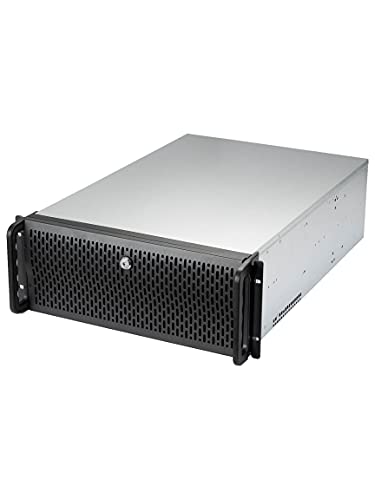

Top 3 picks at a glance
Decide These 3 Things First
Before diving into spec sheets and metal thicknesses, you must define how the case will function in your physical space. Answering these three questions will instantly eliminate 80% of the options on the market, saving you hours of research.
- Where will the case sit, and how much space do you have? A large ATX mid-tower measuring 19 x 8.5 x 18 inches requires significant desk real estate. If you have a compact writing desk, you should target a Micro-ATX or Mini-ITX mini-tower (typically under 15 inches tall) to keep your workspace uncluttered. Alternatively, if you are building a dedicated home server, a rackmount chassis designed for a 19-inch utility rack might be necessary.
- What is your tolerance for dust versus maintenance? High-airflow mesh acts like a vacuum cleaner filter. If you have pets or carpeted floors, a case with an ultra-fine nylon dust filter behind the mesh is mandatory. If you do not mind blowing out your PC with compressed air every two months, you can opt for a coarser, high-flow metal mesh that maximizes thermal performance.
- What is your system’s total heat output (TDP)? If you are building a modest office PC with an integrated graphics card pulling under 150 watts, a basic mesh case with a single intake fan is more than sufficient. If you are building a creative workstation or gaming rig with a dedicated GPU pulling over 300 watts, you will need a case that supports at least three 120mm or two 140mm front intake fans to prevent thermal throttling.
1. Case Size and Motherboard Compatibility
The overall volume of your case dictates what components can fit inside and how much air can circulate around them. PC cases are categorized by the size of the motherboards they accommodate, ranging from ultra-compact to enterprise-grade.
Mini-ITX cases (under 30 liters in volume) are excellent for minimalist desks but require precise component matching and custom cable routing. Micro-ATX (mATX) mini-towers, usually measuring around 15 to 16 inches in height, strike a perfect balance for home offices, offering decent expansion slots without dominating your desk. ATX Mid-Towers are the industry standard, measuring roughly 18 to 20 inches tall and 8 to 9 inches wide. They provide ample clearance for large graphics cards (up to 360mm in length) and massive CPU air coolers (up to 165mm in height). For extreme storage setups, home servers, or rendering workstations, larger E-ATX full-towers or 4U rackmount chassis offer the physical space needed for multiple hard drive cages and dual-power supply configurations.
2. Mesh Material and Perforation Quality
Not all mesh is created equal. The physical design of the front panel determines both structural rigidity and how much air can actually pass through. Cheap cases often use stamped steel panels where the holes are punched out of a flat sheet. If the holes are too small or spaced too far apart, the actual “open area” of the panel might only be 30% to 40%, which chokes your intake fans. Look for high-quality mesh panels that offer an open area ratio of 50% to 60%.
The thickness of the mesh also matters. Standard budget cases use mesh that is only 0.5mm thick, which flexes easily when pressed and can warp over time. Premium designs utilize 0.8mm to 1.0mm thick steel or aluminum mesh. A thicker mesh panel resists bending, dampens fan vibrations, and feels significantly more premium when you remove it for cleaning.
3. Construction Quality and Steel Thickness
A computer case is the structural skeleton of your system. If that skeleton is weak, your components are at risk, and your workspace will be subjected to annoying acoustic vibrations. The internal frame of a high-quality case should be constructed from SECC (Steel, Electrogalvanized, Cold-rolled, Coil) or SGCC steel with a minimum thickness of 0.7mm to 0.8mm.
Avoid cases that weigh less than 10 pounds when empty, as this is a primary indicator of ultra-thin, low-grade metal. A sturdy mid-tower should weigh between 14 and 20 pounds empty. This weight adds structural dampening, ensuring that when your mechanical hard drives spin or your intake fans reach 1,500 RPM, the case does not amplify those vibrations into a low-frequency hum on your wooden desk. Additionally, if the case features a tempered glass side panel, ensure it is at least 4mm thick and mounted with rubber-cushioned standoffs to prevent cracking.
4. Thermal Capacity, Fans, and Acoustic Control
As we look ahead to 2026, component power consumption continues to rise, making thermal capacity a primary buying factor. When evaluating a mesh front panel case, look closely at the pre-installed fan configuration. Budget cases often include zero to two cheap, sleeve-bearing fans that run at a constant, loud speed. Look for cases that include PWM (Pulse Width Modulation) fans, which allow your motherboard to dynamically adjust fan speeds based on system temperatures.
For optimal acoustics in a home environment, 140mm fans are vastly superior to 120mm fans. A 140mm fan can move the same volume of air (measured in Cubic Feet per Minute, or CFM) at 800 RPM as a 120mm fan running at 1,200 RPM. This lower rotational speed keeps noise levels well below 22 dBA, making the PC virtually silent during daily office tasks. Ensure the case has mounting rails rather than fixed screw holes, allowing you to slide the fans up or down to target air directly at your hot graphics card or CPU cooler.
5. Price Tiers and What to Expect
The PC case market is highly competitive, but price ranges generally correlate directly with material quality, included accessories, and ease of assembly.
- Budget: In this tier, expect thinner 0.5mm to 0.6mm steel construction and basic punched-metal mesh. Dust filters are often coarse, non-removable, or held in place by cheap plastic tabs. Front panel ports are usually limited to older USB 2.0 or USB 3.0 Type-A connections. However, you can still find great compact mATX options here if you are willing to manage cables carefully.
- Mid-Range: This is the sweet spot for most home users and gamers. Cases in this bracket feature robust 0.7mm to 0.8mm steel frames, high-quality nylon dust filters with magnetic or slide-out mechanisms, and three to four pre-installed PWM fans. You will also get modern front I/O options, including USB 3.2 Gen 2 Type-C ports for fast external drive speeds.
- Premium: At this level, you are paying for premium materials like thick anodized aluminum, dual-chamber layouts, advanced sound-dampening materials on non-mesh panels, and heavy-duty modular drive cages. These cases often support massive liquid cooling radiators (up to 420mm) and include built-in fan controllers and premium cabling channels with Velcro straps.
6. Cable Management and Modularity
A mesh front panel is designed to let air flow straight through the chassis to the rear exhaust. However, if your case is a rat’s nest of power supply cables, that airflow is severely disrupted, creating pockets of stagnant hot air. When analyzing a case, check the clearance behind the motherboard tray. There should be at least 20mm to 25mm of space to route thick power cables.
Look for rubber grommets on the cable pass-through holes to protect your wires and hide clutter. Modularity is another key asset; look for removable hard drive cages. If you are only using modern M.2 solid-state drives mounted directly to your motherboard, removing the bulky metal HDD cage from the bottom of the case opens up valuable space for your power supply cables and improves the intake path of the bottom front fan.
Spec Checklist
Use this checklist to compare features across different price points to ensure you are getting the right value for your budget.
| Feature / Specification | Budget Tier | Mid-Range Tier | Premium Tier |
|---|---|---|---|
| Steel Thickness | 0.5mm – 0.6mm (SGCC) | 0.7mm – 0.8mm (SECC) | 0.8mm – 1.0mm+ (SECC/Aluminum) |
| Front I/O Ports | 2x USB-A (USB 3.0), Audio Jack | 2x USB-A, 1x USB-C (3.2 Gen 2) | Multiple USB-C, USB-A, Audio, Reset |
| Dust Filtration | Coarse mesh or none | Magnetic nylon filters (Front/Bottom) | Slide-out fine nylon micro-filters |
| Included Fans | 1x – 2x 120mm (3-pin non-PWM) | 3x – 4x 120mm/140mm PWM | 3x+ Premium PWM Fans or Fan Hub |
| Cable Routing Depth | 15mm – 18mm | 20mm – 25mm with tie-downs | 25mm – 30mm with routing channels |
| Max GPU Clearance | Up to 300mm | Up to 360mm | 400mm+ (Supports all modern cards) |
Red Flags
When shopping for a mesh case, watch out for these common manufacturing shortcuts that can ruin your building experience and system performance:
- “Fake” Mesh Front Panels: Some deceptive budget cases feature a solid plastic front panel with a small strip of mesh running down the sides. This is not a true mesh case. It severely restricts airflow, forcing the fans to work harder and creating excessive noise. The mesh must cover the entire front face of the chassis.
- Non-Removable Front Filters: If the dust filter is permanently glued or riveted behind the metal mesh, you will have to carry your entire PC outside or to a sink just to clean it. Only buy cases where the filter can be easily popped off, slid out, or magnetically detached in under five seconds.
- Break-Out PCIe Expansion Slots: Cheap cases use stamped metal expansion slot covers on the back that you must physically bend and snap off to install a graphics card. These leave sharp edges, cannot be reinstalled if you change your setup, and are a clear indicator of low-end construction. Look for cases with reusable covers held in place by screws.
- Lack of Motherboard Tray Cutouts: If the motherboard tray lacks a large cutout behind the CPU socket, you will have to completely remove the motherboard from the case just to install or upgrade your CPU cooler. This turns a 10-minute upgrade into a frustrating two-hour teardown.
FAQ
Does a mesh front panel make the PC louder than a solid panel?
Counterintuitively, a high-quality mesh case is often quieter than a solid-front case under load. While solid panels block some direct fan noise, they starve the fans of air. This causes the fans to spin at much higher RPMs to keep components cool, generating a loud, high-pitched vacuum sound. In contrast, a mesh panel allows fans to run at lower, whisper-quiet speeds while maintaining excellent temperatures.
How do I clean the dust out of a mesh front panel?
For magnetic or slide-out nylon filters, simply remove them from the case, vacuum them on a low setting, or rinse them under a faucet and let them dry completely before reinstalling. For the metal front mesh panel itself, a quick wipe with a microfiber cloth or a blast of compressed air from the inside out will clear away accumulated dust in seconds.
Can I mount a liquid cooling radiator behind a mesh front panel?
Yes, mesh cases are ideal for liquid cooling. Mounting a 240mm, 280mm, or 360mm radiator behind the front mesh allows the radiator to receive a constant supply of fresh, ambient air, resulting in significantly lower CPU or GPU temperatures compared to mounting the radiator at the top of the case where it exhausts warm internal air.
What is the difference between punched metal mesh and fabric/nylon mesh?
Punched metal mesh serves as the outer structural panel of the case, protecting the interior from impacts while providing wide openings for airflow. Nylon or fabric mesh is an ultra-fine screen placed directly behind the metal mesh. The metal mesh handles the structural duty, while the fine nylon mesh handles the filtration of micro-dust particles.









