
When you’re building a quiet PC, upgrading a case full of whiny stock fans, or just trying to cut down the hum in a home office, the bearing inside each fan matters more than most people realize. The two bearing types that dominate conversations about silent cooling are magnetic levitation and fluid dynamic bearing (FDB). Both promise quieter operation than cheap sleeve bearings, but they get there in very different ways — and they suit very different buyers. One is a premium, near-frictionless technology that shows up in high-end builds and novelty levitation gadgets alike. The other is the proven workhorse found in most quality fans sold today, including popular budget multipacks. This guide breaks down how each one actually sounds, lasts, and costs over time so you can pick the right bearing for your home setup.
Our Top Picks
 ESTODAL Magnetic Levitation Machine Core DIY Kit Magnetic10cm/3.94inch4.72 x 4.72 x 0.79 inchesCheck on Amazon

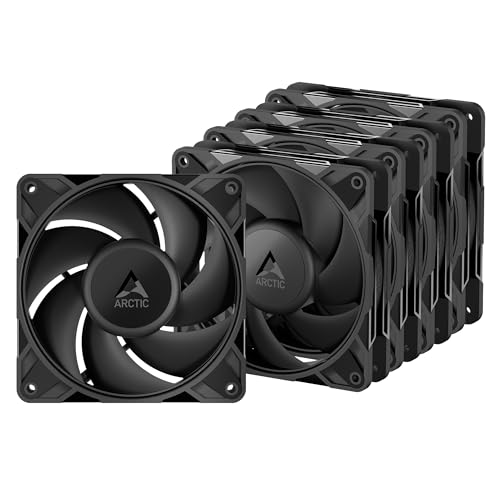

Top 3 picks at a glance
Quick Verdict
If your absolute priority is the lowest possible noise floor — especially at low and medium speeds — magnetic levitation fans are the better choice. With the rotor suspended in a magnetic field, there’s no solid contact between shaft and bearing, which eliminates the mechanical friction hum that develops in contact-based bearings over time. If your priority is reliable, quiet-enough cooling at a sane price, fluid dynamic bearing fans win handily. A quality 120 mm FDB fan costs a fraction of a mag-lev equivalent, lasts 5–10 years under normal use, and modern designs are quiet enough that most people can’t tell the difference at idle speeds. For most homes, FDB is the smart buy; for dedicated silent builds and audio-sensitive rooms, mag-lev justifies the premium.
Side by Side
| Factor | Magnetic Levitation Fans | Fluid Dynamic Bearing Fans |
|---|---|---|
| Noise at low RPM | Near-silent; no bearing contact means no friction whine | Very quiet; oil film dampens contact, faint hum possible |
| Noise at high RPM | Airflow noise dominates; bearing stays quiet | Airflow noise dominates; slight bearing noise may emerge |
| Lifespan | Often rated 100,000+ hours; no mechanical wear on bearing | Typically 50,000–100,000 hours rated |
| Price range | ~$25–$60+ per fan; niche models cost more | Varies |
| Maintenance | None; sealed design, dust only | None; sealed oil reservoir, dust only |
| Availability | Limited model selection, fewer sizes | Widely available in 80/92/120/140 mm, PWM and DC |
| Durability when mounted horizontally | Unaffected — no oil to pool or drain | Modern FDB handles any orientation; older designs degraded |
| Failure mode | Electronics failure more likely than bearing wear | Oil slowly dries over years; gradual noise increase warns you |
| Look | Futuristic; pairs well with showcase builds | Standard, unobtrusive, tons of RGB and black options |
| Best for | Silent PCs, bedrooms, studios, showcase builds | Everyday desktops, budget builds, multi-fan case cooling |
Where Magnetic Levitation Fans Wins
True friction-free operation. In a mag-lev fan, the rotor floats on a magnetic field rather than spinning inside a lubricated sleeve. There is no metal-on-anything contact, which means the characteristic low-frequency hum and the high-pitched whine that contact bearings can develop simply don’t exist. At 600–800 RPM, a good mag-lev fan is effectively inaudible beyond the sound of moving air.
No degradation curve. FDB fans start whisper-quiet and stay quiet for years, but the oil film can gradually thin, and noise creeps up. Mag-lev fans have no lubricant to dry out, so their acoustic profile on year five should match day one.
As an Amazon Associate we earn from qualifying purchases at no extra cost to you.



Any orientation, any vibration environment. Because nothing physically supports the rotor, mounting angle and external vibration don’t affect bearing behavior. That matters if you’re mounting fans on radiators, on hard panel mounts, or in a small apartment where a case sits on a wooden desk that amplifies vibration.
Longevity math. Manufacturers commonly rate mag-lev fans at 100,000 hours or more — roughly 11 years of continuous 24/7 operation. That ceiling comes from the electronics, not the bearing.
The same magnetic suspension principle shows up outside of cooling, too — it’s what lets desk gadgets like the Floating Money Banknote Lamp hover and rotate a bill in midair with a 3-color LED glow. It’s a fun way to see the technology at work, and a popular gift for a game room or man cave, though as a decor piece rather than a cooling solution.
Where Fluid Dynamic Bearing Fans Noise Wins
Price, dramatically.A five-fan mag-lev setup could easily cost three to five times as much.
Modern FDB is genuinely quiet. The old stereotype of whiny case fans comes from cheap sleeve bearings. A well-made FDB fan holds an oil film between shaft and bearing, damping contact noise effectively. Below roughly 1,000 RPM, most listeners can’t distinguish it from a mag-lev fan in the same case.
Selection and ecosystem. FDB is the default bearing in quality fans across every major size, from 80 mm compact cases to 200 mm big-air builds. You’ll find it in high-static-pressure radiator fans, high-airflow case fans, and everything between, in black, white, and RGB variants. Mag-lev offerings are comparatively sparse.
Predictable failure. When FDB lubricant ages, fans get progressively louder first — an early warning that lets you replace a fan on your schedule. Mag-lev fans tend to work flawlessly until an electronic component fails without warning.
Cost Over 5 Years
Fluid dynamic bearing: A typical mid-tower build needs 3–5 case fans. Even replacing one fan at year four adds only a few dollars. Expect 50,000–100,000 rated hours, meaning most FDB fans outlive the PC they’re cooling.
Magnetic levitation:Over five years, there’s no lubricant top-up or maintenance, and the rated lifespan means you likely won’t replace anything. The premium buys silence and longevity, not savings.
Bottom line: FDB costs roughly one-third to one-fifth as much over five years for a full case. For a den desktop, the money is better spent elsewhere.
Which One for Your Home
Small Apartment
In a studio or one-bedroom, your PC likely sits within arm’s reach of where you sleep or work, so noise floors matter. A hybrid approach works well: mag-lev fans on the front intake nearest your ears, budget FDB fans for rear and top exhaust.
Family with Kids or Pets
Here, durability and value beat marginal acoustic gains. Pets shed, kids spill, and PCs in family spaces collect dust that touches every fan equally. Spend on FDB multipacks, add magnetic dust filters, and plan to clean fans twice a year. Put the savings toward the actual noise issue in family rooms: positioning the PC under a desk rather than on it.
Rental
Renters usually can’t modify HVAC or windows, so a loud PC stands out more. But since you’ll likely move within a few years, invest conservatively. A quality FDB 5-pack is the sweet spot — quiet enough for apartment living, cheap enough that you won’t hesitate to reinstall them in your next machine. Skip mag-lev unless your rental doubles as your content-creation studio. If you want a levitation flourish that survives the move, the ESTODAL Magnetic Levitation Machine Core DIY Kit is a fun, portable desk piece with a 500 g load capacity and built-in LED — a conversation starter that travels in a box, unlike installed fans.
Long-Term Home
If you’re setting up a permanent office or media room and expect to keep the same machine for 5–10 years, mag-lev earns its keep. The noise-free bearing, immunity to oil degradation, and 100,000+ hour ratings align with a long ownership horizon. Build the machine once with mag-lev fans where airflow allows, and you’ll never think about bearing noise again. Pair with the quietest FDB or mag-lev options for exhaust positions, and enjoy what by 2026 standards is a genuinely inaudible desktop.
FAQ
Are magnetic levitation fans actually quieter than fluid dynamic bearing fans?
At low to medium speeds, yes — measurably, because there’s no bearing contact to generate friction noise. At high speeds (above roughly 1,500 RPM), airflow turbulence becomes the dominant noise source for both types, and the gap narrows considerably. At idle with 0 RPM modes, neither spins at all, so they’re equally silent.
How long do fluid dynamic bearing fans last?
Most manufacturers rate FDB fans at 50,000–100,000 hours. In a home PC running 8 hours a day, that’s 17–34 years of real-world use — far beyond typical ownership. Heavy-duty 24/7 operation shortens that, but five years of quiet service is a conservative expectation.
Do magnetic levitation fans fail?
Eventually, yes — but usually through electronics (driver circuitry, LEDs, control chips) rather than bearing wear, since there’s no mechanical contact to degrade. Failure tends to be abrupt rather than the gradual noise increase you get with aging oil-based bearings.
Is it worth paying more for mag-lev fans in a bedroom PC?
If the PC runs while you sleep and sits closer than about three feet from your bed, the premium is defensible — bearing noise is most noticeable in quiet rooms at night. If the machine idles at 0 RPM or sleeps overnight, quality FDB fans with a 0 RPM mode deliver the same practical silence for far less money.









