
Modern homes are increasingly centered around technology. From high-end home offices where we manage our daily careers to living room entertainment centers housing whisper-quiet media PCs and gaming consoles, our household electronics require careful maintenance to perform at their best. When building or upgrading a home computer or console, one of the most critical decisions you will make is how to manage the heat generated by your processor. This brings us to a classic debate in the hardware world: the liquid metal vs ceramic thermal paste performance difference.
For the average homeowner, this choice is not merely a technical specification; it directly impacts the daily living environment. A hot processor requires cooling fans to spin at maximum speed, creating a constant, irritating hum that disrupts a quiet living room or home office. Conversely, choosing the wrong thermal compound can introduce physical risks to expensive home electronics, potentially causing permanent damage if a conductive liquid spills onto delicate circuitry. Deciding which thermal interface material is right for your home means balancing the desire for absolute silence and peak performance against safety, ease of installation, and long-term durability.
As an Amazon Associate we earn from qualifying purchases at no extra cost to you.


Our Top Picks


Top 3 picks at a glance
Quick Verdict
If you prioritize absolute silence, maximum heat dissipation for high-wattage systems (such as 250W+ processors), and are comfortable with a meticulous, high-risk application process, liquid metal is the ultimate choice. It can drop operating temperatures by 10°C to 15°C compared to standard compounds, allowing your cooling fans to run at whisper-quiet levels. However, for 95% of home users, ceramic or carbon-based thermal paste is the superior choice. It is completely non-conductive, highly affordable, exceptionally easy to apply, and lasts up to eight years without needing maintenance, making it the safest and most practical option for a busy household.
Side by Side
To help you visualize how these two thermal interface materials compare in a typical home environment, we have laid out their key characteristics side by side:
| Feature | Liquid Metal | Ceramic / Carbon-Based Paste |
|---|---|---|
| Acoustic Comfort (Noise Level) | Excellent. Drastically lowers fan speeds, resulting in a quieter home. | Good. Fans may spin faster under heavy household workloads. |
| Durability & Lifespan | Moderate. May require reapplication or inspection every 1 to 2 years. | Exceptional. Often lasts 5 to 8 years without drying out. |
| Price Range | Varies | Varies |
| Maintenance & Application Risk | High. Electrically conductive; can destroy components if spilled. | Zero. Non-conductive and completely safe if over-applied. |
| Space & Substrate Requirements | Strict. Cannot be used with aluminum heatsinks; requires copper or nickel. | Universal. Safe for all metal heatsink designs and surfaces. |
| Visual Cleanliness / Aesthetics | Can stain copper heatsinks, leaving a dull, alloyed gray mark. | Wipes away cleanly with standard isopropyl alcohol. |
| Hardware Resale Value Protection | Low. Etching on the CPU integrated heat spreader (IHS) can hurt resale. | High. Preserves the original markings on the hardware perfectly. |
| Best For | Delidded CPUs, silent home theater PCs, and extreme gaming setups. | Family computers, home office workstations, and budget builds. |
| Typical Operating Wattage | Optimized for high thermal loads (150W to 350W+). | Excellent for standard home devices (15W to 150W). |
Where Liquid Metal Wins
The primary advantage of liquid metal lies in its staggering thermal conductivity. Traditional thermal pastes, including carbon and ceramic variations, generally offer thermal conductivity ratings between 4 and 12 W/mK (watts per meter-kelvin). In contrast, liquid metal compounds, which are typically made from eutectic alloys of gallium, indium, and tin, boast conductivity ratings exceeding 73 W/mK. This massive physical difference means that heat is transferred from the hot silicon chip to the metal heatsink almost instantaneously.
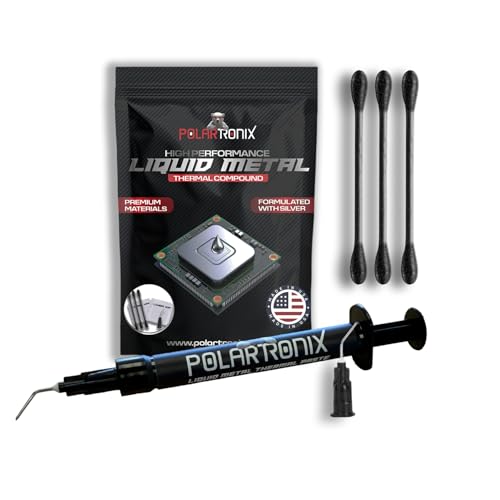
For high-performance home applications, such as a dedicated home theater PC (HTPC) tucked inside a tight media console or a high-end gaming rig in a warm room, this efficiency is game-changing. Premium options like the Thermal Grizzly Liquid Metal Thermal Paste Conductonaut 1 Gram or the PolarTronix Liquid Metal Thermal Paste – 1 Gram – Made in USA – Liquid Metal for PS5 – CPU – GPU – Series S Series X- Game Consoles Best for overclocking – Premium Materials – Ps5 Liquid Metal are specifically engineered to maximize this thermal transfer.
Because the heat escapes the processor so rapidly, your cooling fans do not need to ramp up to high decibel levels to keep the system stable. This results in a serene, noise-free home office or living room environment. Furthermore, for compact home entertainment consoles that run warm, liquid metal provides the thermal headroom necessary to prevent thermal throttling, ensuring smooth, uninterrupted performance during family movie nights or gaming sessions.
Where Ceramic Thermal Paste Performance Difference Wins
While liquid metal dominates in raw thermal transfer, ceramic and carbon-based thermal pastes win decisively in safety, ease of use, and overall peace of mind. Ceramic pastes utilize non-conductive materials like zinc oxide, aluminum oxide, or carbon particles suspended in a silicone fluid. This composition means they do not conduct electricity. If you accidentally apply too much paste and it squeezes out onto the motherboard, your computer will continue to run safely without short-circuiting.
Products such as the ARCTIC MX-7 (4 g) – Ultimate Performance Thermal Paste, Long Durability and the larger ARCTIC MX-7 (8 g) – Ultimate Performance Thermal Paste, Long Durability represent the pinnacle of this worry-free design. They are incredibly forgiving to apply, requiring only a simple pea-sized drop in the center of the processor before mounting the heatsink.
Additionally, ceramic and carbon pastes do not react chemically with your cooling hardware. Gallium, the primary ingredient in liquid metal, rapidly destroys aluminum through a process called galvanic corrosion, turning solid metal into a brittle, crumbly powder. It also reacts with copper over time, forming a dull alloy layer that requires sanding to remove. Ceramic paste is entirely inert, meaning it is completely safe for any heatsink material in your home electronics and will wipe away cleanly years down the line, preserving the resale value of your components.
Cost Over 5 Years
When planning a home budget, evaluating the total cost of ownership over a five-year period is highly practical. Traditional thermal paste is incredibly economical.
Liquid metal, on the other hand, is a premium investment. Over a five-year period, liquid metal can migrate or react with copper heatsinks, requiring you to open the system, clean the contact points, and reapply the compound at least once or twice to maintain peak thermal transfer.
Which One for Your Home
Small Apartment
In a compact studio or one-bedroom apartment, space is at a premium and background noise is highly noticeable. A noisy computer fan can easily drown out a quiet television show or disrupt a partner sleeping nearby. If you have a high-performance system in a small space, liquid metal can help maintain a quiet environment by allowing your fans to spin at their lowest possible speeds. However, if your home computer is used primarily for standard tasks like browsing, remote work, or streaming, a high-quality ceramic paste paired with a moderately sized, quiet air cooler is the safest way to achieve a peaceful living space without the stress of managing liquid metal.
Family with Kids and Pets
For homes filled with children, curious pets, and busy schedules, reliability and safety are the top priorities. Computers in family spaces are often subjected to physical bumps, vibrations, and occasional rough handling. Liquid metal remains a fluid alloy at room temperature, meaning severe physical shocks could theoretically cause tiny droplets to migrate off the processor die and onto the motherboard, causing a catastrophic short circuit. A non-conductive, highly durable paste is the clear winner here. It is completely immune to physical shocks, requires zero maintenance, and will reliably protect the family PC for years without any intervention.
Rental
If you live in a rental property, you likely move your desktop computer, media consoles, and office setup every few years. During a move, electronic equipment is subjected to vibrations, tilts, and temperature fluctuations in transit. Transporting a computer with liquid metal applied requires extra caution, as tilting the system on its side during a bumpy car ride increases the risk of the liquid metal shifting. Using a stable, non-conductive carbon or ceramic paste ensures that your hardware remains perfectly safe and ready to plug in at your new home, no matter how bumpy the move.
Long-Term Home
If you are established in your forever home and are building a dedicated, high-end home office or a custom home theater room designed to stay pristine through 2026 and beyond, your focus is likely on maximum longevity and peak performance. If you are comfortable with advanced hardware maintenance, using liquid metal on your main workstation or game console can keep your system running at peak speeds with minimal acoustic footprint. However, if you prefer a “set-it-and-forget-it” philosophy for your home infrastructure, opting for a premium ceramic paste ensures your systems remain stable, safe, and maintenance-free for nearly a decade.
FAQ
Is liquid metal safe to use on aluminum heatsinks?
No, liquid metal should never be used on aluminum heatsinks. The gallium in liquid metal rapidly infiltrates the crystalline structure of aluminum, causing it to corrode and crumble within hours. It is only safe to use on heatsinks made of solid copper or copper coated with nickel.
Will switching to liquid metal lower my home electricity bill?
The direct impact on your home electricity bill will be negligible. While liquid metal allows your processor to run cooler, the actual power consumed by the processor remains virtually the same. The only energy savings come from your cooling fans running at lower speeds, which saves less than a few watts of electricity.
Can I use ceramic thermal paste on a PlayStation 5?
The PlayStation 5 is specifically designed from the factory to use liquid metal on its custom processor. Because the system’s cooling architecture is engineered around the extreme thermal conductivity of liquid metal, replacing it with standard ceramic paste could lead to thermal throttling and system shutdowns under heavy gaming loads.
How do I clean up ceramic thermal paste compared to liquid metal?
Ceramic thermal paste is very easy to clean; you simply wipe it away using a paper towel or microfiber cloth dipped in 90% or higher isopropyl alcohol. Liquid metal is much more difficult to remove, as it does not dissolve in alcohol. It must be carefully wiped away using specialized cotton swabs, taking extreme care not to let any metallic droplets fall onto other electronic components.









