
Acoustic foam can make a PC a little quieter, but only a little, and only if you place it where it will not choke airflow. A reviewer who compared a case with and without its factory foam measured a difference of about 0.9 dBA, which the reviewer called well within the margin of error. The practical way to use it is to line the inside of solid side and top panels with thin, fire-rated foam, keep it away from vents and hot parts, and treat it as the last step after fan speed and vibration are sorted.
Our Top Picks



Top 3 picks at a glance
Quick Answer
- Expect a small gain: foam absorbs sound reflecting around inside the case; it does not block noise leaving through open vents or fan grilles.
- Where it goes: inside solid side panels and, if you do not use it for exhaust, the solid top panel. Never over intake filters, exhaust fans, the power supply area, graphics card exhaust path or voltage regulator heatsinks.
- Thickness: 1 inch (25 mm) or thinner is the practical limit in most cases; cut tiles to fit rather than stacking them.
- Safety: choose foam with a stated fire classification (for example Class A under ASTM E84) or melamine foam. Generic wall panels often say only “flame retardant” without a test class.
- Verify: measure temperatures and fan speeds before and after. If fans spin faster under the same load, the foam is hurting more than helping.
What You Need
- Acoustic foam in 1-inch or 2-inch tiles, ideally with a stated fire rating (confirm on listing).
- A sharp utility knife, a metal straightedge and a cutting mat or scrap board.
- Isopropyl alcohol and a lint-free cloth to clean the panel before sticking anything to it.
- Double-sided tape or hook-and-loop strips if the foam has no adhesive backing. Several listings say adhesive is not included, so confirm what comes in the pack.
- Monitoring software that shows CPU and GPU temperatures and fan speeds, plus a repeatable load such as a long game session.
What Foam Does and Does Not Do
Acoustic foam is an absorber. It soaks up sound energy bouncing between panels, which calms echo and some mid- and high-frequency noise such as fan whine or hiss. It is not a barrier. Blocking sound depends on mass, density and sealed gaps, which is why mass-loaded vinyl is classed as a blocker and foam is not.
A rule of thumb from acoustic-foam guides is that 1-inch foam becomes useful above roughly 1,000 Hz and 2-inch foam above roughly 500 Hz. Strict wavelength math says a thin absorber needs to be about a quarter of the wavelength to work fully, so sources vary on how conservative to be. What nobody disputes is that low-frequency hum needs far more thickness than any PC panel can hold. That is why foam helps the buzzy, airy part of a PC’s sound and does little for deep resonance.
PC noise comes from two paths: air noise from fans and drives, and structure-borne vibration that the thin metal panels amplify. A damping review from a respected quiet-PC site made the same point: panels are thin and can resonate, so damping materials work best when they stop panel resonance and contain noise, not as a stand-alone fix.
Realistic Expectations
| Noise source | Does foam help? | Better first step |
|---|---|---|
| Fan whoosh through open vents | Barely; the sound leaves through the opening | Lower fan speed with a fan curve, or fit larger, slower fans |
| Fan hiss reflecting inside the case | Some | Foam on solid panels |
| Low hum or panel buzz | Little | Vibration isolation, tightening panels, checking for loose parts |
| Spinning hard drive | A small amount | Rubber mounting, or switching to a solid-state drive |
| Coil whine from the graphics card or power supply | Little; it is electrical | Frame-rate cap, different power limit, or an RMA if severe |
Perception matters as well. A 10 dB(A) increase is generally heard as roughly twice as loud, so a change below 1 dB(A) will be hard to notice at all.
How to Add Foam Without Trapping Heat
Choose the Material
| Material | Heat tolerance | Fire behavior | Notes for PC use |
|---|---|---|---|
| Standard polyurethane wedge or pyramid tiles (the type most wall-panel packs use) | One supplier says flexible polyurethane starts softening around 80 to 120 degrees Celsius | Flammable unless rated; look for a stated test class | Fine on a side panel away from hot parts; thick tiles may foul cable routing |
| Melamine foam | Manufacturer figures run well above 150 degrees Celsius continuous | Inherently flame-resistant; widely used where heat is an issue | Preferred near warmer spots; not shedding fibers |
| Mass-loaded vinyl or butyl sheet | Varies; confirm with the maker | Varies | Adds blocking mass for low-frequency vibration, but it is heavy and thin cases may not carry it |
The packs listed below are polyurethane wall panels sold for rooms, not products made for computer cases. Their listings use wording such as “flame retardant” without naming a formal test, and similar listings state no Class A or UL 94 rating. If you rely on them inside a PC, confirm the rating with the seller and keep the foam clear of anything that gets hot.
Step-by-Step Installation
- Finish the cheaper quieting steps first: set a sensible fan curve, fit vibration-damping fan mounts and remove any loose-fitting parts that rattle.
- Log a baseline. Run your usual load for ten to fifteen minutes and note CPU temperature, GPU temperature and fan speeds. Record the room temperature.
- Power off, unplug the PC and remove the side panel. Lay it flat on a table.
- Check the panel’s inner face for room. Locate bumps for latches and the clearance beside the graphics card, power cables and any tempered-glass retention points.
- Trace the panel’s flat areas onto the foam backing, leaving a margin of about a centimeter at the edges and around cutouts.
- Cut with a sharp blade, using the straightedge. Cut through in several light passes instead of one heavy pass, which tears foam.
- Clean the panel with isopropyl alcohol and let it dry.
- Fix the foam with adhesive backing, double-sided tape or hook-and-loop strips. Press firmly and make sure no loose corner can fall onto a fan.
- Refit the panel, reconnect power and repeat the baseline test. Compare fan speeds at the same temperature as well as temperatures themselves.
- If the fans now ramp higher or components run warmer at the same load, remove or trim the foam back from the hot zones.
Placement Guide
| Location | Verdict | Reason |
|---|---|---|
| Inside the solid left or right side panel | Good | Large flat area with little airflow demand |
| Solid top panel not used for exhaust | Good if clear of the CPU cooler | Covers another reflecting surface |
| Behind the front intake | Avoid | This is the main air path; restricting it makes fans louder |
| Around rear or top exhaust | Avoid | Blocks hot air from leaving |
| Power supply shroud and intake | Avoid | The unit needs clear air; never open a power supply to add foam |
| Near graphics card heatsinks and motherboard voltage regulators | Keep clear | These parts run hot and foam insulates them |
Balancing Sound and Cooling
Foam is also an insulator, and forum users report that coating panels can raise temperatures when airflow is tight. Reviews of heavily dampened cases show the trade clearly: one popular quiet case with foam- and bitumen-lined panels runs several degrees warmer than mesh-fronted designs in some comparisons, and reviewers describe the solid front panel as restrictive. The lesson is the same inside your own case. Anything that reduces how easily air enters raises fan speeds, and louder fans erase the benefit of the foam.
A commonly given warning in quiet-PC guides is never to cover intakes, exhaust vents or the power supply area. A well-ventilated case with fans at low speed is often quieter than a sealed case whose fans must work harder.
Combine Foam With Other Quieting Steps
- Fan speed first. A BIOS or software fan curve lowers the loudest source directly.
- Bigger, slower fans. Larger fans can move the same air at lower speed.
- Vibration isolation. Rubber fan mounts, drive isolation and feet under the case cut structure-borne noise, which thin panels amplify.
- Cooler and graphics card settings. A tower cooler or a modest power limit lets fans stay slow.
- Foam last. Use it as a finishing touch for the remaining mid- and high-frequency noise.
If It Does Not Work
- Temperatures rose: remove foam from the panel regions closest to the graphics card and cooler, or switch to thinner pieces.
- Still loud: run the fan-speed sweep. Set fans to fixed speeds in steps and listen for a specific speed where buzzing peaks; that is resonance and needs mounts, not foam.
- Foam smells strongly: panels ship compressed, and listings advise letting them expand in a ventilated space for a day or two before use. If the smell persists, do not install them.
- Foam sags or detaches: clean the panel again and use mounting strips instead of relying on a weak adhesive backing.
Gear That Helps
Focusound 52-Pack Acoustic Foam Panels (1 inch) – a thin option for panel linings
As an Amazon Associate we earn from qualifying purchases at no extra cost to you.

These are 12 by 12 inch wedge tiles at 1 inch thick, which is close to the thickness that fits most side panels. A similar Focusound listing quotes a density near 25 kg per cubic meter and mentions flame-retardant properties, but no formal fire rating was found, so confirm on listing. Fifty-two tiles is far more than a single PC needs, so this is a good pick if you also want to treat a desk area. The foam arrives compressed and needs time to expand.
Saiqiang 12-Pack Acoustic Foam Panels (1 inch) – the right quantity for one case

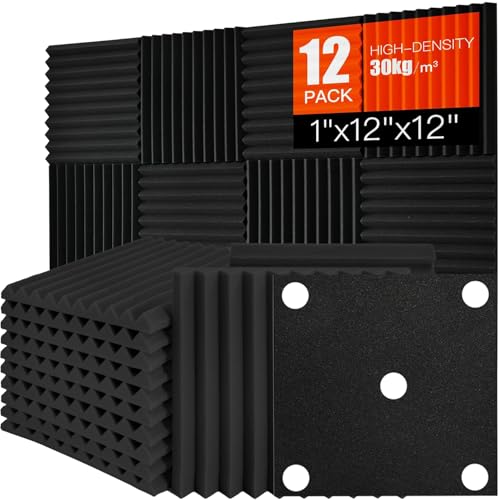
Twelve 1-inch wedge tiles are enough to line the side and top panels of a tower with leftovers. The title promises high-density black wedge panels, though a related Saiqiang listing quotes about 30 kg per cubic meter, so confirm density and whether adhesive is included on this exact listing. Cut each tile to size and avoid pieces thicker than the gap beside the graphics card. This is the easiest of the five to match to a single build.
24-Pack 2-Inch Pyramid Acoustic Foam – for room treatment more than cases

This pack covers about 24 square feet with 2-inch pyramid tiles, and the title cites a 25 kg per cubic meter density. Pyramid tiles at 2 inches are generally too thick for inside most PC cases; consider them if you want to treat the wall behind a desk, or for a case with an unusually wide side-panel gap. The listing says “high NRC” without a number, so no absorption figure is confirmed. This is a runner-up for PC lining.
50-Pack 2 x 12 x 12 Inch Foam Panels – bulk quantity, thicker tiles

The title states 2-inch tiles in a 50-pack, and the seller notes adhesive is not included, so budget for tape or hook-and-loop strips. Thickness limits its use inside a case; it is best for room use or large enclosures. Acoustic foam of this style absorbs reflections rather than blocking noise, so do not expect a silent PC from foam alone. Confirm the fire classification before using it near electronics.
Focusound 120-Pack Acoustic Foam Panels (1 inch) – far more than one PC needs

This 1-inch wedge pack is the same thickness as the 52-pack, with many more tiles. It makes sense only if you plan to line several PCs or an entire gaming corner. Cutting tiles down yields many small pieces, and the unused foam is hard to store. The listing describes wedge panels for offices and studios, not computers, so apply the same cautions about fire rating and placement.
Common Mistakes
- Covering the front intake. This restricts the main air path and raises fan speeds.
- Using thick tiles in a tight case. A 2-inch pyramid can press against the graphics card or cable bundles.
- Ignoring fire safety. Unrated polyurethane foam is flammable and gives off heavy smoke when burned. Use rated or melamine foam and keep it off hot parts.
- Expecting it to block sound. Foam absorbs echoes; it does not seal an open vent or stop vibration.
- Skipping the baseline. Without before-and-after temperatures and fan speeds, you cannot tell whether the foam helped.
- Putting foam inside the power supply. Never open a power supply; capacitors can hold a charge, and the job voids the warranty.
Questions
Will acoustic foam make my PC overheat?
It can if it covers vents, intake paths or hot components, because foam insulates and restricts air. Kept to solid side panels, the change is usually small. Check temperatures and fan speeds against a baseline to confirm.
Is regular foam safe inside a computer?
Not always. Common polyurethane foam can soften at moderate temperatures and is flammable unless treated. Choose a foam with a stated fire classification, or melamine foam, and keep it away from hot parts. A grounded metal case lowers risk but does not remove it.
How much quieter will it make my PC?
Measured results are modest. One reviewer recorded about 0.9 dBA of difference with a case’s factory foam under heavy graphics load and roughly half a decibel with only fans running. Larger gains come from lowering fan speeds.
Should foam go on the outside of the case?
Enclosing a PC in foam traps heat and is not recommended. Outside damping mostly helps vibration, and you would still hear noise from the front and back vents.
What thickness should I choose?
One inch or thinner suits most cases. Thicker foam absorbs lower frequencies better, but it rarely fits near the graphics card or cable routing.
Update History
- October 20, 2026 – Updated with specification checks and a revised product comparison.
- Check the product page for current specifications and availability before buying.
Sources
- Hardware Canucks sound-dampening measurements on a SilverStone Kublai case
- Silent PC Review damping and vibration articles
- SoundAssured flammability rating explainer
- SoundProofCow and SoundAway fire-rated foam pages
- Acoustic guides on foam absorption versus mass-loaded vinyl
- Case reviews covering the Fractal Design Define 7 dampening trade-offs
- Supplier references for polyurethane and melamine foam heat limits
- Retailer product listings for the five foam packs









