
Tucking your gaming PC into a closed desk cabinet or a sealed compartment looks tidy, but it can slowly cook your hardware. A PC breathes, and if it is trapped in an airtight box it just recirculates its own hot exhaust until temperatures climb and fans roar. The good news is that a few targeted changes make a cabinet-mounted PC run nearly as cool as one in the open.
As an Amazon Associate we earn from qualifying purchases at no extra cost to you.

Why a closed cabinet traps heat
Your PC dumps its heat into the surrounding air. In an open room that air is constantly replaced, but inside a sealed cabinet the exhaust has nowhere to go. It builds up, the intake fans start pulling in that same warm air, and you get a feedback loop where the cabinet interior keeps rising above room temperature. Since component temps track ambient almost one-for-one, a cabinet running 10C hotter than the room pushes your CPU and GPU 10C higher too.
| Cabinet condition | Interior vs room temp | Result |
|---|---|---|
| Sealed, no ventilation | +10-20C | Throttling, loud fans |
| Rear/side cutout, passive | +5-10C | Warm but usable |
| Active exhaust fan added | +2-5C | Near open-air |
| Open back, good clearance | +1-3C | Effectively open |
The fixes, from easiest to best
The core goal is simple: get hot air out and cool air in, so the cabinet stops recirculating exhaust.
Open it up and add clearance
The single most effective step is to remove or open the back panel of the cabinet, or cut a generous vent behind the PC’s exhaust so hot air escapes straight into the room. Leave several centimeters of clearance around the case, especially at the intake and exhaust, so fans are not breathing against a wall. If the cabinet has doors, running with them open during gaming makes a large difference.
Add active ventilation
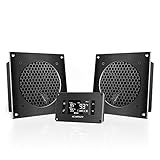
For a truly enclosed cabinet, add cabinet fans. A quiet fan or two mounted to pull hot air out of the top or back of the compartment and let cool air enter low creates a chimney effect, moving the PC’s heat out before it recirculates. USB or thermostat-controlled cabinet fan kits exist exactly for this. Position exhaust high and intake low, matching how heat rises.
Orient the PC and reduce the heat
| Tactic | Benefit |
|---|---|
| Exhaust facing the cabinet opening | Vents heat straight out |
| Intake near a cool air source | Feeds fresh air |
| Cabinet exhaust fan up high | Removes rising hot air |
| Undervolt CPU/GPU | Less heat to remove |
| Cap frame rates | Lower sustained load |
Point the case so its rear and top exhaust face the cabinet’s opening or vent, and keep the intake side near where cool air can reach it. Reducing the heat you generate helps too: undervolting a modern CPU or GPU trims several degrees, and capping frame rates lowers sustained power draw and therefore the heat the cabinet has to deal with.
FAQ
Can I keep the cabinet doors closed while gaming?
Only if the cabinet has real ventilation, ideally an open or vented back plus active exhaust fans. With a truly sealed compartment, closed doors during gaming will trap heat and drive throttling. If you cannot add ventilation, run with the doors open under load.
Does a mesh-front case help in a cabinet?
It helps the PC breathe, but it cannot fix a sealed cabinet, because the case can only pull whatever air the cabinet provides. Solve the cabinet ventilation first; then a good airflow case makes the most of the cool air it receives.
Monitoring to confirm your fixes work
After venting the cabinet and adding fans, verify the result rather than guessing. Log your CPU and GPU temperatures during a demanding game session with the cabinet in its normal daily state, doors and all, then compare against the same test with the compartment fully open. If the gap is only a few degrees, your ventilation is doing its job; if temperatures still climb sharply when closed, you need more exhaust or a larger opening. A cheap thermometer inside the cabinet is a useful gauge too, since the goal is keeping interior air within a few degrees of the room.
Bottom line
A closed desk cabinet cooks a gaming PC by trapping and recirculating its exhaust, raising the interior temperature and every component with it. Open or vent the back, leave clearance around the case, and add active cabinet fans that push hot air out high and draw cool air in low. Orient the exhaust toward the opening and trim heat with undervolting, and your cabinet build can run almost as cool as one in the open.









