
Designing a compact desktop setup or integrating a space-saving PC into a modern home workspace comes with a unique set of engineering challenges. While minimalist, narrow computer cases slide beautifully into tight shelving, under desk mounts, or sleek media consoles, they severely restrict the vertical space available for internal components. The single most common point of failure for builders working in these tight dimensions is purchasing a CPU cooler that prevents the case side panel from closing.
Many builders make the critical mistake of looking at the external width of their PC chassis—for example, 170 millimeters—and assuming a 150-millimeter tall cooler will fit comfortably. In reality, you must subtract the thickness of the case steel, the height of the motherboard standoffs (typically 6 to 8 millimeters), the thickness of the motherboard PCB itself, and the physical height of the CPU socket and its integrated heat spreader (IHS). This math quickly shrinks your available clearance. Squeezing in an oversized cooler can warp your motherboard, crack a tempered glass side panel, or choke your system’s airflow. Knowing how to choose cpu cooler height for narrow pc case layouts requires understanding the exact mechanical clearances of your chassis and matching them to your processor’s thermal output.
As an Amazon Associate we earn from qualifying purchases at no extra cost to you.




Our Top Picks
 Thermalright AXP90 X36 Low Profile ITX CPU CoolerHeight 36mm3.74 x 3.7 x 0.83 Inches0.9 PoundsCheck on Amazon


Top 3 picks at a glance
Decide These 3 Things First
Before browsing catalog listings or matching RGB lighting schemes, you must establish three baseline parameters. Skipping these steps almost guarantees compatibility issues during assembly.
- Your Case’s True Maximum CPU Cooler Clearance: Never guess this value. Check the manufacturer’s technical specification sheet for the exact maximum CPU cooler height limit. If you are using a vintage, custom, or unbranded chassis, manually measure from the surface of the CPU’s integrated heat spreader to the outer edge of the chassis frame using a digital caliper or a precise metric ruler.
- The CPU’s Thermal Design Power (TDP): Your processor’s power draw dictates how much metal mass and fan surface area you need. A low-profile cooler measuring under 40 millimeters cannot safely cool a 150-watt top-tier CPU under sustained workloads. You must balance the physical height limit of your case with the thermal realities of your silicon.
- Motherboard Component and RAM Height: Narrow cases often require small form factor motherboards (Mini-ITX or Micro-ATX). On these compact boards, the CPU socket sits incredibly close to the RAM slots and the motherboard’s VRM (Voltage Regulator Module) heatsinks. A cooler that fits vertically might still fail to fit horizontally if it collides with tall, high-profile RAM heat spreaders.
1. Physical Height Categories and Case Clearance
CPU coolers for narrow cases generally fall into three distinct height brackets, each designed for specific chassis depths. Understanding these categories prevents you from buying a cooler that is physically incompatible with your enclosure.
Ultra-Low Profile (Under 40mm): Designed for ultra-slim, console-style, or mini-ITX cases (such as those under 80 millimeters in total external width). These coolers, like the Thermalright AXP90 X36 which stands at a mere 36 millimeters tall, utilize a horizontal heatsink design where a slim 90-millimeter fan blows air directly down toward the motherboard. They offer maximum clearance but are limited to CPUs with moderate power demands (typically 65W to 100W TDP).
Standard Low Profile (45mm to 75mm): Suitable for mid-sized small form factor (SFF) cases. These coolers utilize slightly thicker fin stacks and sometimes larger 120-millimeter slim fans to handle higher thermal loads (up to 125W TDP) while remaining low enough to clear tight side panels.
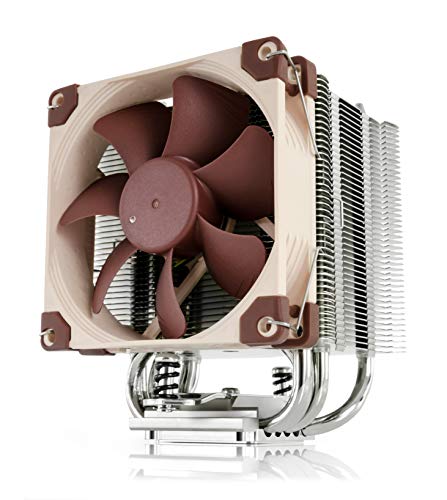
Compact Towers (92mm to 135mm): If your narrow case has a bit more breathing room (around 140 to 160 millimeters of total external width), a compact tower cooler is ideal. These designs feature a vertical heatsink tower where air blows parallel to the motherboard. Options like the Noctua NH-U9S at 125 millimeters tall or the ID-COOLING SE-903-XT V2 at 135 millimeters tall fit beautifully in mid-width towers, offering robust cooling capacity (up to 150W TDP) without the massive footprint of standard 160-millimeter towers.
2. Heatpipe Architecture and Thermal Capacity
The height of a cooler is directly tied to its ability to move heat away from your processor. In narrow spaces, manufacturers must get creative with heatpipe integration to maximize efficiency without adding vertical bulk.
Heatpipes are hollow copper tubes filled with a small amount of liquid that vaporizes when heated, traveling to the cooler’s fins to dissipate before condensing back into liquid. The number of heatpipes and how they contact the CPU are critical performance indicators:
- Direct Contact Heatpipes: Common in budget-friendly options like the ID-COOLING SE-903-XT V2, which features 3 direct-contact copper heatpipes. The copper pipes are flattened and polished to sit directly on the CPU lid, providing rapid heat transfer at an affordable price point.
- Nickel-Plated Copper Baseplates: Found in premium compact options like the Noctua NH-U9S. Here, the heatpipes are sandwiched inside a solid copper block. This configuration distributes heat more evenly across all pipes, which is highly beneficial for modern multi-core processors with concentrated hot spots.
3. Base Plate and Fin Material Composition
When vertical space is restricted, the materials used in your heatsink dictate its thermal conductivity. Most compact coolers utilize a hybrid construction of copper and aluminum to balance performance, weight, and retail cost.
Copper has a thermal conductivity of roughly 401 W/m·K (Watts per meter-Kelvin), making it incredibly efficient at absorbing heat quickly. Aluminum, while lighter and cheaper, has a lower conductivity of around 205 W/m·K but excels at radiating heat into passing air. Because of this, high-performance compact coolers use copper for the base plate and heatpipes, and aluminum for the thin cooling fins.
Weight is another factor to consider. A heavy tower cooler put under physical stress in a narrow case can flex the motherboard PCB. Compact coolers generally weigh between 220 grams (for ultra-low profile models like the Thermalright AXP90 X36) and 620 grams (for premium 92mm towers like the Noctua NH-U9S). Ensure your cooler includes a rigid steel mounting backplate rather than plastic push-pins if it weighs more than 400 grams.
4. Fan Configuration and Acoustic Output
A compact heatsink is only as good as the fan pushing air through it. In narrow cases, fan thickness is just as critical as overall cooler height. Standard PC fans are 25 millimeters thick, but low-profile coolers often rely on slim 15-millimeter or even 12-millimeter fans to save precious vertical space.
Slim fans must spin faster to match the airflow (measured in Cubic Feet per Minute, or CFM) of their thicker counterparts. Higher rotational speeds (measured in RPM) can lead to increased noise. When evaluating fans, look for Pulse Width Modulation (PWM) support, which allows your motherboard to dynamically adjust fan speeds based on real-time CPU temperatures. A high-quality fan should operate quietly between 800 RPM and 2500 RPM, keeping noise levels under 30 dB(A) during average office workloads.
5. Price Tiers and Value Propositions
The market for compact cooling spans from budget-friendly problem solvers to high-end engineering marvels. Finding the right tier depends on your system’s performance requirements and your budget.
Budget Tier: This segment offers incredible value for standard home office PCs and entry-level gaming setups. Models like the ID-COOLING SE-903-XT V2 and the Thermalright Assassin X 120R Digital provide reliable cooling for CPUs drawing up to 150W. While they may lack premium fan bearings or high-end metal finishes, they get the job done efficiently.
Mid-Range Tier: This tier focuses on specialized low-profile solutions for tight spaces. The Thermalright AXP90 X36 sits on the border of budget and mid-range, offering premium ITX compatibility at an accessible price. In this bracket, you find better mounting hardware, slim high-performance fans, and improved RAM clearance profiles.
Premium Tier: Dominated by brands like Noctua, this tier is for builders who demand near-silent operation, exceptional build quality, and long-term socket support. The Noctua NH-U9S showcases what is possible in this space: premium SSO2 fan bearings, nickel-plated copper construction, and an industry-leading mounting system that ensures perfect pressure distribution across the CPU.
6. Mounting Systems and Socket Compatibility
A cooler is useless if it cannot be securely fastened to your motherboard. Modern sockets from Intel (LGA1700, LGA1851) and AMD (AM4, AM5) have different physical dimensions and mounting hole patterns.
Before purchasing, confirm that the cooler includes the specific mounting brackets for your socket. Premium manufacturers include comprehensive mounting kits with high-quality metal backplates, spacers, and tension-spring screws. Budget options sometimes save costs by using universal plastic brackets or clip-on systems. In narrow cases, a secure, screw-through metal mounting system is highly preferred; it prevents the cooler from shifting or losing contact with the CPU during transport or when the PC is positioned horizontally in a media console.
7. Side Panel Airflow Interaction
The physical height of your cooler determines its distance from the case’s side panel. This gap is crucial for maintaining proper airflow dynamics.
If you choose a low-profile cooler that sits too close to a solid, non-ventilated side panel (less than 10 millimeters of clearance), the fan will struggle to pull in fresh air, leading to high temperatures and a loud, high-pitched whistling noise caused by air starvation. Conversely, if your narrow case features a perforated mesh side panel, placing a low-profile cooler extremely close to the mesh can be beneficial, as it allows the fan to draw cool ambient air directly from outside the chassis. Always analyze your case’s side panel material (mesh vs. solid glass or steel) when calculating your optimal cooler height.
Spec Checklist
Use this reference table to understand what specifications you should expect across different price brackets when shopping for a compact CPU cooler.
| Specification | Budget Bracket | Mid-Range Bracket | Premium Bracket |
|---|---|---|---|
| Height Range | 110mm to 135mm (Compact Towers) | 36mm to 67mm (Low-Profile) | 95mm to 125mm (High-Density Compact) |
| Heatpipe Count | 3 to 4 Copper Heatpipes | 4 to 6 Copper Heatpipes | 5 to 6 Nickel-Plated Heatpipes |
| Base Plate Type | Direct Contact Aluminum/Copper | Direct Contact or Copper Plate | Nickel-Plated Pure Copper Base |
| Fan Type | Standard 92mm / 120mm PWM | Slim 90mm / 120mm PWM (15mm thick) | Premium Quiet PWM (e.g., Noctua NF-A9) |
| TDP Rating | Up to 150W | 65W to 125W | 140W to 180W+ |
| Warranty | 1 to 2 Years | 2 to 3 Years | 6 Years |
Red Flags
When hunting for the perfect compact cooler, watch out for these common warning signs that indicate potential compatibility or performance issues:
- Unrealistic TDP Claims: If an ultra-slim 30mm cooler claims to support a 200-watt TDP processor, be highly skeptical. Solid physics dictates that a heatsink with limited surface area cannot dissipate extreme heat without a fan spinning at deafening speeds.
- Plastic Mounting Clips: Avoid heavy compact towers that rely on plastic push-pins or frail plastic brackets. These components degrade over time under constant heat cycles, risking a loss of mounting pressure or complete detachment.
- No Mention of RAM Clearance: If the manufacturer’s product page does not list physical clearance diagrams or specify RAM height limits, the cooler may overhang your motherboard’s memory slots, forcing you to buy low-profile RAM or run your system with fewer memory modules.
- Protruding Fan Clips: Some tower designs use wire clips to mount the fan to the heatsink. If these clips protrude past the top edge of the cooler, they can add 2 to 3 millimeters of unlisted height, potentially scratching or cracking your case’s side panel.
FAQ
How much clearance should I leave between the top of the CPU cooler and the side panel?
Ideally, you should leave a safety buffer of at least 3 to 5 millimeters between the top of your CPU cooler and the inner surface of the side panel. This margin accounts for manufacturing tolerances in the case standoffs, motherboard thickness, and socket height. If your side panel is solid glass or metal, this gap also prevents the fan from creating turbulent, high-pitched acoustic noise.
Can a 36mm low-profile cooler handle an Intel Core i7 or AMD Ryzen 7 processor?
Yes, but with strict caveats. A 36mm cooler like the Thermalright AXP90 X36 can manage these high-performance chips only if you limit their power draw in the motherboard BIOS (using Eco Mode or power limit scaling) or perform undervolting. Under stock settings and sustained heavy workloads, these processors will quickly exceed the thermal capacity of an ultra-low-profile cooler, causing the CPU to thermal throttle to protect itself.
What is the difference between a top-down cooler and a tower cooler for narrow cases?
A top-down cooler mounts its fan parallel to the motherboard, blowing air downward through horizontal fins. This layout is incredibly short (often under 50mm) and helps cool surrounding motherboard components like the VRMs and RAM. A tower cooler mounts its fan perpendicular to the motherboard, blowing air horizontally. Tower coolers are taller (usually 110mm to 135mm in compact sizes) but offer significantly better cooling efficiency because they can utilize thicker fin stacks and align directly with the case’s rear exhaust fans.
Will upgrading my CPU cooler in 2026 require a completely new case if I go with a narrow chassis?
Not necessarily. If you purchase a high-quality, narrow PC case that supports standard cooler mounting heights (such as up to 135mm), you will have plenty of upgrade paths as we head toward 2026 and beyond. The key is choosing a chassis that uses a standardized layout. Avoid proprietary pre-built cases that feature non-standard motherboard mounting designs or integrated, non-removable cooling shrouds, as these will severely limit your future hardware compatibility.









