Our Top Picks

The Short Answer
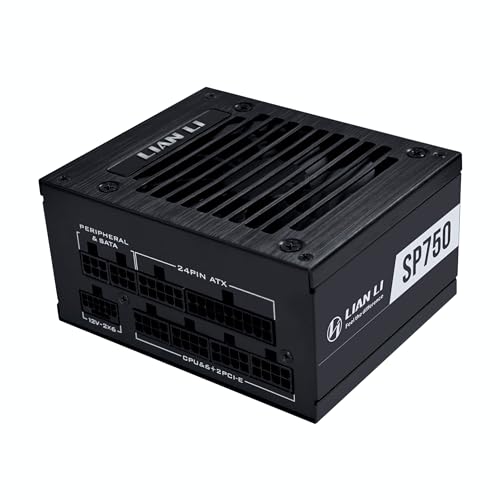
It depends entirely on your specific Mini-ITX case model. While standard Mini-ITX motherboard specifications assume an SFX or SFX-L power supply form factor, many modern Small Form Factor (SFF) enclosure designs include modular mounting points to fit a standard ATX power supply. The single condition determining compatibility is whether your Mini-ITX chassis physically provides the standard 150mm x 86mm clearance window alongside adequate depth clearance (typically 140mm to 160mm) without obstructing the graphics card slot or CPU cooler clearance.
Compatibility at a Glance
| Factor | Requirement | Notes |
|---|---|---|
| Interface | Standard 24-pin ATX, 8-pin EPS, PCIe / 12V-2×6 headers | Electrically identical across ATX and ITX; physical cable length and rigidity are the primary bottlenecks. |
| Power | Matching system draw + 20% overhead (typically 500W–1000W) | ATX PSUs often handle high transient spikes better due to larger bulk capacitors than SFF units. |
| Drivers | No OS drivers required; monitoring software optional | Digital PSUs require a USB 2.0 internal header (`/dev/hidraw` on Linux or vendor software on Windows). |
| Firmware | ATX 3.0 / ATX 3.1 compliant design logic | BIOS settings like ErP Ready and Restore on AC Power Loss govern board-level interaction. |
| Form Factor | 150mm (W) x 86mm (H) x 140–160mm (D) mounting envelope | Requires explicit chassis bracket support; cuts directly into internal volume and GPU length limit. |
What Determines It
Interface
Electrically, an ATX power supply and Mini-ITX motherboard share the exact same pinouts and voltage rails (+12V, +5V, +3.3V, and +5VSB). Mini-ITX motherboards utilize the standardized 24-pin ATX main power header alongside a standard 8-pin (4+4) EPS CPU connector. Modern graphics cards in ITX builds may also draw from the 16-pin 12V-2×6 power connector defined in the PCIe 5.1 specification.
As an Amazon Associate we earn from qualifying purchases at no extra cost to you.


The primary interface bottleneck is physical cable routing. Standard ATX power supplies ship with long, stiff cables (usually 600mm to 750mm) intended for mid-tower chassis. In a Mini-ITX case, these thick, insulated bundles block internal airflow, press against CPU fan blades, or prevent the side panels from closing cleanly. Fully modular ATX units allow you to eliminate unused harnesses, which is mandatory when squeezing large power hardware into sub-20-liter cases.
Power
Power consumption requirements do not change based on motherboard form factor; they depend on your CPU and GPU thermal design power (TDP). An ATX power supply actually delivers thermal and electrical advantages over smaller SFX alternatives because larger 120mm or 140mm cooling fans can spin at lower RPMs to dissipate internal heat.
However, thermal load density inside an ITX case is high. Because an ATX PSU occupies significantly more cubic volume than an SFX unit (approx. 1.23 liters vs. 0.5 liters), it restricts ambient air circulation. You must ensure the PSU’s intake fan draws clean external air (usually through a meshed side or front panel) and exhausts heat directly through its rear honeycomb exhaust, rather than dumping warm air into the CPU socket chamber.
Drivers
Standard ATX power supplies are purely hardware-driven hardware components that operate independently of the operating system. No device drivers are needed for basic voltage regulation, soft-off states, or power delivery to the motherboard.
If you use a smart or digital ATX power supply equipped with internal telemetry, the unit connects to the Mini-ITX motherboard via a standard USB 2.0 internal 9-pin header. Monitoring software reads real-time metrics (such as 12V rail ripple, fan RPM, and watt draw) by polling hardware interfaces managed in Windows Device Manager under Human Interface Devices (HID) or using low-level kernel drivers. If your Mini-ITX board has only one internal USB 2.0 header and it is occupied by an AIO liquid cooler, you will need an internal USB hub.
Firmware
Power delivery handshaking relies on hardware timing signals (specifically the PWR_OK signal line) defined by Intel’s Power Supply Design Guide. When you press the power button, the motherboard grounds the PS_ON# pin, signaling the ATX unit to spin up its main transformer rails. Once voltages stabilize within a 100ms to 500ms window, the PSU asserts PWR_OK high (+5V), instructing the BIOS/UEFI to execute POST routines.
In 2026, PC chassis manufacturers routinely publish precise 3D clearance models that factor in ATX 3.1 excursion standards. Inside the motherboard BIOS/UEFI menu, navigating to Advanced > APM Configuration allows you to tweak low-level power interactions. Enabling ErP Ready (S4+S5 or S5 states) lowers standby power consumption below 0.5 watts when using an ATX PSU, which helps clear residual static current on high-density Mini-ITX motherboards.
Form Factor
Form factor dimensions are the definitive barrier to compatibility. Standard ATX power supplies adhere to fixed dimensions of 150mm width and 86mm height, but their depth varies anywhere from 140mm to 200mm. By comparison, native SFX power supplies measure 125mm (W) x 63.5mm (H) x 100mm (D).
When an ITX case supports an ATX PSU, it usually relies on one of two structural layouts:
- Direct Mount: The chassis rear panel features a multi-pattern cutout that accepts either standard ATX screw spacing (6BA threads) or SFX spacing via a removable steel adapter plate.
- Internal Bracket with Extension Cable: The ATX PSU mounts near the front or top of the frame, relying on an internal AC extension cable routed to a rear C14 pass-through plug.
Installing an ATX PSU in an ITX case often imposes direct trade-offs on other components, frequently reducing maximum supported GPU length from 330mm down to 240mm, or limiting top radiator support from 240mm down to 120mm.
How to Check Yours
- Check Chassis Clearance Specs: Look up your ITX case specifications online or in the user manual. Confirm the Max PSU Length parameter. If it explicitly states “Supports ATX PSUs up to 140mm” (or 150mm), your power supply will physically fit the frame.
- Measure GPU Clearance Buffer: If your graphics card exceeds 280mm in length, measure the distance from the rear panel to the backplate of the GPU. Ensure the lower edge of an ATX PSU frame leaves at least 15mm to 20mm of clearance above the GPU’s PCB and top power connectors.
- Verify Internal Extension Clearance: For cases using an internal AC pass-through cable, check the orientation of the socket on your ATX power supply. Ensure the internal C13 plug on the case’s cable does not collide with the PSU’s master power switch or external socket lip.
- Validate System Power Settings: Turn on the system and enter BIOS by tapping
DelorF2. Navigate to Advanced > ACPI Settings or APM Configuration, set Restore AC Power Loss toPower Off, and ensureErP Readyis configured toEnabled (S4+S5)to prevent parasitic power bleed through the dense ITX motherboard traces.
If It’s Not Compatible
If your Mini-ITX case does not natively fit an ATX power supply, apply one of the following hardware solutions:
Option 1: Convert to an SFX Power Supply using an SFX-to-ATX Adapter Bracket
- What causes it: The ATX PSU exceeds the depth, width, or height limit of the ITX chassis, blocking the GPU slot or side panels.
- How to check: Place the ATX PSU against the mounting frame; if the screw holes do not align or the body overlaps the motherboard standoff plane, it is incompatible.
- What to do: Purchase an SFX power supply along with an offset SFX-to-ATX adapter plate. Secure the adapter plate to the SFX PSU using the four countersunk flat-head screws provided with the bracket, then thread the combined assembly into the case’s factory mounting points.
- How to undo: Unfasten the four outer chassis screws, disconnect internal power leads, remove the adapter bracket, and restore the original frame setup.
Option 2: Install Low-Profile Custom Flexible Cables
- What causes it: The ATX PSU fits mechanically into the frame, but thick factory sleeve cables press hard against the back of the GPU or CPU cooler fan blades.
- How to check: Attempt to close the case side panel. If the stiff 24-pin ATX bundle forces the panel to bulge or prevents the latch from seating, cable rigidity is preventing closure.
- What to do: Replace factory PSU cables with custom-length unsheathed silicone or individual embossed cables cut precisely to length (e.g., 200mm 24-pin ATX cable, 300mm EPS cable). Alternatively, install 90-degree low-profile adapters (such as right-angle 24-pin and 8-pin connectors) at the motherboard side.
- How to undo: Unplug the custom/angled connectors, snap out the custom cables from the PSU modular side, and reconnect the original OEM modular cables.
Option 3: Switch to an ATX-Compatible Small Form Factor Enclosure
- What causes it: The chassis lacks physical cutouts or structural depth for any power supply larger than a dedicated 100mm SFX footprint.
- How to check: Consult the physical chassis schematic; if the internal framework uses fixed steel walls spaced strictly at 125mm x 63.5mm, larger hardware physically cannot enter the interior.
- What to do: Transfer your hardware into a high-compatibility SFF chassis designed specifically to bridge ATX power supplies with ITX motherboards (for example, sub-15L cases built with variable front PSU mounting rails).
- How to undo: Move all core hardware (motherboard, GPU, storage) back to your original ITX chassis and store or return the secondary enclosure.
FAQ
Can an ATX PSU damage a Mini-ITX motherboard?
No. Standard ATX power supplies supply the exact same pinouts, electrical signal timing, and voltage tolerances (+12V, +5V, +3.3V) required by Mini-ITX specifications. As long as physical clearances prevent short circuits against motherboard solder joints, electrical operation is perfectly safe.
Does using an ATX PSU in an ITX case affect GPU clearance?
In many compact chassis layouts, yes. Because an ATX PSU extends 140mm to 160mm in depth, its lower cable output bay frequently extends directly into the path of long, triple-fan graphics cards. Always check your case manual to see how ATX PSU installation alters maximum allowable GPU length.
Is an SFX-to-ATX adapter bracket required for all ITX cases?
No. An adapter bracket is only required if your Mini-ITX case features a native standard ATX mounting opening, but you choose to install a smaller SFX power supply inside it. If your case is natively built for SFX, an ATX power supply cannot be used without custom chassis modification.
Why do custom cables matter when fitting an ATX power supply in an ITX case?
Factory ATX power supply cables are designed for full-sized ATX towers and measure over 600mm long with stiff, heavy insulation. In an ITX case, extra cable mass chokes system airflow and strains motherboard headers. Short, flexible, custom-length cables resolve these clearance bottlenecks without requiring structural modifications.