
Our Top Picks
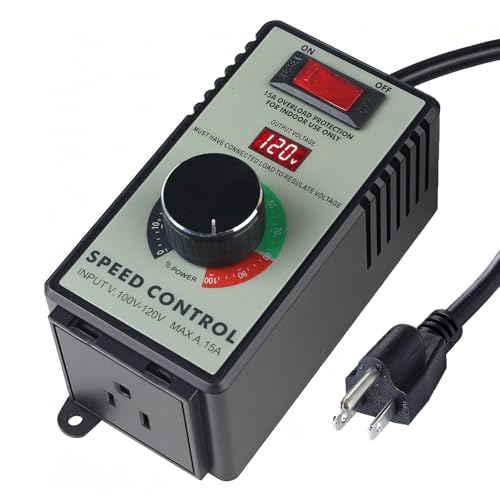 Cdmall AC Motor Speed Controller for Brushed Motors5.5 x 2.4 x 2.25 Inches0.18 PoundsCheck on Amazon

The Short Answer
Probably not — unless your build has more fans than your motherboard has headers, or you want quieter operation than BIOS voltage control can deliver. A fan controller earns its spot in two situations: you’re running more than four to six fans and have run out of 3-pin/4-pin headers, or you’re chasing near-silent operation and want manual, real-time dial control over airflow instead of software curves.
If your case came with two or three fans and your motherboard has spare headers, a controller is a nice-to-have, not a need-to-have. Your BIOS already does the job.
As an Amazon Associate we earn from qualifying purchases at no extra cost to you.


What You Actually Get
Fan controllers fall into two broad camps, and the products most shoppers land on reflect that split.
PC-focused controllers and adapters. A typical budget option is a 12V fan speed controller kit — an AC-to-DC power adapter (100–240V input, adjustable 3–12V DC output, roughly 36W total capacity) paired with a splitter cable that drives up to four 3-pin or 4-pin fans. They replace or bypass motherboard control entirely: you dial the voltage, the fans spin faster or slower. Lower voltage means lower RPM, less noise, and less airflow — the relationship is direct and predictable.
AC motor speed controllers.They include an LED voltage display and overload protection. These are not for standard 12V PC fans; they’re for the kind of high-CFM duct or inline exhaust fan you might pair with a server rack, a grow tent, a workshop ventilation setup, or a home theater cabinet that runs hot. If your “build” is a PC, this category usually isn’t what you want. If your build is a ventilated enclosure of any other kind, it might be exactly right.
The physical hardware itself is simple: a dial or knob, a display on some models, wiring, and connectors. Installation for a PC adapter takes under ten minutes — plug the adapter into a wall outlet, connect the splitter to your fans, set your voltage. AC controllers mount to a panel or wall and wire inline with the fan’s power cord.
Pros
- Manual control beats badly tuned fan curves. Cheap motherboard fan software sometimes produces annoying RPM oscillation. A physical dial gives you steady, predictable speed.
- Quieter builds. Dropping 12V fans to 7V or 5V can cut noise dramatically for workloads that don’t generate much heat.
- Works during boot and in BIOS-limited situations. Hardware control doesn’t depend on OS software or a working fan-curve profile.
- AC controllers add safety features. Overload protection and a live voltage readout are genuinely useful on 120V duct and exhaust fans.
- Longevity. Fans running at lower RPM and lower voltage accumulate bearing wear more slowly.
Cons
- Voltage control isn’t PWM. Many modern 4-pin PWM fans drop to minimum speed gracefully via PWM; undervolting a 3-pin fan can cause stalling or failure to spin up at low settings.
- You lose automatic temperature response. A dial doesn’t know your CPU hit 80°C. Manual control means manual vigilance.
- Extra cables and a wall wart. A PC adapter kit means one more AC adapter in your cable management future — most measure roughly 4–5 inches per side and weigh 8–12 oz.
- Wattage ceilings are real. A 36W adapter divided across four fans gives you about 9W per fan. High-RPM 2000+ RPM fans can exceed that per-fan budget at full tilt.
- Wrong tool confusion. Buyers frequently grab an AC motor controller for 12V PC fans (or the reverse). The voltage and current profiles don’t match, and misapplication can damage fans or the controller.
- Most modern motherboards make it redundant. Six or more headers with granular BIOS curves are standard now, even on mid-range boards.
Who Should Buy It
Buy a controller if you check any of these boxes:
- You’re building a home server, network rack, or AV cabinet where fans run constantly and you want them locked at a fixed, quiet speed.
- You simply prefer tactile control and hate fiddling with fan-curve software.
Who Should Skip It
Skip it if your motherboard has open fan headers and its BIOS or vendor software lets you set curves per header — because that’s a free fan controller you already own. Also skip it if:
- You have two or three case fans total and no noise complaints.
- You’re considering an AC motor controller for standard PC fans — wrong voltage category entirely.
- You want temperature-responsive automatic control; a dumb dial can’t do this, and a good motherboard can.
Cheaper Alternatives
| Option | Cost | Trade-off |
|---|---|---|
| BIOS/manual fan curves on your motherboard | Free | Limited by the number of headers; tuning takes a few reboots to get right |
| Software control (vendor utilities or open-source tools) | Free | Runs in the OS only; useless during boot and adds background software |
| 7V or 5V fan adapter pigtails (12V-to-7V tricks) | Varies | Fixed speed, no adjustment; can under-volt some fans into stalling |
| Powered fan hubs with PWM passthrough | Varies | Adds headers without giving up motherboard PWM control — best of both worlds for most builders |
| Case-integrated fan hub/controller | Varies | Check whether your case already has one before buying anything |
FAQ
Will a fan controller reduce my fan lifespan?
No — usually the opposite. Running fans at lower voltage and RPM reduces bearing stress. The caveat is undervolting below a fan’s rated start voltage, which can cause stutter-starts that wear the motor. Most 12V fans start reliably at 5V or above; stay at or above that floor.
Can I use a 120V AC speed controller on my PC’s 12V fans?
No. AC motor speed controllers are designed for brush-type AC motors on household current and will not safely drive 12V DC PC fans. For PC fans you need a DC output controller or adapter — the 100–240V AC input, 3–12V DC output type. Match the controller to the fan’s voltage and current requirements every time.
How many fans can one controller handle?
Check the wattage budget. A typical 36W adapter kit supporting four 3-pin/4-pin fans allows roughly 9W per fan — fine for standard 120mm and 140mm case fans, but tight for high-static-pressure or 3000-RPM industrial fans that can draw more. Add up your fans’ rated wattage and leave 20% headroom.
Is it worth buying a fan controller in 2026, or is it obsolete?
It’s niche now, not obsolete. Modern motherboards handle six-plus fans with precise PWM control, so most builders don’t need one. But controllers remain the practical answer for header shortages, always-on server and rack builds, fixed-speed workshop ventilation, and anyone who wants hardware-level control that survives a software crash.









