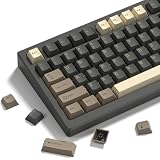
The Kailh Box White set (108 pieces) is the best overall pick for typing: it is a clicky MX-style switch with a 45 gf actuation force, a click bar mechanism and a dust-protected box around the stem, and the count covers a full-size board with spares. Typing switches are the ones that feel good over thousands of words a day, so the useful traits are a defined actuation point, a clear feedback bump or click, and a force light enough to avoid fatigue. Every other set here is a blue-style clicky or a tactile option in a smaller count.
Our Top Picks


Top 3 picks at a glance
Quick List
- IOGOG 72-piece Blue clicky – best for a 65% rebuild with a pre-lubed clicky feel
- Kailh Box White (108 pcs) – best overall for typists who want a crisp click and a full-size set
- Zhouwang 20-piece Crystal Blue – best for trying a clicky feel on a small project
- IOGOG 30-piece clicky – best for repairing or extending a keyboard you already own
- Zhouwang 108-piece Blue clicky (50 gf) – best for a full-size clicky swap with a stated 50 gf force
- Hinbkenla 72-piece Tactile – best for a quieter tactile bump without a click
Which One Is Right for You?
| If you… | Choose |
|---|---|
| want a lighter, crisper click and a full-size quantity | Kailh Box White (108 pcs) |
| want a traditional blue-switch feel for a full-size board at a stated 50 gf | Zhouwang 108-piece Blue clicky |
| are building a 65% or smaller layout and want pre-lubed blue-style switches | IOGOG 72-piece Blue clicky |
| need to replace a handful of switches on an existing board | IOGOG 30-piece clicky |
| only want a small sample to see whether you like clicky switches | Zhouwang 20-piece Crystal Blue |
| share a room or office and prefer a bump without the click | Hinbkenla 72-piece Tactile |
Count your keys first. A full-size board has 104 to 108 keys, a 75% layout has about 82 to 84, a 65% layout about 67 to 68, and a 60% layout 61 to 64. Add roughly 10 percent for spares and mistakes. The sets below span that range, so the right quantity often decides the winner before feel does.
All 6 Picks in Detail
1. IOGOG 72-piece Blue clicky – Best for a pre-lubed 65% rebuild
As an Amazon Associate we earn from qualifying purchases at no extra cost to you.

This IOGOG set contains 72 three-pin blue-style clicky switches that the listing describes as pre-lubed and dustproof. A blue-style switch produces an audible and tactile click partway through the key press, which many typists like because it confirms every keystroke. Seventy-two pieces cover a 65% board with spares but fall short of a full 75% layout, so count your keys before ordering.
Who should buy it: someone rebuilding a compact board who wants the traditional click without paying for a named brand. Who should skip it: anyone who works near other people, because blue-style switches are among the loudest on the market. Pair it with a plate and case that dampen sound if you can, and try one switch first to be sure the force suits your fingers.
- 72 switches, three-pin MX-style
- Clicky, blue-style feel
- Pre-lubed, per the listing
- Dustproof design claimed in the listing
- Actuation force and travel: confirm on listing, though blue-style switches commonly sit near 50 gf
Before you buy, confirm that your board accepts three-pin switches and that 72 pieces cover your key count. Keep the leftover switches as spares, since a bent pin during installation is easy to do.
Pros
- Good quantity for compact layouts
- Distinct audible feedback while typing
Cons
- Loud in shared spaces
- Brand-level specification detail is limited
Compared with the 108-piece Zhouwang set, this IOGOG pack suits smaller boards, while the Zhouwang suits a full-size layout.
2. Kailh Box White (108 pcs) – Best overall for a crisp click and full-size quantity

The Box White is a branded Kailh design and the best-documented switch in this group. Kailh publishes the Box White at about 45 gf of operating force with roughly 1.8 mm pre-travel and 3.6 mm total travel, and the click comes from a click bar rather than the click jacket used in classic blue switches. The box wall around the stem is the design’s dust and water protection. This listing is the three-pin version, which fits plate-mount and hot-swap boards that accept three-pin switches.
Who should buy it: writers, coders and data-entry users who spend hours at the keyboard and want a sharp, light click. Who should skip it: people in shared rooms. The three-pin design suits plate-mount boards and hot-swap sockets that accept it, so check your board first. The listing mentions waterproofing; treat that as dust and splash resistance at the switch, not protection for the whole keyboard.
- 108 switches, three-pin, clicky
- 45 gf actuation force per the listing
- Box design for dust and water resistance, per Kailh; the keyboard itself is not made waterproof by it
- Click bar mechanism with a sharp click
- About 3.6 mm total travel according to Kailh’s specification
Because the force is lighter than a classic blue-style switch, you may find that it lets you type faster with less effort, though the very audible click will still carry across a room.
Pros
- Lighter force than many blue-style switches
- Enough pieces for a full-size build
Cons
- The click is crisp and loud, so it can disturb others
- Three-pin version will not fit boards that require five-pin switches
It is a lighter and more refined clicky alternative to the unbranded blue-style sets, which makes it the first choice for long typing sessions.
3. Zhouwang 20-piece Crystal Blue – Best for sampling a clicky feel

This is a small pack of crystal-housing blue clicky switches that the listing markets for 3D-printed and mod projects. Twenty pieces will not fill a typical keyboard, so its job is to let you hear and feel a blue-style click before you commit to a full set or to swap a few keys on a macro pad. Details on force and pin count are not in the listing name, so confirm both before use.
Who should buy it: curious buyers, macro pad builders and modders who want a clear housing. Who should skip it: anyone rebuilding a whole keyboard. If you like the feel, move up to a larger pack, and note which force rating the final set uses so that your keys match across the board.
- 20 switches
- Crystal blue housing, clicky feel
- Pin count: confirm on listing
- Actuation force: confirm on listing
- Intended for small and DIY projects
The listing emphasizes 3D-print and DIY use, so treat it as a sampler: install two or three in a spare socket, type for a few minutes, and decide whether the click suits you before buying more.
Pros
- Low commitment way to try a clicky switch
- Transparent housing suits lighting mods
Cons
- Too few for most keyboards
- Sparse listing details
Versus the 30-piece IOGOG pack, it is better suited to experiments than to repairs.
4. IOGOG 30-piece clicky – Best for repairs and small additions

Thirty clicky switches are the right size to replace a few failing keys, to add a numpad section, or to build a compact macro pad. The listing calls them three-pin, dustproof and suited to accurate typing. As with the other unbranded sets, check the force and travel on the product page, and expect the click to be loud and sharp.
Who should buy it: owners of a board with a few chattering or dead switches, or builders adding a small section such as a numpad. Mixing brands on one board can make the keys feel uneven, so try to match the force and clicky style of the switches you are replacing, and replace a whole row if you notice a clear difference.
- 30 switches, three-pin
- Clicky, with a dustproof design claimed
- Intended for gaming and typing use
- Force and travel: confirm on listing
- Housing color and lubrication: confirm on listing
If you are replacing switches in a soldered board, plan for careful desoldering; on a hot-swap board you can simply pull the old switch and press the new one in with the pins aligned.
Pros
- Handy quantity for fixes and small builds
- Same feel family as the larger IOGOG set
Cons
- Not enough for a full keyboard
- Listing says little about lubrication
It is the smaller sibling of the 72-piece IOGOG pack, so pick by how many keys you need to replace.
5. Zhouwang 108-piece Blue clicky (50 gf) – Best for a full-size clicky swap
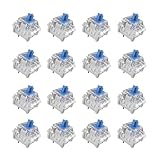
This full-size pack of blue clicky switches states a 50 gf actuation force, three-pin construction, pre-lubed and dustproof features. A 108-piece count covers a full-size or tenkeyless board with spares. Fifty gf is a traditional blue-switch force, a bit heavier than the Kailh Box White’s 45 gf, so it suits typists who like a firmer key.
Who should buy it: full-size keyboard owners who want a classic blue-switch sound and a firm key. Who should skip it: people who find 50 gf tiring over a long session. Because the listing says pre-lubed, give the switches a quick feel check as you install them, and set aside any that feel scratchy as spares.
- 108 switches, three-pin
- 50 gf actuation force per the listing
- Blue-style clicky feel
- Pre-lubed and dustproof, per the listing
- Travel distance: confirm on listing, though blue-style switches usually have about 4 mm total travel
Because there is a stated force and a full-size count, this pack makes it easier to plan a build than the sets with sparse details. Still, check the pin count and travel on the page before ordering.
Pros
- Full-size quantity with spares
- Stated force makes comparison easy
Cons
- Loud click
- Factory lubrication can vary from switch to switch
Next to the Box White, this is the heavier, more traditional clicky option.
6. Hinbkenla 72-piece Tactile – Best for a quieter bump without a click

The Hinbkenla pack stands out because its listing calls the switches three-pin tactile in a transparent blue housing. A tactile switch gives a bump at the actuation point without the separate click mechanism, so it is quieter than the clicky sets. The housing color can be confusing, because blue often signals a clicky switch, so confirm the switch type on the product page before you build.
Who should buy it: typists who like a bump but not a click, such as people who type in the same room as a partner or colleague. Who should skip it: anyone who specifically wants clicky sound. The included tools are useful for first-time builders, but verify the housing type, pin count and force before you place the order.
- 72 switches with tools included
- Three-pin, tactile feel, per the listing
- Transparent blue housing
- Dustproof design claimed
- Force and travel: confirm on listing
If the pack turns out to be clicky rather than tactile, you will want to know before you solder anything, so install one switch first and listen to it in a quiet room.
Pros
- Quieter than clicky sets
- Includes a switch tool for easier installation
Cons
- Tactile versus clicky wording needs confirming on the page
- Limited specification detail
It is the sole tactile choice here, so it is the natural pick for shared rooms when compared with every other clicky set.
Specs Compared
| Switch set | Quantity | Type | Pins | Stated force | Notable features |
|---|---|---|---|---|---|
| IOGOG 72-piece Blue clicky | 72 | Clicky (blue-style) | 3 | confirm on listing | Pre-lubed, dustproof |
| Kailh Box White | 108 | Clicky (click bar) | 3 | 45 gf | Box design, dust and water resistant |
| Zhouwang 20-piece Crystal Blue | 20 | Clicky | confirm on listing | confirm on listing | Crystal housing |
| IOGOG 30-piece clicky | 30 | Clicky | 3 | confirm on listing | Dustproof |
| Zhouwang 108-piece Blue clicky | 108 | Clicky (blue-style) | 3 | 50 gf | Pre-lubed, dustproof |
| Hinbkenla 72-piece Tactile | 72 | Tactile | 3 | confirm on listing | Switch tool included, dustproof |
How We Chose These
We gathered the loose keyboard switch sets in the current catalog that are marketed for typing and compared the listing fields: switch type, pin count, quantity, stated force and any lubrication or dust-protection claims. For the Kailh Box White we also read the manufacturer’s published figures for force and travel. We ranked sets higher when they state concrete specifications and give a quantity that fits a real keyboard layout, and we flagged sets whose listings leave force, travel or pin count unstated. This is a research-based comparison of published information. We also considered how the quantity in each pack maps to common keyboard layouts, since a set that is too small for your board is of little use however good the switches feel.
What to Look For
Switch type: linear, tactile or clicky
Linear switches move smoothly with no bump, tactile switches add a bump at the actuation point, and clicky switches add a bump plus an audible click. For typing, tactile and clicky types give feedback that helps you know a key has registered. Linear switches are quieter and smoother but give less feedback. Every set here is clicky except the Hinbkenla tactile pack, so choose based on how much noise you and the people around you can accept.
Force and travel
Actuation force is measured in gram-force. Typing switches commonly range from about 45 gf to 60 gf. Lighter keys reduce finger fatigue over a long day but are more prone to accidental presses, while heavier keys feel firmer. Travel matters too: the Kailh Box White has about 3.6 mm total travel with a 1.8 mm actuation point, while classic blue-style switches have about 4 mm total travel. A shorter travel can feel quicker, and a longer one can feel more relaxed. Rule of thumb: if you type with a light touch, start near 45 gf.
Pin count and mounting
Three-pin switches have a central stem post and two metal contacts, and they fit plate-mount boards and most hot-swap sockets. Five-pin switches add two plastic alignment pins and are meant for PCB-mount boards. Your board decides this: hot-swap boards accept either type if you clip the extra plastic pins off a five-pin switch, but a plate-mount board with no extra holes needs three-pin switches. Check your keyboard’s documentation or the listing for supported types before you buy.
Quantity, spares and layout
Worked example: a 75% keyboard with 84 keys needs 84 switches, and with a 10 percent buffer for bent pins and bad presses that is about 92. A 72-piece set is too small, but a 108-piece set covers it comfortably. For a 65% layout with 68 keys, 72 pieces leaves only four spares. Stabilized keys such as the spacebar, Enter and Shift use stabilizers, not extra switches, but they still count as a switch position on the board.
Lubrication, noise and sound-dampening
Pre-lubed claims on a listing say that the factory applied lubricant to the stem or spring, but consistency can vary between switches in a bag. Lubing improves smoothness and reduces spring ping, yet it cannot remove the click of a clicky design. If noise is a concern, consider O-rings, a foam-filled case or a tactile switch instead of a clicky one. Good practice is to install one switch, try the feel in your editor or on a typing site, and then commit to the rest.
Pairing switches with keycaps, plates and cases. The feel of a switch depends on the parts around it. A metal plate gives a firmer, sharper sound, a polycarbonate plate is softer, and a PBT keycap tends to sound deeper than a thin ABS cap. Clicky switches are loudest on a hollow case, so foam or a tape-mod can tame the echo. When you swap switches, check that the existing stabilizers are lubed, because a rattling spacebar will undo the benefit of a good switch.
Soldering and hot-swap installation. With a hot-swap keyboard you can pull a switch with a puller and push in a new one without soldering. Make sure the pins are straight before pressing them in, since a bent pin is the most common cause of a dead key. With a soldered board you will need a soldering iron and a desoldering tool, and careless heat can lift traces from the board. If you have never done it before, start on a hot-swap board.
Questions
Are clicky switches good for typing?
Many typists like them because the click confirms each press and the bump makes the actuation point obvious. They are loud, though, so they are a poor match for shared offices and video calls.
What is the difference between a blue switch and a Kailh Box White?
Both are clicky, but the mechanisms differ. Classic blue switches use a click jacket, while the Box White uses a click bar and a box around the stem. The Box White is published at a lighter 45 gf force and a shorter travel.
Do I need five-pin or three-pin switches?
It depends on the board. Hot-swap boards usually work with either, and plate-mount boards without extra holes need three-pin switches. Read your board’s specifications before you buy.
How many switches should I buy?
Count your keyboard’s key positions and add about 10 percent. For a 104-key full-size board that means roughly 115 switches, so a 108-piece set covers every position with only a few spares; add a small extra pack if you expect to make mistakes.
Will pre-lubed switches stay smooth forever?
Factory lubricant helps, but it can thin or migrate over time. If a switch starts to feel scratchy, you can open it and relube it, or replace it, which is easy on a hot-swap board.
Can I mix tactile and clicky switches on one keyboard?
Yes. Some typists put a tactile or clicky switch on the keys they use most and a linear one on others. Make sure the force levels are close, or the board will feel uneven under your fingers.
Update History
- October 20, 2026 – Initial publication; product set drawn from current catalog listings.
- Check the product page for current specifications and availability before buying.
Sources
- Manufacturer-style specification pages and retailer sheets for Kailh Box White switches
- Retailer listing titles and specification fields for each set
- Keyboard enthusiast guides covering switch types, pin counts and force ratings