
The best horizontal PC case for a desk in this group is the SilverStone GD09, a classic low-profile HTPC-style chassis that lies flat, accepts ATX and Micro-ATX motherboards and leaves room for a full-size build under or beside a monitor. A horizontal case is one that sits on its side like an old desktop, saving vertical space and keeping ports within reach. If you want something much smaller, the SilverStone ML08 is a true slim Mini-ITX horizontal option, and the JONSBO TK-0 can be laid flat too. Three of the six cases here are upright towers and are marked as runner-ups.
Our Top Picks


Top 3 picks at a glance
Quick List
- JONSBO TK-0 – best for a small dual-chamber Mini-ITX case that can stand upright or lie flat
- SilverStone ML08B-H – best for a slim Mini-ITX console-style desk or shelf build
- JONSBO C6-ITX – runner-up; upright Mini-ITX tower with a handle and a small desk footprint
- Zalman S4 – runner-up; upright ATX mid-tower for a larger build, not a horizontal case
- Metalfish T40 – runner-up; upright 7-liter Mini-ITX case for very small desks
- SilverStone GD09 – best overall horizontal case for a full-size ATX or Micro-ATX desktop
Which One Is Right for You?
| If you… | Choose |
|---|---|
| want a true flat desktop case with a full-size ATX or Micro-ATX board | SilverStone GD09 |
| want the slimmest horizontal case and can live with a low-profile CPU cooler | SilverStone ML08B-H |
| want a compact, good-looking case that can be turned to lie flat on its side | JONSBO TK-0 |
| care more about a small footprint than about lying flat, and want a carry handle | JONSBO C6-ITX |
| need space for a larger ATX build with radiators and do not mind a tower | Zalman S4 |
| have a very small desk and use an SFX power supply with a compact graphics card | Metalfish T40 |
The deciding question is how much hardware you want to fit. The GD09 is the only case here that takes a standard ATX motherboard while staying horizontal. The ML08 and TK-0 are Mini-ITX only and demand an SFX-class power supply. The other three stand upright, so they suit a desk where width matters more than height.
All 6 Picks in Detail
1. JONSBO TK-0 – Best for a Small Case That Stands Upright or Lies Flat
As an Amazon Associate we earn from qualifying purchases at no extra cost to you.

The TK-0 is a small dual-chamber Mini-ITX case with curved glass and a walnut wood finish, as the listing says. It is the only upright-style case here that listings describe as usable either standing or lying down: the feet are removable and can be refitted to the back panel to lay the case flat. That flexibility makes it a handy choice for a desk that changes over time.
- Mini-ITX (one listing also mentions DTX; confirm on listing)
- About 235 x 250 x 280 mm, roughly 16.5 liters
- Graphics cards up to 230 mm long; SFX power supplies up to 160 mm
- CPU cooler height listed at about 135 to 137 mm depending on the source
- One 3.5 inch bay and one 2.5 inch bay; front USB-C
Fit and setup notes: because the power supply sits in its own chamber with a separate air intake, check that the supply you choose is SFX and no longer than the stated limit. Lying flat changes how the graphics card and coolers sit, so look at your parts in both orientations before buying. The glass is decorative, so do not stack a monitor or heavy items on top of the case.
Who should skip it: anyone who wants a large graphics card or a tall air cooler, and anyone who needs more than one 3.5 inch drive. It is a better fit for a tidy, mostly stationary desk setup than for a performance workstation, where the tight chamber layout can limit airflow. If the look and the flexible orientation matter to you and your parts are modest, it is an appealing small case.
Pros
- Can be oriented upright or on its side
- Separate chamber for the power supply helps heat management
Cons
- Mini-ITX and SFX only
- Glass panels are not meant to bear weight
Compared with the SilverStone ML08B-H, it offers a more decorative design but far less graphics card room and a bulkier shape.
2. SilverStone ML08B-H – Best for a Slim Console-Style Desk Build
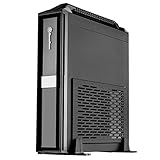
The ML08B-H is a super-slim Mini-ITX case built to work horizontally or vertically, with a carry handle on the H model. SilverStone describes a 12-liter chassis only 87 mm tall, and it is the lowest-profile case in this list. It suits a desk where you want the PC to look like a game console beneath a monitor, with the graphics card and processor in separate airflow zones.
- Mini-ITX; dimensions of about 380 x 87 x 370 mm (W x H x D)
- Graphics card up to 330 mm long and two slots wide, per SilverStone
- SFX and SFX-L power supplies only, up to 130 mm deep
- CPU cooler limited to 58 mm in height
- Two 2.5 inch bays, no chassis fans; front USB 3.0 ports and audio
Fit and setup notes: the 58 mm cooler limit means a low-profile cooler, so a power-hungry processor can run hot or loud. The power supply sits at the front with an extension cable, so read the manual’s cable routing carefully. There are no fan mounts, so the case relies on the parts’ own fans, which makes the choice of graphics card and cooler especially important.
Who should skip it: builders who want a quiet, high-power system, because the 58 mm cooler limit and the lack of fan mounts push you toward low-power parts. It is ideal for a media or office machine with an efficient processor and a compact graphics card. For a big air cooler or a standard power supply, move up to the GD09.
Pros
- True slim horizontal design that can also stand upright
- Roomy for graphics cards for a case this thin
Cons
- Very limited CPU cooler height and no fan mounts
- SFX power supply required
Next to the GD09, it is far smaller but forces tighter choices on cooling and power supply.
3. JONSBO C6-ITX – Runner-Up for a Small Desk Footprint

The C6-ITX is a handled mesh Mini-ITX tower, so it stands upright and is not a horizontal case. It earns a place as a runner-up because its footprint is only about 202 by 266 mm, which fits almost any desk, and it accepts a standard ATX power supply, which is unusual for a case this small. If your priority is saving desk width, it is a good choice; if you want a flat case under a monitor, look at the GD09 or ML08.
- Mini-ITX and Mini-DTX, about 202 x 266 x 295 mm
- Graphics cards under 255 mm long, with room for four expansion slots
- Tower CPU coolers up to about 170 mm tall
- ATX or SFX power supplies up to 140 mm long, according to sources
- One 3.5 inch or 2.5 inch drive; optional 120 mm fans
Fit and setup notes: the ATX power supply mounts at the front of the case, so keep the front clear for airflow and cabling. The mesh panels help cooling but let dust through, so plan to clean filters. Because it stands upright, a monitor cannot sit on top in the way it can on a flat desktop case.
Who should skip it: anyone who insists on a flat case. If your desk is narrow and you only need to save width, it works very well, and the ATX power supply support is a rare convenience at this size. It suits a build with a compact tower cooler and a mid-length graphics card, and the mesh panels keep temperatures reasonable.
Pros
- Tall tower coolers and an ATX power supply fit in a small body
- Carry handle and tool-free access
Cons
- Not a horizontal case
- Supports only one drive
Compared with the Metalfish T40, it is larger but much easier to cool and build in.
4. Zalman S4 – Runner-Up for a Larger Upright Build

The Zalman S4 is a compact ATX mid-tower, which means it is an upright case and does not meet the horizontal brief. We include it as a runner-up for desk users who want a roomy case for a bigger build. The listing names two 120 mm fans, an acrylic side panel, support for a 240 mm radiator and a 315 mm graphics card. Choose it only if you want maximum hardware room, not a flat chassis.
- ATX, Micro-ATX and Mini-ITX motherboards
- Two 120 mm fans included; front 240 mm radiator support
- Graphics cards up to 315 mm; CPU coolers up to about 160 mm
- Power supply up to about 180 mm; seven expansion slots
- Dimensions: confirm on listing
Fit and setup notes: some retailers warn that it is not compatible with ATX boards that have side-mounted SATA connectors in the lower right corner, so check your board. Because the case is tall, it works best beside a desk or under it, not on top. For a simple, larger build with standard parts, it is a straightforward choice.
Who should skip it: anyone with limited desk space, because it is the largest upright case here, and anyone who wants a flat profile. It suits a builder who wants conventional parts, a radiator option and several drives at an accessible size. Its role in this list is to show what a conventional tower offers compared with a true horizontal chassis.
Pros
- Standard ATX parts and radiator support
- Included fans and a simple layout
Cons
- Tall upright tower, not a horizontal desktop
- Large for a desk
Against the GD09, it has more fan and radiator support but cannot lie flat under a monitor.
5. Metalfish T40 – Runner-Up for Very Small Desks

The Metalfish T40 is a 7-liter A4-style Mini-ITX case with a carry handle. It stands upright and is not a horizontal case, but it takes very little desk space. The listing names support for SFX and SFX-L power supplies, a 70 mm CPU cooler and a 206 mm graphics card. It is best for people who want the smallest possible PC and are willing to accept compromises on cooling.
- Mini-ITX only; about 212 x 137 x 260 mm
- CPU cooler up to 70 mm, graphics cards up to 206 mm
- SFX and SFX-L power supplies
- Two expansion slots and three 2.5 inch drive bays
- A PCIe riser cable is required for the graphics card; confirm on listing what is included
Fit and setup notes: build order matters in a case this small, with the power supply and cables installed before the board. A compact graphics card and a low-profile cooler are essential, and the 70 mm limit rules out large air coolers. Check which riser cable is supplied, since the PCIe generation depends on the version you buy.
Who should skip it: first-time builders, since tight spaces and a riser cable make assembly harder, and anyone who plans to run a power-hungry processor. It suits an experienced builder who wants a portable PC with an efficient processor and a short graphics card, and who is comfortable choosing parts around a 70 mm cooler limit.
Pros
- Very small and portable
- Includes a handle and dust filters
Cons
- Not a horizontal case
- Tight clearances limit part choices
Next to the JONSBO C6-ITX, it is smaller but much less forgiving to build in.
6. SilverStone GD09 – Best Overall Horizontal Case for a Full-Size Desktop

The GD09 is a real horizontal desktop chassis, aimed at home theater and desk use, with a faux aluminum front and room for ATX and Micro-ATX boards. SilverStone lists seven plus one expansion slots, a 440 x 170 x 358 mm body (about 26.8 liters) and a design with positive air pressure and removable filters. It is the best option here if you want a full-size system that lies flat.
- ATX, Micro-ATX and SSI-CEB motherboards
- Graphics cards up to about 309 mm long, with a width limit of about 133 mm
- CPU coolers up to about 138 mm tall
- One 5.25 inch external bay, two 3.5 inch bays and one 2.5 inch bay
- One 120 mm fan included; two 80 mm rear fan positions
Fit and setup notes: power supply length limits differ between sources, from about 170 mm to a recommended 180 mm, so check the supply you plan to use. The second 3.5 inch drive can crowd the CPU cooler, so a tall air cooler may need that bay left empty. Positive air pressure keeps dust down only if the filters are cleaned regularly.
Who should skip it: anyone who wants the thinnest possible profile or an SFX-based tiny build, since the GD09 is broad and about 170 mm tall. It suits a desk with room for a wide case, where the extra volume pays off with standard ATX parts, drive bays and a roomier cooler allowance than the slim Mini-ITX cases offer.
Pros
- Full-size motherboard in a horizontal case
- Filtered airflow and room for drives
Cons
- Larger than the Mini-ITX cases and has a limited cooler height
- Cooler clearance shrinks if the second 3.5 inch bay is used
Compared with the ML08B-H, it is bigger and easier to cool, and it gives you ATX flexibility in exchange for desk space.
Specs Compared
| Case | Orientation | Motherboards | GPU length limit | CPU cooler limit | Power supply |
|---|---|---|---|---|---|
| JONSBO TK-0 | Upright or flat (feet removable) | Mini-ITX (DTX mentioned; confirm on listing) | 230 mm | About 135 to 137 mm | SFX up to 160 mm |
| SilverStone ML08B-H | Horizontal or vertical | Mini-ITX | 330 mm, two slots | 58 mm | SFX or SFX-L, 130 mm depth |
| JONSBO C6-ITX | Upright | Mini-ITX, Mini-DTX | Under 255 mm | About 170 mm | ATX or SFX up to 140 mm |
| Zalman S4 | Upright | ATX, Micro-ATX, Mini-ITX | 315 mm | About 160 mm | ATX up to about 180 mm |
| Metalfish T40 | Upright | Mini-ITX | 206 mm | 70 mm | SFX or SFX-L |
| SilverStone GD09 | Horizontal | ATX, Micro-ATX, SSI-CEB | About 309 mm | About 138 mm | ATX; length limit varies, confirm on listing |
How We Chose These
We built this list from the cases named in the catalog and compared them using manufacturer product pages, manuals where available, and retailer listing titles and specification fields. A horizontal desk case should lie flat, keep its ports within reach and leave clear airflow, so we looked at orientation first, then at supported motherboard sizes, graphics card and cooler clearance, power supply type and fan or filter provisions. Three of the six listings are upright cases, so we placed them as runner-ups and said so plainly instead of calling them horizontal. Where sources disagreed on a dimension, such as cooler height or power supply length, we gave the range and advised you to confirm on the listing.
What to Look For
What Horizontal Means on a Desk
A horizontal case lies flat so it can sit under a monitor or next to a keyboard tray. The benefit is height: a slim case about 9 to 17 cm tall leaves your eye line clear. Measure the space before buying, including the monitor stand’s clearance. For example, if your monitor’s panel starts 4 cm above its stand and the case is 17 cm tall, the bottom of the screen sits at about 21 cm above the desk, so you may need to raise or lower the stand to keep the top edge at eye level. Also check weight limits. Most cases are not rated to carry a monitor, so only place one on top if the manufacturer says the top panel can take the load. Glass or acrylic panels should never be used as a shelf.
Motherboard Size and Power Supply Type
The size of the motherboard determines everything else. Mini-ITX boards measure 170 by 170 mm, Micro-ATX boards are about 244 by 244 mm, and ATX boards are about 305 by 244 mm. Slim and small cases are usually Mini-ITX only and require an SFX power supply, which is about 125 mm long and 63.5 mm tall, or SFX-L, which is longer at about 130 mm deep. Full-size ATX supplies are larger and need much more room. Check the power supply’s length against the case limit, and include the cable bend allowance at the back, because thick modular cables can add a few centimeters.
Cooling and Clearance
Horizontal cases are low, so CPU cooler height is the main limit. A slim case may accept only 58 mm, which means a low-profile air cooler or a small liquid cooler, while a larger horizontal case may allow 138 mm. Graphics card length and width matter too, especially in cases that mount the card on a riser. Look for filtered intake vents and keep them clear of paper, cloth or carpet, since blocked vents cause heat buildup. Small cases run hotter, so choose a processor and graphics card with moderate power draw, and check that airflow paths are not blocked by cables.
Storage, Ports and Everyday Use
Desk cases are used daily, so check the front panel. USB-C and several USB-A ports save fumbling behind the case, and an audio jack is handy for headphones. Consider drive bays: a 2.5 inch SSD bay or two is enough for most users, but a media library may need 3.5 inch bays. Tool-free panels make dusting easier. A carry handle is useful if you move the PC between rooms or to events. Finally, consider noise: positive-pressure designs with filters and fewer, larger fans are generally quieter than tiny fans spinning fast, but only if the parts inside do not produce a lot of heat.
A Worked Example: Choosing Between Slim and Full-Size
Suppose you have a desk 60 cm deep and want to keep a 27 inch monitor at a comfortable height. The ML08B-H is 87 mm tall and 370 mm deep, so it leaves nearly all the desk free and keeps the monitor low. The GD09 is 170 mm tall and 358 mm deep, which raises the monitor by about 8 cm more, but it lets you use an ATX power supply, a taller cooler and extra drives. If your parts are a mid-range processor and a compact card, the slim case works. If you want standard parts that are easy to upgrade, choose the GD09. Remember to measure your own desk, because a stand with legs can straddle a case and save height.
Dust and noise also matter on a desk, because the case sits close to you. Intake filters should be removable so you can wash or wipe them every few weeks, and a case placed on carpet will clog quickly, so use hard feet or a shelf. Fans that spin slowly are quieter, so a case with room for larger, slower fans is preferable when your parts allow. Avoid placing a case in an enclosed cabinet without ventilation, because trapped heat shortens component life and can trigger thermal throttling, which slows the PC. Keep power cables and drinks clear of the vents as well, and never block the power supply intake underneath the case.
Questions
Can I put a monitor on top of a horizontal PC case?
Only if the manufacturer says the case can bear the weight. Many cases have thin panels that can bend, and glass or acrylic tops are not designed for weight. If you are unsure, use a monitor stand with legs that straddle the case.
Are horizontal cases hotter than towers?
They can be, because they are smaller and have less room for airflow. Good filtered vents, a modest-power processor and a suitable cooler keep temperatures in check. Always keep the vents clear.
Which of these cases take a full-size ATX motherboard?
The SilverStone GD09 and the Zalman S4 support ATX boards. The GD09 is horizontal, while the Zalman S4 is an upright tower. The other four cases are Mini-ITX.
Do I need an SFX power supply?
For the ML08B-H, TK-0 and Metalfish T40, yes. The C6-ITX takes SFX or ATX, and the GD09 and S4 take standard ATX. Check the length limit before you buy.
Can a horizontal case fit a large graphics card?
Sometimes. The ML08B-H lists room for cards up to 330 mm, while the GD09 lists about 309 mm with a width limit. Always check both length and thickness in the listing.
Why are some of these cases listed as runner-ups?
Because they stand upright rather than lying flat. The C6-ITX, Zalman S4 and Metalfish T40 are good small or mid-size cases, but they do not meet the horizontal brief. The TK-0 is included because the listing describes a way to lay it on its side.
Update History
- October 14, 2026 – Initial publication; product set drawn from current catalog listings.
- Check the product page for current specifications and availability before buying.
Sources
- Manufacturer product and specification pages and manuals for SilverStone, JONSBO and Zalman
- Retailer listing titles and specification fields
- Independent case coverage from TechPowerUp and HEXUS









