
The best all-round pairing for a Ryzen 7 7800X3D in this list is the STORMCRAFT Valkyrie, which pairs the chip with a 16 GB Radeon RX 9070 XT and a 2 TB drive. If you are building yourself, the Sapphire Nitro+ RX 7800 XT is the simpler 16 GB option. The 7800X3D is an AM5 processor with eight cores, 16 threads, and 96 MB of L3 cache that leans on its cache for gaming, so the graphics card is usually what decides your frame rates at higher resolutions.
Our Top Picks
Top 3 picks at a glance
Quick List
- STORMCRAFT Valkyrie (RX 9070 XT) – best for 1440p and 4K gaming out of the box
- Sapphire Nitro+ RX 7800 XT – best for DIY builders wanting 16 GB of VRAM
- STORMCRAFT Falcon (RTX 5070) – best for NVIDIA features with a 360mm AIO
- AVGPC Whirlwind (RTX 5070) – best for storage-heavy builds with a 2 TB drive
- Sapphire Nitro+ RX 7900 XTX – best for maximum VRAM and 4K textures
- Micro Center 7800X3D + B850 bundle – best for starting a DIY platform from scratch
- KOTIN (RTX 5060 Ti 8GB) – best for a white, display-equipped 1080p build
- XFX Speedster RX 7600 – best for a low-power 1080p upgrade
Which One Is Right for You?
| If you… | Choose |
|---|---|
| Want a ready-made PC for 1440p or 4K with 16 GB of VRAM | STORMCRAFT Valkyrie |
| Are building yourself and want 16 GB for less power | Sapphire Nitro+ RX 7800 XT |
| Prefer DLSS and NVIDIA software in a prebuilt | STORMCRAFT Falcon |
| Want an RTX 5070 system with 2 TB of storage | AVGPC Whirlwind |
| Need the most VRAM and plan to game at 4K | Sapphire Nitro+ RX 7900 XTX |
| Need a CPU and board to start a build | Micro Center bundle |
| Play mostly esports at 1080p and like a front display | KOTIN prebuilt |
| Are upgrading an older PC with a modest power supply | XFX Speedster RX 7600 |
Think in terms of resolution first. At 1080p the 7800X3D is rarely the limit, so even a mid-range card works. At 1440p and 4K the card carries more of the load, and VRAM becomes a second filter. If you already own an AM5 system, the three standalone cards are the direct upgrade; the prebuilts replace the whole machine.
All 8 Picks in Detail
1. STORMCRAFT Valkyrie (RX 9070 XT) – Best for 1440p and 4K
As an Amazon Associate we earn from qualifying purchases at no extra cost to you.

The Valkyrie suits buyers who want a finished PC built around the 7800X3D and AMD’s RDNA 4 flagship, without choosing parts individually. The Radeon RX 9070 XT carries 16 GB of memory on a 256-bit bus and supports FSR 4 upscaling on its second-generation AI accelerators.
Who should look closely: players moving up from a 1080p setup to a 1440p or 4K monitor, since 16 GB of VRAM and a 256-bit bus are the main reasons to pick this card over an 8 GB model. The 7800X3D pairs well here because the card, not the processor, is the part that sets the ceiling at those resolutions. Before buying, confirm the power supply brand and wattage, since the listing excerpt shows the processor, graphics card, memory, and drive but not the power supply or case. AMD’s reference card uses two 8-pin connectors, but partner designs can differ, so a prebuilt maker’s own cabling is worth checking. Also confirm the cooler type and the warranty terms for the whole system rather than only the individual parts. Because the platform is AM5, a future processor swap remains possible, while the graphics card is the component you would replace first.
- CPU: Ryzen 7 7800X3D (8 cores, 16 threads, 96 MB L3)
- GPU: Radeon RX 9070 XT, 16 GB, 304 W board power, PCIe 5.0 x16
- Memory: 32 GB DDR5
- Storage: 2 TB SSD
- Power supply, cooler, and case: confirm on listing
Pros
- 16 GB of VRAM leaves headroom for high-resolution textures
- 2 TB of storage is the largest in this list, alongside 32 GB of memory
Cons
- Board power of 304 W means the power supply’s rating matters; confirm it on the listing
- Prebuilt part brands and warranty terms need checking
Compared with the Falcon’s RTX 5070, this system offers four more gigabytes of VRAM, while the Falcon offers NVIDIA’s feature set.
2. Sapphire Nitro+ RX 7800 XT – Best for DIY 16 GB Value

This is the simplest standalone upgrade for an existing AM5 build that needs 16 GB of VRAM. The RX 7800 XT sits on a 256-bit bus with 60 compute units and 64 MB of Infinity Cache, and AMD rates its total board power at 263 W.
This card makes sense when you already have an AM5 motherboard, memory, and a roomy case, and the missing piece is a graphics card with enough memory for 1440p. A 256-bit bus and 16 GB are generous at this tier, and 263 W of reference board power is easier to cool and power than the larger Radeon in this list. The details that decide fit are the ones Sapphire’s Nitro+ cooler changes: length, thickness, fan count, and the exact power connectors. Measure your case before ordering, leave room for airflow in front of the fans, and check that your power supply has the required PCIe power cables rather than relying on adapters. If you want upscaling from the newest Radeon generation, look at the RX 9070 XT in the prebuilt above instead.
- Memory: 16 GB GDDR6
- Architecture: RDNA 3, 60 compute units
- Board power: 263 W (reference)
- Interface: PCIe 4.0 x16
- Card length, power connectors, and boost clock: confirm on listing, since Nitro+ cards run larger than reference
Pros
- Generous VRAM for 1440p gaming
- Lower power draw than the 7900 XTX
Cons
- Older RDNA 3 architecture rather than RDNA 4
- Large partner cooler needs case clearance
Compared with the RX 9070 XT, it draws less power but gives up the newer architecture.
3. STORMCRAFT Falcon (RTX 5070) – Best for NVIDIA Features

The Falcon fits buyers who want DLSS and NVIDIA software in a prebuilt with a 360mm AIO already fitted. NVIDIA lists the RTX 5070 with 12 GB of GDDR7, a 250 W total graphics power, and a 650 W recommended system power.
The Falcon is a good example of a balanced prebuilt: a 120 W-rated processor, a 250 W graphics card, and an 850 W power supply that sits comfortably above NVIDIA’s 650 W system recommendation. The B850 chipset provides current-generation PCIe, and DDR5-6000 is a common sweet-spot pairing for Ryzen 7000 chips. Check that memory is installed as two modules for dual-channel operation, which the listing excerpt does not state, and confirm the case, warranty length, and what software or drivers come preinstalled. NVIDIA’s feature set, including DLSS 4, is the main reason to prefer an RTX 5070 system to the Radeon alternatives, with the trade-off being 12 GB of VRAM instead of 16 GB.
- CPU: Ryzen 7 7800X3D
- GPU: GeForce RTX 5070, 12 GB GDDR7, 192-bit
- Memory: 32 GB DDR5-6000 RGB
- Storage: 1 TB SSD
- Platform: AMD B850 chipset, 850 W power supply, 360mm AIO
Pros
- 850 W power supply leaves headroom above NVIDIA’s 650 W guidance
- 360mm liquid cooling suits the 7800X3D
Cons
- 12 GB of VRAM is less than the 16 GB offered by Radeon rivals
- Only 1 TB of storage
It is the closest match to the AVGPC Whirlwind, which trades faster memory for double the storage.
4. AVGPC Whirlwind (RTX 5070) – Best for Storage-Heavy Builds
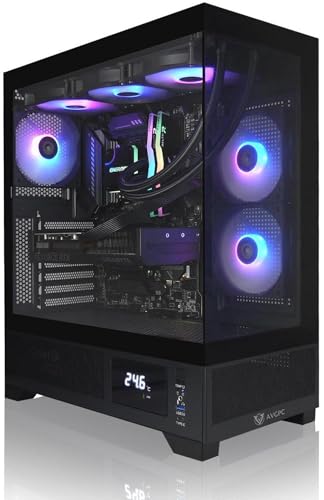
The Whirlwind pairs the same RTX 5070 12 GB with a 7800X3D and a 2 TB NVMe drive, suiting buyers with large game libraries who still want a 360mm AIO.
The Whirlwind is aimed at players with large libraries or who record gameplay, because a 2 TB NVMe drive gives breathing room that a 1 TB system lacks. The memory is DDR5-5600, which is rated lower than DDR5-6000, so check in the BIOS that the memory profile is enabled; some systems ship with the profile off. The listing title is truncated after the Wi-Fi mention, so confirm the motherboard chipset, power supply wattage, case, and warranty before buying. As with the Falcon, you get the same graphics card, so the choice comes down to storage, memory speed, and the seller’s support terms rather than the graphics hardware.
- CPU: Ryzen 7 7800X3D
- GPU: GeForce RTX 5070, 12 GB
- Memory: 32 GB DDR5-5600
- Storage: 2 TB NVMe M.2 SSD
- Cooling and networking: 360mm AIO and Wi-Fi; power supply and motherboard confirm on listing
Pros
- 2 TB of fast storage fits many large installs
- Wi-Fi appears in the listing title (truncated; confirm on listing)
Cons
- DDR5-5600 is slower than the 6000 kit in the Falcon
- Power supply rating not shown in the title
Choose it over the Falcon when storage matters more than memory speed.
5. Sapphire Nitro+ RX 7900 XTX – Best for Maximum VRAM

For 4K players and anyone who mods games with large texture packs, the 7900 XTX is the VRAM leader of this group. AMD’s specifications list 24 GB of GDDR6 on a 384-bit bus, 96 compute units, and 96 MB of Infinity Cache.
The 7900 XTX is the choice when VRAM is the limit you worry about: heavily modded games, high-resolution texture packs, and 4K play all consume memory fast. The card’s 355 W reference board power is substantial, so pair it with a quality power supply of generous rating and plan for case airflow, since a Vapor-X cooler design can be long and thick. Check three details on the listing before committing: card length, slot thickness, and the exact set of power connectors, because partner cards often differ from AMD’s reference. With a 7800X3D in the system, the processor will rarely hold this card back at 4K, although some very CPU-bound games at low resolution can still be capped by the processor.
- Memory: 24 GB GDDR6, 384-bit
- Board power: 355 W (reference)
- Interface: PCIe 4.0 x16
- Cooler: Nitro+ Vapor-X
- Length, slot thickness, and connectors: confirm on listing
Pros
- 24 GB of VRAM gives a long runway for texture-heavy games
- Wide 384-bit memory bus
Cons
- 355 W board power calls for a strong power supply and good airflow
- Large card; check case length
It uses far more power than the RX 7800 XT, so pick it for the extra memory, not for efficiency.
6. Micro Center 7800X3D + B850 Bundle – Best for Starting a Build

This is not a graphics card. It is the CPU and board you would pair a card with, and it suits builders who want the platform sorted before choosing a GPU.
Think of this as the foundation for a graphics-card upgrade path. The AM5 platform and PCIe 5.0 support mean that any card in this list will work, and the board’s DDR5 support lets you choose a memory kit at a speed that suits your plans. The processor ships without a cooler, so you must add one, and you must also supply memory, storage, a power supply, a case, and the graphics card. Confirm the board’s Wi-Fi support, number of M.2 slots, and BIOS version on the listing, since a board may need a BIOS update for the newest processors. This pick is the best fit if you enjoy building and want to choose each remaining part yourself.
- CPU: Ryzen 7 7800X3D (no cooler in the box)
- Board: GIGABYTE B850 Gaming WF, AM5
- Memory support: DDR5
- Expansion: PCIe 5.0 and Gen 5 M.2 support (title truncated)
- Wi-Fi, M.2 count, and slot layout: confirm on listing
Pros
- Gives you a matched CPU and board
- PCIe 5.0 support suits current graphics cards
Cons
- No cooler, memory, or card included
- Requires you to assemble and buy the rest
Compared with the prebuilts, it gives the most freedom to choose parts and takes the most work.
7. KOTIN (RTX 5060 Ti 8GB) – Best for a White, Display-Equipped Build

The KOTIN fits buyers who want a white, liquid-cooled 7800X3D system with a built-in smart display. NVIDIA lists the RTX 5060 Ti with 180 W graphics power and 600 W recommended system power.
The KOTIN is for buyers who care about appearance as much as performance: a white case, liquid cooling, and a smart display that can show system stats. The RTX 5060 Ti in the 8 GB configuration is best suited to 1080p, and to 1440p with moderate settings. Its 180 W graphics power and 600 W recommended system power from NVIDIA make it easy to power, and the listing’s 650 W supply leaves some margin, though the title is truncated, so confirm it. The main caution is memory: 16 GB of system RAM works today but offers less room for background applications than the 32 GB systems here. Verify the liquid cooler’s radiator size and the warranty terms before buying.
- CPU: Ryzen 7 7800X3D
- GPU: GeForce RTX 5060 Ti, 8 GB
- Memory: 16 GB DDR5
- Storage: 1 TB SSD
- Extras: white liquid cooling, 9.16 in display, 650 W power supply (title truncated)
Pros
- Lower power draw than the 12 GB and 16 GB cards here
- Display adds a distinctive look
Cons
- 8 GB of VRAM can limit newer games at higher settings
- 16 GB of system memory is the least of the prebuilts
It trades VRAM and memory capacity for lower power draw, so the Falcon is the stronger pick for longevity.
8. XFX Speedster RX 7600 – Best for a Low-Power 1080p Upgrade

The RX 7600 is the entry-level choice, and it is a labeled runner-up for a processor this capable. It suits upgrades where the power supply and case are modest.
Use the RX 7600 when budget, case size, or an older power supply make bigger cards impractical. It uses a PCIe 4.0 x8 link, which is fine on an AM5 board, and 8 GB of GDDR6 on a 128-bit bus targets 1080p. Pair it with a 7800X3D only if you plan to upgrade the card later, because the processor can do much more than this card allows. Before buying, confirm the power connector type, card length, and the power supply requirement on the listing, because these details vary by manufacturer. For anyone who plays at 1440p or wants longer-term headroom, a 12 GB or 16 GB card is a better investment.
- Memory: 8 GB GDDR6, 128-bit
- Board power: 165 W (reference)
- Interface: PCIe 4.0 x8
- Compute units: 32, with 32 MB of Infinity Cache
- Outputs: HDMI and three DisplayPort
Pros
- Low board power for a current-generation card
- Lower power draw is easier on smaller power supplies
Cons
- 8 GB of VRAM limits future-proofing
- Will not let a 7800X3D stretch its legs at higher resolutions
Step up to the RX 7800 XT if you can accommodate the extra power.
Specs Compared
| Pick | GPU | VRAM | Board power | Type | Other notes |
|---|---|---|---|---|---|
| STORMCRAFT Valkyrie | RX 9070 XT | 16 GB | 304 W | Prebuilt | 32 GB DDR5, 2 TB SSD |
| Sapphire Nitro+ RX 7800 XT | RX 7800 XT | 16 GB | 263 W | Card | Confirm on listing |
| STORMCRAFT Falcon | RTX 5070 | 12 GB | 250 W | Prebuilt | 32 GB DDR5-6000, 850 W |
| AVGPC Whirlwind | RTX 5070 | 12 GB | 250 W | Prebuilt | 32 GB DDR5-5600, 2 TB |
| Sapphire Nitro+ RX 7900 XTX | RX 7900 XTX | 24 GB | 355 W | Card | Confirm on listing |
| Micro Center bundle | None | None | None | CPU and board | B850, AM5, DDR5 |
| KOTIN prebuilt | RTX 5060 Ti | 8 GB | 180 W | Prebuilt | 16 GB DDR5, 1 TB |
| XFX Speedster RX 7600 | RX 7600 | 8 GB | 165 W | Card | PCIe 4.0 x8 |
How We Chose These
This list comes from desk research of published specifications. We started with the products in the catalog and matched each one to the Ryzen 7 7800X3D. We checked graphics card memory, bus width, and board power against NVIDIA’s product pages and AMD’s published specifications, and confirmed the processor’s core count, cache, and socket. For prebuilts we relied on the details visible in each listing title and flagged anything truncated as confirm on listing. We ranked cards on VRAM, power draw, and how well they suit common resolutions, and we left out claims about frame rates that we could not verify.
What to Look For
Match the card to your resolution and VRAM needs
The 7800X3D lifts frame rates in CPU-heavy games, but a weak card still caps you. A simple test: lower the game’s resolution and see if the frame rate rises. If it does, the GPU was the limit. Use the table below as a rule of thumb, not a guarantee, since games vary.
| Target | VRAM guideline | Options in this list |
|---|---|---|
| 1080p high refresh | 8 GB workable, 12 GB safer | RX 7600, RTX 5060 Ti, RTX 5070 |
| 1440p high settings | 12 to 16 GB | RTX 5070, RX 7800 XT, RX 9070 XT |
| 4K or heavy texture mods | 16 GB or more | RX 9070 XT, RX 7900 XTX |
Check power and connectors
The 7800X3D has a 120 W TDP. Add a 250 W RTX 5070 and you have 370 W of rated power on those two parts alone. NVIDIA recommends 650 W for the system, and lists two 8-pin cables or a 300 W-or-greater PCIe Gen 5 cable for that card. The RX 9070 XT at 304 W uses two 8-pin connectors in its reference form. Do not daisy-chain one cable to two connectors on the same card, and confirm adapters on the box.
Confirm physical fit
Standalone cards vary a lot in length and thickness, particularly the Nitro+ models. Measure the case from the rear bracket to the nearest fan or radiator, and compare the result with the card’s listed length. The 7800X3D ships without a cooler, so the bundle needs a separate one.
Prebuilt versus DIY
A prebuilt saves time and gets you a warranty from one seller, but verify the power supply brand, the memory configuration, and the case airflow, since titles rarely list them. DIY costs more effort but lets you choose each part.
Worked example
You play at 1440p and want a card that lasts: the RX 7800 XT gives 16 GB for 263 W, while the RTX 5070 gives 12 GB for 250 W with DLSS 4 support. If you value DLSS 4 and NVIDIA software, the 5070 fits; if you mod games with large textures, the 16 GB card fits.
Questions
Does the 7800X3D bottleneck high-end GPUs?
Rarely at 1440p and 4K, where the graphics card is the limit. At 1080p in some very CPU-heavy titles a top card can become CPU-limited, but this is a strong gaming processor.
Is 8GB of VRAM still acceptable?
For 1080p, yes, but expect to lower texture settings in newer games. For 1440p and above, choose 12 GB or more.
Should I buy the Micro Center bundle or a prebuilt?
Choose the bundle if you want to pick your own card, memory, cooler, and case. Choose a prebuilt if you want a complete machine with one warranty contact.
Is AMD or NVIDIA better to pair with the 7800X3D?
Both work. Radeon cards here offer more VRAM per card, while GeForce RTX 50 cards offer DLSS 4. Choose by the features and memory you need.
Do I need PCIe 5.0 for these cards?
No. Several listed cards use PCIe 4.0, and the RX 7600 uses only eight lanes, which is fine on AM5.
Does the 7800X3D come with a cooler?
No. Buy one separately unless a prebuilt includes liquid cooling.
Update History
- October 20, 2026 – Updated with specification checks and a revised product comparison.
- Check the product page for current specifications and availability before buying.
Sources
- NVIDIA – GeForce RTX 5070 and RTX 5060 family product specifications
- Wikipedia – GeForce RTX 50 series, Radeon RX 7000 series, Radeon RX 9000 series, and List of AMD Ryzen processors
- Product listing titles supplied for each pick









