
For a work or monitoring desk that needs many screens rather than high frame rates, a four-output graphics card is the practical answer, and the six cards in this list are all entry-level designs aimed at that job. The ARDIYES GT 740 4GB, the SOYO GT 730, the maxsun GT 730 and the second ARDIYES GT 730 each advertise four HDMI ports. Do not treat any of them as gaming cards. The seventh entry, a DisplayPort splitter, is not a graphics card at all and appears as a labeled runner-up.
Our Top Picks
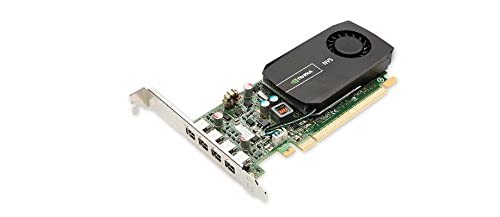 PNY NVIDIA NVS 510 Graphics Card with DisplayPort2 Gb6.3 x 11 x 2.73 inches0.5 poundsCheck on Amazon
Top 3 picks at a glance
Quick view
As an Amazon Associate we earn from qualifying purchases at no extra cost to you.



- ARDIYES GT 740 4GB (4x HDMI) – best four-screen card with GDDR5 memory in the title
- SOYO GeForce GT 730 (4x HDMI 2.0B) – best for video walls and trading screens
- maxsun GeForce GT 730 (4x HDMI) – best single-slot option for compact builds
- ARDIYES GT 730 4GB (4x HDMI) – best budget four-screen listing
- Glorto GeForce GT 730 (2x HDMI, DP, VGA) – best for mixed old and new monitors
- PNY NVIDIA NVS 510 – best for business displays, once you confirm the outputs
- DGYBDFC DisplayPort splitter – runner-up, not a graphics card
Comparison table
| Model | Type | Key specs as stated in the title | Best for |
|---|---|---|---|
| ARDIYES GT 740 4GB | Graphics card, low profile | GDDR5, 4x HDMI, PCIe 3.0 x16 | Four screens, office |
| Glorto GT 730 4G | Graphics card, low profile | 2x HDMI, DP, VGA, DDR3, PCIe 2.0 x8, Windows 11 | Mixed connectors |
| SOYO GT 730 4GB | Graphics card | DDR3, 64-bit, 4x HDMI 2.0B, PCIe x8 2.0 | Video wall |
| PNY NVS 510 | Business display card | DisplayPort accessories; check the listing for memory and outputs | Office, signage |
| maxsun GT 730 4GB | Graphics card, single slot | ITX, 4x HDMI, 4K quad | Small cases |
| ARDIYES GT 730 4GB | Graphics card, single slot | GDDR3, 4x HDMI, 64-bit DDR3 | Budget four-screen |
| DGYBDFC DisplayPort splitter | Not a graphics card | 1 in 3 out, DP MST hub, 4K60Hz claim | Adding screens to a spare DP port |
The seven listings
ARDIYES GT 740 4GB (4x HDMI)
The title pairs a GT 740 with 4GB of GDDR5, four HDMI ports for a quad multi-monitor setup, a PCI Express 3.0 x16 interface and silent cooling, and positions it for office and home theater use. GDDR5 is faster than the DDR3 on the GT 730 listings, which helps video playback and scrolling across large desktop areas, but the title says nothing about gaming, so that is not what it is for. The card is low profile, so check whether the box contains a short bracket for slim cases. Because all four outputs are HDMI, a DisplayPort monitor would need an adapter, and some adapters limit refresh rate. The silent-cooling wording suggests a passive or very quiet design, which is plausible for a card of this class, but the title does not give a fan count or a power figure, so read buyer comments on temperatures in a closed case.
- Pros: four HDMI outputs; GDDR5 stated; PCIe 3.0 x16.
- Cons: older chip generation; per-output resolution not stated; no DisplayPort.
Who it’s for: office desks with four screens. Who should skip it: anyone who plays modern games.
SOYO GeForce GT 730 (4x HDMI 2.0B)
A 4GB DDR3 card with a 64-bit interface, four HDMI 2.0B ports, a 4K quad-monitor claim, PCI-E x8 2.0 and a single-fan cooler. The title names video walls and stock trading as the use cases, which is the right way to read it: many screens showing charts, not demanding graphics. The 64-bit memory width is narrow, so heavy video or 3D work will strain it. Confirm the real maximum for each output and whether 4K applies to all four at once. A practical test of the claim is the manual: look for a table that lists resolution and refresh rate for one, two, three and four active screens, because many cards reduce the limit as more outputs are used. Also confirm what comes in the box, such as a low-profile bracket, since the title does not say.
- Pros: HDMI 2.0B named; four outputs; aimed at monitoring screens.
- Cons: 64-bit DDR3; single fan may add noise; 4K quad is a seller claim.
Who it’s for: trading and signage walls. Who should skip it: video editors and gamers.
maxsun GeForce GT 730 4GB
This one is a single-slot ITX-style card with four HDMI ports and a 4K quad monitor claim. The title does not give the memory type, so check the listing before assuming it matches the others. The single-slot design leaves the neighbouring slot free in a small case, which matters in an ITX build, but it also implies a thin heatsink, so look for cooling and noise comments from buyers. The 4K quad wording is a seller claim, and the title does not tell you the refresh rate, so confirm whether four screens run at 30Hz or 60Hz. For a spreadsheet or browser desk, 30Hz is workable but cursor movement looks slightly choppy, while 60Hz is the better experience. Ask the same question of every four-output card in this list.
- Pros: single slot; four HDMI outputs; compact.
- Cons: memory type and bus width not in the title; small cooler.
Who it’s for: small cases that need four screens. Who should skip it: buyers who want full specs in the title.
ARDIYES GT 730 4GB (4x HDMI)
This variant lists GDDR3 in one place and 64-bit DDR3 in another, a mixed description that suggests the title was assembled loosely. It is described as a four independent display card with a PCI Express single-slot ITX form. Because the title mixes memory terms, read the product page for the true memory type before you buy. It is the same card concept as the maxsun listing and the other ARDIYES model, so treat them as near-duplicates and compare the seller pages rather than the names. A shopper who sees three nearly identical four-HDMI GT 730 cards from different sellers should pick on the clarity of the specification table, the return terms and the driver support information, not on the product name. If one listing publishes a manual and the others do not, that is a useful signal.
- Pros: four independent outputs; single slot; low price tier.
- Cons: mixed GDDR3/DDR3 wording; per-output limits unclear.
Who it’s for: budget four-screen desks. Who should skip it: buyers wary of loose listings.
Glorto GeForce GT 730 4G
The only card here with a mixed set of connectors: two HDMI, one DP and one VGA, along with DDR3 memory, a PCI Express 2.0 x8 interface and a Windows 11 compatibility claim. That VGA output helps if one of your screens is an older monitor, and the DisplayPort output covers a modern screen. It has four connectors in total, but the title does not say how many can run at once or at what resolution, so check the manual. Think of this card as a bridge product for desks with a mix of screens: for example, a modern 24-inch display on DisplayPort, a second on HDMI and an older panel on VGA. The low profile and PCIe 2.0 x8 details make it suitable for slim office PCs, but the seller’s Windows 11 wording is a seller claim, so verify driver availability for the exact chip variant.
- Pros: mixed connectors; Windows 11 claim; low profile.
- Cons: DDR3; PCIe 2.0 x8; VGA output is analog.
Who it’s for: desks with old and new monitors. Who should skip it: all-HDMI setups.
PNY NVIDIA NVS 510
The title is short: an NVIDIA NVS 510, a PNY part number and DisplayPort accessories. The NVS family targets business and signage displays rather than gaming, but the title does not state memory, outputs or resolution, so read the listing carefully. Verify what kind of DisplayPort connectors the card has and whether adapters for HDMI or DVI are included, since that decides the cost of using it with your existing screens. NVS cards have a long history in offices and trading floors because they prioritise display count and stability over graphics speed, which is how the line is positioned. This is a category fact, not a verified feature of this listing, so treat it as a reason to read the product page, not as a promise. Compare the total cost with adapters included against the four-HDMI cards before deciding.
- Pros: business-oriented design; DisplayPort accessories mentioned.
- Cons: sparse title; adapter needs likely; older design.
Who it’s for: multi-screen office or signage. Who should skip it: buyers who cannot verify outputs.
DGYBDFC DisplayPort splitter (runner-up, not a graphics card)
This is a 1-in-3-out DisplayPort MST hub with a dual DP and HDMI adapter and a 4K60Hz extended-display claim. It is not a graphics card, and we list it because buyers who search this keyword sometimes want a cheap way to split one output. It shares one port’s bandwidth across three screens and relies on MST support in the graphics card and operating system, so it cannot add power or performance. If your graphics card already has a DisplayPort output and you only need one or two extra screens, a hub like this can be a sensible stopgap. Check whether it needs USB power, whether mirroring is the default and what the maker says about refresh rate with three screens connected at once.
- Pros: adds screens without a new card; low price tier.
- Cons: shared bandwidth; MST support needed; the 4K60Hz claim may not apply to all screens.
Who it’s for: a Windows desk with a spare DisplayPort. Who should skip it: anyone expecting independent outputs.
How we picked these
We compared the listing titles surfaced for this keyword, kept the six graphics cards with multi-display claims and added one splitter as a labeled runner-up. The basis is published specifications, manufacturer documentation and buyer reviews. Nobody on the team used or measured these units, so we give no performance figures. Where a title is sparse or contradicts itself, we say so, and the near-identical four-HDMI GT 730 listings are grouped as variants. We ranked listings on how clearly the title describes outputs, memory and slot type, and not on any claim of speed.
What to look for in a multi-monitor graphics card
Output count and connector types
Count your screens and match their inputs: HDMI, DisplayPort, DVI or VGA. A card with four HDMI ports suits four HDMI monitors; mixed screens need a mixed card or adapters. Adapters add cost and sometimes limit resolution, so choose a card whose ports match your monitors. Active adapters, which convert between signal types, are more reliable than cheap passive cables for some conversions, and they may need USB power. Also check for the physical count of video ports on the card bracket, because a low profile bracket sometimes has room for fewer connectors than a full-height one.
Resolution and refresh per output
A four-output claim does not state resolution. Look for “per output” figures in the manual. HDMI 2.0 supports 4K at 60Hz in principle, while older HDMI versions often cap 4K at 30Hz, which feels sluggish for a desktop. A quick calculation helps: four 1080p screens at 60Hz is a modest load, while four 4K screens at 60Hz asks much more of the memory and the outputs than an entry-level chip can supply. If you read “4K” in a title, ask how many screens can run at that resolution at the same moment. The answer is usually in the manual rather than the headline. Windows also lets you set the refresh rate per display in the advanced display settings, which is where you will see what the card actually accepts.
Graphics chip class
The GT 730 and GT 740 are older, entry-level chips. They suit office work, charts, video playback and signage. They are not for modern games, 3D modeling or video editing. If you need those, read our guide to graphics cards for 4K video editing.
Memory, bus and slot
DDR3 on a 64-bit bus is a narrow path. GDDR5 is faster. A PCIe x8 or x16 connector fits in a x16 slot, and older PCIe versions still work in newer boards. Low profile cards need a short bracket for slim cases. Check whether the card needs a power cable (the titles do not mention one), since many entry-level cards draw power from the slot only. If the listing is silent, an unpowered design is likely, but the specification table is the place to verify it. Also check the card’s physical length and the height of its bracket against the case, and whether your motherboard has a free slot that is not blocked by a drive cage.
Drivers and operating system
Older chips can sit on legacy driver branches. Check Windows 11 support for the exact variant, and be cautious if you use Linux or macOS, where support varies. Open-source drivers on Linux often work with older chips, but multi-output behaviour varies, so read user reports for your exact card. On Windows, install the driver from the chip maker or the card maker before connecting the extra screens, then use the display settings to arrange them in the order they sit on the desk.
Setup worksheet
| Your desk | What to look for |
|---|---|
| 4 modern monitors, office use | Four-output card with HDMI 2.0 and per-output figures |
| 3 monitors, one old | Card with mixed HDMI, DP and VGA |
| Small case, one free slot | Single-slot low profile model |
| Spare DisplayPort only | MST hub, if the card supports it |
A worked example: a desk with three 24-inch Full HD monitors on HDMI and one older VGA panel needs four outputs of mixed types, so the Glorto, with two HDMI, one DisplayPort and one VGA connector, matches the connectors without adapters if the maker’s wording holds. A desk with four identical HDMI monitors is the case the four-HDMI cards were built for. In both cases, write down each monitor’s input type and native resolution before you shop, and compare that list with the listing’s specification table line by line.
Mistakes buyers make
The first is buying a four-output card and expecting gaming performance. Next is assuming “4K quad” means four 4K screens at 60Hz. Buyers also forget that a low profile card needs a short bracket or that an old chip may lack a current driver. Some trust a splitter to give independent outputs. Others mix up the memory type when titles contradict each other, so read the specification table, not only the headline. A further slip is ignoring the connector mix: buying four HDMI outputs and then discovering that two monitors only take DisplayPort or DVI. And some buyers pick a card for its output count and forget that every extra screen adds to the load on a processor with integrated graphics, which is the cheaper route when a spare motherboard output exists. Look at your motherboard’s video ports before spending money.
Verdict
For a straightforward four-screen office desk, the ARDIYES GT 740 4GB is the clearest listing here. The SOYO GT 730 suits trading and video-wall screens, and the Glorto GT 730 helps if you have mixed connectors. Treat the PNY NVS 510 as one to verify, and the splitter as a workaround. If your screens are mixed, the Glorto offers the most connector variety. If you want serious graphics performance across several screens, skip this class of card and look at a mainstream graphics card with multiple outputs, then compare it with the ideas in our AMD graphics card selection guide. Always read the specification table before ordering, because the headline is a seller claim.
Related guides
- Sustainable Gaming Pc Power Supply Efficiency Guide
- Thermal Paste Application Method For Lga1851
- Low Profile Graphics Card For Dell Optiplex
Frequently asked questions
Can these cards run four monitors at once?
The listings with four HDMI ports advertise four independent displays, and the maker’s wording is the only evidence in the titles. Before buying, open the specification table and look for the maximum resolution and refresh rate per output, because four outputs on one board do not guarantee four 4K screens at 60Hz. If the listing does not give per-output figures, treat the claim as unconfirmed.
Are these cards good for gaming?
No, and the titles say as much by pointing to office work, home theater, video walls and stock monitoring. The GT 730 and GT 740 are older, entry-level graphics chips, and several listings show a 64-bit DDR3 memory interface, which is narrow. They suit displaying many windows, charts and videos. If gaming matters, choose a modern graphics card and use its outputs, then add a second small card only if you need more screens.
Is a special driver needed for a card with four HDMI ports?
Usually the standard driver for the graphics chip is enough, but older chips may sit on a legacy driver branch, so check that a Windows 11 driver exists for the exact variant before ordering. Only one listing here states Windows 11 compatibility in the title. Look for a driver download link on the seller or manufacturer page and read recent buyer comments about installation.
Can a DisplayPort splitter replace a multi-output graphics card?
In some setups, yes, but it works differently. A multi-stream transport hub shares one DisplayPort output between several screens, so the total bandwidth is divided, and resolution and refresh rate per screen can drop. Operating-system support varies: it works as extended desktops on Windows, but some systems treat it as mirrored only. Confirm both points on the listing and with the graphics card’s DisplayPort version.
What slot do these cards use?
They plug into a PCI Express slot, and the titles mention versions 2.0 and 3.0 and widths of x8 or x16. A card with a smaller connector fits in a larger slot, and the board negotiates the speed, so a newer motherboard works with an older card. Low profile cards may also need a short bracket for small cases, so check what comes in the box.



