The Cubilux 7.1 USB Surround Sound Card is the best overall external sound card for PC gaming in this group: a compact aluminum USB unit with 7.1 analog outputs, a line input, a microphone input and a headphone jack that handles up to 384kHz. An external sound card moves audio processing out of the computer, which helps when the motherboard jacks are noisy, missing or broken. Choose the Fosi Audio K5 Pro if you own demanding headphones and want real amplification, and the StarTech ICUSBAUDIO7D if you need optical digital output. One listed product, the Creative Audigy Fx Pro, is an internal PCIe card and is placed as a runner-up.
Our Top Picks
 Creative Sound Blaster Audigy Fx Pro Hi-Res PCIe4.13 inches6.93 x 5.59 x 1.57 inches0.1 PoundsCheck on Amazon
 Micolindun External Sound Card USB Hubs Audio Adapter2.17*2.17*0.79 in2.17 x 2.17 x 0.79 inches0.13 poundsCheck on Amazon




Top 3 picks at a glance
Quick List
- Cubilux 7.1 USB Surround Sound Card – best for 7.1 analog output plus line and mic inputs
- StarTech 7.1 USB Audio Adapter (ICUSBAUDIO7D) – best for optical digital output and 7.1 analog
- Creative Sound Blaster Audigy Fx Pro – best for a desktop that has a free PCIe slot (internal, not external)
- VENTION USB Sound Card – best for a simple stereo adapter with a volume control
- Fosi Audio K5 Pro Gaming DAC and Amp – best for powering demanding headphones
- Micolindun External Sound Card – best for adding audio jacks and USB ports in one dongle
Which One Is Right for You?
| If you… | Choose |
|---|---|
| run a 5.1 or 7.1 analog speaker setup and also want a mic | Cubilux 7.1 USB Surround Sound Card |
| want a headphone amp with bass and treble controls | Fosi Audio K5 Pro Gaming DAC and Amp |
| need an optical digital output to a receiver | StarTech 7.1 USB Audio Adapter |
| just want working stereo audio and a volume knob on a cable | VENTION USB Sound Card |
| use a desktop tower and prefer a card inside the case | Creative Sound Blaster Audigy Fx Pro |
| need extra USB ports and an audio jack from one port | Micolindun External Sound Card |
Start with what you plug in. Headphones, a headset with a mic, or a surround speaker set each call for a different device. Then check the connection: a USB device works on laptops and desktops, while a PCIe card needs a free slot.
A sound card does not raise frame rates. The gains are cleaner output, more connectors, extra control and, for high-impedance headphones, more headroom. If your current audio sounds fine, an upgrade is optional.
Also think about cable length and placement. A dongle that hangs from a laptop port can strain the jack, while a small unit on a short cable stays put on the desk. If you plan to use it with a desktop, the front or rear USB ports both work, but rear ports on the motherboard usually give cleaner power than a shared hub.
All 6 Picks in Detail
1. Cubilux 7.1 USB Surround Sound Card – Best for 7.1 analog output plus line and mic inputs
As an Amazon Associate we earn from qualifying purchases at no extra cost to you.

Who it suits: gamers and creators who want multichannel analog output and recording inputs from a single USB port. The listing names 48kHz-384kHz sample rates, a full aluminum alloy housing, USB-A, and support for line-in and stereo microphone input.
The details in the listing are worth reading closely. The headphone output supports up to 384kHz and 24-bit, but the 7.1 surround output is limited to 48kHz and 16-bit, which is perfectly adequate for game audio. The microphone input takes a three-pole TRS microphone, so a four-pole headset plug will not connect directly. The unit is bus powered, plug and play, and works with Windows 10 or later and macOS per the listing. You need amplified speakers with matching analog inputs to use the 7.1 outputs.
- Connection: USB-A, bus powered
- Outputs: 7.1 analog on 3.5mm jacks plus a headphone jack
- Inputs: line in and stereo microphone in
- Sample rate: up to 384kHz on headphones, 48kHz on surround per the listing
- Build: full aluminum alloy housing
Pros
- Wide set of inputs and outputs for the size
- Metal housing for shielding
Cons
- Surround output is limited to 48kHz
- Needs a three-pole microphone
It offers more inputs than the StarTech ICUSBAUDIO7D but has no optical digital output.
2. StarTech 7.1 USB Audio Adapter (ICUSBAUDIO7D) – Best for optical digital output and 7.1 analog

Who it suits: anyone connecting a PC to an AV receiver or a surround set with digital inputs. The listing names an external USB sound card for laptops and desktops with up to 7.1 surround and digital SPDIF, model ICUSBAUDIO7D.
StarTech describes a bus-powered adapter built around a C-Media chip with 16-bit and 48kHz conversion, 3.5mm jacks for 7.1 analog output, dual microphone inputs, volume and mute controls, and optical Toslink SPDIF connectors. The optical pass-through carries two-channel audio only, so a digital connection will not deliver 5.1 or 7.1 from this device. It is an older design, and the sample rate ceiling is modest, so it suits games and movies and not audiophile listening. It uses the High Speed USB 2.0 interface, which has plenty of bandwidth for audio.
- Connection: USB 2.0, bus powered
- Outputs: 7.1 analog on 3.5mm jacks and optical SPDIF
- Inputs: dual microphone inputs per StarTech
- Resolution: 16-bit, 44.1 and 48kHz per StarTech
- Controls: volume and mute
Pros
- Optical SPDIF for receivers
- Established brand with a long product history
Cons
- 16-bit and 48kHz limits
- Optical output is two-channel only
It is better for receiver users than the Cubilux, which has no digital output, but it lacks the Cubilux’s higher headphone sample rate.
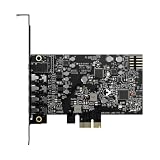
3. Creative Sound Blaster Audigy Fx Pro – Best for a desktop that has a free PCIe slot (internal, not external)

Who it suits: desktop owners who would rather install a card than hang a dongle off a USB port. The listing describes a Hi-Res PCIe sound card with surround sound and clean audio for PC upgrades.
This product does not match the external facet, since it goes inside the case, so it is placed as a runner-up. It is still a useful comparison because it is the only item here for desktops only. Reviews describe it as a low-profile PCIe card with discrete 7.1 output, a built-in headphone amplifier, up to 120 dB signal-to-noise on the DAC and playback up to 32-bit and 384kHz. Recording specifications differ between reviews, so confirm them on the product page. It cannot be used with a laptop, and you need a free slot and an open case.
- Connection: PCIe, installed inside a desktop
- Outputs: 7.1 surround and a headphone amplifier per reviews
- Playback resolution: up to 32-bit and 384kHz per reviews (confirm on the product page)
- Form factor: low-profile card with half-height bracket per reviews
- Software: Creative’s own control software
Pros
- No dangling cable or USB port used
- Dedicated headphone amplifier
Cons
- Desktop only and not external
- Needs a free PCIe slot
Pick it over the Cubilux only if you have a desktop and want the audio hardware tucked inside the case.
4. VENTION USB Sound Card – Best for a simple stereo adapter with a volume control

Who it suits: people who need working stereo audio in the simplest way, such as replacing a broken front jack or giving a laptop an extra headphone output. The listing describes an external stereo sound card with volume control that converts USB to a 3.5mm jack for Windows, Mac, PC and laptops.
VENTION makes several similar adapters that differ in their jacks, so the exact port layout matters. Models with a volume knob generally use USB 2.0, stereo output, 44.1 and 48kHz at 16-bit, and no drivers. Some versions have a combined headset jack and others have separate headphone and microphone jacks, and at least one version does not support a four-pole headset. Check the product page for the jack type before ordering. This is a basic adapter, so do not expect surround sound or amplification for demanding headphones.
- Connection: USB, bus powered, plug and play
- Output: stereo to 3.5mm jack
- Control: inline volume control per the listing
- Sample rate: commonly 44.1 and 48kHz at 16-bit for the family (confirm on listing)
- Compatibility: Windows, Mac, PC and laptops per the listing
Pros
- Simple and light
- Handy inline volume control
Cons
- Stereo only
- Jack layout varies by model, so confirm before buying
It is the plain option next to the Micolindun adapter, with a volume control instead of extra USB ports.
5. Fosi Audio K5 Pro Gaming DAC and Amp – Best for powering demanding headphones

Who it suits: gamers with higher-impedance headphones or headsets that need more power than a laptop or motherboard jack provides. The listing describes a gaming DAC and headphone amplifier with 1000mW output, a mic input, and USB-C, optical and coaxial inputs.
This is a desktop DAC and amp, not a traditional multichannel sound card, and it is stereo only. Fosi lists 1000mW at 16 ohms, falling to 80mW at 300 ohms, so the headline power figure applies to low-impedance headphones. It offers bass and treble controls, RCA outputs for active speakers and a mic input with a splitter for headsets. USB-C input is up to 24-bit and 96kHz per Fosi, and optical and coaxial inputs go higher. If you only use cheap earbuds, the extra power will not matter.
- Connection: USB-C, optical and coaxial inputs
- Output power: 1000mW at 16 ohms, 80mW at 300 ohms per Fosi
- Outputs: 3.5mm headphone jack and RCA
- Controls: bass, treble and master volume
- Resolution: USB-C up to 24-bit and 96kHz per Fosi
Pros
- Real amplification with tone controls
- Works with consoles and phones as well as PCs
Cons
- Stereo only with no surround output
- Larger than a USB dongle
It is the pick over the Cubilux for headphone quality, while the Cubilux wins on analog surround and extra inputs.
6. Micolindun External Sound Card – Best for adding audio jacks and USB ports in one dongle

Who it suits: laptop users who want audio jacks and extra USB ports from a single port. The listing describes an external sound card with USB hubs, converting a USB port to 3.5mm audio and microphone jacks for PC and laptop, plug and play.
Retail summaries describe a round, light unit with a textile cable, a microphone jack, a headphone jack and two USB 2.0 ports, and no drivers needed. It is a basic stereo device, so it will not provide surround sound, and the sample rate and resolution should be confirmed on the product page. It is best seen as a convenience adapter and a replacement for a damaged audio jack, not a performance upgrade.
- Connection: USB, plug and play
- Outputs: 3.5mm audio and microphone jacks per the listing
- Extras: two USB 2.0 ports per retail summaries
- Channels: stereo (confirm on the product page)
- Compatibility: PC and laptop per the listing
Pros
- Adds USB ports along with audio
- Very easy to set up
Cons
- Basic stereo audio
- Specifications are thin, so confirm details
Compared with the VENTION adapter, it adds USB ports but not a volume control.
Specs Compared
| Product | Type | Connection | Channels | Digital out | Inputs | Resolution (per listing or maker) |
|---|---|---|---|---|---|---|
| Cubilux 7.1 USB Surround Sound Card | External USB | USB-A | 7.1 analog | confirm on listing | Line in, stereo mic | Up to 384kHz headphones, 48kHz surround |
| StarTech ICUSBAUDIO7D | External USB | USB 2.0 | 7.1 analog | Optical SPDIF | Dual mic inputs | 16-bit, 44.1 and 48kHz |
| Creative Sound Blaster Audigy Fx Pro | Internal PCIe card | PCIe | 7.1 | confirm on listing | Line in (confirm on listing) | Up to 32-bit and 384kHz playback per reviews |
| VENTION USB Sound Card | External USB | USB | Stereo | None | Mic (confirm on listing) | Commonly 16-bit, 44.1 and 48kHz |
| Fosi Audio K5 Pro | External DAC and amp | USB-C, optical, coaxial in | Stereo | None | 3.5mm mic | USB up to 24-bit and 96kHz |
| Micolindun External Sound Card | External USB with hub | USB | Stereo | None | Mic jack | confirm on listing |
How We Chose These
This list comes from research into manufacturer specifications, retailer listing text and published reviews, not from running the devices ourselves. The criteria were whether the product is truly external, the number and type of audio outputs and inputs, sample rate and bit depth, digital output options, headphone amplification, microphone support, driver requirements and build. One internal card and one DAC and amp are included for comparison and are labeled in their sections. Where sources disagreed on a figure, we noted the difference and told you to confirm it on the product page.
What to Look For
Do you need one at all?
Most modern motherboards have decent onboard audio, so an external sound card helps in specific situations: a noisy or broken onboard jack, a laptop with a single combo jack, a need for more inputs, or headphones that need more power. An external card does not change in-game performance. Its benefit is the audio path, not frame rates.
If you only need a headphone port, a stereo adapter is enough. If you want separate speakers and a microphone, choose a unit with multiple jacks or a headset-compatible jack.
Channels and surround sound
Hardware 5.1 and 7.1 output requires multiple analog jacks and a matching speaker system. Most gaming headsets use two channels and create surround through software, so a 7.1 sound card with stereo headphones only gives you the headphone output. Check that your game or operating system sends multichannel audio.
Rule of thumb: stereo headphones need a stereo device; a 5.1 or 7.1 speaker set needs a multichannel card with the right number of jacks, and the speakers must have matching analog inputs.
Sample rate, bit depth and impedance
CD quality is 16-bit at 44.1kHz. Higher figures such as 24-bit at 192kHz or 384kHz matter mainly for music files, and game audio rarely uses them. More important is signal-to-noise ratio and a quiet noise floor. For headphones, impedance matters: models above about 80 ohms often benefit from an amplifier, and sensitivity affects loudness.
Example: a 32 ohm headset runs well from almost any device, while a 250 ohm studio headphone will sound quiet and thin from a basic dongle. The Fosi K5 Pro’s power drops from 1000mW at 16 ohms to 80mW at 300 ohms, which shows why the headphone you use matters.
Microphone connectors and compatibility
Headsets use either a four-pole TRRS plug that carries audio and mic on one plug, or two three-pole plugs. A device with only a three-pole mic jack will not accept a single-plug headset directly. Check which connector the adapter has and whether it supports your headset type.
Also confirm operating-system support. Some units list Windows 10 or later and macOS, and older models may list older Windows releases. Driverless operation is common for stereo adapters, and multichannel units may rely on the operating system’s generic USB audio class driver.
Lastly, set the device up in the operating system. Choose it as the default playback device, pick the right speaker configuration in the sound settings, and test each channel before a game session. Many apparent problems, such as one silent speaker or a muted microphone, come down to the wrong default device or configuration.
Questions
Will an external sound card improve game performance?
No. It handles audio only, so frame rates are unaffected. The possible improvements are cleaner sound, more connectors and better headphone drive.
Is a USB sound card better than onboard audio?
It can be if your onboard audio is noisy or lacks the jacks you need. A well-built motherboard may already sound good, so the difference is often small.
Do I need 7.1 for gaming?
Only if you use a multichannel speaker system. For stereo headphones, a stereo device is enough, and surround effects come from the game or headset software.
Why is the Creative Audigy Fx Pro on this list if it is internal?
It is the exception on a list of external devices, because it is a PCIe card that only fits desktops. Laptop owners should choose one of the USB options instead.
What is a DAC and amp?
A DAC converts digital audio to an analog signal, and the amp raises that signal to drive headphones. The Fosi K5 Pro combines both in one box and adds tone controls and a microphone input.
Can I use a USB sound card with a console?
Some can, but compatibility varies by console and device. The Fosi K5 Pro lists support for several consoles, while the simple adapters mostly target PCs and laptops, so check the product page.
Update History
- October 14, 2026 – Initial publication; product set drawn from current catalog listings.
- Check the product page for current specifications and availability before buying.
Sources
- Manufacturer product and specification pages for Fosi Audio, StarTech and VENTION
- Retailer listing titles and specification fields
- Published hardware reviews and user manuals for the sound cards listed