
Building a PC with a clean interior is a war against cables. Every fan you add traditionally brings two lines with it — a PWM lead to the motherboard and an ARGB lead to the controller — and by the time you’ve installed six fans, the area behind your motherboard tray looks like a bird’s nest. Worse, that clutter creeps into view through the tempered glass, ruining the look you paid for. Daisy chain fans and proper splitter cables solve this by linking fans to each other in a single series, so one connection runs to the board instead of six.
The problem is that the market is flooded with options: dedicated splitter cables, extension leads, and true daisy-chain fan kits that interlock natively. We sorted through them to find the best daisy chain ARGB fans and supporting cables for a clean cable build, ranking eight picks that cover both full fan upgrades and the wiring that makes existing fans behave. Whether you’re building fresh in 2026 or tidying up a case that’s gotten out of hand, there’s a pick here for you.
Our Top Picks
 Thermalright TL-M12Q-S X3 120mm ARGB Case FansTL-M12Q-SX34.7 x 0.98 x 4.88 inches0.2 PoundsCheck on Amazon
 Jstincal 2-Pack 1-to-1 ARGB Extension Cable11.8 inches11.8 x 0.4 x 0.4 inches0 PoundsCheck on Amazon


Top 3 picks at a glance
Quick Picks
| Product | Best for | Price |
|---|---|---|
| skineat 4-Pin PWM Fan Splitter Cable (88cm) | Tidying PWM fan runs on a budget | Check on Amazon |
| TNJPSEK 3-Pin ARGB Splitter Cables (8-Pack) | Bulk ARGB connections for multi-fan builds | Check on Amazon |
| skineat 4-Pin PWM Fan Splitter Cable (88cm) | A long-reach PWM extension | Check on Amazon |
| Thermalright TL-M12Q X3 120mm ARGB Fans | Best value true ARGB fan 3-pack | Check on Amazon |
| Thermalright TL-M12Q-S X3 120mm ARGB Fans | Slim-profile builds with tight clearance | Check on Amazon |
| Jstincal 2-Pack 1-to-1 ARGB Extension Cables | Extending short ARGB leads | Check on Amazon |
| Thermalright TL-M12QW X3 120mm ARGB Fans | White-themed builds | Check on Amazon |
| 6-Pack PWM ARGB Daisy-Chain Fans (3 Forward + 3 Reverse) | All-in-one daisy-chain ecosystem | Check on Amazon |
How We Compared
For this roundup, we focused on the practical realities of cable management rather than raw benchmark numbers. Priority went to products that reduce connector count: native daisy-chain fans that pass power and ARGB data from one unit to the next, and splitters/extensions that let existing fans do the same. We compared connector types (4-pin PWM vs. 5V 3-pin ARGB), cable lengths, pack sizes, and price per fan or per cable, using only manufacturer-published specifications.
We also weighed ecosystem fit. A splitter is only as clean as the routing it allows, so 88cm-class PWM extensions and 11.8-inch ARGB extensions earned points for reaching a motherboard header from a top-mounted radiator without splicing. Finally, we favored fan kits that bundle forward and reverse blades for paired intake/exhaust symmetry — a detail that matters as much for looks as airflow. No lab airflow testing was performed; the figures cited come from spec sheets.
The 8 Best Picks
1. skineat 4-Pin PWM Fan Splitter Cable (88cm / 34in)
This 88-centimeter PWM extension is the quiet workhorse of a clean build. It’s for anyone whose existing fans have great lighting but messy power leads — no need to replace the fans themselves.
- Pros: Generous 88cm (34in) length reaches across full-tower cases; PST daisy-chain support cuts header usage dramatically.
- Con: PWM-only — you’ll still need a separate solution for ARGB lines.
Skip it if your fans already have native daisy-chain tails or you use a fan/RGB controller hub.
As an Amazon Associate we earn from qualifying purchases at no extra cost to you.


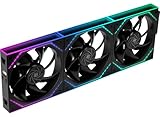


2. TNJPSEK 3-Pin ARGB Splitter Cables, 1-to-1 (8-Pack, White)
The white sleeving disappears against white fan frames and light-colored cases, and the 1-to-1 design means each fan keeps its own addressable channel rather than being cut into segments. Ideal for builders running many ARGB devices from one motherboard header.
- Pros: Eight-pack covers a full case plus strips and CPU cooler lighting.
- Pros: White sleeves look intentional, not like an afterthought.
- Con: Many splitters on a single header means you should verify your header’s power budget for heavily loaded setups.
Skip it if you only need one or two extensions — a smaller pack wastes money.
3. skineat 4-Pin PWM Fan Splitter Cable (88cm / 34in)
Yes, this is the same excellent cable as our number-one pick, and its return here reflects how often a clean build needs two of them: one for the front/intake fan cluster and one for the top/exhaust run. The 34-inch reach handles radiator fans mounted at the top of the case with the header run along the back edge.
- Pros: Buy two and split intake and exhaust onto separate channels for independent control.
- Pros: Consistent build quality and the same generous 88cm length.
- Con: Duplicative if your board already has plenty of PWM headers.
Skip it if a single splitter already covers your fan count.
4. Thermalright TL-M12Q X3 120mm ARGB Case Fans
These are the fans you pick when you want to replace old non-addressable hardware with modern ARGB without paying premium-brand prices, and their standard 120mm frame drops into any common case mount.
- Pros: 68.9CFM is plenty for intake duty or a 240/360mm radiator.
- Con: Daisy-chaining is via splitters rather than fully integrated interlocks, so expect slightly more visible cabling than native daisy-chain kits.
Skip it if you want the sleekest possible interlocking look — see pick eight.
5. Thermalright TL-M12Q-S X3 120mm ARGB Case Fans
It’s the right choice for compact cases where every millimeter behind the fan frame counts, or for anyone who liked the M12Q’s numbers but wants the S-series look.
- Pros: Same strong 68.9CFM / 2000RPM spec sheet in an S-series package.
- Pros: Fits Thermalright’s budget ecosystem, so you can mix packs cheaply.
Skip it if your case has unrestricted 25mm fan mounts — the standard M12Q is the better value.
6. Jstincal 2-Pack 1-to-1 ARGB Extension Cables (11.8 Inches)
Sometimes you don’t need a splitter — you need reach. It’s a niche but essential fix, and the 1-to-1 pass-through design keeps every LED fully addressable.
- Pros: 11.8 inches per cable solves the most common short-lead frustration.
- Con: Doesn’t split — one fan in, one fan out, so it can’t reduce connector count on its own.
Skip it if your fans already reach the header; put the money toward a fan upgrade instead.
7. Thermalright TL-M12QW X3 120mm ARGB Case Fans
Specs are identical to its siblings: 120mm frames, 2000RPM, 68.9CFM per fan. Pair it with the white TNJPSEK splitters above and your entire airflow-and-lighting stack reads as one deliberate design instead of a black-fan compromise in a white case.
- Pros: Full 68.9CFM and 2000RPM performance is unchanged.
- Con: White frames show dust faster, so budget for occasional cleaning.
Skip it if your build is black-themed — the standard M12Q is the same money.
8. 6-Pack PWM ARGB Daisy-Chain Fans (3 Forward + 3 Reverse)
This is the cleanest solution on the list, full stop. Six 120mm fans with a modular daisy-chain design link directly to each other — no splitters required — so a full case’s worth of fans collapses into one PWM line and one 5V ARGB line at the motherboard. Better still, the pack includes three forward-blade and three reverse-blade fans, so intake and exhaust sides both show unbroken lighting with no visible blade backs.
- Pros: Native daisy-chain interconnects eliminate splitter cables entirely.
- Pros: Mixed forward/reverse blades give symmetrical lighting on both sides of the case.
- Con: Locked into the included ecosystem — adding fans later means buying more of the same series.
Skip it if you’re only upgrading one or two fans; the 3-packs above are more flexible.
Buying Guide
Match Your Connectors: PWM vs. ARGB
Fan speed runs on 4-pin PWM; lighting runs on 5V 3-pin ARGB. They are not interchangeable, and a 12V RGB plug will destroy ARGB hardware. Before buying any splitter or extension, count your motherboard’s 4-pin PWM headers and 5V 3-pin ARGB headers separately. Daisy-chain fans and splitters reduce how many of each you need, but the connector types must still match exactly at every link in the chain.
Mind Your Power Budget
Every fan draws current through the header it ultimately connects to. A single PWM header typically supports two to three 120mm fans comfortably; pushing six through one splitter risks weak spin-up or a header that can’t deliver rated speed. Native daisy-chain kits like pick eight are engineered for series connection, but DIY splitter chains should stay short. Check each fan’s rated current draw and keep the chain total within your board header’s spec.
Plan the Route Before You Buy
Clean builds are routed, not stuffed. Measure the distance from your furthest fan position to the motherboard headers, then buy extensions long enough to run cables behind the tray: the 88cm (34in) skineat covers most full-tower runs, while the 11.8-inch Jstincal extensions suit short hops. Decide intake vs. exhaust positions first so you know how many forward and reverse fans you need before committing to a pack.
Our Verdict
FAQ
Do daisy-chain fans need separate PWM and ARGB connections?
Yes. Even fully daisy-chained kits terminate in two lines at the motherboard: one 4-pin PWM for speed control and one 5V 3-pin ARGB for lighting. The chain reduces six fans to those two connections instead of twelve.
Can I mix ARGB fans from different brands on one header?
Generally yes, as long as everything uses the standard 5V 3-pin ARGB connector and the header’s power budget isn’t exceeded. Lighting sync will work through your motherboard software, though connector orientations and locking clips vary slightly between brands.
How many fans can one ARGB header safely power?
Most motherboard ARGB headers supply around 2–3A at 5V (roughly 10–15W). Individual ARGB fans typically draw modest power for their LEDs, but check each product’s rated current. For large builds, a powered ARGB/fan controller hub is safer than one long splitter chain.
Are reverse-blade fans worth it for a clean look?
If you care about aesthetics, absolutely. Standard fans show the back of the frame and supporting struts from outside the case when used as intake. Reverse-blade fans flip the blades so the lighting face points outward, giving front intake and rear exhaust a symmetrical appearance — which is exactly why our top fan pick bundles three of each.









