Our Top Picks


Top 3 picks at a glance

Best CPU for Delta Force: Top Picks for Smooth FPS
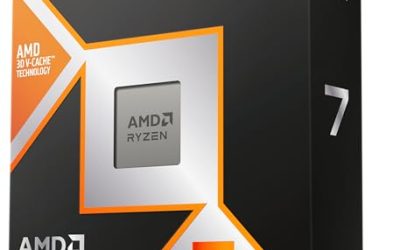
The best CPU for Delta Force is the AMD Ryzen 7 9800X3D for a new high-refresh gaming PC, while the Ryzen 7 7800X3D remains an excellent value upgrade if you already use an AM5 motherboard.
Delta Force can run on a modest six-core processor, but large multiplayer matches, busy combat zones, background applications, and high-refresh monitors make frame-time consistency more important than peak average FPS. The right processor should provide strong gaming performance, enough threads for the game and Windows, a sensible cooling requirement, and a practical upgrade path.
As an Amazon Associate we earn from qualifying purchases at no extra cost to you.


Quick CPU recommendations
| CPU | Best for | Cores/threads | Platform path | Cooling guidance |
|---|---|---|---|---|
| AMD Ryzen 7 9800X3D | Top-tier 1080p and 1440p gaming | 8/16 | AM5; future Ryzen upgrades possible | Quality tower air cooler or 240 mm AIO |
| AMD Ryzen 7 7800X3D | Value-focused high-refresh gaming | 8/16 | AM5; strong upgrade flexibility | Good tower air cooler |
| AMD Ryzen 7 9700X | Gaming plus heavier productivity | 8/16 | AM5; DDR5 required | Mid-range tower cooler |
| Intel Core i5-14600K | Strong gaming and mixed-use value | 14/20 | LGA1700; limited newer CPU upgrade path | Large tower cooler or 240 mm AIO |
| Intel Core Ultra 7 265K | New Intel build with productivity headroom | 20/20 | LGA1851; DDR5 required | Large tower cooler or 240 mm AIO |
1. AMD Ryzen 7 9800X3D: best overall CPU for Delta Force
The Ryzen 7 9800X3D is the strongest all-around choice when your priority is stable high-refresh gaming. Its eight Zen 5 cores and 16 threads are sufficient for Delta Force, voice chat, recording software, browser tabs, and other background tasks. Its large 3D V-Cache can also help reduce CPU-side frame-time spikes in games that repeatedly access large world and simulation data sets.
This is especially useful at 1080p with a fast graphics card, where the processor is more likely to limit performance. At 1440p, the GPU normally becomes more important, but a fast gaming CPU still helps maintain consistent lows in large multiplayer sessions. Published-review performance varies by map, patch, graphics preset, memory, and GPU, so treat any reported FPS range as an indication rather than a guarantee.
Build pairing and cooling
Pair the 9800X3D with a Radeon RX 9070 XT or GeForce RTX 5070 Ti for a balanced 1440p system. A GeForce RTX 5080 makes more sense for demanding 4K settings, while a cheaper Radeon RX 7800 XT or GeForce RTX 4070 Super can be appropriate if you play at 1440p with upscaling.
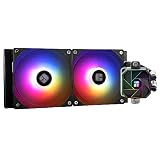
The chip is far easier to cool than many high-core-count processors, but it still benefits from a quality dual-tower air cooler or a 240 mm liquid cooler. Use an AM5 motherboard with a current BIOS, two DDR5 memory modules, and preferably 32 GB of DDR5-6000 memory with a suitable EXPO profile.
2. AMD Ryzen 7 7800X3D: best value AM5 option
The Ryzen 7 7800X3D remains a compelling choice when its price is substantially below the 9800X3D. Its eight cores and 16 threads are enough for smooth Delta Force gameplay, and its 3D V-Cache gives it strong gaming behavior without requiring an expensive cooler.
It is a particularly sensible choice for an existing AM5 owner who wants to replace an older Ryzen 5 processor. Depending on your motherboard, you may only need a BIOS update, the CPU, and perhaps a better cooler. That can cost much less than replacing the motherboard, memory, and processor together.
When not to choose it
Choose a newer processor instead if you frequently render video, compile large projects, or stream with heavy CPU encoding. The 7800X3D is a gaming specialist rather than a high-core-count productivity chip. For a new build, compare its total platform cost against the 9800X3D rather than buying it automatically.
3. AMD Ryzen 7 9700X: balanced gaming and productivity
The Ryzen 7 9700X provides eight Zen 5 cores and 16 threads without the extra cache design used by the X3D models. That makes it a good fit for someone who plays Delta Force but also wants responsive performance in content creation, software development, and everyday multitasking.
In GPU-limited 1440p or 4K gaming, the practical gap between a conventional high-end Ryzen 7 and an X3D model can narrow. If you are pairing the CPU with a midrange graphics card, or if your monitor is limited to 60–144 Hz, the 9700X may offer the better overall balance.
It also has relatively moderate cooling needs. A good single-tower or dual-tower air cooler is usually preferable to spending heavily on liquid cooling. As with the other AM5 options, plan on DDR5 memory and a B650, B850, X670, or X870-class motherboard that supports the processor with the appropriate BIOS.
4. Intel Core i5-14600K: strong value for mixed workloads
The Core i5-14600K combines six performance cores with eight efficiency cores, for 14 cores and 20 threads in total. That extra thread capacity is useful if Delta Force runs alongside streaming tools, a browser, Discord, or background encoding.
It can deliver excellent gaming performance, but its power behavior is less convenient than that of the Ryzen 7 options. Use a substantial air cooler or a 240 mm AIO, enable sensible motherboard power limits, and update the motherboard BIOS. A board that removes all power limits can increase heat, noise, and sustained consumption without providing a proportional improvement in gameplay.
LGA1700 supports several generations of Intel processors, but it is not the best long-term upgrade platform for a new 2026 build. Choose the 14600K when the processor and motherboard are offered at a clear value, or when you already own compatible DDR4 or LGA1700 hardware.
5. Intel Core Ultra 7 265K: for a new Intel productivity-oriented build
The Core Ultra 7 265K offers 20 cores and 20 threads and uses Intel’s newer LGA1851 desktop platform. Its additional cores are useful for recording, encoding, multitasking, and applications that scale beyond eight gaming cores.
For a Delta Force-focused system, however, do not buy it solely because it has more cores. The game generally benefits more from strong per-core performance, cache behavior, low memory latency, and consistent scheduling than from having the highest core count. The 265K becomes more attractive when gaming is only one part of the computer’s workload.
It requires a new LGA1851 motherboard and DDR5 memory. Select a board with a robust power design and use a large air cooler or 240 mm liquid cooler. A Core Ultra 5 model can be a better value if you do not encode video or run demanding applications while gaming.
How many cores does Delta Force need?
Six modern cores and 12 threads are a reasonable minimum for a new gaming build, but eight cores and 16 threads are the safer target for long-term smoothness. More cores do not automatically produce higher FPS; they provide headroom for background tasks and future game updates.
- Existing six-core CPU: keep it if your frame times are stable and the GPU is the limiting component.
- New budget build: choose a current six-core processor with simultaneous multithreading, rather than an older four-core model.
- High-refresh 1080p: prioritize a fast eight-core gaming CPU, especially with a powerful GPU.
- 1440p or 4K: spend more of the budget on the graphics card once you have a competent six- or eight-core CPU.
- Gaming plus streaming or creation: choose eight strong cores or a processor with additional efficiency cores.
CPU and GPU pairing matrix
| Target setup | Suitable CPU tier | Balanced GPU examples | Why |
|---|---|---|---|
| 1080p, 144 Hz | Ryzen 5 class or Ryzen 7 7800X3D | Radeon RX 7700 XT, GeForce RTX 4060 Ti | Moderate GPU load; CPU consistency matters |
| 1080p, 240 Hz | Ryzen 7 9800X3D or 7800X3D | GeForce RTX 5070, Radeon RX 9070 | High refresh exposes CPU and memory limits |
| 1440p, 144–180 Hz | Ryzen 7 9700X, 7800X3D, or Core i5-14600K | Radeon RX 7800 XT, RX 9070, GeForce RTX 5070 | Good balance between CPU and GPU spending |
| 1440p, high settings | Ryzen 7 9800X3D or Core Ultra 7 265K | Radeon RX 9070 XT, GeForce RTX 5070 Ti | Powerful GPU benefits from strong frame-time performance |
| 4K | Ryzen 7 9700X or any recommended eight-core CPU | GeForce RTX 5080 or Radeon RX 9070 XT | GPU is usually the primary limit |
Settings and upgrade checks that prevent CPU-related stutter
Before replacing a processor, verify where the limit is. Enable an in-game performance overlay and watch GPU utilization, CPU thread usage, frame-time graphs, and memory usage. If GPU usage stays near full while the frame-time graph is smooth, a faster CPU may change little. If one or more CPU threads are saturated while GPU usage repeatedly falls, the processor or game settings may be limiting performance.
- Use a sensible frame-rate cap. Set the cap a few frames below your monitor’s practical refresh rate. This reduces unnecessary CPU and GPU queuing and can improve frame-time consistency.
- Keep background software controlled. Disable unnecessary overlays and browser processes before testing. Recording, RGB utilities, and hardware monitoring can add small but cumulative interruptions.
- Use dual-channel memory. Install two matching DIMMs and enable the memory profile in the BIOS. A single memory module can reduce bandwidth and hurt minimum-frame behavior.
- Check temperatures and clock speeds. If the CPU reaches its thermal limit and reduces clocks, improve cooler mounting, airflow, or fan curves before buying a new processor.
- Update the game and motherboard BIOS. Multiplayer patches and firmware updates can affect scheduling, memory compatibility, and frame-time behavior.
For most buyers, the final decision is simple: choose the Ryzen 7 9800X3D for the highest-end gaming-focused build, the Ryzen 7 7800X3D when discounted or already supported by your AM5 system, and the Ryzen 7 9700X when productivity and efficient cooling matter as much as gaming. Select Intel’s Core i5-14600K or Core Ultra 7 265K when their broader thread capacity and platform pricing fit your workload better.
Frequently asked questions
How much memory should I pair with a Delta Force gaming CPU?
Use 32 GB of DDR5 memory for a new AM5 gaming build, preferably as two DDR5 modules with a suitable EXPO profile. The article also lists 64GB DDR5 kits, but 32 GB is the stated preferred configuration for the Ryzen 7 9800X3D. DDR5 is required for the Ryzen 7 9700X and Core Ultra 7 265K platforms.
Do I need to replace my motherboard when upgrading to a Ryzen 7 7800X3D?
Not necessarily, if you already have an AM5 motherboard. Depending on the motherboard, the upgrade may require only a BIOS update, the Ryzen 7 7800X3D, and possibly a better cooler. For a new build, compare the complete platform requirement against the Ryzen 7 9800X3D, including the motherboard, memory, processor, and cooling.
Which cooler is suitable for the recommended Delta Force CPUs?
The Ryzen 7 7800X3D generally suits a good tower air cooler, while the Ryzen 7 9700X usually works well with a single-tower or dual-tower air cooler. The Ryzen 7 9800X3D can use a quality dual-tower air cooler or a 240 mm liquid cooler. The Core i5-14600K and Core Ultra 7 265K need a substantial or large air cooler, or a 240 mm AIO.
Should I upgrade my CPU if my graphics card is already limiting performance?
Keep an existing six-core CPU if frame times are stable and the graphics card is the limiting component. At 1440p or 4K, the GPU usually deserves more of the budget after you have a competent six- or eight-core processor. A CPU upgrade matters more for high-refresh 1080p, where CPU and memory limits are easier to expose.
What should I check before replacing a CPU for Delta Force stutter?
Check whether the problem is actually CPU-related by considering frame-time stability, graphics-card usage, monitor resolution, and background workloads. Voice chat, recording software, browser tabs, streaming tools, Discord, and encoding can add CPU demand. Also verify the motherboard BIOS, memory configuration, cooling, and power limits before replacing the processor.