
The Short Answer
Yes — daisy chain fans are worth it over individual fans for most PC builders, with one condition: you actually plan to run three or more fans in the same area of your case. If you only need one or two fans total, the wiring convenience that makes daisy chain fans appealing disappears, and you should just buy whatever standard fan fits your budget.
The core value proposition is simple. Each fan has input and output connectors built into its frame, so you link them together like strands of lights. One cable reaches your motherboard or fan controller instead of three, four, or six separate PWM and RGB plugs competing for limited headers.
As an Amazon Associate we earn from qualifying purchases at no extra cost to you.
What You Actually Get
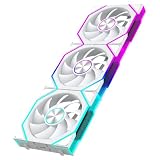
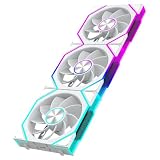
A daisy chain fan kit typically includes three 120mm fans with interlocking side connectors.
You’ll choose between forward and reverse blade designs. Forward (standard) fans are meant for front intakes and rear exhausts. Reverse fans are designed for side intake or bottom mounts where you want the ARGB ring facing the viewer without the “lit stripe” effect you get from mounting a standard fan backward. Some builders buy both types in the same kit line so their intakes and exhausts match visually.
Wattage draw on fans like these is modest — typically 0.2 to 0.4A per fan at 12V (about 2.4 to 4.8W each). Even chaining three fans on one header keeps you well under the 1A safe limit most motherboards specify, but always check the listed amperage before stacking more than three on a single header.
Pros
- Fewer cables to route. One PWM connection and one ARGB connection instead of two or three pairs. This is the single biggest quality-of-life improvement, especially in smaller cases where cable space is tight.
- Frees up motherboard headers. Budget and mid-range boards often ship with only two or three system fan headers. Chaining fans lets you fill a six-fan case without buying a hub.
- Cleaner aesthetics. No visible connector clusters behind the motherboard tray or near the front intake, which matters if you have a tempered glass panel.
- Easier future upgrades. Adding a fourth or fifth fan later means plugging into the existing chain, not finding a new header.
- Matching hardware. Kits like the JEYI packs guarantee three fans with identical blade design, lighting behavior, and bearing noise profile — no mixing and matching.
- Synchronized lighting out of the box. ARGB signal passes through the chain, so all fans mirror the same effect without extra controllers or software fiddling.
Cons
- A single failure affects the chain. If the middle fan’s connector dies, everything downstream can lose power or lighting. Individual fans fail independently.
- Header load limits. Every fan in the chain draws from one header. Three fans is fine; stacking five or six on one header can exceed its rated amperage.
- Less fan choice. The daisy chain market is smaller than the general fan market. If you want a specific high-end model from a premium brand, it may not exist in a chained version.
- Fixed grouping. Most kits come in threes. If you need exactly four fans, you’re buying six or leaving a fan in the box.
- Connector quality varies by brand. Budget daisy chain fans sometimes have loose interlocks that cause flickering ARGB or intermittent PWM signals. Read recent buyer feedback before committing.
- Replacement logistics. If one fan in a three-pack fails after the warranty window, you may end up buying a whole new kit rather than a single replacement.
Who Should Buy It
Daisy chain fans make the most sense if you’re building or refreshing a system with three or more case fans, especially a mid-tower or compact build where cable management space is limited. They’re also the right call if your motherboard is header-poor — say, two system fan headers — and you don’t want to add a powered fan hub. And if you care about the ARGB look, a matched forward-plus-reverse set gives you a uniform lighting ring across intakes and exhausts without individual fan controllers.
Who Should Skip It
Skip daisy chain fans if you only need one or two fans — a single rear exhaust or a two-fan front intake setup gains almost nothing from chaining. Skip them if you’re running a high-airflow workstation with six or more fans on minimal headers; buy a PWM fan hub instead and choose your favorite individual fan freely. Also skip them if you’re a silence-obsessed builder chasing a specific premium fan known for low-noise performance at low RPM; the chained format hasn’t fully reached the high-end Noctua and Phanteks tier yet. Finally, if your existing fans work fine, there’s no performance reason to swap — daisy chaining changes wiring, not airflow.
Cheaper Alternatives
| Option | Cost | Trade-off |
|---|---|---|
| Basic 120mm non-RGB fans (3-pack) | Check on Amazon | No lighting, separate cables for each fan, but plenty of airflow for the money |
| Standard ARGB 3-pack (non-chaining) | Check on Amazon | Similar looks and performance, but two to three extra cables and more headers used |
| PWM fan hub + cheap individual fans | Varies | Solves the header problem, keeps full fan choice; adds one more component and cable in the case |
| Keep existing fans + splitter cables | Check on Amazon | Zero upgrade cost if your fans are healthy; splitters don’t carry ARGB signal, so lighting stays uncontrolled |
FAQ
Do daisy chain fans perform worse than individual fans?
No. The chaining only affects wiring and ARGB signal, not the fan motor, blade design, or airflow. A chained 120mm fan moves the same air as the equivalent standalone model. Any performance difference between brands comes down to the fan hardware itself, not the connector format.
Can I mix forward and reverse daisy chain fans on one header?
Yes. Electrically they’re identical — both are PWM fans that draw from the same header and pass ARGB through. Direction only changes which way air flows and which side shows the lit face. Many builders pair the JEYI reverse version for intakes with the forward version for exhausts so the ARGB ring faces outward in both locations.
How many daisy chain fans can I run off one motherboard header?
Check the amperage rating printed on your motherboard’s header spec and on each fan. Most 120mm ARGB fans draw 0.2 to 0.3A each, so three fans (roughly 0.6–0.9A total) sit safely under the typical 1A limit. For four or more fans, use a powered hub to avoid overloading the header.
Are daisy chain fans worth it in 2026 compared to a fan hub?
For three-fan setups, yes — the chain is cleaner because there’s no hub box to mount and hide, and kits now cost the same as ordinary three-packs. For five or more fans, a powered hub paired with your choice of individual fans is usually the smarter, more flexible setup.









