
Our Top Picks
 Cooler Master Hyper 212 Black CPU Air Cooler4 Heat Pipes4.7 x 3.1 x 6.3 inches1.54 PoundsCheck on Amazon


Top 3 picks at a glance


The Short Answer
If you are asking what mm CPU cooler height clears the side panel, the answer is always this: the cooler must be shorter than your case’s maximum CPU cooler clearance spec. Most manufacturers list this clearance in millimeters, and you need at least 2 to 3 mm of extra space for safe closure and airflow. For example, if your case lists 160 mm of cooler clearance, a cooler that is 155 mm tall will clear comfortably, while a 159 mm cooler will likely fit but may leave almost no margin for fan vibration or panel bulge.
In practical terms, measure or check your case manual for its stated clearance, then choose a cooler at least 3 mm shorter. In compact and small-form-factor cases, clearance often drops to 60 mm to 75 mm, so only low-profile coolers in the 37 mm to 67 mm range will clear the panel. In standard mid-tower ATX cases, most clearances fall between 155 mm and 170 mm, which accommodates almost all single-tower air coolers.
As an Amazon Associate we earn from qualifying purchases at no extra cost to you.


Standard Sizes
CPU air coolers are categorized by total height from the CPU heat spreader to the top of the fan or heatpipe cap. That height is what must clear your side panel. The categories below reflect what you will see on retail listings in 2026 and how they relate to common case types.
| Cooler Category | Typical Height (mm) | Typical Height (inches) | Typical Height (cm) | Common Case Compatibility |
|---|---|---|---|---|
| Ultra Low Profile | 37 – 47 mm | 1.46 – 1.85 in | 3.7 – 4.7 cm | Ultra-slim HTPC, 2U rack, some mini-ITX under 65 mm clearance |
| Standard Low Profile | 53 – 67 mm | 2.09 – 2.64 in | 5.3 – 6.7 cm | Most mini-ITX and slim microATX, cases rated 70 mm to 80 mm |
| Compact Tower / 92mm Fan | 130 – 148 mm | 5.12 – 5.83 in | 13.0 – 14.8 cm | Compact microATX and mid-towers with 150 mm+ clearance |
| Mainstream 120mm Single Tower | 148 – 160 mm | 5.83 – 6.30 in | 14.8 – 16.0 cm | Standard mid-tower ATX, requires 160 mm+ clearance |
| Tall Performance Tower | 160 – 168 mm | 6.30 – 6.61 in | 16.0 – 16.8 cm | Large mid-tower and full tower, requires 165 mm to 170 mm clearance |
| Dual Tower / High-End Air | 158 – 165 mm | 6.22 – 6.50 in | 15.8 – 16.5 cm | Wide ATX cases only, often needs 165 mm+ and RAM clearance check |
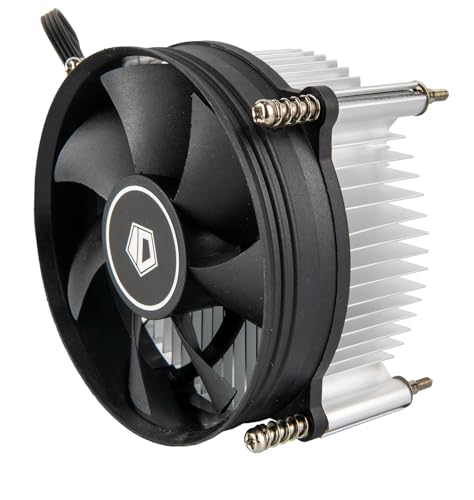
Real-world examples from current listings help ground these ranges. An ultra low-profile model like a 45 mm cooler with four heatpipes and a slim 92 mm fan measures about 1.77 inches or 4.5 cm tall and weighs around 290 to 310 grams. A 57 mm low-profile cooler with five heatpipes measures about 2.24 inches or 5.7 cm tall, weighs 400 to 480 grams, and is often rated for 95W to 130W TDP. A mainstream single-tower cooler with four heatpipes and a 120 mm PWM fan typically stands 152 mm to 155 mm tall, or about 5.98 to 6.10 inches, weighs 580 to 700 grams, and is rated for 150W to 180W TDP.
How to Measure Your Space
Do not rely on eyeballing or guessing. The only reliable way to know what mm cooler height clears your side panel is to verify the case specification and then confirm with a physical measurement if you already own the case.
- Find your case model number. It is usually printed on the rear panel, on the box, or on the purchase receipt. Search for the official spec sheet and locate the line that says CPU Cooler Clearance or CPU Height Limitation. Note the number in millimeters.
- If you do not have the spec sheet, measure manually. Remove the side panel and place the case on its side. Install the motherboard with standoffs. Use a ruler or caliper to measure from the top of the CPU heat spreader, or from the motherboard surface plus 2.5 to 3 mm for the CPU, straight up to the inner edge of the side panel when closed. Have a second person hold the panel in place while you measure the gap at the CPU center.
- Subtract your safety margin. Subtract 3 mm from the case clearance to get your maximum cooler height. For a quiet build or if your panel has no bulge, subtract 5 mm. Example: 82 mm case clearance minus 3 mm equals a 79 mm maximum cooler.
- Check secondary interference. Measure RAM height from the motherboard to the top of the heat spreader, typically 31 mm for low-profile RAM and 44 mm to 51 mm for RGB RAM. Also note the position of the side-panel fan mount, dust filter, or cable bar, which can reduce effective clearance by 2 to 6 mm.
- Compare to the cooler spec. Every reputable cooler lists Height including fan in millimeters. Ensure that listed height is less than or equal to your calculated maximum. If a cooler lists 57 mm and your maximum is 58 mm, it will clear.
For accuracy, use millimeters as your primary unit. Small errors in inches add up quickly at this scale. One inch equals 25.4 mm, so a quarter-inch error is more than 6 mm, enough to prevent the panel from closing.
By Room or Use Case
Different builds place different limits on what height will clear. Choose by case size and environment, not just by CPU wattage.
Mini-ITX Living Room and HTPC Cases
These are the most restrictive. Many slim HTPC cases offer only 47 mm to 70 mm of clearance to keep the chassis under 4.5 inches tall to fit in a media console. You will need an ultra low-profile cooler in the 37 mm to 47 mm range for the tightest cases, or 53 mm to 67 mm for slightly taller console-style cases. Expect to use a 92 mm PWM fan and four copper heatpipes. Cooling capacity is typically 65W to 95W TDP, suitable for 35W to 65W processors used in home theater PCs. Prioritize coolers under 60 mm tall and confirm total height with the slim fan installed, as some list height without the fan.
Compact Office and Small Form Factor MicroATX
Office-oriented microATX cases often have 80 mm to 135 mm of clearance. This is an in-between zone where both low-profile and compact tower coolers can work. A 57 mm five-heatpipe cooler at about 2.24 inches tall is a popular choice because it clears most 80 mm-rated panels while offering better thermal headroom than a 45 mm model. It typically handles 65W to 125W CPUs, weighs under 500 grams, and keeps noise lower than a tiny ultra-slim fan. If your case allows 135 mm, consider a compact 130 mm to 148 mm tower with a 92 mm or 120 mm fan for quieter operation at moderate loads.
Standard Mid-Tower ATX Gaming Builds
This is the most forgiving category. Most mid-towers built for ATX and microATX boards provide 155 mm to 170 mm of clearance, with 160 mm being the most common spec. This accommodates mainstream single-tower coolers with 120 mm fans that stand 148 mm to 160 mm tall. These coolers usually include four heatpipes, a 120 mm PWM fan rated 600 to 1800 RPM, and support 150W to 180W TDP. For gaming systems with CPUs in the 65W to 125W base TDP range, a 152 mm to 155 mm cooler gives excellent value and will clear almost any mid-tower panel. If your case lists 165 mm or more, you can also use taller 160 mm to 168 mm performance towers or 158 mm to 165 mm dual-tower models, but verify RAM clearance as taller front fans often overhang DIMM slots.
Workstation and Full Tower Cases
Full towers and large airflow-focused mid-towers usually advertise 168 mm to 185 mm of clearance. Here, side-panel clearance is rarely the limiting factor. You can run any mainstream or dual-tower cooler and focus instead on RAM height, motherboard VRM heatsink height, and case width for cable management. Even so, maintain the 3 mm safety margin. A cooler that is exactly equal to the listed clearance can still contact a side-panel dust filter or an acoustic dampening pad, which can be 2 mm to 4 mm thick.
Common Sizing Mistakes
The most frequent error is confusing case width with CPU cooler clearance. A case that is 210 mm wide does not have 210 mm of cooler space. Standoffs, motherboard thickness, the CPU itself, and the panel construction all reduce the usable height by 15 mm to 25 mm. Always use the manufacturer CPU cooler clearance figure.
A second mistake is trusting the cooler height without the fan. Some low-profile models list heatsink-only height. A slim 92 mm fan adds 15 mm, a standard 25 mm thick fan adds 25 mm. A heatsink listed at 30 mm can become 45 mm once the fan is clipped on. Always use the total height including fan.
A third mistake is ignoring motherboard and socket variance. Intel LGA1700, LGA1200, and AMD AM4 and AM5 sockets have slightly different stack heights, and aftermarket mounting kits can add a millimeter. A cooler that clears on one board may be a tight fit on another. If your margin is under 2 mm, test fit before applying thermal paste.
A fourth mistake is forgetting about RAM and side-panel features. Tall RGB RAM can force you to raise the front fan on a tower cooler by 5 mm to 10 mm, increasing total height above the rated spec and preventing panel closure. Similarly, a side panel with a mounted 120 mm or 140 mm fan, a protruding cable management bar, or a thick tempered glass mount can intrude into the CPU area. If your panel has any interior protrusion over the CPU, subtract its depth from your available clearance.
Finally, do not assume that wattage rating equals fit. A low-profile cooler rated for 130W at 57 mm tall may still be the correct choice over a 155 mm tower rated for 180W if your case only allows 70 mm. Thermal performance only matters if the panel can close.
FAQ
How much gap do I need between the cooler and the side panel?
Aim for at least 3 mm between the top of the cooler and the inside of the side panel. This prevents contact from vibration, panel flex, and thermal expansion, and it allows a thin boundary layer of air to exhaust. For silent builds or cases with thin sheet-metal panels that flex when pressed, a 5 mm gap is better. If your case clearance is 160 mm, treat 157 mm as your practical maximum.
Can I use a 57 mm low-profile cooler in a case rated for 60 mm?
Yes, a 57 mm cooler will clear a 60 mm rated case with 3 mm to spare. That is an ideal fit. This size class typically uses a 92 mm PWM fan, four to five heatpipes, weighs 360 to 480 grams, and supports 65W to 130W CPUs depending on the model. It is a common pairing for compact cases that cannot fit a tower. Just confirm the measurement includes the fan, and check that RAM or VRM heatsinks do not overhang the cooler footprint.
Will a tall tower cooler that touches the side panel still work?
No. If the heatpipe caps or fan frame press against the panel, do not force it. Contact can transfer vibration and create noise, bend heatpipes, and block airflow across the fin stack. It can also bow the side panel and stress the motherboard mounting. If you have zero clearance, choose a cooler 5 mm shorter or switch to a low-profile model appropriate to your case spec.
Do I need to consider anything besides height?
Yes. Check the cooler footprint length and width, which is typically 95 mm to 127 mm square for low-profile models and 120 mm to 140 mm tall by 75 mm to 85 mm deep for tower models. Ensure it does not cover the first PCIe slot or interfere with tall RAM. Also verify TDP coverage. Match the cooler rated TDP to your CPU actual power draw under load, not just base TDP, and keep the cooler weight within your motherboard limits. Most boards handle up to 750 grams without issue, but for coolers above 850 grams, avoid moving the system frequently.









