
If you’re building in a Mini-ITX case, GPU clearance is the single spec most likely to sink your build. The graphics card you already own — or plan to buy — has to physically fit, breathe properly, and not sag into your power supply. Yet buyers keep making the same three mistakes: they compare maximum GPU length without checking width, they ignore whether that max length survives once a front radiator or thick fan is installed, and they forget that triple-slot cards need slot clearance, not just millimeters of length. A case advertising “330mm GPU support” may only fit a 300mm card once you add a 25mm-thick front fan.
Our Top Picks
 Cooler Master NR200P V2 Mini-ITX PC Case ReadyMini-ITX14.65 x 7.28 x 11.5 Inches10.85 PoundsCheck on Amazon


Top 3 picks at a glance
Decide These 3 Things First
Before comparing any cases, answer these questions. They narrow the field faster than any spec sheet.
As an Amazon Associate we earn from qualifying purchases at no extra cost to you.



1. Which GPU, exactly? Write down its length, width, and slot count. A compact card like an RTX 4060 or RX 7600 runs around 190–240mm long and two slots wide (~42mm). A flagship like an RTX 5080 or RX 9070 XT typically spans 300–340mm and 2.5 to 3.5 slots (50–70mm thick). The Cooler Master NR200P V2, for example, is explicitly rated for cards up to 357mm long when mounted vertically — a figure that only matters if your card’s thickness also fits. If you haven’t bought the GPU yet, decide the class first; it determines your minimum case volume.
2. Air-cooled or liquid-cooled? A 280mm AIO in the front eats 30–55mm of interior depth. In a case like the Metalfish T60, which is barely larger than the components it holds, a thick radiator and a long GPU are usually an either/or choice. Cases designed around AIO support — the NR200P V2 handles up to 280mm radiators — budget interior volume for both.
3. Power supply type. SFX and SFX-L PSUs are shorter (100mm or 130mm deep versus ~140–160mm for ATX), freeing interior length for the GPU. If a budget case assumes a full-length ATX PSU, your real GPU clearance may drop by 40–60mm.
Internal Volume and Real GPU Clearance
Case volume in liters is the honest starting point, but translate it into actual card dimensions. The SGPC K39 is a 5-liter chassis, and 5L cases typically cap GPU length around 180–230mm and require low-profile or dual-slot cards under roughly 125mm tall. That’s fine for a 4060-class single-fan card and impossible for a 330mm triple-slot flagship. The Metalfish T60 sits slightly larger, generally accommodating cards in the 250–290mm range depending on configuration, while the NR200P V2’s ~18-liter interior supports cards up to 357mm in vertical orientation.
Three numbers to verify on any spec sheet:
- Max GPU length with cooler installed — not the bare-interior figure. Subtract roughly 25–55mm if the case uses front radiators or thick dust-filtered intakes.
- Max GPU width/thickness in slots — 2 slots ≈ 41mm, 2.5 ≈ 51mm, 3 ≈ 60mm, 3.5 ≈ 69mm. Width clearance fails more builds than length does.
- Height above the PCIe slot — cards taller than ~140mm from slot to top of shroud collide with side panels in sandwich-style cases.
When in doubt, search owner threads for your exact card and case combination. Manufacturer maximums assume ideal configurations; real builds rarely are.
Material and Build Quality
Most ITX cases in this price bracket use 0.8–1.2mm SPCC steel with an aluminum or tempered-glass panel option. Thickness matters for two reasons: rigidity under a heavy GPU (a 1.5kg card with no support bracket will flex thin panels over time) and resonance. Sub-1mm steel panels can buzz against fans at certain RPMs.
The Metalfish T60 and SGPC K39 use steel frames in the 0.8–1.0mm class — adequate, but plan on a GPU support bracket for cards over 300mm. The NR200P V2 includes a stiffer frame plus a tempered glass panel (~3–4mm thick), which adds roughly 0.8–1.2kg of weight on one side; check that your desk or shelf handles the total. Assembled weights range from about 3kg for the K39 to 6–7kg for the NR200P V2 before components.
Treat them as benching tools or DIY bases, not daily-driver cases.
Airflow and Thermal Performance Around the GPU
Clearance without airflow means thermal throttling. A GPU breathing into a glass panel 5mm away can lose 5–10°C versus a perforated side, which translates to lower sustained clocks. Look for:
- Side panel ventilation. Mesh or perforated panels adjacent to the GPU fans beat solid glass for thermals; glass wins on aesthetics only.
- Fan mounts feeding the card. Bottom intake fans (2× 120mm in the NR200P V2 class) blowing directly into the GPU can drop card temperatures several degrees versus a single fan configuration. The T60-class cases typically support one or two 92mm fans — modest but workable for two-slot cards under 250W.
- Power class matching. Cards under 200W are comfortable in nearly any ventilated ITX case. Cards at 250–350W (RTX 5070 Ti and up, RX 9070 XT) want direct bottom intake and at least 2–3mm of space between fan shroud and panel. Cards above 350W really want a case in the NR200P’s volume class or a 240mm+ AIO on the CPU to avoid dumping heat onto the card.
Never rely on a case’s marketing temperature claims — verify the fan layout makes physical sense for your card’s cooler orientation.
Price Tiers: What Your Budget Buys
Warranty and Manufacturer Support
Cases fail less often than PSUs or GPUs, but panels dent, threads strip, and tempered glass ships cracked. Cooler Master backs the NR200P V2 with a typical 2-year limited warranty and accessible replacement-part support. Smaller brands like Metalfish and SGPC often offer shorter coverage (1 year or less) with slower, overseas-based support — factor in that a replacement side panel might take weeks. Buy from a retailer with a no-hassle 30-day return window, since fitment problems (your card doesn’t fit after all) are far more common than hardware defects. Inspect tempered glass panels the day the box arrives; claims filed after the return window close rarely succeed.
Delivery, Assembly, and Fitment Realities
ITX cases ship in compact boxes (the K39’s retail box is roughly 30×25×15cm), so shipping damage is rare but panel scratches are not. Assembly expectations differ sharply by design:
- Sandwich and console-style cases (K39, T60): Expect 1–2 hours. Tight interiors mean routing the 24-pin and 8-pin CPU cables before installing the motherboard, and plan the GPU for last. Modular PSUs with short, sleeved cables save genuine frustration.
- Layouts like the NR200P V2: 1–2 hours with far fewer contortions — removable top/side panels, a riser option for vertical GPU mounting, and room to actually hold a screwdriver.
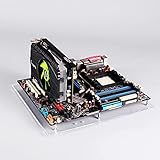
- Open benches: 30–45 minutes, but you supply everything: standoffs, riser cable, and patience.
Spec Checklist: Budget vs. Mid vs. Premium
| Spec | Budget (under $50) | Mid | Premium |
|---|---|---|---|
| Typical volume | Open frame / 8L+ | 5–18L | 10–20L |
| Max GPU length | Unlimited (open) or ~260mm | ~200–357mm by model | Up to 360mm+ |
| GPU thickness | 2–2.5 slots | 2–3.5 slots by model | 3.5–4 slots |
| Panel material | Acrylic / 0.8mm steel | 1.0mm steel; glass option | Aluminum, 4mm glass |
| Radiator support | None / 120mm | Up to 280mm | 280–360mm |
| PSU support | SFX / external | SFX / SFX-L; some ATX | SFX-L / ATX |
| Riser cable included | No | Sometimes (vertical mounts) | Usually, PCIe 4.0 rated |
| Example | Acrylic test bench | NR200P V2, K39, T60 | Aluminum SFF boutique cases |
Red Flags
- Single “max GPU length” figure with no cooler caveat. Honest specs state clearance with fans/radiators installed.
- No thickness or slot spec listed. Length-only listings usually mean narrow interiors.
- Tempered glass on both sides with no mesh option. Fine for low-watt builds, a thermal trap for 250W+ cards.
- PCIe 3.0 riser bundled with a modern case. You’ll likely replace it.
- Sub-1mm steel with no GPU support bracket. Long heavy cards will sag.
- “Fits RTX 5090” claims on 5–8L cases. Check third-party build logs; these claims often assume a specific 2-slot card variant and an SFX-L PSU in an exact position.
- No published interior drawings. Reputable SFF brands publish dimensioned diagrams — their absence suggests rough fitment.
FAQ
How much GPU clearance do I actually need?
Take your card’s official length and add 10–15mm of breathing room, then confirm the case’s figure accounts for any radiator or front fans. Add a support bracket plan for cards over 300mm or 1.5kg. If your card is 3+ slots thick, verify slot clearance explicitly — this is the most commonly overlooked dimension.
Can a Mini-ITX case handle a flagship GPU like an RTX 5090?
Yes, but only in the larger SFF layouts. Cases in the NR200P V2’s class — roughly 18 liters with 357mm clearance and SFX PSU mounting — accept flagship-length cards, ideally in undervolted or compact-cooler variants. True 5L cases like the SGPC K39 cannot; plan on a 200W-or-less card there.
Is vertical GPU mounting worth it in a small case?
For clearance and showcase value, yes; for thermals, it depends. Vertical mounts with a 20–30mm riser offset keep the card’s fans away from the glass and can improve temperatures slightly. Flush vertical mounts against glass typically raise GPU temps a few degrees. Make sure the riser is PCIe 4.0-rated if your card and motherboard support it.
What’s more important: case size or airflow?
For cards under 200W, prioritize size and portability — almost any ventilated ITX case works. For 250W+ cards, prioritize airflow and volume; a poorly ventilated small case can cost you 5–15% sustained performance through thermal throttling. As of 2026, high-efficiency GPUs have eased this trade-off, but cooler is still faster.









