
Choosing between sleeved PSU cables and the flat stock cables that come with a modular power supply sounds like a small detail, but it affects how your PC looks, how easy it is to build, and whether air can move freely inside your case. In a home setting — whether the computer sits in a living room, a small apartment desk nook, or a dedicated office — cable bulk and stiffness can mean the difference between a clean, cool-running system and one that traps heat, collects dust, and is a pain to clean around. The real decision is not just aesthetics versus function; it is whether you want a flexible, factory-tuned solution for airflow or a more structured, showpiece look that requires careful routing to keep airflow intact.
Both options work with modern modular power supplies, both will safely power your components when properly rated, and both are widely available in 2026 for ATX, SFX, and SFX-L builds. The right choice comes down to your case size, your airflow priorities, and how much time you want to spend on cable management.
As an Amazon Associate we earn from qualifying purchases at no extra cost to you.


Our Top Picks


Top 3 picks at a glance
Quick Verdict
If your top priority is maximum airflow with the least hassle, stick with modular stock cables — especially the flat, flexible ribbon-style cables included with most quality modular PSUs. They bend easily, tuck flat against the chassis, and leave more open space behind the motherboard tray and in front of intake fans.
If your priority is a premium, uniform look and you have a mid-tower or larger case with good routing channels, sleeved extension cables are the better fit.
Side by Side
| Feature | Sleeved PSU Cables (Extensions or Full Replacement Kits) | Modular Stock Cables (Flat / Ribbon Stock Cables) |
|---|---|---|
| Comfort (Ease of Building) | Stiffer 16AWG wires hold shape but resist tight bends; combs keep runs neat but make routing through grommets slower. Allow extra 30-45 minutes for a clean install. | Very flexible flat ribbons bend at 90 degrees easily; fastest to route and easier for first-time builders. |
| Durability | Braided PET or nylon sleeve resists abrasion and fraying; 16AWG copper handles high wattage (up to 600W on 12VHPWR/12V-2×6 with proper connector). Sleeve can snag if pulled sharply. | OEM-grade PVC / ribbon insulation rated for PSU warranty; thinner profile but less abrasion resistance if repeatedly rerouted. |
| Price Range | ||
| Maintenance | Braided texture traps dust and pet hair more readily; needs light dusting with compressed air or soft brush every 2-3 months. | Smooth flat surface wipes clean quickly; less dust accumulation, easier to vacuum around. |
| Space Needed | Each sleeved 24-pin bundle is about 18-22mm thick with combs; extensions add 30cm / 11.8 inches of extra length to manage behind the tray. Best with 25-35mm of rear clearance. | Flat 24-pin ribbon is about 6-9mm thick and lays flush against the back panel; needs only 15-20mm rear clearance. Ideal for cases with shallow 15-18mm cable channels. |
| Look | Uniform color, tight parallel lines, premium show-build aesthetic. Available in solid, dual-tone, and white/black combos. | Utilitarian black ribbons, less visual impact. Designed to disappear, not to be displayed. |
| Airflow Impact | Can improve front-of-case appearance but may impede airflow if bundles cross directly in front of intake fans or fill basement shroud space. Requires deliberate routing. | Lowest obstruction when routed flat along edges and behind tray; maximizes open volume in main chamber for front-to-back airflow. |
| Resale | Adds visual appeal for listings and photos; may not add dollar value unless buyer wants that color scheme. | Retains PSU warranty compliance; buyers trust factory cables for safety and compatibility. |
| Best For | Mid-tower ATX builds, showcase setups, living room PCs where looks matter and space is plentiful. | Small cases, high-airflow performance builds, rentals, and homes where easy cleaning and cooling matter most. |
Where Sleeved Psu Cables Wins
Sleeved cables win on presentation and structure. Each wire is individually wrapped in a soft braided sleeve, so the entire run holds a straight, parallel shape when you use the included combs. That rigidity is an advantage in a panoramic or tempered-glass case where cables are visible. Instead of a loose ribbon that sags, you get tight, color-matched lines from the power supply to the motherboard, GPU, and EPS connectors. Kits like the AsiaHorse 16AWG PSU Cable Extension Sleeved Custom Mod GPU PC Audio Video Power Supply Soft Braided Cables with Two Color Comb Kit provide a 24-pin, 8-pin EPS, and 6+2-pin PCIe set at 30cm length, which is enough to create that straight-run look without replacing your factory cables entirely.
The 16AWG wire gauge used in many sleeved kits is also a practical benefit. Thicker copper handles higher current with less heat at sustained loads, which matters for systems with a 250-450 watt GPU and a 125-170 watt CPU. While stock cables are already correctly gauged for their PSU, 16AWG extensions give builders extra peace of mind for heavy, long-duration gaming or creative work, provided the extensions use proper terminals and are not excessively chained.
Sleeved kits offer more color control for a home that doubles as a living space. If your desk is in a family room, a white, black, or dual-color set can tie the PC into your decor rather than leaving a tangle of black ribbons visible through glass. The combs, usually 4 to 6 per kit, keep spacing even at 3-4mm between wires, which photographs well and stays tidy even after you move the PC for cleaning.
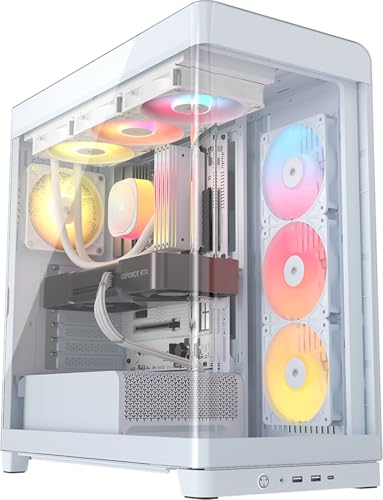
The trade-off is bulk. A combed 24-pin sleeved bundle does not compress. In a mid-tower such as the CORSAIR Frame 4500X RS ARGB, with its deep 35mm rear channel and open basement, you have room to fold the extra 30cm of extension length. In a compact microATX or slim tower with only 16-18mm of space behind the tray, that same bundle will push the side panel outward and can spill into the main chamber if you force it, which directly hurts airflow.
Where Modular Stock Cables Airflow Wins
Modular stock cables win on airflow, flexibility, and simplicity. The flat, flexible cables that ship with modern modular PSUs are engineered to be thin and to fold flat. A typical flat 24-pin cable measures roughly 55-60mm wide but only 6-9mm thick, so you can press it completely flat against the motherboard tray, route it through the nearest grommet, and leave the main compartment open for air. That matters because front intake fans — usually two or three 120mm or 140mm fans moving 40-70 CFM each — need an unobstructed path across the GPU and CPU cooler and out the rear or top exhaust.
In small and short-depth cases, stock-style flat cables are often the only way to maintain clear airflow without creative workarounds. The SilverStone Technology Flat Flexible Short Cable Set Designed for SilverStone Modular Power Supplies PP05-E is a good example of why: at 200-300mm lengths versus the standard 550-650mm ATX lengths, short cables eliminate the coiled excess that otherwise fills the PSU basement and blocks bottom intake or front-to-back movement. Less excess means less material to trap warm air around drives and shrouds.
Weight and handling also favor stock. A full flat cable set for a 750-850 watt PSU typically weighs 350-500 grams total, while a sleeved extension kit adds another 280-420 grams on top of the stock set because you are keeping both. That extra mass and stiffness can strain tight connector angles on GPUs with recessed 8-pin or 12V-2×6 plugs, where a sharp bend within 35mm of the connector is required to clear a side panel.
Finally, compatibility and warranty favor stock. Replacement sleeved kits must be matched exactly to your PSU model; pinouts vary between brands and even between product lines. Flat stock cables are guaranteed correct for that unit. If you swap PSUs later, you swap the included cables and know the pinout is right, which avoids a common and costly mistake for home builders.
Cost Over 5 Years
Over five years, the cost difference is modest but worth planning.
That is a one-time expense, and braided cables do not wear out quickly under normal home use, lasting the full five years without replacement. Energy cost is essentially identical; cable type does not change wattage draw if properly rated.
If you move or rebuild within that period, flat stock cables transfer cleanly to a new case, even a smaller one. Sleeved extensions are more case-dependent; a 30cm extension that looked perfect in a mid-tower may be too long for a compact build, prompting a second purchase of short flat cables anyway.
Which One for Your Home
Small Apartment (Desk Nook, 10×10 to 12×12 Room)
Choose modular stock flat cables. Space is tight, rear clearance is often limited to 15-22mm, and the PC may sit near a wall where exhaust heat matters. Flat ribbons tuck tight, keep the interior open, and make it easier to slide the case out for dusting without snagging a stiff bundle. If you want a touch of color without sacrificing space, limit sleeved cables to a single visible run, such as the 8-pin EPS at the top, and keep the 24-pin flat.
Family With Kids or Pets
Choose modular stock flat cables for the main build, with sleeved only if the case is fully enclosed and out of reach. Braided sleeves look great but collect pet hair and fingerprints faster and invite curious hands to tug on combed, visible runs. Flat cables route behind the tray and out of sight, making the exterior easier to wipe down. Pair with a case that has filtered intakes and a solid PSU shroud, like the high-airflow CORSAIR Frame 4500X RS ARGB, to keep hair out of the cable chamber.
Rental (You Cannot Modify Furniture or Room Layout)
Choose modular stock flat cables. Rentals often mean limited desk depth, 20-24 inch deep desks, and no wall-mounting or custom ventilation. Flat cables let you keep the PC cooler without cutting panels or adding external fans, and they make moving easier — no stiff bundles to rebend after transport. Extensions add weight and length that can press against side panels in transit.
Long-Term Home (Dedicated Office or Living Room Showcase)
Choose sleeved PSU cables if you have a mid-tower or larger case with 25mm+ rear space and you value a finished look for the next several years. In a permanent setup, you can take the time to route extensions properly — behind the tray, through grommets, with gentle curves and no crossings over intake fans — so airflow remains strong while the build looks intentional. A full kit such as the Asiahorse 16AWG Pro Power Supply Sleeved Cable with dual EPS support works well for high-end boards that need two 8-pin CPU connectors, and the combs will keep the system photo-ready for a long time.
FAQ
Do sleeved cables block airflow compared to stock flat cables?
They can if routed poorly. A sleeved 24-pin bundle is roughly twice as thick as a flat ribbon and extensions add 30cm of extra length that must be stored. When pressed flat against the tray and kept out of the direct path between front intake fans and the GPU/CPU cooler, the difference in temperatures is small. When bunched in front of fans or packed into a shallow basement, sleeved bundles restrict open volume and can raise dust buildup. Flat stock cables are inherently lower-profile and easier to keep out of the airstream.
Are sleeved extension cables safe for high-wattage gaming PCs?
Yes, when they are 16AWG or 18AWG, use proper terminals, and are rated for your GPU and CPU power connectors. Most quality extensions handle 300-600 watts on PCIe and EPS lines without issue. Safety depends on correct pinout, firm seating, and avoiding overly tight bends within 35mm of the connector. Never mix full replacement sleeved cables between PSU brands; pinouts differ. Extensions that plug onto your existing stock cables avoid pinout mismatch but still require secure connections.
Will I need a new case if I switch to sleeved cables?
Not necessarily. Most ATX mid-towers with 25-35mm of space behind the motherboard tray handle sleeved extensions well. Compact microATX, slim ATX, and many small-form-factor cases with 15-18mm of rear space are better served by flat or short-length stock cables. Check your case manual for rear clearance and PSU shroud height before buying. If your panel bows or you must force cables to close it, switch back to flat.
How do I keep either cable type cleaner and cooler at home?
Route all cables behind the motherboard tray, use the case’s tie points, and keep runs parallel to edges rather than across the middle of the case. Leave 40-50mm of clear space in front of intake fans and avoid stacking cables under the GPU. Dust every 2-3 months with short bursts of compressed air, vacuum the room rather than the PC interior, and clean front filters monthly if you have pets. Either cable type stays cooler when dust does not insulate it and air has a clear front-to-back path.









