A wired gaming mouse gives a direct, lag-free connection, but the cable itself can fight you. It drags across the desk, catches on the edge of the mousepad, and tugs the mouse sideways in the middle of a flick. A mouse bungee fixes that by lifting the cable off the desk and holding it at a steady height, so the mouse moves almost like a wireless one while keeping the wired connection. The right bungee stays put, feeds cable smoothly, and never pulls back against your hand.
This guide is for competitive players who flick fast and low, desk workers with crowded surfaces, LAN players who pack light, and anyone whose mouse cable keeps snagging. The four bungees below were chosen from the names and specifications on their Amazon listings, covering a weighted RGB stand, a suction-cup base, a compact travel design, and a tiny adhesive mount.
Top 3 picks at a glance

Quick Picks
As an Amazon Associate, we earn from qualifying purchases.
| Product | Best for | Key spec from title |
|---|---|---|
| Razer Mouse Bungee V3 Chroma | RGB gaming setups | 240g weighted base with 16.8 million-color RGB underglow |
| COUGAR Bunker Mouse Bungee | Glass or slick desks | Vacuum suction pad with flexible cable mount |
| Hotline Games Mouse Bungee 3.0 | Travel and LAN play | 220g weighted base with retractable spring arm |
| Pulsar Micro Bungee ES | Tiny desks and monitor edges | 1.77-inch adhesive mount with 360-degree pivot |
How to Choose
Start with how the base stays put
The base is what keeps a bungee from sliding across the desk during fast flicks, and the three common designs behave very differently. A weighted base with rubber feet works on almost any flat surface and needs no setup, but it takes up desk space and can still creep on a very slick top. A vacuum suction base grips glass and polished surfaces that defeat rubber feet, yet it needs a smooth, clean spot to seal. An adhesive mount skips the base entirely and sticks to a monitor edge or desk side, which saves space but commits you to one position until you swap the pad. Match the mount to your desk surface before anything else.
Match the arm to your cable
The arm is the part that holds the cable, and it has to suit both the cable and your movement. A spring arm lifts the cable and feeds it out smoothly as the mouse travels, which suits wide, low-sensitivity swipes. A flexible rubber arm bends to the angle you set and stays there, which suits players who want a fixed cable path. A short silicone arm works when the cable only needs a small lift near the monitor. Check the clip width: a clip made for thin rubber cords can pinch a thick braided cable, while a wide clip lets a thin cable slip. Look for a clip that the listing says fits rubber, braided, and paracord cables.
Think about desk space and travel
A full-size weighted bungee needs a clear patch of desk behind the mousepad, and on a crowded desk that patch may not exist. Measure the space first, then compare it with the footprint on the listing, because a bungee that overlaps the mousepad will lift the pad edge and annoy you every session. If you travel to LAN events, a compact frame with a retractable arm packs into a bag without a separate case, while a heavy base adds weight you will feel in a backpack. A micro bungee that sticks to the monitor edge uses no desk space at all, which is the cleanest answer for a tiny desk or a shared workspace.
Decide whether extras matter
Some bungees add lighting or extra ports, and those extras are worth weighing against the core job of holding a cable. RGB underglow looks right in a lit-up setup and can sync with other gear from the same brand, but it needs a USB connection and software to change the lighting. A built-in hub gives a spot for a wireless dongle or a flash drive, yet the hub on most bungees runs at USB 2.0, so it will not move large files fast. A plain bungee with no lighting and no hub does one job, needs nothing installed, and usually weighs less. Pick extras only if you will actually use them.
The 4 Best Options
Razer Mouse Bungee V3 Chroma
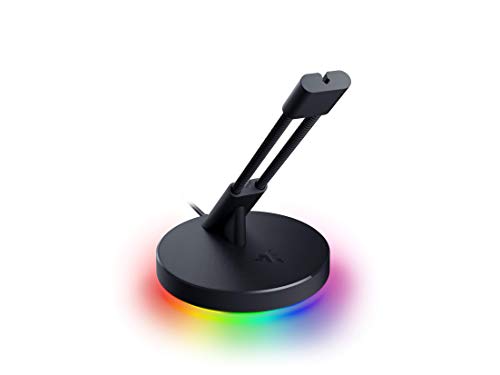
The Razer V3 Chroma is the most complete bungee in this guide, built around a 240g weighted base that stays planted through fast, low-sensitivity flicks. The adjustable spring arm holds the cable at a useful height, and the rubber-coated catch fits rubber, braided, and paracord cables without scuffing them. Eight lighting zones under the base glow through Razer Synapse, so the bungee blends into a Chroma-lit setup instead of sitting there as a plain black block. It suits players who want the steadiest bungee available and like their desk gear to match.
Specs
- Adjustable spring arm with rubber-coated cable catch
- Weighted base, 240g (8.5 oz), with anti-slip feet
- Chroma RGB underglow with 16.8 million colors and 8 lighting zones
- Fits rubber, braided, and paracord mouse cables
- Model RC21-01520100-R3U1
- Compact footprint, 3.55 x 4.83 inches
Best for: RGB gaming setups where a heavy, stable bungee with lighting is wanted.
Watch out for: Changing the lighting needs Razer Synapse 3, and without the software the bungee lights up with a default cycling effect only.
COUGAR Bunker Mouse Bungee
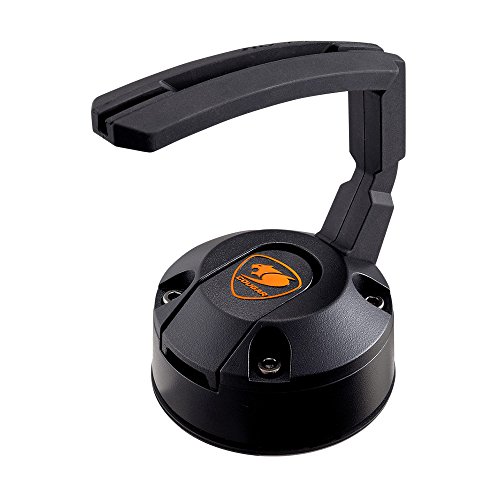
The Cougar Bunker takes a different approach to staying put: instead of weight, it uses a vacuum suction pad that clamps onto the desk and releases with a pull tab. That makes it the pick for glass or polished desks where a weighted base can still slide, and the flexible rubber arm bends to the angle you set rather than springing back. A USB port on the base gives a spot for a wireless dongle. At only 3 ounces it is light enough to carry to a LAN, and the compact frame leaves most of the desk free.
Specs
- Patented vacuum suction pad base
- Flexible cable mount with rubber arm
- Model CGR-XXNB-MB1
- 6 x 4.3 x 3.3 inches, 3 ounces
- 1 USB 2.0 port
- Black color
Best for: Glass or slick desks where a weighted base can slide.
Watch out for: The suction pad needs a smooth, clean surface to grip, and the Amazon listing shows 1 USB 2.0 port while some other listings show more, so confirm the port count on the listing.
Hotline Games Mouse Bungee 3.0
The Hotline Games 3.0 is the travel pick in this guide, with a 220g weighted base and a retractable spring arm that compresses into a compact frame for a bag. The bendable arm and rubber clip hold rubber, braided, and paracord cables, and the arm lifts the cable about 10 cm off the desk, which is enough to stop drag without pulling the mouse back. Anti-slip rubber feet keep the base steady on a hotel desk or a LAN table. It has no lighting and no hub, so it does exactly one job and does it without any software.
Specs
- Weighted base, 220g, with anti-slip rubber feet
- Retractable spring arm with bendable construction
- Rubber clip fits rubber, braided, and paracord cables
- Compact frame packs down for travel
- Lifts the cable about 10 cm off the desk
- Black color
Best for: Travel and LAN play where a compact bungee that packs down is wanted.
Watch out for: It has no lighting and no USB hub, so players who want those extras should look at the Razer or Cougar picks instead.
Pulsar Micro Bungee ES

The Pulsar Micro Bungee ES is barely there, and that is the point. It is a 1.77-inch square pad with a flexible silicone arm that sticks to the back of a monitor or the edge of a desk with 3M VHB adhesive, so it takes up no desk space at all. A 360-degree ball-bearing pivot lets the arm swing with the mouse, and the 9 g body disappears behind a monitor. An extra adhesive pad comes in the box for repositioning. It suits cramped desks and monitor-mounted setups where a full-size bungee simply will not fit.
Specs
- Super-compact footprint, 1.77 x 1.77 inches
- 0.32 oz (9 g) body
- Flexible silicone arm with 360-degree ball-bearing pivot
- 3M VHB adhesive mount, attaches to monitor or desk edge
- Extra adhesive pad included
- Polycarbonate and silicone construction
Best for: Tiny desks and monitor edges where a full-size bungee will not fit.
Watch out for: The adhesive mount needs a clean, flat surface to hold, and moving the bungee means replacing the adhesive pad.
Which One Fits Your Situation
You play fast flicks in competitive shooters
Pick the Razer V3 Chroma. The 240g base stays planted through wide, low-sensitivity swipes, and the spring arm feeds cable smoothly instead of tugging the mouse back mid-flick. The rubber-coated catch fits the braided and paracord cables most competitive mice ship with, and the RGB underglow matches a Chroma-lit setup. Just leave a clear patch of desk behind the mousepad for the base.
Your desk is glass or very slick
Pick the Cougar Bunker. Its vacuum suction pad grips smooth surfaces where a weighted base can creep, and the flexible rubber arm bends to the angle you set. The pull tab releases the seal when you want to move it, and the light 3-ounce frame is easy to carry. Check that the desk spot is clean and flat first, since dust or texture breaks the seal.
You travel to LAN events
Pick the Hotline Games 3.0. The retractable spring arm compresses into a compact frame that fits in a bag, and the 220g base is heavy enough to stay put on a hotel desk without needing a perfectly smooth surface. The rubber clip holds the usual cable types, and the lack of lighting or a hub keeps it light. It is the simplest bungee here to pack and unpack.
Your desk has almost no free space
Pick the Pulsar Micro Bungee ES. It sticks to the back of a monitor or the edge of the desk, so it uses no desk space at all, and the 360-degree pivot lets the silicone arm follow the mouse. The 9 g body is invisible behind a monitor, and the extra adhesive pad lets you reposition it once. Clean the mounting spot first so the adhesive holds.
Common Mistakes
- Buying a bungee for a wireless mouse, which has no cable for it to manage.
- Placing a suction-cup bungee on a textured or dusty desk, where the seal cannot hold.
- Sticking an adhesive mount on a dirty surface, then moving it and finding the pad will not grip again.
- Choosing a clip that cannot hold a thick braided cable, so the cable slips out mid-match.
- Setting the bungee too far from the mouse, leaving a long slack loop that still drags on the desk.
Frequently Asked Questions
Do I still need a mouse bungee with a wireless mouse?
No. A bungee only manages a cable, so a wireless mouse gains nothing from one. The bungee earns its place when a wired mouse cable drags across the desk, catches on the mousepad edge, or tugs during flicks. If you switch to wireless later, the bungee can come off the desk entirely, since it serves no other purpose.
Will a mouse bungee work with any wired mouse?
Almost any wired mouse works with a bungee, as long as the clip fits the cable. Most clips on current bungees accept rubber, braided, and paracord cables, which covers nearly every gaming mouse sold today. Very thick cables can be a tight fit in a narrow clip, so check the clip description on the listing when the mouse uses an unusually heavy cable.
Where should I place the bungee on my desk?
Set it behind the mousepad, roughly in line with where the cable leaves the mouse, with the arm pointing toward the mouse. Leave enough slack between the bungee and the mouse for full swipes, but not so much that the cable pools on the desk. A good check is a wide flick to each corner: the cable should stay lifted and never tug the mouse.
Can I move a suction-cup or adhesive bungee later?
A suction-cup bungee moves easily: lift the pull tab, reposition it, and press it down on a clean, smooth spot. An adhesive bungee is harder to move, because the pad loses grip once peeled off. Keep the spare pad that ships with the Pulsar, or have a fresh adhesive pad ready before you reposition an adhesive mount.
Related guides
More from Amazon
Programs that pair well with the guide above. Offers and eligibility are set by Amazon and may change.
Free shipping on eligible items, Prime Video and more. Eligible new members can start with a free trial.
Start a Prime free trialAd-free music streaming. Eligible new subscribers can start with a free trial.
Try Music Unlimited freeA Prime membership for ages 18-24 with a trial period. Eligibility is set by Amazon.
See Prime for Young AdultsAudiobooks and podcasts to listen to on the go. Eligible new members can start with a free trial.
Try Audible freeAs an Amazon Associate we earn from qualifying purchases.