A mouse pad is the smallest piece of a gaming setup, and it is the one your hand touches through every match. A bare desk makes a sensor read unevenly, lets the mouse skip on fast flicks, and wears down mouse feet in weeks. A pad that is too small forces you to lift and recenter the mouse in the middle of a fight, while a pad that slides around the desk is worse than no pad at all. The right pad gives the sensor a steady surface, gives your wrist a smooth path, and stays put while you play.
This guide is for players setting up a first gaming desk, players on a tight desk who need a compact pad, and players who want a larger surface for low-sensitivity aiming without a large outlay. The four pads below were chosen from the names and specifications on their Amazon listings, covering compact cloth pads, a stitched-edge control pad, and a medium pad with a thick foam base.
Top 3 picks at a glance


Quick Picks
As an Amazon Associate, we earn from qualifying purchases.
| Product | Best for | Key spec from title |
|---|---|---|
| Corsair MM100 Cloth Gaming Mouse Pad | Compact desks and tight setups | Cloth surface, 320 x 270 mm |
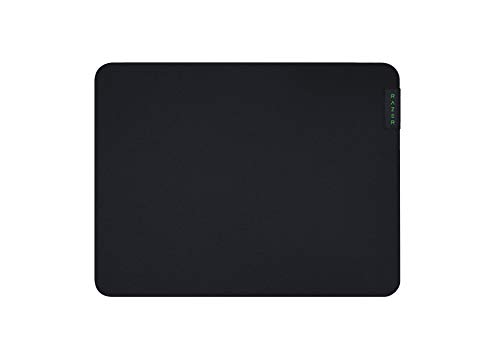
| Razer Gigantus V2 Medium | Everyday gaming and low-sensitivity aim | Textured micro-weave cloth, 360 x 275 mm |
| SteelSeries QcK Small | Small desks and travel setups | Micro-woven cloth, 250 x 210 mm |
| HyperX FURY S Pro Medium | Control-focused aiming | Stitched anti-fray edges, 360 x 300 mm |
How to Choose
Size first: match the pad to your desk and your aim
Measure the space on your desk before you buy, and leave room for the keyboard beside the pad. A compact pad around 250 to 320 mm wide suits a small desk and players who aim with the wrist at higher sensitivity, while a medium pad around 360 mm wide gives low-sensitivity players room for wide arm sweeps without lifting the mouse. If the pad has to share the desk with a full-size keyboard, check the depth as well, because a pad that runs under the keyboard can bunch up at the edge. A pad that fits the desk and the way you aim will feel right from the first match, and one that does not will annoy you every day.
Cloth surfaces and glide: speed or control
Most low-priced gaming pads use a cloth surface, and the weave decides how the mouse feels. A tightly woven, smooth cloth lets the mouse glide fast with little resistance, which suits players who flick between targets and value quick movement. A denser, slightly rougher weave adds friction and stopping power, which suits players who track a moving target and need the crosshair to stop exactly where they leave it. Neither feel is better in general, so think about how you aim: if you overshoot targets, a slower surface with more control will help; if your aim feels sluggish, a faster surface will help.
Thickness and edges: comfort and durability
A thin pad around 1 to 2 mm thick sits close to the desk and keeps the wrist near the surface, which many players prefer for long sessions. A thicker pad around 3 to 4 mm adds cushioning and stays flat over small bumps or seams in the desk, which matters on an older wooden desk. The edge matters just as much: stitched edges stop the cloth from peeling and fraying where the wrist rests, while an unstitched edge can lift and curl after months of use. If you play every day, a stitched edge is the detail that decides how long the pad looks new.
The base and the wash: keeping the pad still and clean
A pad is useless if it moves, so check the base before anything else. A rubber or silicone base grips the desk and holds the pad still through fast flicks, while a thin foam base can slide on a smooth desk. Cloth pads pick up dust, skin, and drink spills, so think about cleaning too: some cloth pads can be washed with warm water and left to dry flat, while others should only be wiped with a damp cloth. A pad that is easy to clean keeps its glide for longer, and a pad that never gets cleaned turns slow and sticky over time.
The 4 Best Options
Corsair MM100 Cloth Gaming Mouse Pad
The Corsair MM100 is the simplest pad in this guide, and that is its strength. It is a plain black cloth pad with a surface tuned for optical and laser sensors, and it gives a steady, controlled glide without any extra features to get in the way. At 320 by 270 mm it fits a standard desk with room for the keyboard beside it, and the thin cloth construction lies flat straight out of the box. It suits players who want a no-fuss pad that works from day one and do not need a stitched edge or a thick foam base.
Specs
- Cloth surface optimized for optical and laser gaming sensors
- Glide-optimized textile surface designed for maximum control
- 320 x 270 mm (12.6 x 10.6 in)
- Thin, flexible cloth construction
Best for: Compact desks and tight setups where a plain, dependable cloth pad is enough.
Watch out for: The edges are not stitched, so check them after a few months of daily use for lifting or fraying where the wrist rests.
Razer Gigantus V2 Cloth Gaming Mouse Pad (Medium)
The Razer Gigantus V2 in Medium is the all-rounder of the four, with a textured micro-weave cloth surface that balances speed and control. At 360 by 275 mm it gives low-sensitivity players room for wide arm movements, and the thick, high-density rubber foam base keeps it flat and still on the desk. The surface is tuned for every type of mouse sensor, so it works with the mouse you already own, and the Classic Black color keeps the desk looking plain. It suits players who want one pad that handles shooters, strategy games, and daily work without a second thought.
Specs
- Textured micro-weave cloth surface
- Thick, high-density rubber foam base
- Non-slip base
- 360 x 275 x 3 mm
- Optimized across all mouse sensors
- Classic Black color
Best for: Everyday gaming and low-sensitivity aiming where a medium pad with a firm base is the right fit.
Watch out for: The pad arrives rolled up and needs a day lying flat before it sits fully level on the desk.
SteelSeries QcK Gaming Mouse Pad (Small)
The SteelSeries QcK Small is the compact pick, built around the micro-woven cloth surface that made the QcK line a fixture on tournament desks. At 250 by 210 mm it fits a small desk, a dorm setup, or a bag for travel, and it suits players who aim with the wrist at higher sensitivity. The surface is tuned for both low and high DPI tracking, so optical and laser sensors read it cleanly, and the rubber base holds it in place during fast play. The whole pad is washable, which helps it keep its glide after months of use.
Specs
- Micro-woven cloth surface
- Optimized for low and high DPI tracking
- Non-slip rubber base
- 250 x 210 x 2 mm
- Model 63005
- Washable
Best for: Small desks and travel setups where a compact pad with proven tracking is the priority.
Watch out for: The Small size is tight for low-sensitivity aiming, so players who sweep with the whole arm should pick a larger pad instead.
HyperX FURY S Pro Gaming Mouse Pad (Medium)

The HyperX FURY S Pro Medium is the control pick, with a densely woven cloth surface and seamlessly stitched anti-fray edges that keep the surface uniform from edge to edge. At 360 by 300 mm it gives plenty of room for deliberate, measured aiming, and the soft cloth surface is comfortable under the wrist during long sessions. The textured natural rubber underside grips the desk firmly, and the pad rolls up for transport without damage. It suits players who track targets carefully and want a pad that stops exactly where the hand stops.
Specs
- Densely woven cloth surface optimized for precision
- Seamlessly stitched anti-fray edges
- Soft cloth surface for wrist comfort
- Textured natural rubber underside
- 360 x 300 x 3 mm
- Model HX-MPFS-M, part number 4P5Q5AA
- 2-year warranty
Best for: Control-focused aiming where a stitched edge and a dense weave matter most.
Watch out for: Confirm the Medium size and model HX-MPFS-M on the listing before ordering, since a second code appears for this model in some catalogs.
Which One Fits Your Situation
You play on a small desk
Pick the SteelSeries QcK Small. It takes up little space, the micro-woven cloth tracks cleanly, and the rubber base keeps it still on a cramped desk. It is also the easiest of the four to carry, so it works for a dorm room or a setup that moves between rooms. Just remember that the small size suits wrist aiming, so if you play at low sensitivity, a medium pad will serve you better.
You aim with your whole arm at low sensitivity
Pick the Razer Gigantus V2 Medium. The 360 by 275 mm surface gives your arm room for wide sweeps, and the thick foam base stays flat and steady while you move. The micro-weave surface balances speed and control, so it suits shooters where you flick to a target and then track it. Give it a day to lie flat after unboxing before you judge how it feels.
You want a pad that survives daily use
Pick the HyperX FURY S Pro Medium. The stitched anti-fray edges are the detail that keeps it looking new after months of play, and the dense weave gives a consistent glide across the whole surface. The textured rubber underside holds it in place, and the soft cloth is kind to the wrist during long sessions. Check the model code on the listing so you get the Medium size.
You want the simplest solid pad
Pick the Corsair MM100. It is a plain cloth pad with a sensor-tuned surface, a size that fits most desks, and nothing extra to think about. It lies flat from the start, the glide is steady and controlled, and it does the job without fuss. Keep an eye on the unstitched edges over time, and replace it when the corners start to lift.
Common Mistakes
- Buying the biggest pad without measuring the desk, then finding it runs under the keyboard and bunches up at the edge.
- Picking a fast, slick surface when the real problem is overshooting targets, which a slower control surface would fix.
- Ignoring the base and ending up with a pad that slides across a smooth desk during fast flicks.
- Never cleaning a cloth pad, so dust and grime build up and the glide turns slow and sticky.
- Choosing a pad that is too small for low-sensitivity aiming, then lifting and recentering the mouse in the middle of every fight.
Frequently Asked Questions
What size mouse pad do I need for gaming?
Match the pad to your desk and your sensitivity. A compact pad around 250 to 320 mm wide suits a small desk and wrist aiming at higher sensitivity. A medium pad around 360 mm wide suits low-sensitivity players who sweep with the whole arm. Measure the clear space beside the keyboard first, and leave room for the mouse to move without hitting the desk edge.
Are cloth mouse pads good for gaming?
Yes, cloth pads are the most common choice for gaming because the woven surface gives a steady, predictable glide and works with optical and laser sensors. The weave decides the feel: a smooth weave glides faster, while a denser weave adds friction and stopping power. Cloth pads also cushion the wrist and stay quiet, which hard pads do not.
How do I clean a cloth gaming mouse pad?
Wipe the surface with a damp cloth and a little warm water, then leave the pad flat to dry completely before using it again. Some cloth pads can be washed more thoroughly, but check the listing first, since soaking can loosen the bond between the cloth and the base. Clean the pad regularly so dust and grime do not slow the glide.
Do stitched edges matter on a gaming mouse pad?
Yes, stitched edges stop the cloth from peeling and fraying where the wrist rests, which is where most pads wear out first. A pad with stitched edges keeps a clean edge for much longer, while an unstitched edge can lift and curl after months of daily use. If you play every day, a stitched edge is worth having.
Related guides
More from Amazon
Programs that pair well with the guide above. Offers and eligibility are set by Amazon and may change.
Free shipping on eligible items, Prime Video and more. Eligible new members can start with a free trial.
Start a Prime free trialAd-free music streaming. Eligible new subscribers can start with a free trial.
Try Music Unlimited freeA Prime membership for ages 18-24 with a trial period. Eligibility is set by Amazon.
See Prime for Young AdultsAudiobooks and podcasts to listen to on the go. Eligible new members can start with a free trial.
Try Audible freeAs an Amazon Associate we earn from qualifying purchases.