If your office or bedroom runs hot despite a 280mm or 420mm radiator, the culprit is often airflow, not coolant. Standard airflow fans look great on paper but struggle to push air through dense fin stacks, leaving heat trapped at the radiator and forcing your pump and remaining fans to work harder and louder.
Static pressure fans are built for exactly that restriction. With tighter blade geometry and focused hubs, they maintain pressure through fins instead of stalling against them. Below are the best 140mm options for radiators right now, ranked by value, noise profile, and radiator-specific design, with real prices you will pay at checkout.
As an Amazon Associate we earn from qualifying purchases at no extra cost to you.



Our Top Picks
 GDSTIME 140mm x 38mm High Static Pressure Fan140x140x38mm5.51 x 5.51 x 1.5 inches0.8 poundsCheck on Amazon
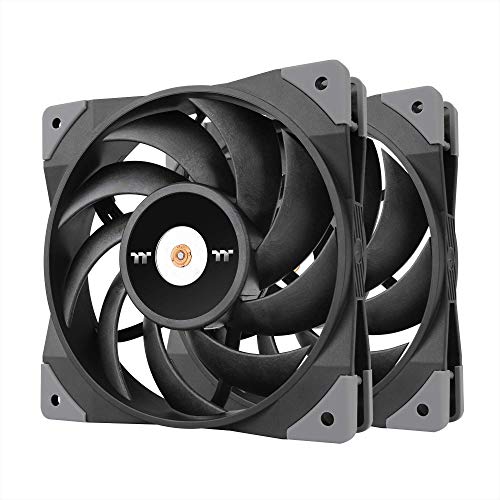 Thermaltake TOUGHFAN 14 Black PWM 500~2000rpm-controlled high Static2 Pack5.51 x 5.51 x 0.98 InchesCheck on Amazon


Top 3 picks at a glance
Quick Picks
| Product | Best for | Price |
|---|---|---|
| NZXT F140P – 140mm Static Pressure PC Case Fan – Black | Best Overall for Most Radiators | Check on Amazon |
| CORSAIR RS140 140mm PWM Fans – Daisy-Chain Connection – Low-Noise – Magnetic Dome Bearing – Dual Pack – Black | Best Dual-Pack Value for 280mm/420mm Rads | Check on Amazon |
| GDSTIME 140mm 12V Cooling Fan 2-Pin High Static Pressure Dual Ball Bearing | Best 12V Industrial Replacement | Check on Amazon |
| GDSTIME 140mm x 38mm High Static Pressure Fan 24V 2-Pin Dual Ball Bearing | Best 38mm Thick Fan for Extreme Restriction | Check on Amazon |
| NZXT F140P – 140mm Static Pressure PC Case Fan – White | Best White Build Pick | Check on Amazon |
| Thermalright TL-C14 140mm Fan, Quiet Operation, S-FDB Bearing, PWM Control, 1500RPM, Balance Performance Case Fan | Best Budget PWM Fan | Check on Amazon |
| Thermaltake TOUGHFAN 14 Black PWM 500~2000rpm-controlled high Static Pressure 140mm Circular Radiator Fan with Anti-Vibration Mounting System Cooling, (2 Fan Pack) CL-F085-PL14BL-A | Best High-RPM Performance Pack | Check on Amazon |
| CORSAIR iCUE Link RX140 140mm PWM Fan – Magnetic Dome Bearing – Single Fan – Black | Best Premium Single Fan with Ecosystem Control | Check on Amazon |
How We Compared
We prioritized fans that are actually sold as 140mm static pressure designs, not generic airflow models. That means blade and frame geometry intended to hold pressure against a radiator, not just move open-air volume. We also weighted radiator-relevant mounting details, including standard 125mm hole spacing for 140mm slots, corner vibration control, and cable management that matters in tight radiator bays.
Control type and bearing design were the next filters. PWM control gives you usable low-speed operation for idle and a real ramp under load, while bearing type affects long-term noise and orientation tolerance on front or top-mounted radiators. We compared dual ball bearing and magnetic dome options for durability against fluid dynamic variants for quiet operation. Finally, we balanced price per fan against what you get in the box. No lab test results are cited because radiator performance depends on fin density, case airflow, and fan curves that vary by build.
The 8 Best Picks
1. NZXT F140P – 140mm Static Pressure PC Case Fan – Black
This is the most versatile pick for builders who want a true static pressure 140mm fan without paying for a multi-fan ecosystem. The F140P uses a focused frame and winglet-style blade tips to keep pressure steady through 30mm to 45mm thick radiators, which is where most 280mm and 420mm AIOs live.
- Pro: Purpose-built static pressure geometry helps maintain airflow through dense radiator fins
- Pro: Fair single-fan price avoids the cost of kits when you only need one or two fans
- Con: Single-pack only, so a full 420mm radiator requires three separate purchases
When to skip: If you need a matched set for push-pull or want daisy-chain wiring to reduce cable clutter, a dual pack will be cleaner.
2. CORSAIR RS140 140mm PWM Fans – Daisy-Chain Connection – Low-Noise – Magnetic Dome Bearing – Dual Pack – Black
For a 280mm radiator, this dual pack is the value play. The magnetic dome bearing is designed for low noise and long life compared to traditional sleeve bearings, and PWM lets your motherboard handle a quiet idle curve and a more aggressive load curve without manual controllers.
- Pro: Daisy-chain connection reduces cable mess in radiator bays with limited header access
- Con: Black only in this pack, so not ideal for white or themed builds
When to skip: If you run a thick custom loop radiator that benefits from a thicker 38mm fan, these standard-thickness 140mm units are not the right tool.
3. GDSTIME 140mm 12V Cooling Fan 2-Pin High Static Pressure Dual Ball Bearing
This GDSTIME is a straightforward 140mm, 12V, 2-pin fan for users who need high static pressure in a simple, always-on configuration. The dual ball bearing design is built for durability in horizontal or vertical radiator mounting and for longer service life than sleeve bearings in warm cases.
- Pro: Dual ball bearing construction for durability in continuous-duty use
- Pro: 12V 2-pin wiring suits industrial panels, DIY enclosures, and legacy controllers
- Con: 2-pin means no PWM speed control, so you cannot tune a quiet curve from the motherboard
When to skip: If you need motherboard-based speed control for a quiet desktop radiator, choose a PWM model instead.
4. GDSTIME 140mm x 38mm High Static Pressure Fan 24V 2-Pin Dual Ball Bearing
When a standard 25mm thick fan stalls, thickness helps. This 140mm x 38mm unit adds 13mm of depth for higher pressure capability, useful on extra-thick radiators, external mo-ra style units, or enclosures with heavy mesh and dust filters. It runs on 24V with 2-pin wiring and uses dual ball bearings for industrial longevity.
- Pro: 38mm thickness provides additional pressure headroom versus standard 25mm fans
- Pro: 24V compatibility for industrial and 24V DC cooling systems
- Con: Requires 24V power and 38mm clearance, which many mid-tower radiator mounts do not have
When to skip: If your case only supports 25mm thick 140mm fans or you only have 12V headers, this will not fit or power correctly.
5. NZXT F140P – 140mm Static Pressure PC Case Fan – White
That makes it the easiest way to match a white radiator, white case, or light-themed build without sacrificing pressure-focused blade design. As we head into 2026, white components continue to carry a premium, so finding the white variant for less than the black one is unusual value.
- Pro: White frame and blades match white radiators and cases without painting or mismatched fans
- Con: Single fan only, so color matching a full 280mm or 420mm array means buying multiples
When to skip: If you prefer black hardware or need a daisy-chain dual pack for simpler wiring, look at the CORSAIR or Thermaltake packs.
6. Thermalright TL-C14 140mm Fan, Quiet Operation, S-FDB Bearing, PWM Control, 1500RPM, Balance Performance Case Fan
It is a 140mm PWM fan with S-FDB bearing rated to a maximum 1500RPM, which balances noise and pressure for slim to medium radiators.
- Pro: PWM control to 1500RPM with S-FDB bearing for quieter operation than ball bearing at low speeds
- Con: General-purpose balance design rather than a dedicated high-pressure industrial blade set
When to skip: If you run a thick, high-FPI radiator that needs maximum pressure, a dedicated static pressure pack is a safer bet.
7. Thermaltake TOUGHFAN 14 Black PWM 500~2000rpm-controlled high Static Pressure 140mm Circular Radiator Fan with Anti-Vibration Mounting System Cooling, (2 Fan Pack) CL-F085-PL14BL-A
This TOUGHFAN 14 pack is built explicitly for radiators, with a circular frame and anti-vibration mounting system to keep resonance down on metal radiator housings. The PWM range of 500 to 2000RPM gives you true low-speed quiet operation and a high top end for heat-soaked loops, controlled directly from the motherboard.
- Pro: Wide 500 to 2000RPM PWM range for quiet idle and strong load performance
- Pro: Radiator-focused design with anti-vibration mounts to reduce case hum
- Con: 2000RPM top speed can be audible if you run an aggressive curve; tuning is required
When to skip: If you want a silent-first build and rarely push the loop hard, a lower-RPM fan may stay quieter without tuning.
8. CORSAIR iCUE Link RX140 140mm PWM Fan – Magnetic Dome Bearing – Single Fan – Black
The iCUE Link RX140 is the premium single-fan option for builders already in or planning to use the iCUE Link ecosystem. This 140mm PWM fan uses a magnetic dome bearing for low friction and reduced noise over time, and it integrates with Link for cleaner cabling and unified control.
- Pro: Magnetic dome bearing designed for low noise and durability
- Pro: iCUE Link integration simplifies wiring and control if you use compatible Link hubs
When to skip: If you do not use iCUE Link or want the best price per fan for a full radiator, the dual packs offer far better value.
Buying Guide
Thickness, Voltage, and Fitment
Most PC radiators expect 140mm fans that are 25mm thick with 125mm mounting hole spacing. That is what the NZXT, CORSAIR, Thermalright, and Thermaltake picks use, so they fit standard 280mm and 420mm mounts without modification. The GDSTIME 140mm x 38mm model is 13mm thicker, which can improve pressure but requires explicit clearance between radiator, case panel, and memory or fittings. Voltage matters too. The two GDSTIME fans are 2-pin units at 12V and 24V respectively, which is common for industrial and DIY use but not for motherboard PWM headers. If you want speed control from the BIOS, stick with the PWM options and confirm you have an available 4-pin header per fan or a hub.
Bearing Type and Noise Reality
Bearing choice affects long-term noise more than marketing suggests. Dual ball bearing, as used in both GDSTIME fans, tolerates heat and varied mounting angles well for continuous operation, but it can be slightly louder at low speeds. S-FDB as in the Thermalright and magnetic dome as in both CORSAIR fans aim for lower noise and smoother ramp. For radiators, anti-vibration mounting matters as much as the bearing. A fan that couples vibration into a steel radiator will hum even if the motor is quiet. Look for integrated rubber corners or mounts, like the Thermaltake system, and use a gentle PWM curve that keeps fans around 600 to 900RPM at idle and only ramps past 1300RPM when coolant temperature rises.
How Many Fans and What Speed Range
Match pack size to radiator size. A 280mm radiator needs two 140mm fans, a 420mm needs three. Speed range tells you how flexible the fan will be. A 500 to 2000RPM range gives you headroom for both quiet nights and heavy gaming loads, while a 1500RPM maximum like the Thermalright TL-C14 is quieter by design but has less overhead for thick radiators.
Our Verdict
FAQ
Do I need static pressure fans for a 280mm or 420mm radiator?
Yes, if the radiator has dense fins. Airflow fans lose pressure quickly when faced with restriction and move less air than their open-air rating suggests. A static pressure 140mm fan is designed to keep pushing through that fin stack, which helps coolant temperatures and lets you run lower RPM for the same cooling.
Can I mix 140mm fan thicknesses on the same radiator?
Avoid mixing 25mm and 38mm fans on one radiator. Different thicknesses have different pressure and speed characteristics, which can create uneven airflow and noise. Use matched fans per radiator and reserve 38mm units for builds where the entire mount has 38mm clearance.
Are 2-pin fans usable on a motherboard PWM header?
2-pin fans will spin if given the correct voltage, but they do not report speed and cannot be PWM-controlled. The GDSTIME 12V and 24V models fall in this category. For desktop radiator control from the motherboard, choose a 4-pin PWM fan so you can set a quiet idle speed and a temperature-based ramp.
What is a good starting fan curve for radiator fans?
Start with a coolant or motherboard temperature-based curve that holds fans at 30 to 40 percent PWM at idle, ramps gently to about 60 percent by 45 degrees Celsius, and only goes above 75 percent when needed for heavy loads. This keeps noise low while preserving headroom for heat soak, and you can adjust from there based on your case and radiator thickness.