
Most people buy thermal paste the way they buy toothpaste: they grab whatever is on sale at the checkout and hope for the best. That is an expensive habit when you are cooling a CPU that pulls 200+ watts or a GPU that regularly spikes past 300 watts. The two most misunderstood specs on the tube—viscosity and thermal conductivity—do more to determine real-world performance than brand names or marketing ever will. Viscosity controls how the paste spreads and how thick your bond line ends up; conductivity controls how efficiently heat crosses that bond line. Get both wrong and you can lose 5–10°C of cooling headroom on the same hardware.
Another common mistake is assuming higher conductivity numbers on the box automatically mean lower temperatures. A paste rated at 14 W/mK can perform worse than an 8.5 W/mK paste if its viscosity is so high that it never fills the microscopic valleys between your CPU heat spreader and your cooler. This guide walks you through matching viscosity and conductivity to your actual build, then covers sizing, price tiers, and the spec sheet details that separate a good tube from shelf filler.
As an Amazon Associate we earn from qualifying purchases at no extra cost to you.


Our Top Picks


Top 3 picks at a glance
Decide These 3 Things First
1. What are you cooling, and how hot does it run? A 65-watt office CPU tolerates almost any decent paste. A 250-watt overclocked processor, a PlayStation 5 under sustained load, or a graphics card with a hot VRAM layout needs a paste with both high conductivity and a viscosity that stays stable over years of 80–95°C operation. If your hardware runs hot, prioritize conductivity (10 W/mK or better) and long-term stability.
2. How often will you service it? If you repaste once every three years, durability matters more than the last 2°C. If you swap coolers seasonally or rebuild frequently, pick a paste that cleans off easily and does not pump out—a semi-solid or paste with higher viscosity resists migration under repeated thermal cycling.
3. What is your comfort level with application? Low-viscosity pastes spread themselves under cooler mounting pressure, which is forgiving for first-timers. Thicker pastes demand even mounting pressure and a deliberate spread. If you have never applied paste before, a smoother, lower-viscosity formula or one sold with included cleaning wipes will save you a frustrating afternoon.
Thermal Conductivity: Read Past the Big Number
Conductivity is measured in watts per meter-kelvin (W/mK), and it is the spec manufacturers lead with. Mainstream pastes typically range from 4 to 8.5 W/mK. High-performance pastes run roughly 10 to 14.5 W/mK. Liquid-metal compounds exceed 70 W/mK but are electrically conductive and aluminum-corrosive—skip them unless you know exactly what you are doing.
Two caveats apply. First, manufacturer numbers are often measured under idealized lab conditions and are not directly comparable between brands; treat the scale, not the decimal, as meaningful. Second, in real builds the bond line is so thin that diminishing returns set in fast: moving from 4 W/mK to 8 W/mK can drop temperatures 3–5°C on a hot chip, while moving from 10 to 14 W/mK often delivers 1–2°C at best. For most builders, an 8.5 W/mK-class paste like ARCTIC MX-6 hits the practical sweet spot, especially since MX-6 is non-conductive, so a stray bead will not short a motherboard.
Viscosity: Why Thickness Changes Everything
Viscosity determines flow. Thin, low-viscosity pastes (roughly 50–100 poise class) self-level under cooler pressure, filling gaps easily but thinning out over time on vertically mounted GPUs—a failure mode called pump-out. Thick, high-viscosity pastes (200+ poise class) hold their position for years and resist pump-out, but require firm, even mounting pressure to avoid air pockets, which are far worse than mediocre paste.
Practical guidance:
- Desktop CPUs with flat, well-lapped contact frames: medium-to-thick paste works well; the strong mounting pressure of tower coolers handles high viscosity easily.
- GPUs and console chips (PS5, Xbox, PS4): a middle viscosity is safest—thin enough to spread under the cooler’s lighter spring pressure, stable enough to survive vertical mounting.
- Laptops: low-to-medium viscosity, because many laptop cooler mounts apply modest, uneven pressure. A paste that needs serious clamping force will underperform here.
- Repeated thermal cycling (enthusiast use): favor higher viscosity to resist pump-out, even at a small cost in peak conductivity.
Manufacturers rarely print viscosity in numeric form, but you can infer it: descriptions mentioning “easy spread” or “low thermal resistance” signal lower viscosity, while “high durability” and “long-term stability” claims generally indicate a thicker formula. Kryonaut Extreme, for instance, is deliberately thicker than standard Kryonaut to hold up under sustained high heat loads.
Container Size: Buy for the Job, Not the Shelf
Thermal paste has a usable lifespan once opened—most syringes are good for roughly two to three years before the formula begins separating or drying in the tube. A single CPU application uses about 0.1–0.2 g. A GPU uses 0.3–0.5 g. A full console repaste typically consumes 0.5–1 g.
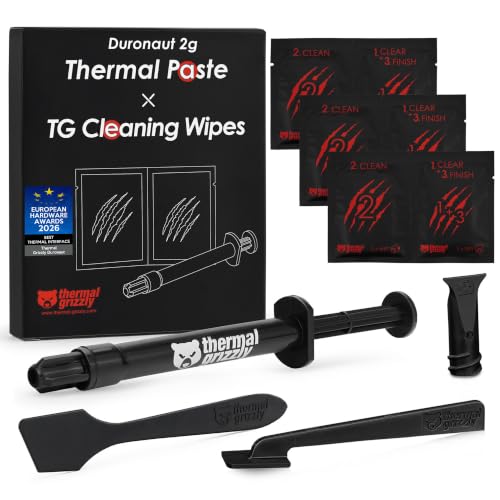
If you repaste multiple machines or a household of PCs, the 8 g tube is the clear buy. If you are doing one CPU and one GPU, the 4 g size still leaves plenty of margin before the paste ages out. A 2 g tube like the Thermal Grizzly options is sized for one or two enthusiast applications and usually bundles cleaning wipes (the Duronaut and Kryonaut Extreme kits both include 6 wet and 6 dry wipes), which adds real value if you do not own isopropyl alcohol and lint-free cloths.
Application and Handling: The Comfort Factor
Syringe applicators with a fine nozzle (0.5–1 mm opening) give the cleanest control; tubs and jars require a spatula and invite contamination. Included accessories matter more than you might expect: a wipe kit turns a 20-minute cleanup into a 2-minute one. Non-conductive formulas (MX-6 is explicitly non-conductive) forgive over-application—excess paste bridging onto the motherboard is annoying but harmless. Electrically conductive pastes and liquid metal turn the same mistake into a dead board.
Weight is a minor ergonomic point: 2 g syringes are pocket-sized (roughly 20 g), while 8 g tubes approach 45–50 g. Either is easy to store; just keep paste between roughly 5°C and 25°C and away from direct sun to preserve viscosity.
Price Tiers: What Each Dollar Buys
Budget: Solid 4–8.5 W/mK pastes in 4 g sizes. Expect temps within 2–4°C of premium products on mainstream hardware.
Mid-range: Larger quantities or added accessories.
Premium: Maximum-conductivity enthusiast formulas. Realistic gain over a good mid-tier paste: 1–3°C. Buy this tier for record attempts, sustained all-core loads, or competitive benchmarking—not for a family desktop.
Spec Checklist
| Spec | Budget | Mid | Premium |
|---|---|---|---|
| Thermal conductivity | 4–8.5 W/mK | 8.5–12 W/mK | 12–14.5 W/mK |
| Viscosity class | Medium, easy spread | Medium-high, durable | High, pump-out resistant |
| Typical quantity | 4 g | 2 g + accessories, or 8 g value tube | 2 g with wipe kit |
| Electrical conductivity | Non-conductive preferred | Non-conductive | Check label; often still non-conductive |
| Best use | Office/mainstream CPUs, laptops | Multi-machine households, GPUs, consoles | Overclocking, sustained 250 W+ loads |
| Servicing interval | 2–3 years | 3–5 years | Check annually under heavy load |
Red Flags
- One conductivity number with no durability or viscosity description. If a listing only shouts “20 W/mK!” with no application details, the figure is likely unverifiable marketing.
- No manufacturing or shelf-life date. Paste older than three years may have separated; ask the seller or choose a fresher listing.
- Electrically conductive paste marketed to beginners. Over-application risk is real; stick to non-conductive formulas unless you are experienced.
- “Liquid metal alternative” claims. Nothing paste-based matches liquid metal’s conductivity; treat such claims skeptically.
- Missing spec sheet entirely. Reputable makers publish viscosity, conductivity, density, and operating temperature ranges (typically -50°C to 150°C or higher).
FAQ
Does higher thermal conductivity always mean lower temperatures?
No. Once you pass roughly 8–10 W/mK, gains shrink to 1–3°C on most consumer hardware, and a poorly matched viscosity can erase those gains entirely. Application quality, cooler mounting pressure, and paste stability usually matter more than the last few watts per meter-kelvin on the label.
How much paste should I actually apply?
About the size of a grain of rice (roughly 0.1–0.2 g) for a desktop CPU, placed center or in a small dot pattern, then spread evenly by cooler mounting pressure. For GPUs and consoles, a pea-sized amount spread in a thin, even film across the die. Excess paste spilling over the heat spreader edges is wasteful but, with non-conductive formulas, harmless.
How long does thermal paste last?
Quality pastes hold their properties for 3–5 years in typical desktop use; under sustained 90°C+ loads or in a vertically mounted GPU, expect 2–3 years before pump-out or dry-out degrades performance. If temperatures creep up 5°C or more from your baseline, it is repaste time.
Can I use the same paste on CPU, GPU, and consoles?
Yes—thermal paste does not care what chip it cools. Just match viscosity to the cooler’s mounting pressure: lighter spring-loaded clips (laptops, some consoles) favor easier-spreading formulas, while strong tower cooler clamps handle thick, durable pastes. A single mid-size tube like an 8 g MX-6 covers several devices across a household, and by 2026 most major formulas are explicitly rated for CPUs, GPUs, and game consoles alike.









