
If you’re building in a compact case, radiator thickness is one of those specs that seems simple on paper and then bites you during assembly. The most common mistake is buying a thick 360mm AIO because “more radiator equals better cooling,” only to discover it collides with your GPU’s power connectors, blocks your RAM slots, or simply doesn’t fit the mounting area at all. Another frequent error: ignoring whether the case manufacturer quotes radiator support *with* or *without* fans installed. A case that “supports a 360mm radiator” may only clear a 27mm-thick radiator plus 25mm fans, leaving zero room for a 38mm thick unit. Buyers also overlook push vs. pull configuration, forget that front-mounted PSUs eat into radiator real estate, and assume all AIOs at the same price perform the same. This guide breaks down what actually matters when matching radiator thickness to a compact chassis, so you can spend your money on cooling performance instead of return shipping.
Our Top Picks
 Thermaltake TR200; Micro Chassis; 1x120mm PWM Fan Included;19.45 x 8.66 x 14.33 Inches13.4 poundsCheck on Amazon
 Thermaltake TR200 WS; Micro Chassis; Wood Front Trim;19.45 x 8.66 x 14.33 inches13.4 PoundsCheck on Amazon
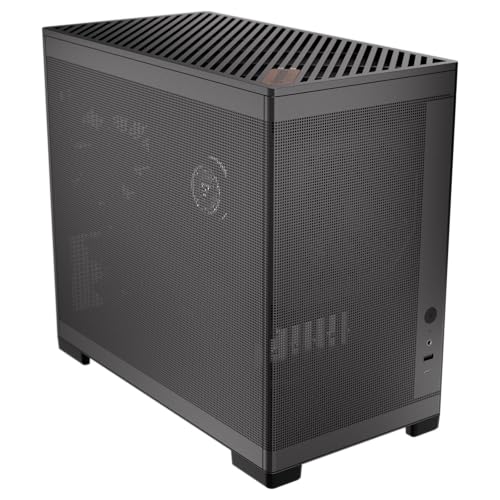

Top 3 picks at a glance
Decide These 3 Things First
Before comparing any AIO, answer these questions honestly, because they narrow your options faster than any spec sheet:
As an Amazon Associate we earn from qualifying purchases at no extra cost to you.


1. How much heat do you actually need to dissipate? A 65W CPU like a Ryzen 5 7600 or Intel Core i5-13400 is comfortable on a 240mm radiator of standard 27mm thickness. A 125W–250W chip — think Ryzen 7 9700X under heavy load or an Intel Core i9 — wants 360mm of surface area, and thickness only becomes the deciding factor when case volume is tight. A 120mm AIO handling up to roughly 100W is often the smarter choice in a genuinely tiny build than a cramped 240mm.
2. What does your case actually clear? Check the manufacturer’s stated radiator support *and* the fan-to-component clearance. A case like the Okinos MiniArt 4 lists 240mm radiator support — that’s your ceiling, not a suggestion. The Lian Li B4-mATX at 21.3 liters supports a 360mm AIO, but you must verify the allowed radiator-plus-fan thickness figure (often 55mm–60mm total) before choosing a 38mm-thick unit.
3. Where will the radiator mount? Top mount, front mount, and side mount all have different clearance consequences. Front mounting a thick radiator pushes it toward the PSU shroud and GPU; top mounting pushes it toward RAM and VRM heatsinks. In compact cases, front mount with fans in pull (exhaust) configuration is frequently the only workable layout for radiators thicker than 30mm.
Radiator Thickness and Physical Fit
Standard radiator thicknesses break down into three tiers. Slim radiators run 15mm–20mm thick, designed for ITX cases and slim-fan pairings (usually 15mm-thick fans), total stack around 35mm. Standard radiators are 25mm–30mm thick — the vast majority of AIOs on the market — and paired with 25mm fans produce a 50mm–55mm total stack. Thick radiators measure 32mm–45mm (38mm is the most common), and with fans push the total stack to 60mm–70mm.
Here’s the practical math: measure your case’s radiator cavity depth, then subtract fan thickness. If the cavity allows 55mm total, a 27mm radiator plus 25mm fans fits with 3mm of breathing room. A 38mm radiator plus 25mm fans needs 63mm — it won’t fit. If the cavity allows 65mm, both work, but check what’s on the other side: in top-mount scenarios, thick radiators routinely foul the top of tall RAM (anything over 40mm, such as many RGB kits at 44mm–48mm). Front-mount scenarios need 30mm–60mm of clearance between radiator edge and GPU backplate depending on GPU length. The Thermaltake TR200, for instance, lists 360mm radiator support and 365mm GPU clearance — but those maximums don’t necessarily coexist. With a 38mm front-mounted radiator and a 330mm-long GPU, you’re usually fine; with a 365mm GPU, you’re almost certainly not.
One more fit factor: tube routing. Thicker radiators have wider end tanks, and in compact cases the tube exit can interfere with the case frame or I/O shield. G1/4 fitting diameter and tube length (typically 300mm–400mm on quality AIOs) matter more in small chassis than in full towers.
Construction and Build Quality
Thickness means nothing if the radiator leaks or the pump dies. Look for these markers:
Radiator construction. Copper cold plate and copper fins with brass or copper tubing is the standard for good thermal performance; avoid aluminum-copper hybrid loops, which suffer galvanic corrosion over 2–3 years. Tank material should be brass or steel with anti-corrosion treatment.
Pump. AIO pumps move 0.5–1.5 liters per minute. Thicker radiators have denser fin stacks and higher flow resistance, so a weak pump underperforms badly. Look for named pump platforms (any of the major third-party pump designs are reliable) and a rated pump speed of at least 1,800 RPM. Three-phase motor pumps run quieter and last longer.
Fittings and tubes. Sleeved tubing that doesn’t kink at tight bends is worth real money in a compact case, where tubes routinely route at sharp angles. Reinforced nylon sleeves with a mesh core resist kinking far better than basic braided sleeves.
Weight. A 360mm standard-thickness radiator weighs roughly 1.0–1.4kg dry; a 38mm-thick 360mm unit can hit 1.8–2.2kg. Check whether your case’s radiator mounting points are steel-reinforced — a 2kg radiator plus three fans hanging from thin sheet-metal tabs is a long-term warranty on sag and vibration noise.
Cooling Performance: Does Thickness Actually Help?
Yes, but with diminishing returns. Going from a 27mm to a 38mm radiator at the same fan speed typically yields a modest improvement — a few degrees Celsius at most under sustained load. The bigger gains come from running fans quieter: a thicker radiator lets you hit the same coolant temperature at 800–1,000 RPM instead of 1,400–1,800 RPM, which is a genuine acoustic benefit in a small case where everything is close to your ears.
By contrast, radiator *area* matters more than thickness. A standard-thickness 360mm will outperform a thick 240mm in nearly every scenario. This is why a case like the Lian Li B4-mATX, which crams 360mm AIO support into 21.3 liters, is more valuable for high-heat CPUs than any thick-radiator advantage in a 240mm-only chassis. Fan choice also matters more than thickness: high-static-pressure fans (rated 2.0mm H2O or above) extract noticeably more from a dense radiator than airflow-optimized case fans, which is exactly why the Thermaltake TR200’s single included 120mm PWM fan is a starting point, not a finished cooling solution.
Realistic expectations: a 360mm standard-thickness AIO with quality fans keeps a 200W+ CPU in the low-to-mid 80s Celsius under sustained all-core load with fans under 1,200 RPM. A 240mm handles a 150W–180W chip similarly. A 120mm unit tops out comfortably around 100W–120W. Thickness shifts those numbers a few degrees, not categories.
Case Compatibility: What the Spec Sheet Hides
The compact-case ecosystem in 2026 is far friendlier to AIOs than it was five years ago, but spec sheets still hide critical details. When evaluating a case, look past “supports 360mm radiator” and find:
Total stack clearance. The single most important hidden number. Anything under 55mm rules out thick radiators entirely; 60mm–65mm allows a 38mm unit with standard fans; 70mm+ allows thick radiator with pull fans.
PSU position. Front-mounted PSU designs like the Okinos MiniArt 4 free up rear clearance for radiators and cables, which is a genuine advantage in mATX builds. Bottom-mounted ATX PSUs typically sit behind the motherboard tray but can restrict front radiator length.
Motherboard cutouts and offset mounting. Some compact cases offset the radiator mount away from the motherboard, buying an extra 5mm–10mm of RAM clearance. This is the difference between fitting a 38mm radiator and not.
Cross-checked maximums. Cases supporting a 360mm radiator *and* a 365mm GPU *and* a 175mm air cooler usually can’t achieve all three simultaneously. Prioritize the components you actually own or plan to buy. The TR200 and TR200 WS, for example, advertise all three numbers, but read them as independent maximums.
Price Tiers and What You Get
Budget: Expect a standard-thickness (27mm) 240mm or 360mm radiator, a workable but not premium pump, basic fans around 1,800–2,000 RPM, and a 3–5 year warranty.
Mid-range: Named pump platforms, higher-static-pressure fans (2.0–3.0mm H2O), better sleeving, and often LCD or ARGB pump heads.
Premium: Thicker radiators (sometimes 38mm–40mm), offload displays, quieter pumps, and premium fans. Justifiable for 200W+ CPUs, showcase builds, or when you specifically need lower noise at a given thermal load. In a compact case, verify the thickness fits before paying the premium — you’re often paying for performance you can’t deploy.
Warranty and support. Budget AIOs carry 3–5 year warranties; mid-range and premium units run 5–7 years, sometimes covering coolant loss and pump failure explicitly.
Delivery and assembly notes. AIOs ship with the coolant pre-filled and sealed, but always check the cold plate for a protective film and inspect fittings for transport damage before install. Radiators ship with mounting hardware for multiple socket types — Intel LGA1700/1851 and AMD AM4/AM5 brackets should be included; confirm AM5 support explicitly, since some older stock ships with AM4-only hardware. Plan 30–60 minutes for install in a compact case, and install the radiator before the GPU whenever possible — tight clearances make this far easier.
Spec Checklist
| Spec | Budget | Mid-Range | Premium |
|---|---|---|---|
| Price | Check on Amazon | Check on Amazon | Check on Amazon |
| Radiator thickness | 25–27mm | 27–30mm | 30–40mm |
| Available sizes | 120/240mm | 240/280/360mm | 280/360/420mm |
| Pump speed | ~1,800 RPM | 2,000–2,800 RPM | 2,800+ RPM, 3-phase |
| Fan static pressure | 1.5–2.0mm H2O | 2.0–3.0mm H2O | 3.0+mm H2O |
| Tubing | Basic sleeved | Reinforced sleeved | Mesh-core, kink-resistant |
| Warranty | 3–5 years | 5–6 years | 6–7 years |
| Socket support | AM4/AM5, LGA1700 | AM5, LGA1700/1851 | All current + offset brackets |
Red Flags
Walk away from any AIO or case combo showing these signs:
Case radiator clearance listed without a thickness figure. “Supports 360mm radiator” means nothing without “maximum radiator + fan thickness: Xmm.” If the manufacturer doesn’t publish it, measure the cavity yourself or choose a different case.
No named pump platform or pump specs. If a listing omits pump speed, motor type, and flow rate, you’re gambling on a generic unit with no service parts.
Aluminum radiator with copper cold plate. Mixed metals corrode. Reputable brands don’t do this; no-name listings do it constantly.
Thickness claims without fan thickness stated. “38mm slim radiator!” paired with standard 25mm fans is a 63mm stack — if your clearance is 60mm, the marketing was technically true and functionally useless.
Warranty under 3 years or warranty service that requires shipping to an overseas address. AIO failures are common enough that warranty logistics matter.
Case maximums that can’t coexist. If a case advertises a 365mm GPU and 360mm radiator with no note about compatibility between them, assume you can’t have both and plan accordingly.
FAQ
Does a thicker radiator always cool better?
No. Thickness adds thermal mass and fin surface area, but the gains are modest — typically a few degrees Celsius at identical fan speeds. The real benefit is achieving the same temperatures at lower, quieter fan speeds. Radiator length (240mm vs. 360mm) matters far more than thickness, and fan static pressure matters nearly as much.
Can I run fans in pull configuration to save clearance?
Pull configuration doesn’t change total stack thickness — radiator plus fans is the same depth either way. What pull configuration changes is *where* the fans sit, which can clear obstruction like RAM or motherboard heatsinks in top-mount setups. Push-pull adds fan thickness on the second side and requires roughly 85–90mm of total clearance; almost no compact case supports it.
Is a 120mm AIO ever a good idea in a compact case?
Yes, for CPUs under about 100W. In genuinely tiny ITX builds where a 240mm radiator would force compromises elsewhere — GPU length, PSU size, airflow — a 120mm unit frees space and still cools a mid-range chip adequately. It’s a worse choice for anything above 120W sustained.
How do I verify a radiator will fit before buying?
Find three numbers: your case’s maximum radiator length, maximum radiator thickness *with fans*, and any note about RAM or GPU clearance conflicts. Then compute radiator thickness plus fan thickness (usually 25mm, or 15mm for slim fans) and compare against the case’s stack clearance with at least 2–3mm to spare. If the manufacturer’s site doesn’t list stack clearance, check the case’s technical drawing for the radiator cavity dimension, or measure with a tape measure if you already own the case.









