
Walk down the cooling aisle of any PC build forum or electronics shop and you’ll run into the same fork in the road: pulse-width modulation (PWM) fans or plain DC fans. Both spin, both move air, both cost relatively little — but they control speed in very different ways, and that difference shapes noise, temperature control, and how much fiddling you’ll do over the life of your build. If you’re cooling a gaming PC, a home server closet, or even a workshop electronics setup, understanding that distinction is the difference between a system that hums along quietly and one that roars every time it warms up. This guide breaks down how each type works, what it costs, and which one fits your home situation.
Our Top Picks


Top 3 picks at a glance
Quick Verdict
For most people building or upgrading a computer, PWM fans are the better choice. They adjust speed smoothly based on actual component temperatures, run quieter at idle, and are supported by every modern motherboard header. If you want set-and-forget cooling, choose PWM. If you want the cheapest possible air mover and don’t mind constant full speed, choose DC.
As an Amazon Associate we earn from qualifying purchases at no extra cost to you.


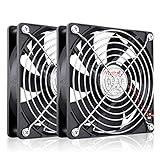

Side by Side
| Factor | PWM Fans | DC (Voltage-Controlled) Fans |
|---|---|---|
| Speed control | Continuous, signal-based control from roughly 0–100% of rated RPM | Voltage-based; effective range typically 5V–12V (about 40–100% of rated speed) |
| Noise at idle | Low; can idle near-silent at 600–900 RPM on a 120mm fan | Fixed or crudely stepped; often runs 1,200–2,000 RPM constantly |
| Wiring | Usually 4-pin (power, ground, tach, PWM signal) | Commonly 2-pin or 3-pin (power, ground, sometimes tach) |
| Comfort (noise profile) | Adaptive; ramps only when temperatures climb | Constant drone unless you add a manual controller |
| Price range | Varies | Varies |
| Maintenance | Same dusting as any fan; motherboard software handles tuning | May require a separate speed controller if you want adjustability |
| Extra hardware | None — any modern motherboard header works | Optional external controller |
| Durability | Comparable bearing life (20,000–50,000 hours typical) | Comparable, though constant high speed can wear bearings faster |
| Space needed | Same footprint; standard sizes 80mm, 92mm, 120mm, 140mm | Controller box needs shelf or enclosure space if used |
| Best for | Gaming PCs, home servers, quiet builds | Budget builds, replacement fans, DIY 12V projects |
Where Pwm Wins
The core advantage of PWM is precision. A PWM fan receives a constant 12V supply, and the motherboard sends a rapid on-off signal — typically cycling thousands of times per second — that sets the effective speed. Because the motor never sees reduced voltage, it starts reliably even at very low duty cycles, and it can hold a slow, steady spin that a voltage-controlled fan would stall at. In practice that means a 120mm PWM fan can idle around 600–800 RPM, which most people find inaudible from a few feet away, then ramp to 1,500–2,000 RPM during a gaming session without you touching anything.
PWM also wins on integration. Every mainstream motherboard sold in the last decade includes 4-pin headers with automatic fan curve control, so you set a temperature target once in software and forget it. That adaptive behavior reduces cumulative noise exposure in a home office or bedroom setup — a real comfort consideration if your computer runs all day. For builds where components run hot, such as high-wattage graphics cards, the ability to spike airflow precisely when needed protects hardware without the constant roar of full-speed operation.
Where Dc Case Fans Which is Better Wins
Basic DC fans compete on simplicity and price. A two-pin 12V DC fan is about as simple as electronics get: apply 12 volts and it spins. There’s no signal wire to configure, no fan curve to tune, and no software dependency. That makes DC fans the natural choice for replacing a failed fan in older equipment, powering a DIY ventilation project, or wiring cooling into something that isn’t a PC — a stereo cabinet, a workshop fume extractor, or a 3D printer enclosure.
Price is the second win. If you need to move air in five places on a tight budget, DC fans let you do it. That’s overkill for a case fan, but it shows how flexible the underlying DC platform is for home projects.
Cost Over 5 Years
Let’s model a typical single-system build. Well-made ball-bearing or hydraulic-bearing fans are rated for 30,000–50,000 hours; running 12 hours a day, five years is only about 22,000 hours, so most sets survive the full period without replacement. Add essentially zero extra cost for control, since your motherboard handles it.
The honest takeaway is that both paths are cheap; PWM buys quieter, automated operation for the price of a pizza, while DC saves a bit more cash if silence doesn’t matter.
Which One for Your Home
Small Apartment
In a studio or one-bedroom, the computer likely sits within arm’s reach of where you sleep or work, so noise is the deciding factor. Go PWM. Four 120mm PWM fans idling at 700 RPM are effectively silent, and they only spin up when a game or render job demands it. Avoid cheap DC fans here — a constant 1,800 RPM drone becomes tiresome in a small, quiet room fast.
Family with Kids or Pets
Shared spaces mean dust, pet hair, and the occasional small hand poking at cables. PWM’s automatic fan curves help compensate for dust-clogged filters by ramping speed as temperatures rise, buying you time between cleanings. Choose PWM fans with hydro or ball bearings for longevity, and plan a quarterly dusting with compressed air. If you’re also cooling a secondary device like a media console, an inexpensive DC fan with a low-voltage adapter (7V instead of 12V) keeps it whisper-quiet and safe around curious kids.
Rental
If you’re in a rental and want minimal permanent footprint, budget matters and so does reversibility. When you move, everything unplugs and travels. Just confirm the adapter is UL-listed and don’t daisy-chain uncertified power supplies; a rental is not the place to experiment with wiring.
Long-Term Home
In a forever home where the PC or home server might run 24/7 for years, invest in PWM. Continuous operation punishes fans that never rest, while PWM’s low idle speeds extend bearing life and keep the mechanical room or office pleasant. Buy four or five name-brand PWM fans, set conservative fan curves, and you likely won’t open the case for maintenance more than twice a year. By 2026, 4-pin PWM headers will be standard on virtually every board you might upgrade to, so your fans carry forward.
FAQ
Can I plug a DC (3-pin) fan into a PWM (4-pin) header?
Yes. The pins are physically compatible, and the header will fall back to voltage-based control. The fan will work, but you lose the fine-grained low-speed control that PWM provides.
Do PWM fans use more electricity?
No. A typical 120mm case fan draws 1–3 watts regardless of control method. PWM is actually slightly more efficient at low speeds because the motor receives full voltage in short pulses rather than reduced voltage continuously.
Are cheap DC fans unsafe?
Reputable-brand fans are fine. The risk comes from no-name fans paired with uncertified power adapters. Buy from established sellers, check that any wall adapter carries a safety listing, and keep 12V wiring insulated and away from metal edges.
How many case fans do I actually need?
For a standard mid-tower PC, two to three 120mm fans — one or two front intakes and one rear exhaust — cover most builds. Adding more yields diminishing returns; fan quality and airflow direction matter more than raw count.









